


Limited time discount Keep Summer Fully Booked
Up to 50%Off

How to white label Amelia

You can use Amelia’s White label feature to replace Amelia’s name and logo with your own branding throughout WordPress and remove links and promotional content associated with Amelia. The feature can only be configured by a WordPress user assigned the Amelia Superadmin role.

Info Please note

The White label feature is available exclusively with the Elite license.
How do I access the White label feature?

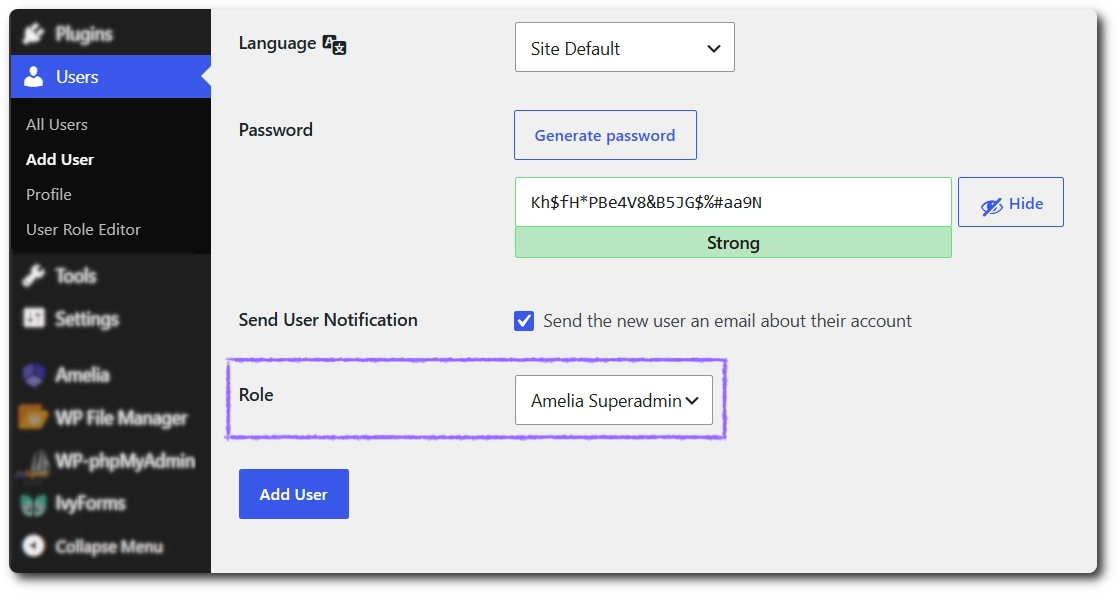
To access the White label feature, create a WordPress user and assign the Amelia Superadmin role. Go to WordPress Users → Add User, enter the user details, select Amelia Superadmin from the Role dropdown, and click Add User.

A regular WordPress Administrator will not see White label under Amelia → Features & Integrations.

Assigning the Amelia Superadmin role to a new WordPress user
Info Please note

We recommend creating a separate user for the initial White label setup. After the feature has been configured, this user can be deleted.

How do I enable White label in Amelia?

Log in to WordPress as the Amelia Superadmin user and open Amelia → Features & Integrations. Scroll to the bottom of the page, find White label, and click Enable.

When the feature is active, click Set up to open Amelia → Settings → White label.

Enabled White label feature with the Set up button in Amelia

Which Amelia branding can I replace or hide?

You can configure the branding shown throughout Amelia from Amelia → Settings → White label. Upload a custom image, enter a plugin name, enable Hide external links if needed, and click Save to apply the changes.

The available options work as follows:

  • Logo replaces the Amelia logo across the plugin, including WordPress menu items, Amelia menus, and booking form blocks and widgets.
  • Plugin name replaces the Amelia name throughout WordPress with the name you enter.
  • Hide external links removes Amelia tips and suggestions, documentation links, Amelia banners, and the Melograno Ventures, View details, and Docs links from the WordPress Plugins page.
White label settings with a custom plugin logo and name
Info Please note

Only the values you configure are replaced. If you do not upload a logo or enter a plugin name, the corresponding branding remains unchanged.

What happens to Amelia blocks and widgets after White label is enabled?

Amelia’s native Gutenberg blocks, Elementor widgets, and Divi modules are updated automatically to use the new branding. Their names and icons reflect the custom plugin name and logo you configured, so you do not need to replace these elements on existing pages manually.

Amelia Elementor widgets displaying a custom plugin name and logo

Do existing Amelia shortcodes update automatically?

No. Shortcodes that were typed or pasted manually into WordPress pages and posts are not updated automatically. After enabling White label, locate every manually added Amelia shortcode and replace its Amelia-specific shortcode name with the corresponding white-label version.

For example, [ameliacustomerpanel appointments=1 events=1] becomes [customer-panel appointments=1 events=1].

Original Amelia shortcode compared with the new white-label shortcode
Alert Please note

Review all pages and posts containing manually entered shortcodes after enabling White label. This requirement applies even if you leave the custom plugin name or logo empty; white-label shortcodes do not use amelia in their shortcode names. Gutenberg blocks, Elementor widgets, and Divi modules do not require manual replacement.

What should I check after configuring White label?

After saving the settings, confirm that the custom name and logo appear correctly in the WordPress menu, Amelia pages, and supported builder widgets. If you enabled Hide external links, also check the WordPress Plugins page and Amelia screens to confirm that documentation links, suggestions, banners, and plugin detail links are hidden.

Finally, test every page containing a manually entered shortcode and replace any shortcode that still uses its original Amelia-specific name.