Limited time discount Book Smarter This Christmas
Up to 50%Off

How can pricing by number of people be used

Pricing by number of people allows you to define different prices depending on how many people attend a service. This lets you create tiered group pricing, offer discounts for larger groups, and adjust your service cost based on total participant count.

Info Note

Pricing by number of people is part of the Custom pricing feature and is available in the Standard, Pro, and Elite license plans.
How do I configure pricing by number of people?

To use this option, first enable the Custom pricing feature in Features and Integrations → Features. Once enabled:

1. Access Amelia → Catalog → Services and create or edit a service.
2. Open the Pricing & duration tab.
3. Increase the Maximum capacity to a value greater than 1.
4. Enable the Pricing by number of people slider.

The option appears only for group services. If the maximum capacity is set to 1, the slider will not be displayed.

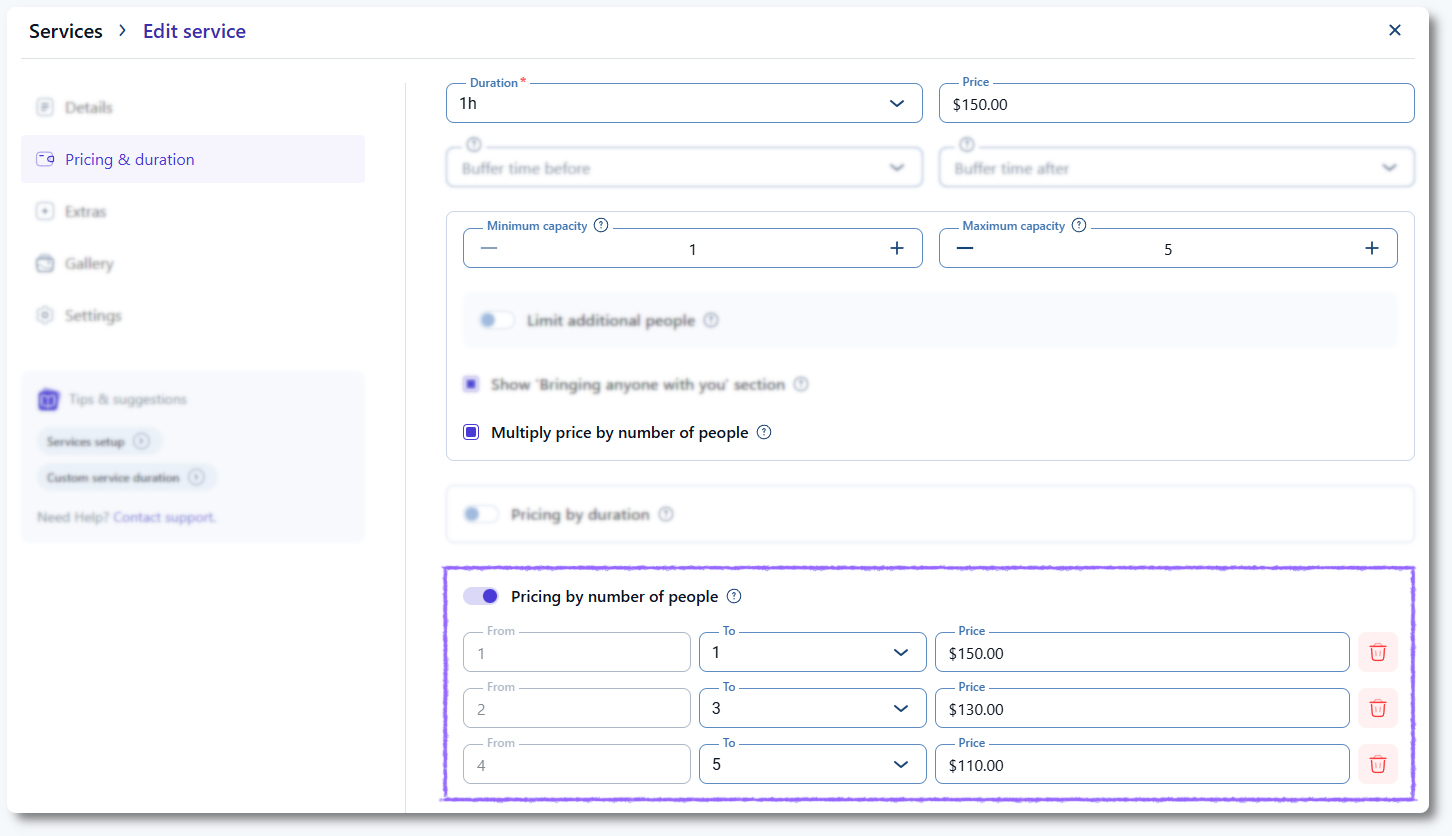
Pricing by number of people option inside the service pricing settings in Amelia

How does Amelia calculate tiered group pricing?

When you enable Pricing by number of people, Amelia automatically creates the first two pricing tiers. The first tier inherits the service price for one person, and the second tier starts at the next available count, with its price set to zero until you define it.

You can create additional tiers by adjusting the upper limit of the last tier. If you lower the upper limit, Amelia automatically creates a new tier to cover the remaining capacity range. The end of the final tier always matches the service’s maximum capacity unless you split it into smaller ranges manually.

If you enable Multiply price by number of people, Amelia multiplies the defined price by the selected group size. If you disable it, the price represents the total cost for the entire group, not a per-person amount.

How can I configure different group prices per employee?

You can define employee-specific prices after saving the service configuration. Open the employee profile, go to the Services tab, expand the category, and select the service. You will see the same pricing tiers created in the service, and you can adjust the price for each tier individually. Tiers themselves cannot be modified from the employee profile, only the prices.

Employee profile in Amelia showing editable group pricing tiers

How does pricing by number of people appear on the front end?

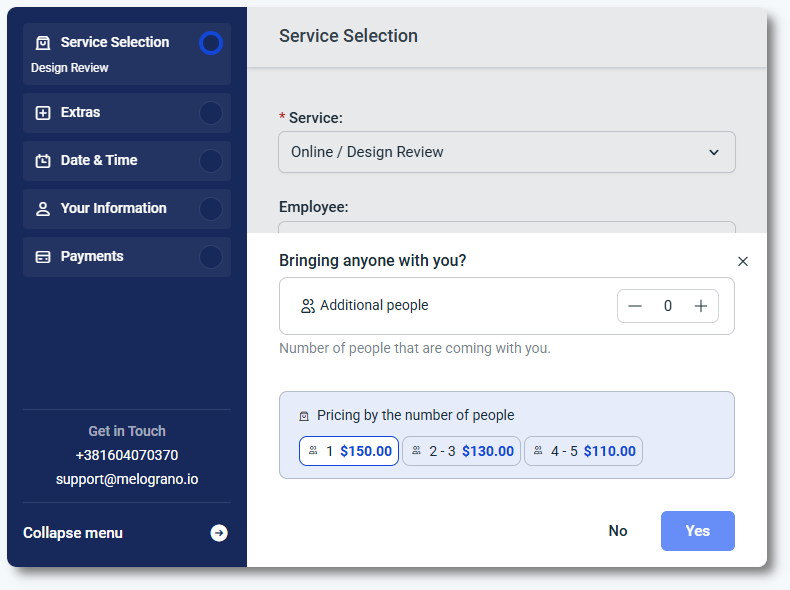
When a service uses Pricing by number of people, a popup appears after the customer selects the service and clicks Continue. The customer chooses how many people will join the appointment, and the price updates based on the defined tier.

Front end group size selection modal in Amelia booking form

If you prefer not to display this popup, you can disable it in:

Customize → Step-by-step form → Service selection → Bringing anyone with you → Options → disable the slider below Pricing by number of people.

Can I book different group sizes in the back end?

Yes. When creating an appointment through Bookings → Appointment → + Book appointment, select the service and employee, choose the date and time, then switch to the Customers tab. After selecting a customer, you will see a box that allows you to define the number of people for that appointment.

You won’t see any visible change on this screen, but Amelia will still count the number of people correctly and apply the matching price behind the scenes. Once you save the appointment, you’ll see the price calculated for the selected group size, based on the pricing rules defined for the service or employee.

What should I keep in mind when using pricing by number of people?

  • Only one custom pricing option can be enabled per service.
  • The Pricing by number of people option appears only when maximum capacity is greater than 1.
  • The last tier always covers the maximum capacity unless you split it into smaller ranges.
  • Enabling Multiply price by number of people switches pricing from tier-total to per-person calculation.
  • Employee profiles inherit tiers but can have different prices per tier.