



How do SMS settings work in Amelia
The SMS settings page in Amelia lets you manage your Amelia SMS account details. Here you can see the email linked to the SMS account, define an alpha sender ID, send messages to additional numbers, monitor and recharge your SMS balance, set low-balance reminders, and change your SMS password.
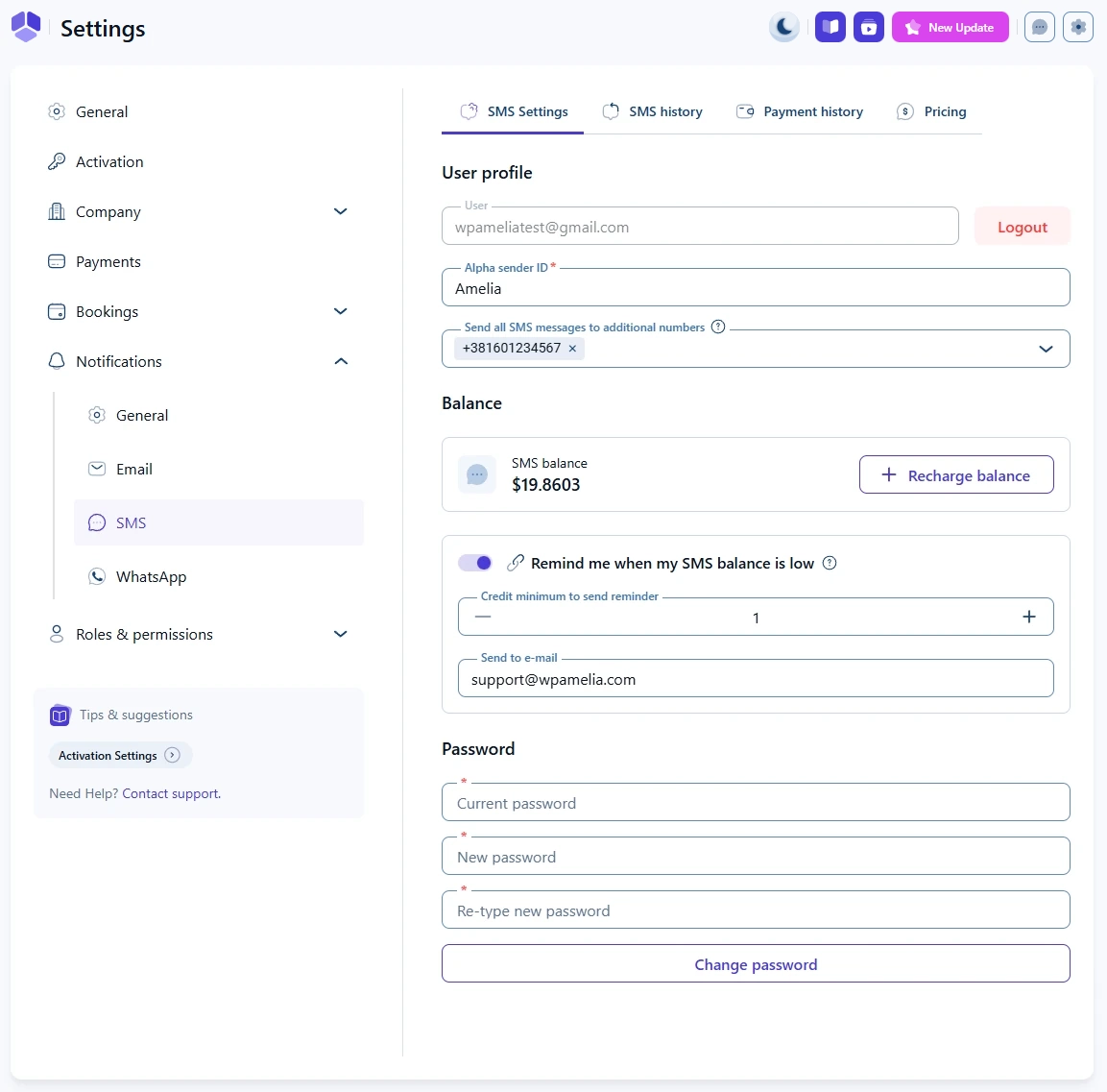
Which options are available in SMS settings?
When you open Settings → Notifications → SMS after signing in, the SMS settings tab shows:
- User profile – the email address used for the SMS account and the Logout option
- Alpha sender ID – the name that appears as the sender in supported countries
- Send all SMS messages to additional numbers – extra recipients for all SMS notifications
- Balance – your current SMS credit and the + Recharge balance button
- Remind me when my SMS balance is low – low-credit email alerts
- Password – fields for changing the SMS account password
These options control how your SMS account behaves globally across all SMS notifications in Amelia.
How does the user profile section work?
The User profile section shows:
- User – the email address associated with your Amelia SMS account. This field cannot be edited from here.
- Logout – logs you out of the SMS platform and returns you to the SMS login screen the next time you open Settings → Notifications → SMS.
If you need to use a different email for SMS, you must log out and sign in with another Amelia SMS account.
How do I configure the alpha sender ID?
The Alpha sender ID field allows you to define a custom sender name for supported countries. This is usually your brand or company name and appears instead of a phone number when SMS messages are delivered.
Delivery rules for sender IDs depend on the recipient’s country. Some countries allow alphanumeric sender IDs, some automatically replace them with a phone number, and some do not support them at all. For details about regional rules and restrictions, see the Sender ID & country rules documentation.
How can I send SMS messages to additional numbers?
The Send all SMS messages to additional numbers option lets you add extra recipients who will receive every SMS notification sent from Amelia. This is useful for admins or managers who want to monitor all outgoing SMS messages.
To add numbers:
- Enter a phone number in the field.
- Press Enter to add it.
- Repeat to add more numbers.
Each additional number receives all enabled SMS messages for both customers and employees.
 Please note
Adding additional numbers increases the total number of SMS segments sent for each notification, which also increases your SMS costs.
How do SMS balance and recharging work?
The Balance section shows your current SMS credit and provides the + Recharge balance button.
- Balance – displays how many SMS credits you have left.
- + Recharge balance – opens the payment flow for purchasing additional SMS credits.
You must maintain a positive SMS balance to continue sending SMS notifications. If the balance reaches zero, SMS messages can no longer be sent until you recharge.
How do I set up low SMS balance reminders?
The Remind me when my SMS balance is low slider enables automatic email alerts when your SMS credit drops below a defined level. When you enable this option, two additional fields appear:
- Credit minimum to send reminder – the credit threshold at which the reminder email is sent.
- Send to e-mail – the email address that will receive the low-balance warning.
Once your balance reaches or drops below the set minimum, Amelia sends an email to the address defined in Send to e-mail so you can recharge before SMS sending stops.
How do I change my SMS account password?
The Password section contains three fields:
- Current password
- New password
- Re-type new password
After entering your current password and confirming the new one, click Change password to save the update. This changes the password for your Amelia SMS account, which you will use the next time you sign in on the SMS login screen.
What should I know before using SMS settings in Amelia?
SMS notifications are sent through Amelia’s built-in SMS platform and are billed separately from your Amelia license. A positive SMS balance is required, and messages are charged per SMS segment based on the recipient’s country.
SMS notifications are separate from email notifications, so enabling an email template does not automatically enable its SMS equivalent.
Delivery rules vary by country. In some regions, alphanumeric sender IDs are restricted or replaced automatically, and some providers charge for failed delivery attempts. For full details, see the Sender ID & country rules documentation.