



Amelia and Trafft sit at the top of this list because the ranking is built on booking mechanics, payment handling, and staff scheduling, not on which vendor has the loudest marketing page.
Spa scheduling software, stripped down to what it actually does, is booking and business management software that lets a spa run appointments, staff calendars, and payments online instead of over the phone.
Independent day spas, med spas, and multi-location wellness groups all end up judging these tools the same way in practice: fewer no-shows, tighter control over which room and which therapist is actually free at a given hour, and one client record that follows a guest across every location.
Amelia runs on more than 90,000 websites as a self-hosted WordPress plugin, according to current WordPress.org installation data (2026). Trafft, built by the same company, takes that same booking engine and puts it on a hosted platform instead.
The Best Spa Scheduling Software
| Platform | Best for | Starting price |
|---|---|---|
| Amelia | Spas that already run on WordPress | Free Lite; paid from $49/year |
| Trafft | Spas that want a booking website live today | Free plan; paid from ~$13.3/month |
| Vagaro | Spas that want a built-in client marketplace | $23.99–$30/month (one calendar) |
| Mindbody | Spas that also run classes | From $99/month per location |
| Fresha | Spas watching their fixed monthly cost | $19.95/month (Individual) or $14.95/month per team member |
| Zenoti | Multi-location spa chains | Quote-only; ~$225–$400/location/month per third-party estimates |
| Mangomint | Premium independent spas | $120/month per location + $10/month per user |
| GlossGenius | Solo spa professionals | $28/month ($24/month billed annually) |
| Phorest | Spas that live on repeat visits | From ~$150 per license/month per third-party estimates |
| Boulevard | High-end day spas | Essentials from $176/month ($158 billed annually) |
Good scheduling software tends to pay for itself faster than owners expect. Fewer missed calls, fewer double bookings, and a client who can grab a slot at midnight without waiting for the front desk to open the next morning, that combination is the real case for running a proper booking system instead of a paper diary.
American spas booked $22.5 billion in revenue in 2024, according to the International Spa Association (ISPA). Most of that revenue still moves through an appointment slot, so the software running that slot is not some minor back-office detail.
Payment data and client records sit on top of every platform on this list. Gateway-level card security (PCI DSS compliance) and, for spas serving EU clients, GDPR-compliant data handling are worth checking before a contract gets signed, not after.
Key figures
- U.S. spa industry revenue: $22.5 billion in 2024 (International Spa Association)
- Amelia install base: more than 90,000 websites (WordPress.org plugin data, 2026)
- Fresha professionals on platform: 450,000+ worldwide (Fresha vendor listing, 2026)
- Zenoti enterprise pricing floor: $225 to $400 per location, monthly (2026 vendor comparisons)
Amelia and Trafft take the top two spots because they cover the widest range of spa sizes at the lowest entry cost. Everything below them solves a narrower problem than “which calendar should this spa run on.”
Amelia: best for spas that already run on WordPress
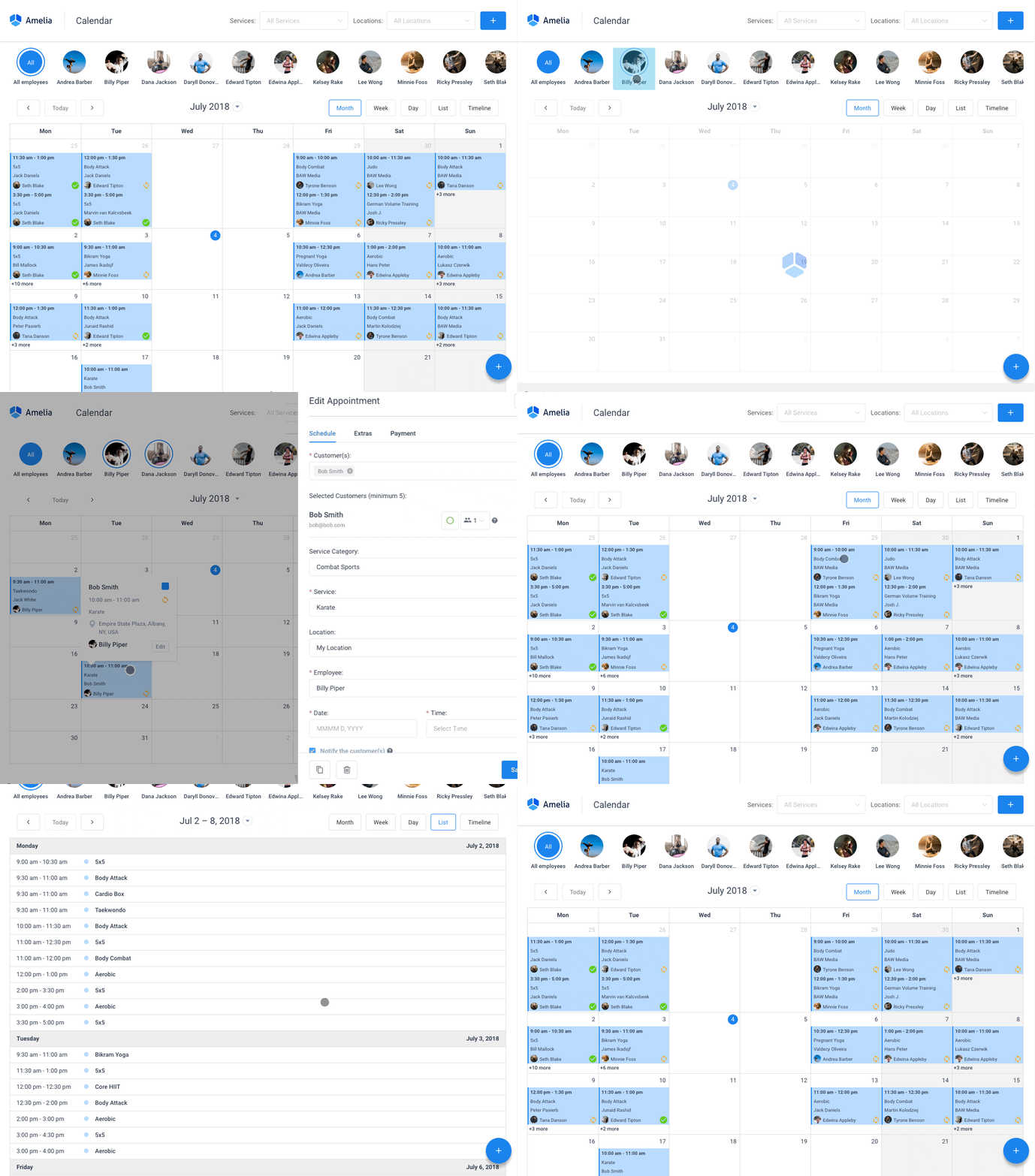
Amelia is a self-hosted WordPress booking plugin, which matters more than it sounds like it should once you consider where the data actually lives. Because the whole thing runs inside the WordPress install, client records and booking history never leave the spa’s own server. That’s a genuinely different trade than every other tool on this list, and it’s the reason a spa already running WordPress should probably just start here.
- Employee shift scheduling and days off
- Packages and shared resources for treatment rooms
- A REST API for custom integrations
- Custom pricing by date and time
- An events module for classes or workshops
It pairs with several payment gateways at the Standard tier and above, including Stripe, PayPal, Mollie, RazorPay, and WooCommerce checkout.
Pricing: the free Lite tier through WordPress.org gets one employee and Square payments only, which is enough to test the workflow properly before committing. Starter runs $49 per year. Standard runs $89 to $99 per year, or $299 to $332 as a lifetime purchase, with Pro and Elite tiers sitting above that for spas that need more. The pricing page lists what each tier unlocks.
The free WordPress booking plugin route through Lite is a reasonable way for a solo spa owner to test the workflow before any card details change hands, and staff calendars handle shift-based scheduling and days off per employee once a spa runs more than one therapist. The live demos show the client-facing side without installing anything.
There’s no recurring fee to a booking marketplace here, and the lifetime license option avoids ongoing subscriptions entirely. Worth planning for: most payment gateways sit on the Standard tier, and it needs an existing WordPress site plus a pass through the plugin settings during setup.
Amelia carries 4.6 stars across hundreds of WordPress.org reviews, and combined with the 90,000-plus install base, that points to a plugin that holds up well past initial setup rather than just looking good at demo stage. Because it’s a purchased plugin running on the spa’s own server, the booking system keeps functioning even if pricing tiers change down the line. That durability rarely gets a mention in roundups that only compare monthly price tags against each other.
Trafft: best for spas that want a booking website live today
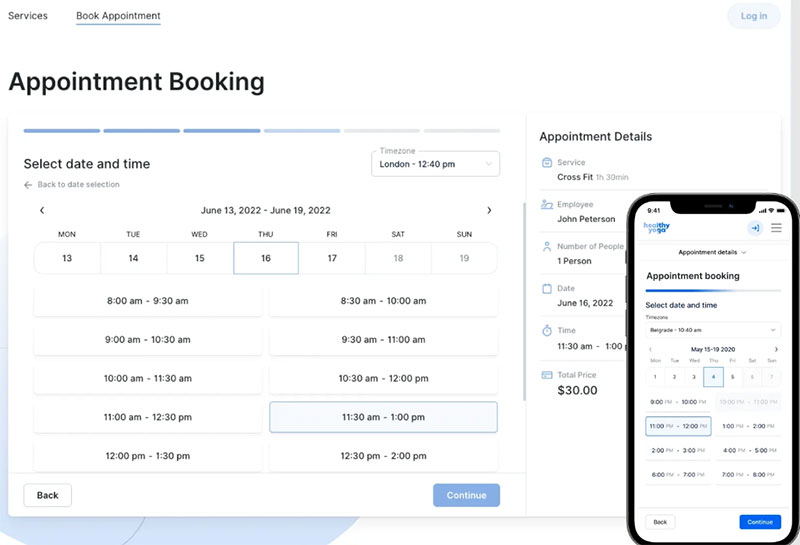
Trafft comes from the same team behind Amelia, but it’s built for a spa that wants a client-facing booking website live in under an hour without touching WordPress, hosting, or a page builder at all. A ready-made, brandable booking site ships out of the box, and the demos show exactly what a client sees.
- Multi-location employee scheduling and roles
- More than 20 integrations, including Zoom, Google Calendar, Stripe, PayPal, and Mailchimp
- SMS, email, and WhatsApp reminders
- A mobile app for staff
- Custom domain support
Clients can lock in a recurring appointment for standing visits while staff work off multi-location schedules in the same dashboard.
Pricing: starts with a free plan for up to 5 employees. Paid plans run from about $13.3 per month billed annually for Starter (10 users), up to $24.5 per month for Scaling (15 users), plus a custom Enterprise tier and a 14-day trial on paid plans. Current tiers are on the pricing page.
GetApp’s verified review data lists appointment scheduling as the primary use case for 98 percent of Trafft reviewers, with Google Calendar the most-cited integration (GetApp, 2026).
No WordPress or hosting setup is needed, there’s a built-in mobile app for staff, and WhatsApp sits alongside SMS and email for reminders (that SMS side effectively works as an appointment confirmation text service baked into the plan rather than a bolt-on).
A few plan details to check first: the free plan covers 5 employees with email-only notifications, SMS runs on credits that top up separately, and multi-location reporting covers the essentials rather than enterprise-grade depth.
Trafft and Amelia coming from the same company means a spa that outgrows a WordPress-only setup can move to the hosted platform without relearning the admin panel from scratch. Most competing tool pairs don’t offer that kind of continuity, and it’s worth something.
Vagaro – Best for spas that want a built-in client marketplace
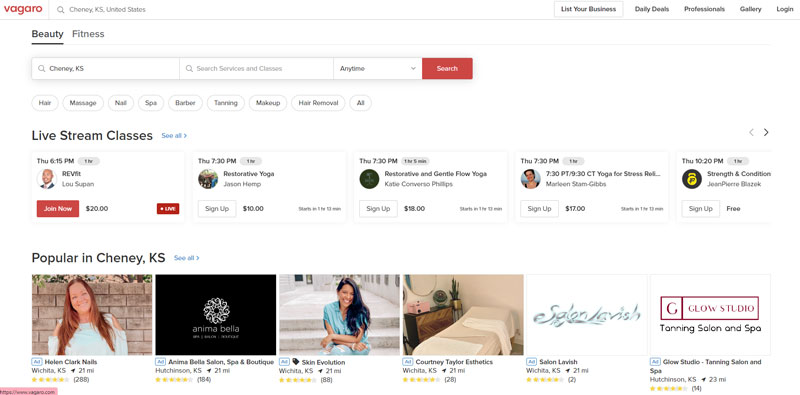
Vagaro bundles scheduling, payments, and a consumer marketplace into one platform for spas, salons, and fitness studios. A free listing in the Vagaro marketplace puts the spa in front of clients who’ve never heard of it before, which is the whole pitch.
- Online booking with waitlist and resource management
- POS hardware
- Membership and package sales
- Payroll and inventory tracking
- Email and text marketing
Pricing: runs $23.99 to $30 per month for one bookable calendar, plus $10 per added calendar, up to $83.99 per month for 7 or more calendars, with custom pricing for multiple locations and a 30-day free trial (Vagaro’s own pricing page, 2026).
The marketplace listing can bring in new-client discovery without extra marketing spend, POS hardware ships pre-loaded, and integrations reach QuickBooks and Xero for accounting.
Card processing runs 2.2 to 3.5 percent depending on volume, though, per-calendar pricing climbs fast for a team of several therapists, and there’s no free plan at all.
The Salon Business’s 2026 review names Vagaro among the highest-rated platforms for salons and spas, citing the breadth of built-in tools relative to price as the deciding factor over rivals. Spas weighing it against a class-heavy competitor can check a direct side-by-side of Vagaro against Mindbody for the calendar-by-calendar differences.
The marketplace listing cuts both ways, worth saying plainly. It brings discovery traffic, sure, but it also places the spa’s calendar next to every other Vagaro-listed business nearby. For a spa competing on exclusivity rather than volume, that’s not obviously a win.
Mindbody – Best for spas that also run classes
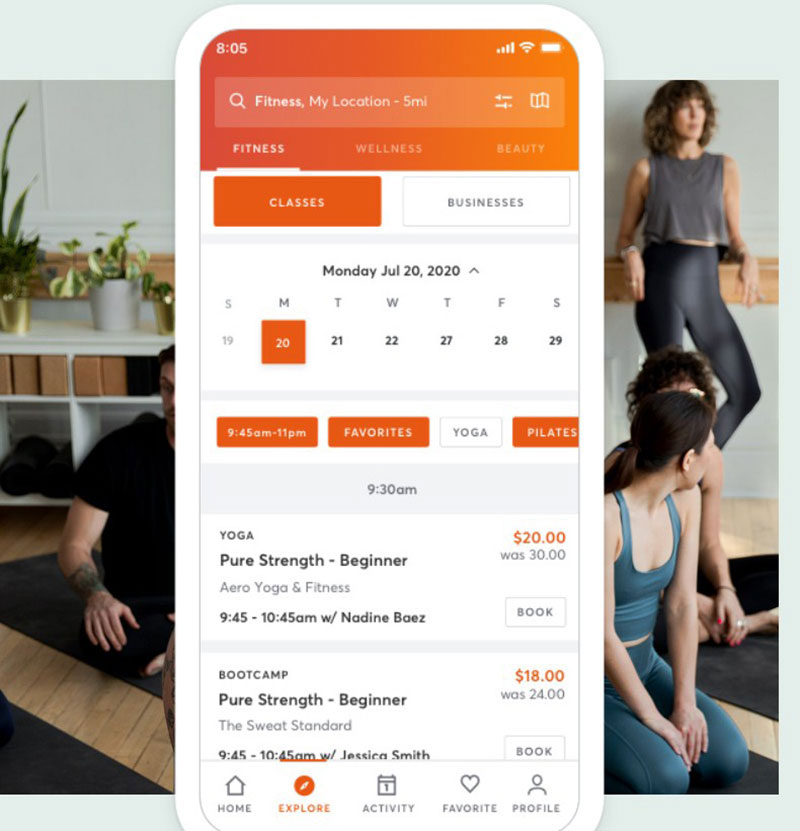
A spa running yoga, fitness, or wellness classes alongside treatments has a scheduling problem that most tools on this list weren’t built for. Mindbody handles both from one calendar, treatment slots and group class scheduling together, without needing a second system bolted on.
- Business management tools
- Integrated payments
- Branded website booking widgets
- A listing on the Mindbody consumer app
- Basic reporting
Staff calendars support team booking for group treatments and back-to-back class scheduling next to individual appointments.
Pricing: starter pricing begins at $99 per month per location, per Mindbody’s own pricing listing (2026).
It’s a strong fit for spas running yoga or fitness alongside treatments, and the consumer-facing Mindbody app is a discovery channel most clients already have installed on their phone.
That said, the starter price sits well above WordPress-based and solo-focused competitors, and the class and membership tools add interface complexity a treatment-only spa may never actually need. Entry-tier reporting stays basic too.
Gitnux’s 2026 spa-schedule ranking names Mindbody the best overall fit for wellness or spa businesses that need appointment scheduling alongside class and redemption workflows in one system. Buyer guides list its class and membership machinery as a benefit, and it is, if you run classes. A single-treatment-room spa without group classes ends up paying for scheduling capacity built around a different business model entirely.
Fresha – Best for spas watching their fixed monthly cost
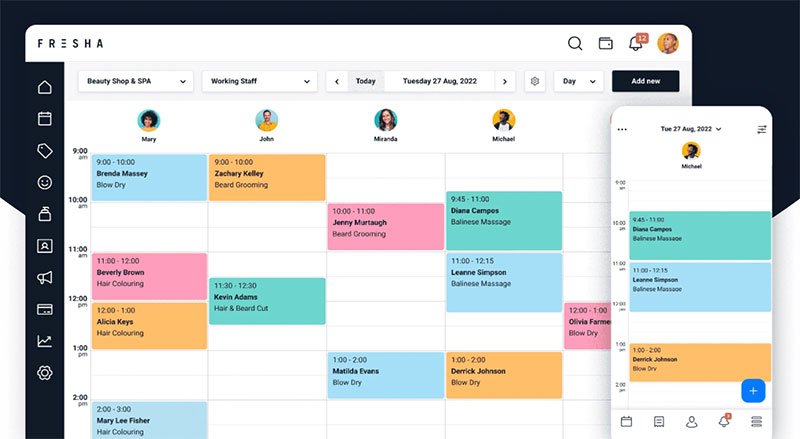
Fresha is priced per bookable calendar rather than per team, and most of its revenue comes from payment processing and a commission on new clients booked through its marketplace, not the subscription itself. That structure keeps the fixed monthly cost lower than most full-featured competitors.
- Online booking and point of sale
- Deposits and card-on-file
- Marketing tools
- A client marketplace listing similar to Vagaro’s
Pricing: starts at $19.95 per month for a single calendar (Individual plan) or $14.95 per month per bookable team member (Team plan), plus card processing fees and a one-time 20 percent commission (minimum $6) on a new client’s first marketplace booking (Fresha vendor listing, 2026).
Worth flagging: Fresha ended its earlier free-forever software model in 2025, so the “free” reputation it built its name on doesn’t fully apply anymore. It still sits among the lower-cost salon software picks for a spa watching every recurring line item, even though the once-free core plan now carries a monthly subscription.
The lower subscription keeps the barrier low for a new spa, the marketplace adds discovery, and deposits plus card-on-file cut down on no-shows.
A monthly per-calendar subscription now stacks on top of processing rates charged on every transaction, though, and the one-time 20 percent commission on new marketplace clients matters more to a high-volume spa than the old zero-dollar pitch suggests. Some marketing and branding tools sit behind paid add-ons too.
Fresha states its platform serves more than 450,000 booking professionals worldwide, per its own vendor listing (2026), and the real cost today is that mix of subscription, processing, and commission rather than any single number.
Zenoti – Best for multi-location spa chains
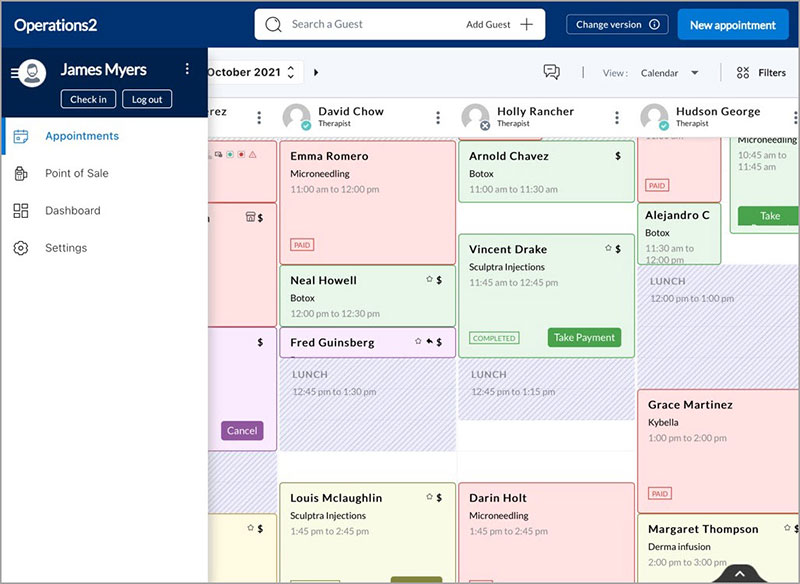
Zenoti is built for spa groups running five or more locations that need centralized reporting, staffing, and inventory from one dashboard rather than five separate ones.
- Multi-location scheduling and resource management
- Point of sale and payroll
- Inventory management
- Business intelligence reporting
- Membership and package management
Resource scheduling keeps rooms and equipment from conflicting across every site, exactly the kind of cross-location double booking problem that trips up smaller tools once a spa group passes two or three locations.
Pricing: there’s no public self-service pricing here. Every quote needs a sales call, but 2026 vendor comparisons from Phorest and Pabau put it roughly at $225 to $400 per location monthly for smaller multi-site groups, scaling toward $10,000 to $15,000 monthly for chains near 100 users.
Centralized reporting across many locations, deep configurability for complex service menus and room assignment, and white-glove migration support are the real draws.
Implementation commonly runs weeks to months, though, and the platform is more than an independent single-location spa typically needs. SchedulingKit’s 2026 review flags a steep learning curve during onboarding relative to the platform’s feature depth, a pattern that lines up with its enterprise, sales-quote-only pricing model.
The same configurability that makes it the pick for chains is what drives those multi-week implementation timelines, a trade-off Phorest’s own comparison guide states plainly about a direct competitor.
Mangomint – Best for premium independent spas
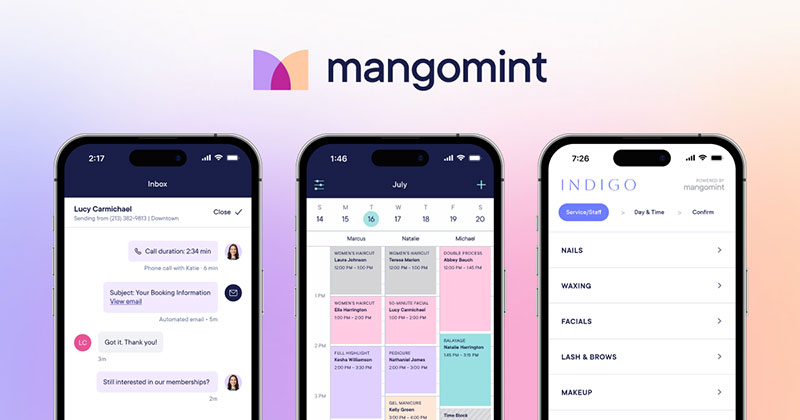
Card-on-file and self-checkout are built directly into the booking flow here, Apple Pay included, and that’s really the point of Mangomint: a polished, automation-heavy booking and checkout experience for independent and med spa teams that care about how the client experience looks and feels.
- Online booking without a required login
- Client profiles centralizing history and notes
- Waitlist automation
- Membership management
- Marketing automation
Package and membership tools double as a way to upsell spa and salon services at checkout instead of running through a separate marketing platform.
Pricing: under Mangomint’s simplified pricing structure effective August 2026, it runs $120 per month per location plus $10 per month per user (Mangomint’s own pricing page).
A clean, modern interface gets singled out by reviewers often, waitlist automation fills schedule gaps on its own, and self-checkout speeds up the front desk during busy hours.
Pricing scales with both locations and staff count though, and phone, payroll, and marketing all sit behind separate paid add-ons. The per-user fee adds up fast for larger teams.
The Salon Business’s 2026 spa software guide names Mangomint the best overall spa management software, largely on operational polish rather than price. Its pricing is now built around a flat per-location-plus-per-user model instead of tiered feature gates, which quietly tells a true solo operator that most of that polish is aimed at teams, not a one-person calendar.
GlossGenius – Best for solo spa professionals
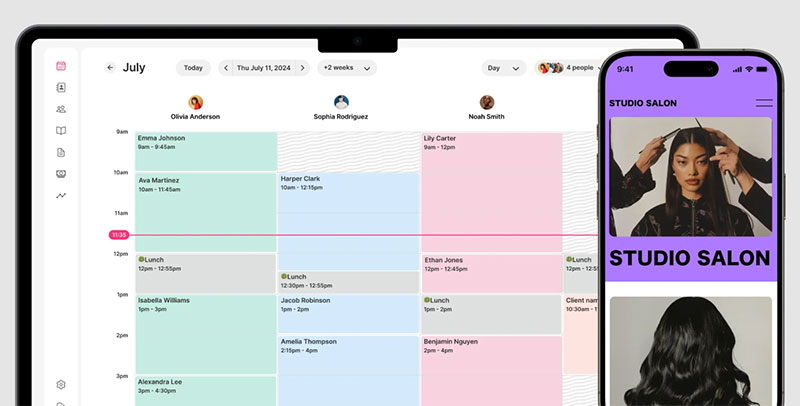
A flat 2.6 percent card processing rate, regardless of ticket size or card type, is the thing that actually matters here more than any scheduling feature. GlossGenius is built for independent estheticians, massage therapists, and mobile spa providers running solo.
- Design-forward booking page
- Email and text marketing on the base plan
- Client management
- Mobile-first admin
Pricing: runs $28 per month billed monthly, or $24 per month billed annually, for the Standard plan (GlossGenius’s own pricing page, 2026), sitting squarely among the better scheduling software for small businesses built around a single provider’s calendar rather than a full team roster.
Marketing tools come included on the base plan instead of sold separately, and setup is fast for a single provider.
Team and multi-location features are noticeably lighter than Vagaro or Mangomint, though, and inventory or backbar tracking stays limited. This one suits solo or very small teams more than a growing spa.
The Salon Business’s 2026 guide positions GlossGenius as the pick for independent professionals on both price and design, and honestly, that flat processing rate matters more than any scheduling feature for a spa doing high-ticket services, since tiered competitor rates quietly cost more per transaction as the average ticket climbs.
Phorest – Best for spas that live on repeat visits
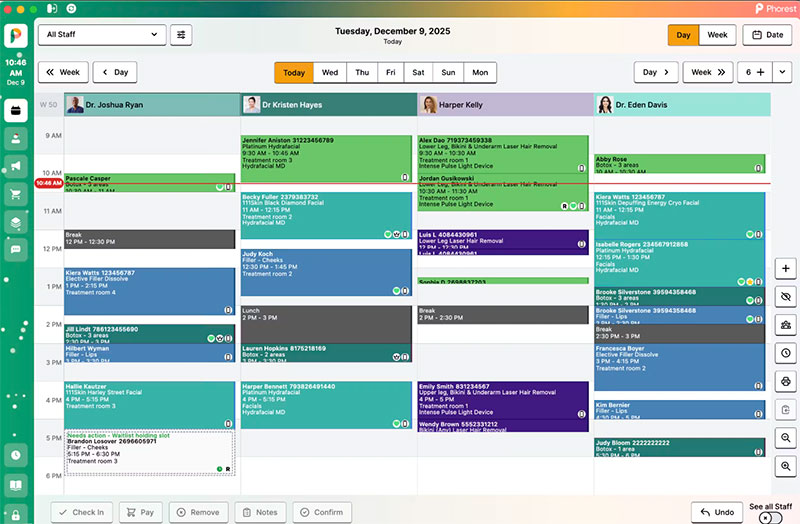
Retention marketing sits built directly onto the calendar here instead of getting sold as a separate tool, which is the whole reason Phorest makes this list. It fits spas where rebooking rates matter as much as the scheduling mechanics themselves.
- Booking calendar with rebooking prompts
- Staff performance tracking
- Reporting
- A dedicated med spa version
Rebooking prompts and retention campaigns are the main lever for getting more bookings out of an existing client list rather than chasing new discovery traffic.
Pricing: runs from about $150 per license per month (ITQlick’s 2026 comparison).
Retention tools built into the calendar, a strong support reputation in the UK and Irish spa and salon market, and a med spa-specific version are the highlights.
Pricing runs above solo-focused tools, multi-location reporting trails Zenoti at enterprise scale, and US market presence and reviews stay noticeably thinner than UK and Irish coverage.
Zenoti’s own 2026 category comparison credits Phorest with the deepest retention marketing layer among the platforms it reviewed, notable coming from a direct competitor. That depth shows up most clearly in UK and Irish adoption data cited by competitors’ own comparison guides, an easy pattern to miss in US-centric spa software roundups.
Boulevard – Best for high-end day spas
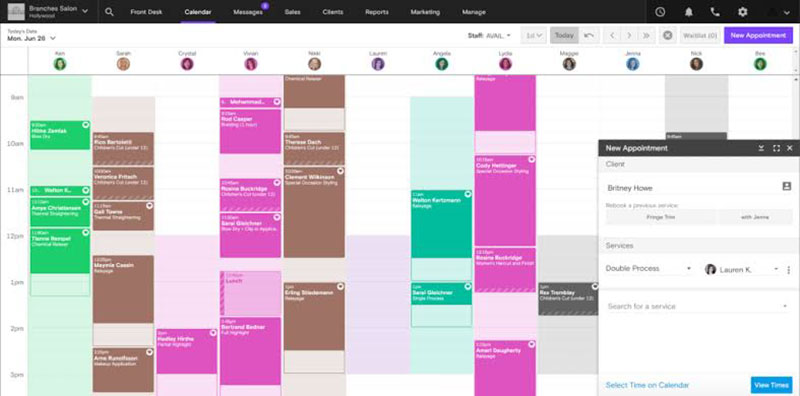
Reviewers keep calling Boulevard’s client-facing booking flow the most polished in its price tier, and that polish is really the product here. It fits higher-end day spas competing on service atmosphere as much as on appointment availability.
Tiered plans run from Essentials to Prestige, with payment processing on the entry tier and marketing plus multi-location tools on the higher tiers, alongside a deep CRM for client relationships. No-show handling around cancelled appointments leans on deposits and card-on-file rather than a dedicated waitlist automation layer like Mangomint’s.
Pricing: Essentials starts at $176 per month ($158 billed annually), Premier at $293 per month ($263 annual), and Prestige at $410 per month ($369 annual), all per location, per Boulevard’s own pricing structure (2026).
The most polished booking flow reviewers cite in its price bracket, strong CRM depth, and responsive support across reviews are the selling points.
It carries the highest entry price on this list, though, has no backbar inventory tracking, and its marketing automation is less configurable than Phorest’s dedicated retention tools.
Zenoti’s own 2026 salon software comparison describes Boulevard’s booking experience as premium because the design work behind it is premium. It prices per plan tier rather than per bookable calendar, so a two-treatment-room spa pays the same Essentials rate as a larger single-location spa, unlike calendar-metered competitors such as Vagaro.
When These Tools Are Not The Right Fit
A solo spa owner still taking bookings by phone or Instagram DM does not need any of the above yet. A free calendar link is enough until missed calls and no-shows start costing real money.
A lot of what looks like a software problem is actually a process problem. A general guide on how to avoid common appointment scheduling mistakes covers that side of it, and no calendar tool fixes it on its own.
A medical spa doing injectables or laser treatments under a physician’s license usually needs clinical charting and HIPAA-scoped documentation layered on top of scheduling. That points toward EHR-scheduling hybrids rather than a pure booking tool.
A resort or hotel spa often needs booking software that talks to the property’s own reservation system, so a guest can charge a treatment to the room. That’s a property-management-system integration most spa-only tools on this list simply don’t offer.
Choosing Between These Ten
Spas already running WordPress and comfortable owning their hosting should start with Amelia. Spas that want a booking website live today, without touching a plugin, should start with Trafft.
Everything past those two solves a narrower problem: multi-location scale, class scheduling, or a marketplace discovery channel. Not a better basic calendar, just a different one.
For anyone still weighing whether to launch at all, a separate guide on how to open a spa covers the business side before software selection becomes relevant. A broader roundup of the best WordPress booking plugins covers general-purpose booking tools for anyone outside the spa and wellness vertical.
How Does Spa Scheduling Software Work
A client picks a service and time, the system checks real-time availability, and a confirmation fires back automatically. That loop doesn’t need a phone call or a staff member watching a calendar, which is the entire appeal.
The booking widget pulls open slots from staff and room calendars the moment a client loads the page. Service duration and buffer time block out the next slot automatically once a booking is confirmed. A confirmation writes to the internal calendar and triggers the first reminder in the sequence, and deposit or full payment, where required, processes through the connected gateway before the slot locks in.
Most of what separates a well-run booking flow from a chaotic one comes down to scheduling appointments the right way before software even enters the picture. The platform just automates the discipline that was already there, or wasn’t.
Buffer time matters more than it looks like it should. A 60-minute massage with no gap between bookings turns into back-to-back overruns the first time a session runs long, and it always does eventually.
Scheduling Therapists, Treatment Rooms, And Multiple Locations
A therapist’s calendar and a treatment room’s calendar are not the same thing. Treating them as one is where double bookings usually start.
Employee calendars track who is free, a specific massage therapist, esthetician, or stylist, along with their hours, days off, and service list. Resource calendars track what is free instead, a treatment room, a hot stone table, a hydrotherapy tub, anything used once that needs to reset before the next booking.
A facial booking only needs to check the esthetician’s calendar. A couples massage needs both therapists free and a room built for two, at the same time, which is a different problem than it sounds like.
Multi-location spas add a third layer. One client database shared across every site lets a regular who normally visits the downtown location book the uptown branch without re-entering their details.
Front desk staff and therapists rarely need the same access. Role-based permissions keep a therapist from editing pricing while still letting them see their own day.
Coordinating who works when, across rooms and shifts, is really just employee scheduling software applied to a service business instead of an office.
How Spa Scheduling Software Handles Payments And Deposits
Two payment moments exist in spa booking, and most software treats them differently: money taken now, and money authorized but charged later.
A deposit at booking is a fixed amount or percentage charged immediately to hold the slot, usually non-refundable past a cutoff. Card-on-file means no charge at booking, but the card gets authorized and charged automatically for a no-show or late cancellation. Full prepayment collects the entire service cost upfront, which shows up most often for high-ticket treatments and first-time clients.
Gateway choice narrows what’s actually possible. Stripe and Square handle most standard card processing, PayPal adds a wallet option many clients already trust, and Mollie covers European debit rails that Stripe alone doesn’t always reach cleanly. A PayPal booking system is often the fastest gateway to configure for a spa that already takes PayPal for retail sales.
Refund and cancellation rules sit on top of whichever method gets chosen. A deposit refund policy that isn’t spelled out at booking time becomes a dispute at the front desk later, and that’s a preventable headache.
How Much Does Spa Scheduling Software Cost
Pricing for spa scheduling software splits into four real models, and the label a vendor uses (free, freemium, subscription) often hides which one is actually in play.
| Pricing model | How it charges | Best fit | Main risk |
|---|---|---|---|
| Flat monthly SaaS | Fixed fee per month, sometimes per calendar | Predictable-volume spas wanting one line item | Cost climbs fast per added staff calendar |
| Per-location enterprise | Custom quote per site, often five figures at scale | Multi-location chains and franchises | No public pricing, slow sales-quote process |
| Low-subscription plus payment processing | Small or per-calendar subscription, revenue mostly from card transaction rates and marketplace commissions | New or very low-volume spas | Cost scales invisibly with revenue and marketplace bookings |
| One-time or lifetime license | Single purchase, self-hosted plugin | WordPress spas avoiding recurring fees | Upgrades and support often still need renewal |
The gated-feature pattern repeats across nearly every vendor. Multiple payment gateways, SMS credits, and multi-location reporting sit behind a mid or top tier, rarely on the entry plan.
A one-time license looks cheaper over three years on paper. It only holds up if the plugin still gets security updates without a renewed support contract, which is worth checking before you get attached to the math.
WordPress Plugin Or Cloud Platform: Which Fits Your Spa
This decision determines where booking data physically lives, and how much setup work sits on the spa’s side before the first client can book.
WordPress now powers roughly 41 percent of all websites, according to W3Techs (2026), which is why a WordPress-based booking plugin is even on the table for most spas in the first place.
WordPress Plugin
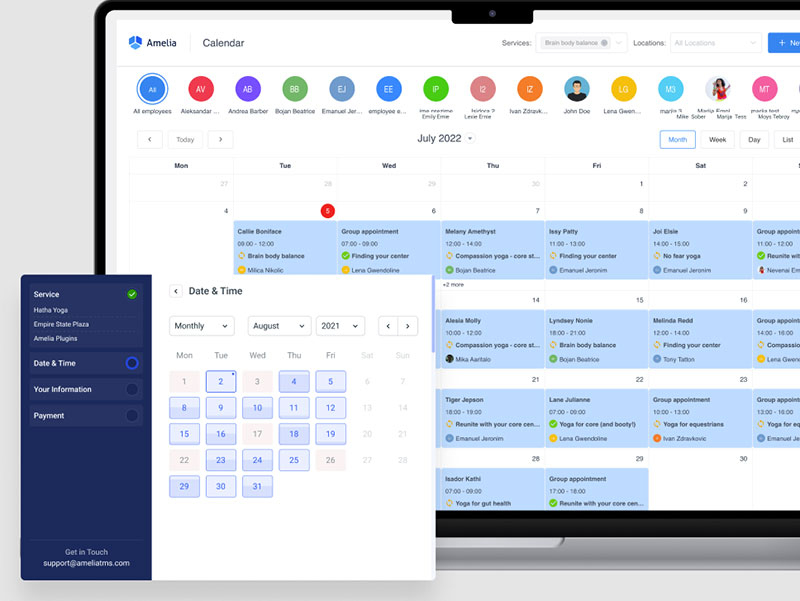
Booking data, client records, and payment logs sit on the spa’s own hosting account with a plugin, inside the same install running the rest of the website. There’s no recurring booking-platform fee beyond hosting, full data ownership, and it works with the site’s existing theme.
The trade is that the spa owns uptime and backups. Updates need testing before they go live, and support quality depends on the plugin vendor rather than a managed platform. Comparing plugin options really means weighing a WordPress calendar plugin against the site’s existing hosting reliability, not against booking features alone.
Cloud Platform
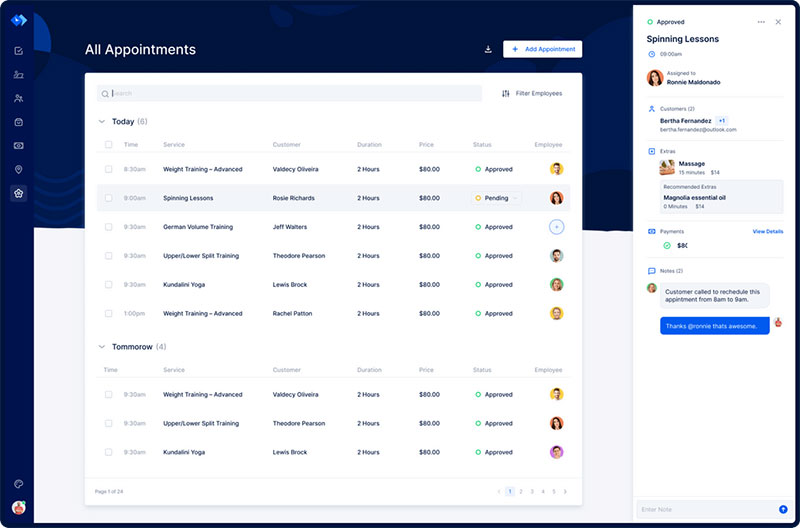
A cloud platform flips the setup order. Booking data lives on the vendor’s servers, and the spa never touches hosting or a content management system at all.
Faster launch and zero server maintenance come at the cost of less control if the vendor changes pricing, features, or shuts down a tier down the road. Migration between the two paths is smoother when both run on the same underlying booking engine, and Trafft and Amelia share that lineage, which is why moving from one to the other keeps the admin panel familiar instead of starting from zero.
How Automated Reminders And Deposits Cut No-Shows
A no-show isn’t a scheduling inconvenience. It’s a chair, room, or table earning nothing for the exact hour it was blocked for.
Personal care and service businesses run roughly a 15 to 30 percent no-show rate industry-wide, according to industry benchmark research. Automated SMS reminders are widely reported to cut no-shows by up to around 38 percent in healthcare and service-industry studies, and businesses requiring a full deposit at booking commonly see meaningfully fewer missed appointments than those that don’t, according to booking-platform vendor data.
Reminder timing matters almost as much as the reminder itself. A message sent the morning of catches fewer cancellations early enough to refill the slot than one sent 24 to 48 hours out. An appointment reminder app only helps if a cancellation reply actually reopens the slot automatically. Otherwise a staff member still has to notice and rebook it by hand, which defeats half the point.
Sami Azrak, founder of SHAVE Barbers & Spa, built his no-show defenses around automated booking reminders after moving off manual scheduling, according to Trafft’s own case profile of the business.
What Does Spa Scheduling Software Connect To
A booking platform that can’t talk to the tools a spa already runs just becomes one more system to check separately.
Calendars And Video Tools
Real-time sync matters most here. A booked slot needs to disappear from every calendar the moment it’s confirmed, not minutes later. Two-way Google Calendar sync keeps double bookings from slipping through between systems, Outlook and iCal support covers staff who run a personal calendar outside Google, and video consultation links handle virtual intake calls or remote follow-ups on a treatment plan.
Setting up appointment scheduling tied to Google Calendar is usually the first integration a spa configures, since staff already check it daily. Video-consultation add-ons matter more for med spas running pre-treatment screening calls than for a standard massage or facial booking, where Zoom integrations mostly go unused.
Payments, Marketing, And Accounting Tools
Stripe, Square, PayPal, and Mollie cover most card and wallet processing across the platforms in this category. Marketing tools like Mailchimp pull from the same client list the booking system already holds, so a promotion goes out without a manual export. QuickBooks and Xero sync revenue and payout data so a spa isn’t reconciling two separate records by hand at month end.
For WordPress-based setups, WooCommerce appointments extend the same storefront a spa might already use for retail product sales into the booking flow itself.
How Spa Scheduling Software Keeps Client And Payment Data Secure
Every booking form that touches a card number or a client’s health notes is a data-handling decision, not just a design choice.
SSL encryption belongs on the booking form itself, not just the homepage. PCI DSS compliance matters for any platform that stores or transmits card data directly rather than tokenizing it through the gateway. GDPR-compliant data handling is worth checking for spas booking clients based in the EU, including a clear data deletion path, and access logs should show who viewed or edited a client’s treatment notes and when.
Tokenized payments reduce exposure the most. When the platform never stores a raw card number, a breach of the booking database doesn’t hand over usable card data.
Treatment notes deserve the same caution as payment data, honestly more than they usually get. A client’s skin condition or injury history sitting in an unencrypted export is a liability most spas don’t think about until it happens.
How To Set Up Spa Scheduling Software
Most spas can go from a blank install to a live booking page in one working session, provided services and pricing are already decided beforehand.
- Connect a calendar and set business hours, including any midday breaks or rotating days off
- Add staff profiles with individual working hours, service lists, and days off
- Build the service catalog with duration, price, and buffer time for each treatment
- Connect a payment gateway and set deposit or card-on-file rules per service
- Configure reminders across SMS, email, or WhatsApp, and set the timing for each
- Test the full flow as a client would, from picking a slot through to receiving the confirmation
Skipping the test-booking step is the most common setup mistake. A gateway that isn’t fully connected fails silently on the client’s side, not the admin’s, so nobody notices until a client complains.
How To Switch From Phone Or Paper Booking To Spa Scheduling Software
The hardest part of switching is rarely the software. It’s convincing regulars who’ve booked by phone for years that the new way isn’t a downgrade.
Export the existing client list from a spreadsheet, a paper salon appointment book, or whatever system currently holds it, before the old method gets retired. Re-enter standing recurring appointments manually where no import path exists between the old and new system. Run phone booking and online booking in parallel for two to four weeks rather than cutting over overnight, and tell regulars directly, at their next visit, rather than relying on a social post they might miss.
Sami Azrak, founder of SHAVE Barbers & Spa, moved his business from manual booking to an online system and built much of his growth story around that switch, according to Trafft’s own case profile.
The parallel-run window matters more than most guides admit. A client who calls during week one of a new system and gets told to book online instead often just doesn’t book at all.
When Switching Spa Scheduling Software Is Not Worth It Yet
Not every spa should switch right now, and pretending otherwise ignores real costs on the other side of the decision.
Peak season two to four weeks away is a bad time. Learning a new system during the busiest weeks of the year costs more in mistakes than it saves. A current system already wired into accounting, payroll, and marketing is another reason to wait, since a new tool would break those connections rather than improve them.
A practice running a handful of appointments a week rarely gets enough back to justify the migration and training time. And a contract with the current vendor that still has months left, with an early termination fee attached, can erase the first year of savings before it starts.
A spa in any of these situations is better served waiting for a slow month or a contract renewal date, then switching with a real transition window instead of a rushed one. The decision isn’t permanent, either. Revisiting it every 12 months, tied to contract renewal, keeps the question from being forgotten entirely.
FAQ on Spa Scheduling Software
What Exactly Is Spa Scheduling Software, And How Does It Differ From General Appointment Software
General appointment software books generic time slots and stops there. Spa scheduling software adds spa-specific mechanics on top: treatment room and equipment scheduling, therapist-level service lists, deposit rules for high-ticket treatments, and package or membership tracking that a generic calendar tool doesn’t build in.
Is Spa Scheduling Software The Same Thing As Spa Management Software
Not quite, though people use the terms loosely. Scheduling covers the booking calendar, staff assignment, and reminders. Management software is broader, usually bundling scheduling with point of sale, payroll, inventory, and marketing, so scheduling ends up being one module inside a full spa management platform rather than a separate category on its own.
What Features Actually Matter When Comparing Spa Scheduling Software
Real-time availability, deposit and card-on-file handling, staff and room-level scheduling, and automated SMS or email reminders decide most comparisons in practice. Multi-location support and calendar sync matter only once a spa runs more than one site, or more than a couple of providers.
Is Spa Scheduling Software Worth It For A Single, Solo Therapist
Yes, once missed calls or double bookings start costing real revenue. A solo therapist gains automated reminders and deposit collection without hiring front desk help. A full multi-location platform is overkill until a second provider or room enters the picture though, so there’s no rush to overbuy.
What Mistakes Commonly Happen When Switching Booking Systems
Businesses forget to update the phone greeting and website links to point at the new booking page. Others cut over without testing the payment gateway first, or drop recurring appointments during migration because no import path carried them across automatically.
How Long Does Implementation Usually Take
A single-location spa with services already defined can launch a booking page within a day. Multi-location or enterprise platforms with custom integrations, staff imports, and payment gateway setup typically take two to six weeks before the system goes fully live.
Do You Need Coding Or Technical Skills To Set It Up
No coding is required for a standard setup. A WordPress plugin needs basic comfort installing plugins and editing pages, while a hosted platform needs none of that, just service, staff, and payment details entered through guided screens.
Where Do You Start With The Best Spa Scheduling Software
Spa scheduling software selection really starts with counting providers and locations, not comparing feature lists, since that single number decides whether a self-hosted setup or a subscription platform fits the business at all.
- Count providers and locations
- Match that count to a pricing model
- Test the entry tier against real bookings before upgrading
A single provider running one location fits either route’s entry tier without triggering an upgrade. Five or more providers across more than one site push the decision toward enterprise-tier platforms before cost even enters the conversation.
Starting on the lowest tier accepts one trade-off worth knowing upfront: multi-location reporting and retention marketing stay locked until volume justifies the upgrade, which usually means a mid-contract plan change rather than a clean annual renewal.
The same starting logic carries over to businesses running a broader service mix than a single-room spa, where wellness booking software covers yoga studios, gyms, and multi-service wellness centers.

Explore topics

Read Inspiring Customer Stories
Check out how our user set Amelia for his business