

Limited time discount Book Smarter This Christmas
Up to 50%Off

How are employees connected to Google Calendar in Amelia

Employees are connected to Google Calendar in Amelia through the admin’s Google account or by signing in with their own Google account. The way employees are connected determines which calendars are used, who controls the connection, and how appointments and events are created in Google Calendar.

For example, an admin can centrally connect all employees to shared company calendars, or allow employees to connect and manage their own Google Calendars through WordPress or the Employee Panel, depending on how much control is needed.

Info Note

Google Calendar connection requires the Google Calendar & Google Meet integration to be enabled and configured first in Features & Integrations → Integrations.
How does Google Calendar connection work in Amelia?

Google Calendar integration in Amelia works by connecting a Google account first and then linking employees to calendars that belong to that account.

The admin connects a Google account, Amelia pulls all available calendars from that account, and employees are linked to one selected calendar. Amelia then creates and manages Google Calendar events based on bookings made in the plugin.

How can admins connect employees to Google Calendar?

Admins have two ways to connect employees to Google Calendar, both using calendars available from the admin’s connected Google account.

How do I connect employees from integrations settings?

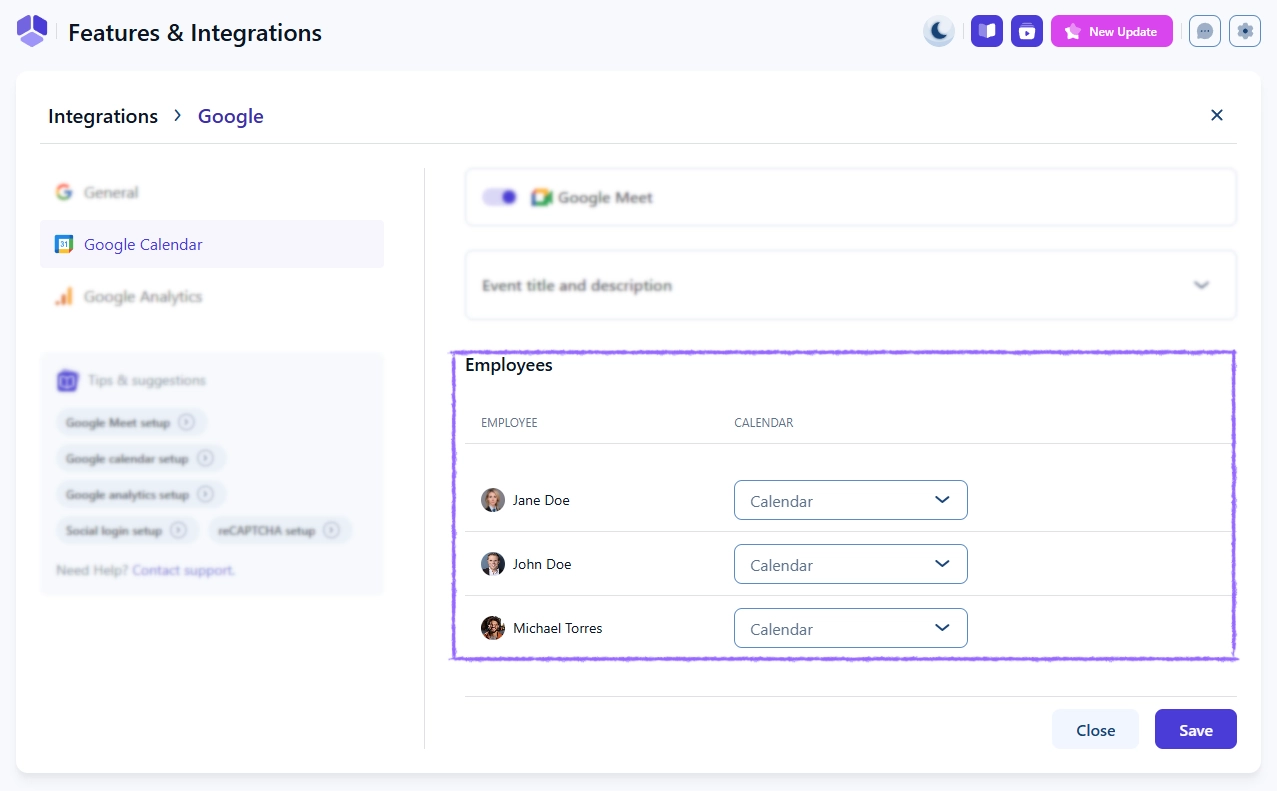
Admins can connect employees centrally from Features & Integrations → Integrations → Google Calendar & Google Meet → Set up, by opening the Google Calendar tab and scrolling to the employee calendar section.

Here, each employee can be linked to a calendar using a dropdown list populated with calendars from the admin’s connected Google account. This connection is controlled entirely by the admin and cannot be changed or disconnected by employees.

Employee calendar selection dropdown in Google Calendar integration settings
Alert Please note

If multiple employees are linked to the same Google Calendar and Remove Google Calendar busy slots is enabled, booking one employee will block the same time slot for all other employees linked to that calendar.
How do I connect employees from the Employees page?

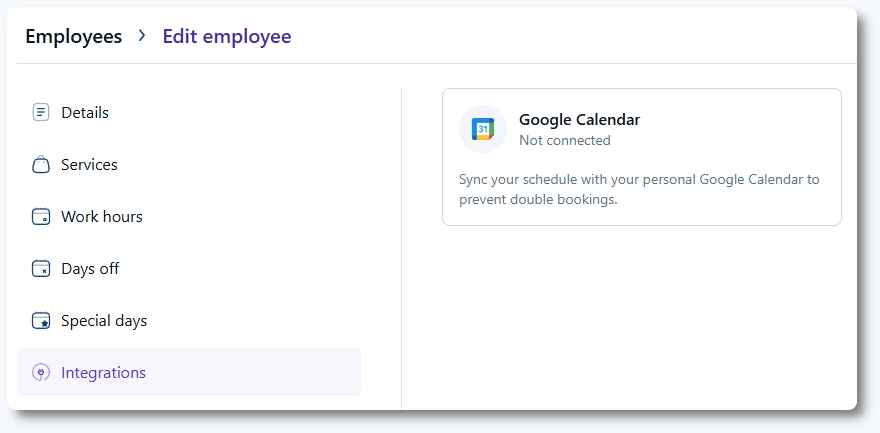
Admins can also connect employees individually by opening Amelia → Employees, editing an employee, and accessing the Integrations tab.

Google Calendar card showing not connected status in an employee profile

From there, clicking the Google Calendar card allows the admin to connect the employee to a Google account and select a calendar from the admin’s available calendars. This method gives employees the option to later disconnect and connect their own Google account.

Employee Google Calendar connection showing calendar selection dropdown after connecting

How can employees connect or change their Google Calendar?

Employees can connect or change their Google Calendar only if the admin connected them through the Employees page and not through Integrations settings.

Employees can do this in two ways:

  • From the WordPress back end, if their employee profile is linked to a WordPress user with the Amelia Employee role
  • From the Employee Panel, using the same Google sign-in flow

Both methods allow employees to disconnect the admin-established connection and sign in with their own Google account, selecting one calendar for synchronization.

Info Note

Employees can select any calendar available in the connected Google account, not just the primary calendar, but only one calendar can be connected at a time.

What happens when multiple employees use the same Google Calendar?

Multiple employees can be connected to the same Google Calendar.

When this setup is used, all appointments and events assigned to those employees are stored in the same calendar. If Remove Google Calendar busy slots is enabled, a booking for one employee blocks availability for all employees sharing that calendar.

If an employee’s calendar is changed, future bookings are created in the newly selected calendar, while existing Google Calendar events remain in the original calendar.

What is the difference between appointments and events with Google Calendar?

Google Calendar behaves differently for services (appointments) and events in Amelia.

How does Google Calendar work with services (appointments)?

Services always require an assigned employee, and Google Calendar events are created only if that employee is connected to a Google Calendar.

Each appointment creates a single Google Calendar event in the employee’s connected calendar. Google Meet links are added only if Google Meet is enabled globally and enabled for the specific service in Catalog → Services → Settings → Integrations.

How does Google Calendar work with events?

Events can function without employees, but Google Calendar synchronization requires at least one employee to be assigned.

If an employee is added as Organizer, the event is created in that employee’s connected Google Calendar. If only Staff members are added, no Google Calendar event is created.

When Add event attendees is enabled, Staff members are added as Google Calendar attendees. If Send event invitation email is enabled, they receive a Google Calendar invitation. When an event is deleted in Amelia, it is also removed from Google Calendar.

If Google Meet is enabled and an organizer is connected to Google Calendar, the Google Meet link is added automatically with no additional configuration.

Organizer and Staff selectors in Amelia's event defining the organizer of the Google event

What should I keep in mind when managing employee Google Calendar connections?

  • Each employee can be connected to only one Google Calendar at a time
  • Disconnecting an employee does not remove existing Google Calendar events
  • New appointments or events are not synced after an employee is disconnected
  • Admin connections made from Integrations settings cannot be overridden by employees
  • Shared calendars affect availability when busy slot removal is enabled