Limited time discount Book Smarter This Christmas
Up to 50%Off

How to set up deposit payments for services in Amelia

Deposit payments for services let you collect part of the booking price upfront while the remaining balance is paid later on-site or via a payment link. This helps prevent no-shows and allows customers to confirm a service without paying the full amount immediately.

Info Example

The Deposit payment feature is available in the Standard, Pro and Elite license plans.
How do I enable deposit payments for a service?

First, enable the Deposit payment feature in Features & integrations.

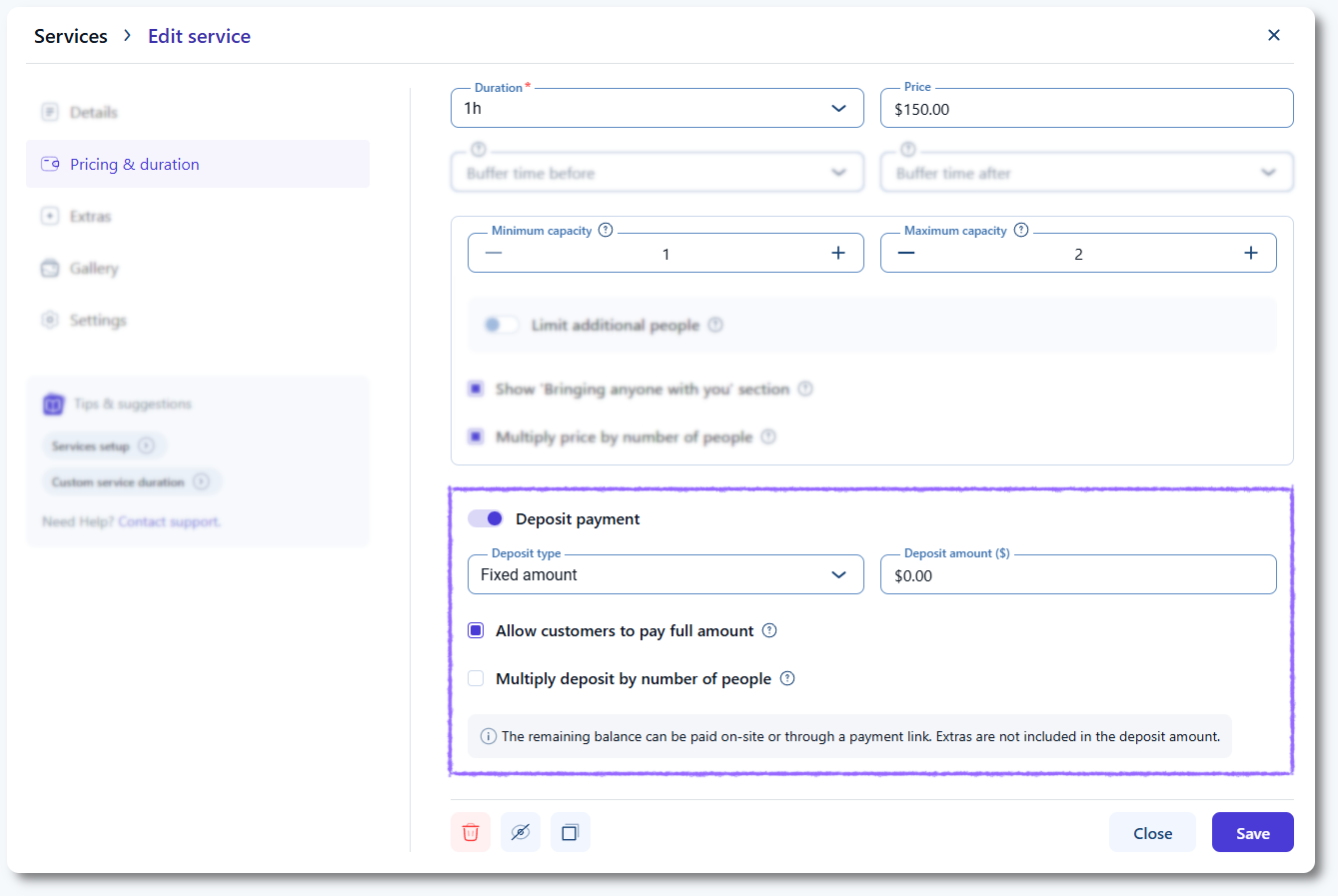
Then open CatalogServices, select a service, and switch to the Pricing & duration tab.

Turning on the Deposit payment slider unlocks all deposit options for that specific service.

Deposits must be configured individually for each service where you want them to apply.

Deposit payment settings in a service’s Pricing & duration tab in Amelia

Which deposit types can I choose?

You can choose between two deposit types:

  • Fixed amount – A single fixed value paid during booking.
  • Percentage – A percentage of the total booking price, including extras and additional people.

With a percentage deposit, the amount automatically adjusts based on service price, employee price, extras, and number of people.

With a fixed deposit, you can choose whether it multiplies by the number of people or remains the same.

Alert Please note

If a service price is set to 0, deposit payment options will not appear in the service settings.

How do fixed and percentage deposits behave?

A percentage deposit is calculated on the full booking price, which includes extras and additional people. This type is recommended when employees have different prices, since the deposit reflects the total cost accurately.

A fixed deposit does not include extras unless you enable the Multiply deposit by number of people option, which appears only when “Fixed amount” is selected. This option ensures that the deposit is per person rather than per booking.

Alert Please note

Extras are included in percentage deposits but not in fixed deposits unless multiplied by number of people.
Can customers choose to pay the full amount instead of the deposit?

Yes. Enable Allow customers to pay full amount if you want customers to decide whether they pay only the deposit or the entire service price during booking.

If this option is disabled, customers will be required to pay only the deposit upfront.

How do deposits work with recurring appointments?

Recurring bookings use the Recurring  appointment payment option to determine how deposits apply:

  • If customers pay for the first appointment only, the deposit applies only to the first appointment.
  • If customers pay for all appointments at once, the deposit is calculated across all appointments in the series.

Fixed deposits follow the same rule but multiply only if Multiply deposit by number of people is enabled.

How are deposits shown to customers during booking?

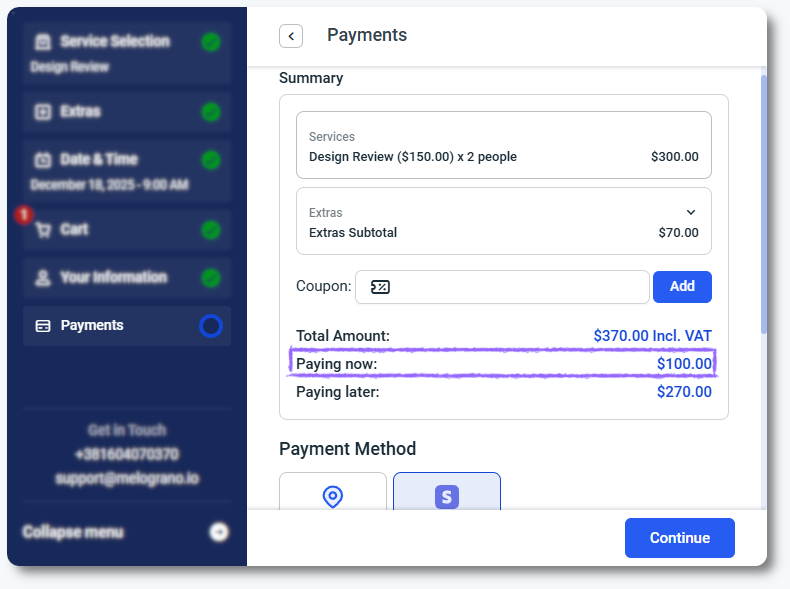
When a service uses deposit payments, the front-end booking form displays the deposit amount clearly along with the remaining balance.

Customers always see:

  • The service price
  • The deposit amount required now
  • The balance due on-site or via payment link

This transparency helps customers understand the payment structure before finalizing the booking.

Deposit and remaining balance shown in the front end booking form in Amelia
Alert Please note

Deposits cannot be refunded as a single amount when multiple services are booked together. Each service must be refunded individually.

What else should I keep in mind when using deposits for services?

  • Deposits work only when at least one online payment method is enabled. On-site-only payment does not display deposit options.
  • If employees have different prices, the percentage deposit type ensures accurate deposit calculations.
  • Fixed deposits remain the same regardless of employee price differences unless multiplied by number of people.
  • The remaining balance can be collected on-site or through a payment link if enabled.
