Limited time discount Book Smarter This Christmas
Up to 50%Off

How to enable Google Pay and Apple Pay with Stripe in Amelia

Google Pay and Apple Pay allow customers to complete their bookings in Amelia with a single tap by paying through a digital wallet instead of entering card details manually. These payment methods work through your existing Stripe integration, so no additional setup is required inside Amelia.

For example, if a returning customer books an appointment on their phone, Stripe will automatically display the Apple Pay or Google Pay button (depending on the device and browser) so the payment can be confirmed instantly.

Info Note

Make sure Stripe is fully set up in Amelia → Settings → Payments.
When do Apple Pay and Google Pay appear during checkout?

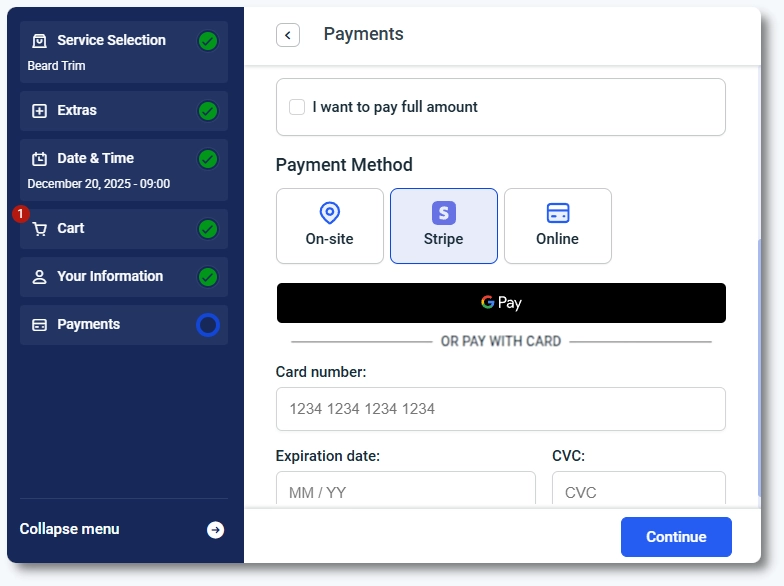
The digital wallet button displays automatically during payment if the customer meets Stripe’s requirements. There is no toggle inside Amelia to turn these wallets on or off.

To show the Apple Pay or Google Pay button, the following conditions must be met:

  • The customer is using a supported device and browser.
  • The customer is signed in to their Apple Pay or Google Pay wallet.
  • Stripe has these wallet methods enabled in your Stripe Dashboard.

If any of these conditions are not met, the wallet option will not appear and Stripe will fall back to regular card entry.

Google Pay checkout button displayed on desktop booking form in Amelia

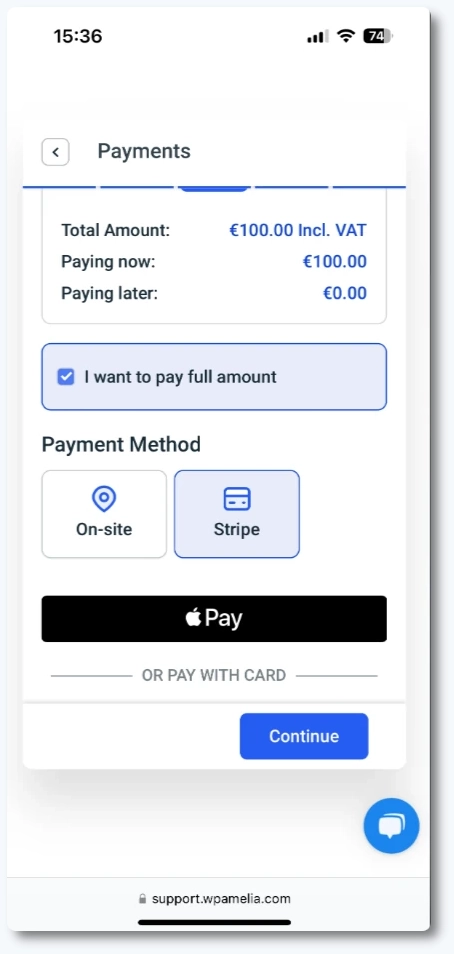
How does the digital wallet button look on mobile?

On mobile devices, Stripe adapts the layout to smaller screens. Wallet buttons are shown prominently at the top of the payment section, and the fields below are stacked vertically for easier touch navigation. Stripe automatically adjusts the display for iOS (Apple Pay) and Android (Google Pay).

Mobile booking form with Apple Pay button displayed above card fields

What should I keep in mind when using Google Pay and Apple Pay?

  • Stripe handles all eligibility checks for wallet display, not Amelia.
  • Customers must be logged into a wallet supported by their browser and device.
  • Apple Pay requires domain verification inside Stripe.
  • Both wallets use the same payment flow and receipts as regular Stripe payments.
  • No additional configuration is required inside Amelia once Stripe is set up.

For more details, refer to Stripe’s official guides: