How do Webhooks work in Amelia
Webhooks allow Amelia to send real-time booking data to external systems whenever a specific booking-related action happens, making it possible to automate workflows without manual input.
For example, when a customer books a service, Amelia can instantly send that booking data to your CRM, a spreadsheet, or an automation platform so your internal team can act on it immediately.
Webhooks are available in the Standard, Pro, and Elite license plans.

How do I enable and access Webhooks?
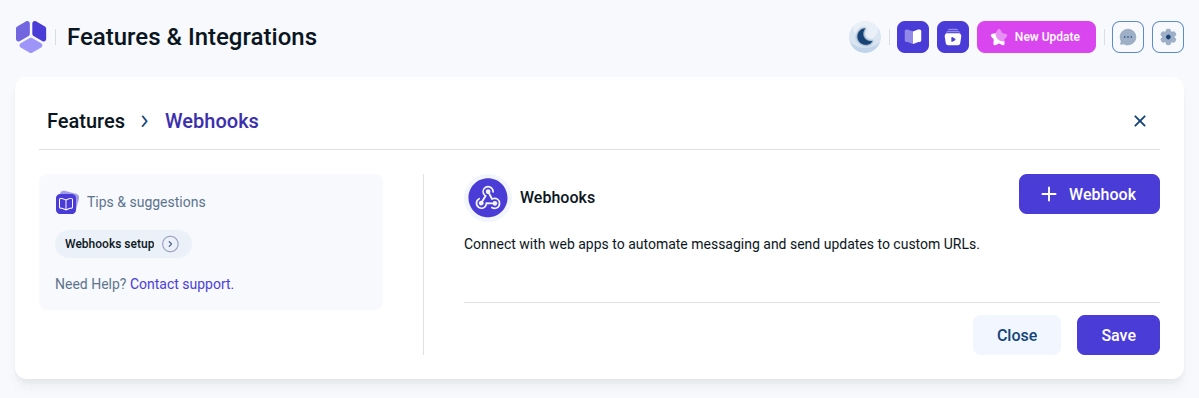
You can enable Webhooks from Amelia → Features & Integrations → Features by clicking Enable on the Webhooks card, after which the Set up and Disable buttons become available for managing the feature.
How do I add a new Webhook?
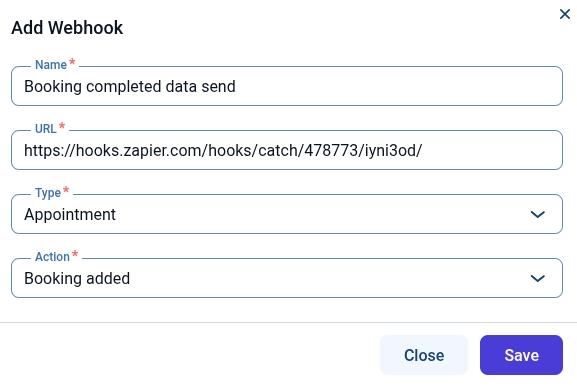
After clicking Set up, you can create a new Webhook by selecting the + Webhook button, which opens the configuration modal where all required fields must be defined before saving.
What does each Webhook field mean?
Each Webhook is defined using four mandatory fields that control how and when data is sent to an external system.
- Name – Used only for internal identification inside Amelia.
- URL – The public endpoint that receives the Webhook payload.
- Type – Defines whether the Webhook sends Appointment, Package, or Event data.
- Action – Defines which exact change triggers the Webhook.
Which Webhook Types can I choose?
Each Webhook can be linked to only one Type, which determines what kind of booking data will be sent.
- Appointment – Sends service-based booking data.
- Package – Sends package purchase and usage data.
- Event – Sends event booking and attendance data.
What Actions can trigger a Webhook?
Actions define the exact moment when Amelia sends the Webhook payload to the external system.
- Booking added – Triggered when a new booking is created.
- Booking rescheduled – Triggered when the date or time changes.
- Booking canceled – Triggered when a booking is canceled.
- Booking status changed – Triggered when the booking status updates.
What data is sent through Webhooks?
The Webhook payload includes booking identifiers, customer details, time and date values, and service, package, or event information based on the selected Type and Action.
What are the limitations of Webhooks?
Webhooks provide one-way data delivery only, meaning they cannot receive external data, control availability, synchronize calendars, or process payments, and all scheduling and payment logic remains fully handled by Amelia.
Each Webhook supports only one Type and one Action, so multiple Webhooks must be created when multiple triggers are required.
What should I keep in mind when using Webhooks?
- Always use a publicly accessible URL that can receive external requests.
- Create separate Webhooks for each Type and Action combination.
- Do not rely on Webhooks for payment validation or availability control.
- Make sure the receiving system is prepared to correctly parse incoming booking data.