How do tickets work in Amelia
With Amelia, managing event ticket sales is flexible and efficient. You can create multiple ticket categories such as “Adults”, “Children”, or “VIP”, each with its own price and capacity. This lets you tailor your event offering to different attendee types. In addition, the Pricing by date range option enables dynamic pricing based on when customers book, making early-bird discounts, last-minute promotions, or seasonal pricing easy to configure. Together, these options help you offer clear pricing, improve conversion, and maximize event revenue.
Tickets are available in the Standard, Pro, and Elite license plans and, they can be used only for events, not services.
How do I enable tickets?
You can enable tickets in Amelia → Features & Integrations → Features by turning on the Tickets feature. Once enabled, the standard event pricing section gains a new Custom pricing slider inside the Pricing tab. There is no Set up button for this feature.
What changes in the Pricing tab when tickets are enabled?
When Custom pricing is disabled, events use a single price, a single capacity value, optional deposit payment, and (if enabled) the waiting list option. Deposit settings remain a global event option and are not tied to individual ticket types.
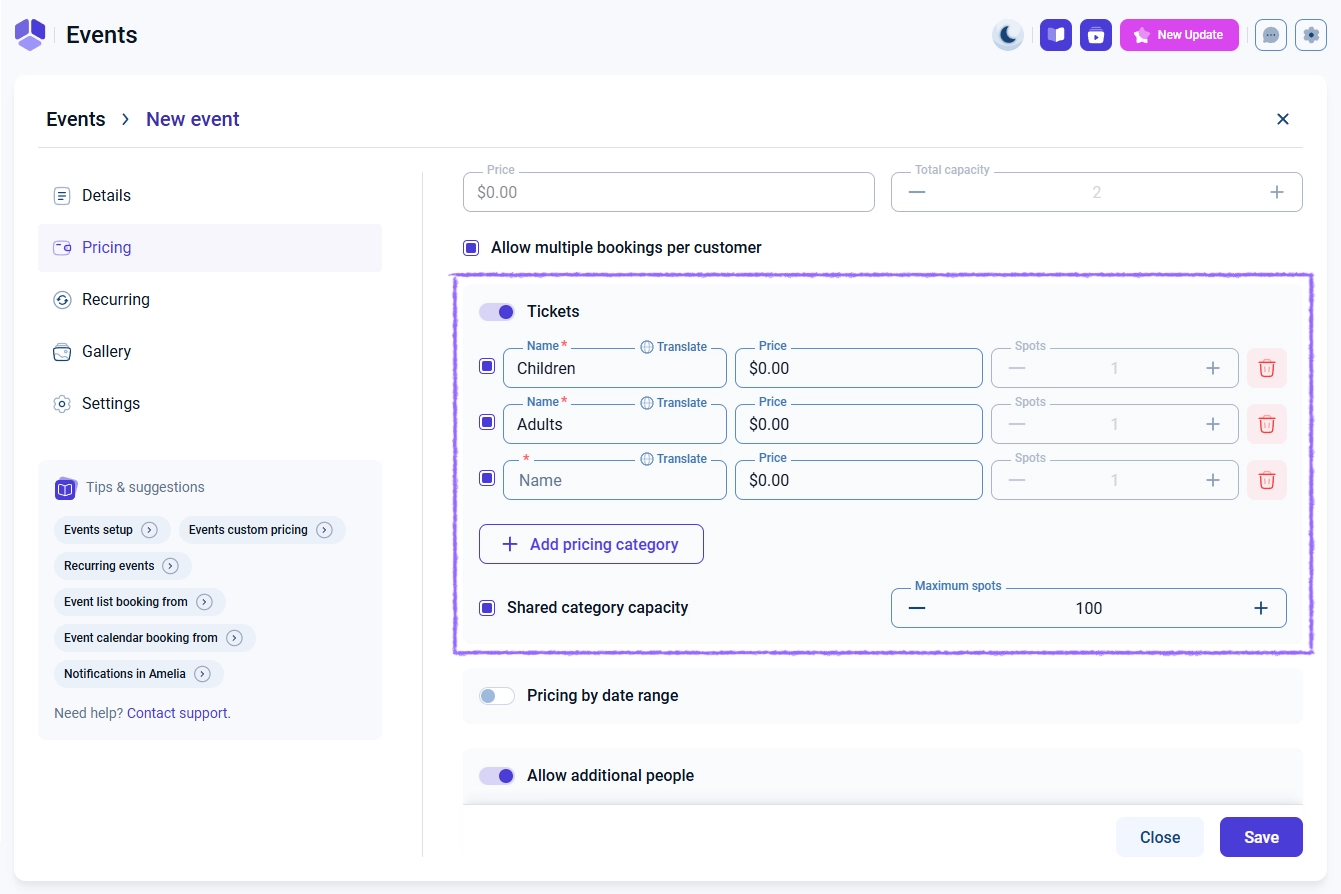
After enabling Custom pricing, the Pricing tab displays ticket category fields, capacity settings, and advanced pricing options. This fully replaces the single-price setup and allows each ticket type to have its own price.
How do I set up ticket categories?
Ticket categories allow you to offer multiple price tiers within the same event. Each category includes:
- Name – required for all categories.
- Price – the cost of the ticket for this category.
- Booked – the capacity for this specific category (disabled when shared capacity is active).
- A checkbox to quickly enable or disable the category without deleting it.
You can create additional categories by selecting + Add pricing category. Each category can be independently priced and shown on the booking form.
How does shared category capacity work?
The Shared category capacity option lets multiple ticket categories draw from one overall event capacity. When enabled:
- The Booked fields in each ticket category become disabled.
- A new Maximum spots field appears.
This creates one pool of available spots that all ticket categories use. Once the shared capacity is filled, the event can no longer be booked, regardless of which ticket type users select.
How does pricing by date range work?
The Pricing by date range slider adds dynamic pricing for tickets based on when the customer makes the booking. To use it, the event’s date and time must already be defined in the Details tab.
After enabling the slider, you can:
- Create ranges by selecting a start and end date.
- Double-click a date to create a single-day rule.
- Set different prices per ticket category for each date range.
Visitors booking earlier or later will see the price that corresponds to the date range in which they book.
How do custom tickets and date-range pricing work together?
When both Custom pricing and Pricing by date range are enabled, the plugin applies the date-range rules to each ticket category independently. Date-range pricing does not override ticket types, it extends them.
If no date range applies to the booking date, the base ticket price is used automatically.
How do tickets appear on the front end?
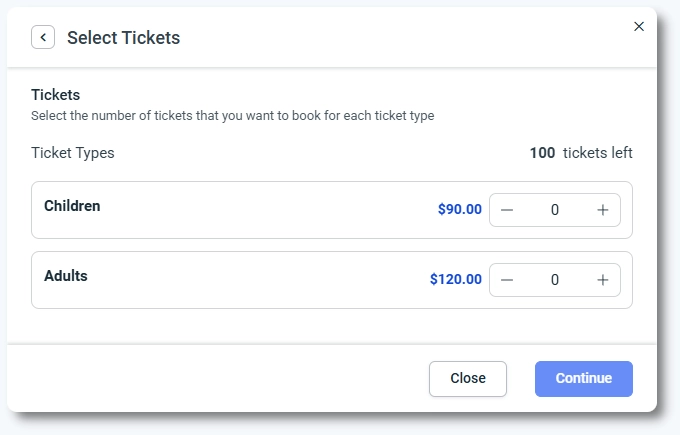
When loading an event form, customers see each available ticket category, its current price, and any capacity limitations. If date-range pricing is enabled, the displayed price reflects the booking date.
The modal view shows categories clearly so attendees can choose the option that fits their needs.
What are common examples of ticket setups?
- Early-bird pricing: cheaper tickets available until a specific date, then replaced by regular pricing.
- VIP and Standard tiers: separate categories for premium seating, merchandise, or added benefits.
- Last-minute pricing: lowering the price close to the event start to boost final bookings.
- Shared capacity festival tickets: categories share the same total capacity but have different prices.
What should I keep in mind when working with tickets?
- You must enable Custom pricing to define ticket categories.
- Date-range pricing cannot be used without ticket categories.
- Shared category capacity limits the event as a whole rather than individual tickets.
- Deposits remain global event options and do not vary per ticket type.
- Disabling a ticket category does not delete it, it only hides it from the booking form.
- Capacity management follows either individual category limits or the shared maximum value.