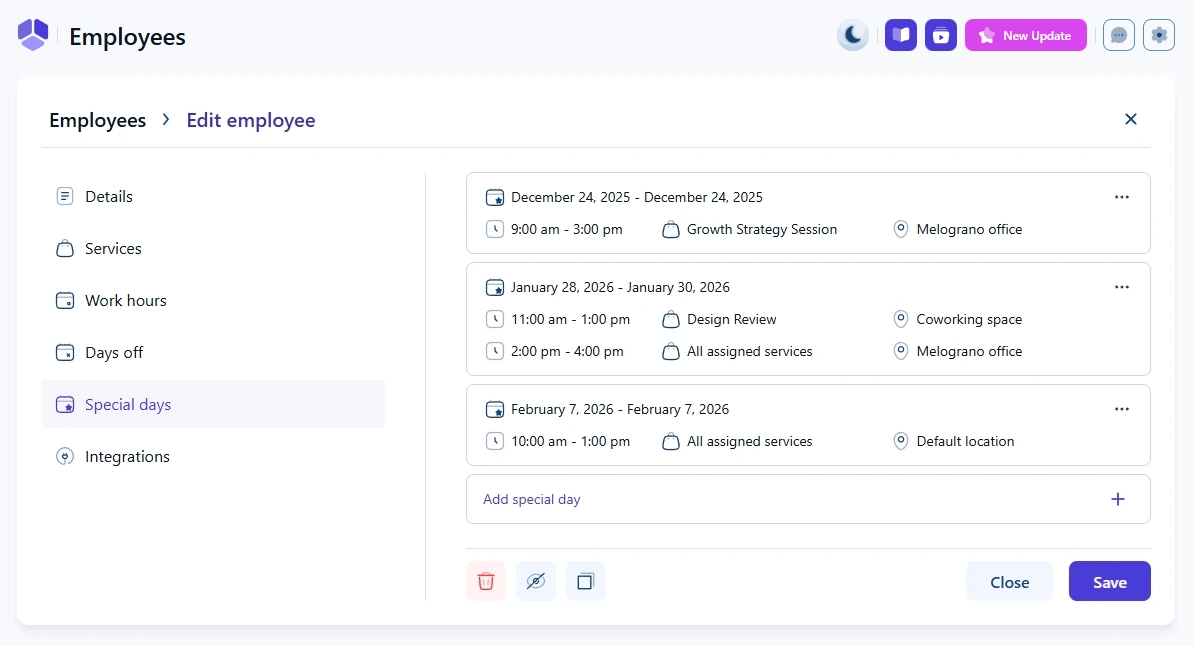
Employee special days are used to override regular work hours for specific dates. They allow you to define custom working periods, services, and locations for a selected date or a range of dates.
Special days are ideal when an employee works outside of their normal schedule, works on a normally unavailable day, or needs a different setup for services or locations.
How do special days interact with work hours and days off?
Special days have a higher priority than regular work hours, but they do not override days off.
Special days override regular work hours.
Special days do not override days off.
This means that if a date is set as a day off, the employee will not be bookable even if a special day exists for that same date.
How are special days defined?
Special days can be added as:
A single date
A range of dates
Each special day can contain one or multiple working periods with fully customized services and locations.
Where do I manage special days for an employee?
Special days are managed per employee in Employees → Edit employee → Special days.
How do working periods behave inside special days?
Each special day can contain one or multiple working periods, similar to regular work hours.
For each period, you can define:
The time range
The services available during that time
The location where the employee works
This allows you to fully override the employee’s default work hours, services, and locations for that specific date.
How do I add a special day for an employee?
To add a new special day, open the Special days tab and click Add special day.
Select the date or date range and define at least one working period.
To add more periods within the same day, use the + Add period option inside the special day popup.
Can special days use different services and locations than work hours?
Yes. Within each special day period, you can override:
Services – instead of using all assigned services, you can allow only specific services
Locations – instead of the default location, you can use a different location (or multiple locations) for that period
For example, an employee can work only on one selected service at one specific location for a special day, even if their regular work hours use different services or locations.
 Spring Deals Are in Full Bloom