Limited time discount Book Smarter This Christmas
Up to 50%Off

How can I configure SMTP for email notifications in Amelia

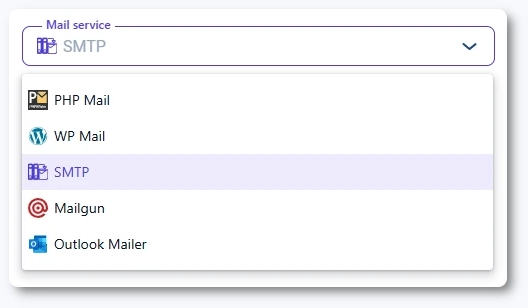
SMTP lets you send Amelia notifications using a fully authenticated mail server. This method provides stronger deliverability and fewer spam issues compared to PHP Mail or WP Mail.

SMTP selected as the mail service in Amelia email settings

What is SMTP and why should I use it?

SMTP (Simple Mail Transfer Protocol) allows Amelia to send authenticated emails through a trusted mail provider. It is considered the most reliable method for transactional emails such as bookings, cancellations, and reminders.

Using SMTP helps prevent:

  • Emails going to spam
  • Delayed deliveries
  • Missing authentication headers
  • Rejected messages from stricter providers
Info Example

If you want the highest reliability for customer notifications, SMTP is usually the best option.

Which SMTP fields do I need to configure?

When you select SMTP as the mail service, the following fields appear:

  • SMTP Host
  • SMTP Port
  • SMTP Secure (SSL or TLS)
  • SMTP Username
  • SMTP Password

Your provider must give you the correct values for these settings.

SMTP configuration fields in Amelia including host, port, secure type, username, and password

Which SMTP ports should I use?

The most commonly used ports are:

  • 465 for SSL
  • 587 for TLS

Your provider may require a different port; always confirm their recommended settings.

How do I configure SMTP for Gmail accounts?

When using a Gmail address as your SMTP provider, the recommended settings are:

  • SMTP Host: smtp.gmail.com
  • SMTP Port: 587
  • SMTP Secure: TLS
  • SMTP Username: your Gmail address
  • SMTP Password: your App Password
Alert Please note
  • Google no longer allows standard password-based SMTP login. You must create an App Password and have 2-Step Verification enabled.
  • As of March 2025, Google recommends switching to OAuth for third-party apps, but SMTP with App Passwords still works and is supported.

Can I configure SMTP for Microsoft accounts?

SMTP is no longer supported for Outlook, Hotmail, Live, and Office365 accounts. Microsoft has discontinued App Passwords for SMTP authentication, which means these email services cannot be used with SMTP inside Amelia.

Alert Please note

If you are using a Microsoft or Outlook email address, you must switch to the Outlook Mailer option instead of SMTP. This method uses Microsoft’s secure authentication flow and is the only supported way to send emails from Amelia with an Outlook-based account.

Can I use SMTP with other email providers?

Yes. Any service that supports SMTP for outgoing email will work with Amelia. This includes:

  • Zoho Mail
  • SendGrid
  • Amazon SES
  • Your web hosting provider
  • cPanel and Plesk email accounts

Just enter the SMTP details provided by your mail service.

Why won’t my SMTP connection work?

If SMTP fails to connect, the most common causes are:

  • Wrong host or port
  • Incorrect secure method (SSL vs TLS)
  • Provider rejecting password-based login
  • Missing App Password (Gmail or Microsoft)
  • Hosting firewall blocking outbound SMTP ports
Alert Please note

Ports 465 and 587 are frequently blocked on shared hosting. Contact your host if Amelia cannot connect even with correct settings.