Limited time discount Book Smarter This Christmas
Up to 50%Off

How can pricing by duration be used

The pricing by duration option allows you to offer a single service with multiple durations that customers can choose from. You can define different prices for each duration and configure different prices for those durations per employee.

How do I configure pricing by duration?

Info Note

Pricing by duration is a part of the Custom pricing feature and it is available in the Standard, Pro, and Elite license plans.
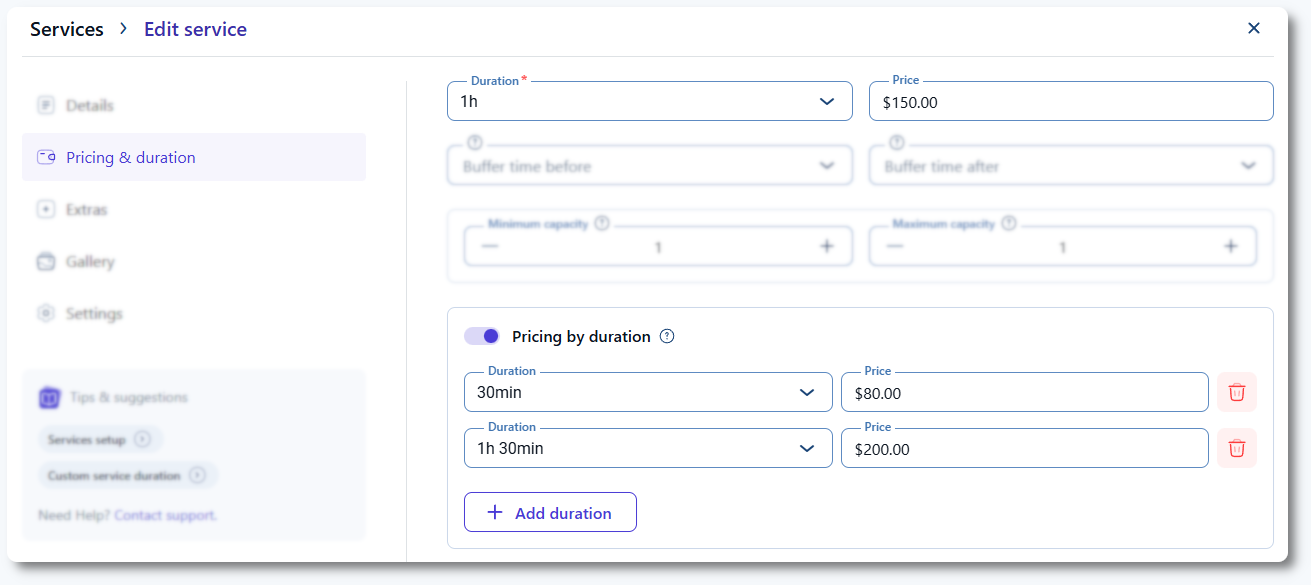
When creating a new service or editing an existing one, open the Pricing & duration tab in the left menu of the service. First, define the default duration and price of the service, then scroll down and enable the Pricing by duration slider. Once enabled, you can configure custom durations and add custom prices for each of them. Like all time periods in Amelia (service duration, employee work hours, breaks, buffer times), the available duration options depend on the Default Time Slot step configured in General Settings.

It the example below, the Default Time Slot step is set to 30 minutes.

Service pricing tab in Amelia showing multiple durations configured

How can I configure different prices for custom durations per employee?

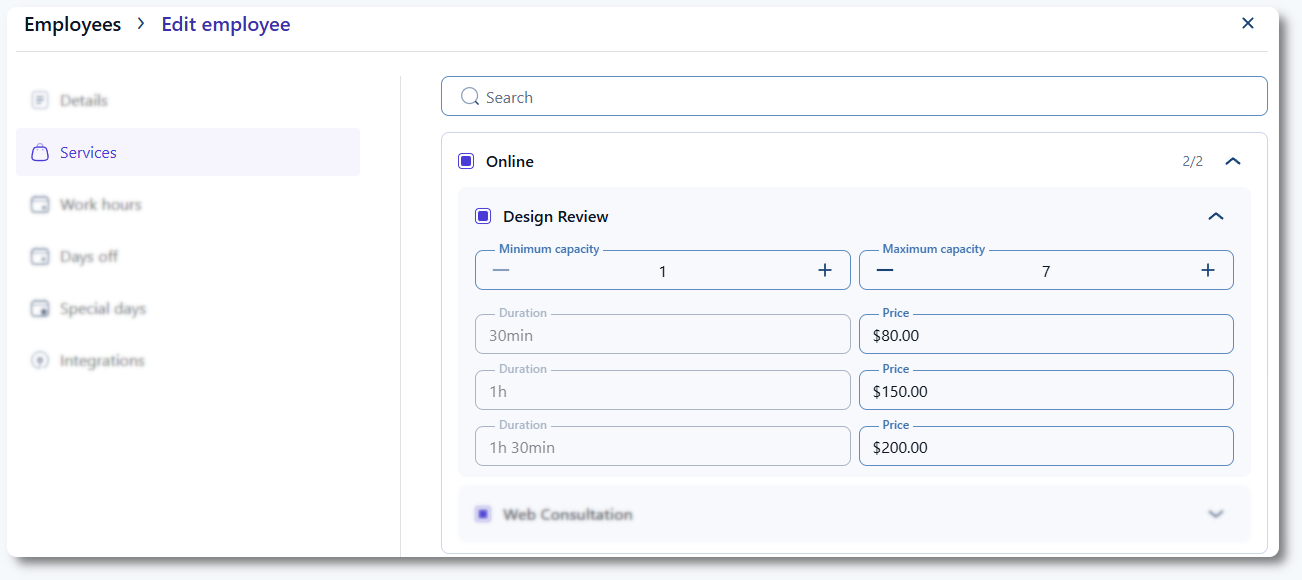
You can edit each employee individually and assign different prices for each duration. In the Services tab of the employee profile, expand the category and select the service that includes multiple durations. You can change the price for each duration, but the durations themselves cannot be edited from the employee profile.

Employee profile showing editable custom duration prices
Alert Please note

Make sure your employee’s Work Hours are long enough to fit all Custom Duration periods plus any applicable Buffer Times.

Example #1: If one of the Custom Duration periods lasts 3 hours and the employee works from 09:00 to 11:00, the employee will not be able to offer the 3-hour appointment.

Example #2: If the service lasts 2 hours and has a 1-hour buffer time, and the employee works from 09:00 to 11:00, the total required time is 3 hours, so the employee cannot offer this appointment.

The solution is to extend the employee’s Work hours.
How does booking look on the front end with pricing by duration enabled?

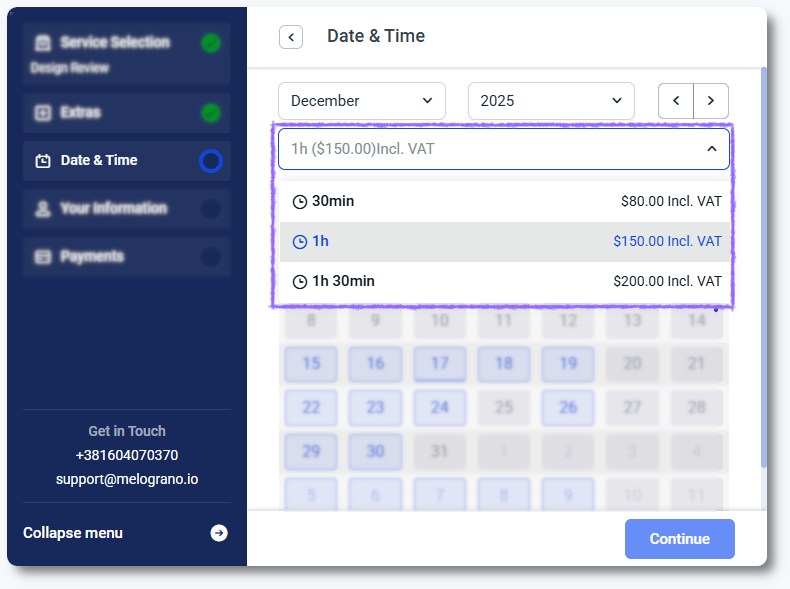
Custom duration is supported in both the Step-by-step and Catalog booking forms. Add the desired form to the front-end page using a shortcode or a builder (Elementor, Divi, Gutenberg). There are no additional settings for Pricing by duration. If a service has multiple durations configured, they appear above the calendar in a dropdown menu. Customers must select the desired duration to view available time slots.

Amelia's Step-by-step booking form showing duration selection dropdown

Available time slots depend on employee availability, their work hours, and other booked appointments. For example, if the default duration of a service is 1 hour and there is a 1-hour appointment at 12:00, the customer cannot book a 2-hour custom duration at 11:00. Amelia displays only the time slots that can accommodate the selected duration.

Info Note

Group appointments can be used with different duration periods of a single service.

Example:
Default Duration: 1 hour
Custom Duration: 2 hours
Maximum Capacity: 3 people

If the first customer books the 2-hour appointment at 10:00, upcoming customers will not see the 11:00 slot because customers cannot join mid-appointment. However, they can still book the 1-hour duration at 10:00. This allows group appointments where some customers book shorter durations and others book longer durations, as long as all appointments start at the same time.
Can I book different durations in the back end?

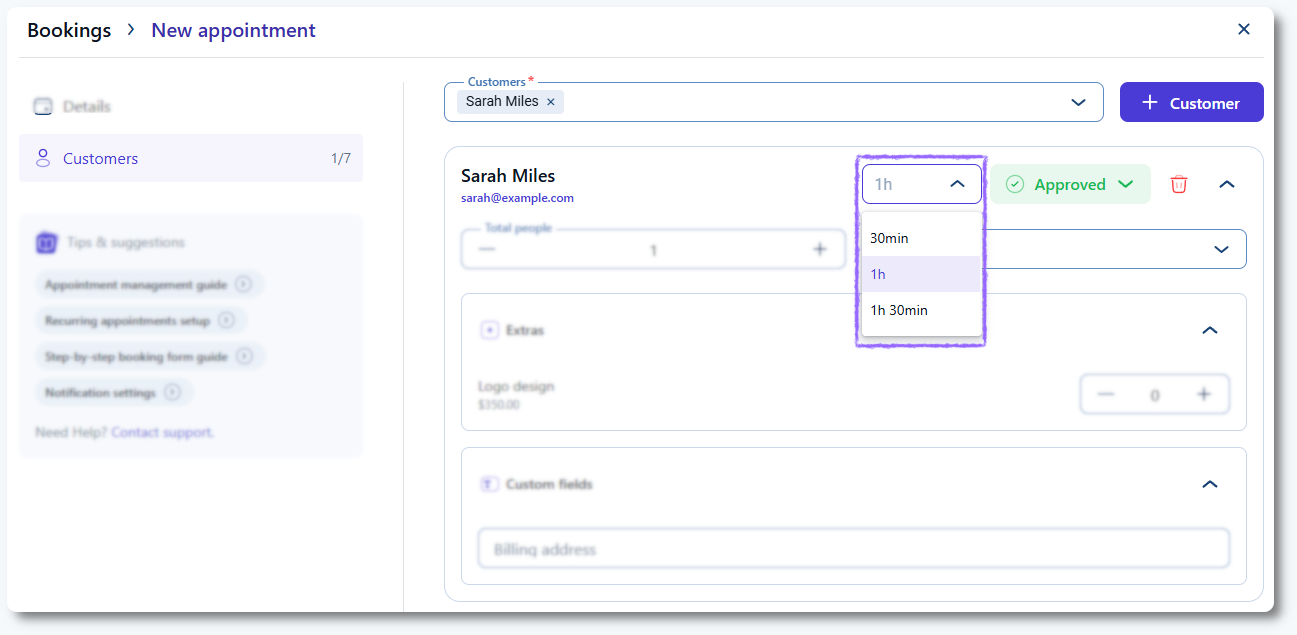
Yes. When creating a new appointment through Bookings → Appointment → + Book appointment, select the service, employee, date, and time, then switch to the Customers tab. After selecting a customer, you can choose the appointment duration from the dropdown menu next to the booking status.

Back end appointment creation in Amelia showing duration dropdown

What should I keep in mind when using pricing by duration?

  • Once this option is enabled, other custom pricing methods cannot be used for the same service.
  • Booking shorter durations first prevents longer durations from being booked at the same time.
  • Booking a longer duration first allows other customers to book a shorter duration of the same appointment, as long as all appointments start at the same time.
  • If the employee has another appointment immediately after the selected time slot, longer durations will not be available because appointments cannot overlap.