How do I configure Outlook Calendar integration settings in Amelia
After creating Azure credentials and saving the Client ID and Client Secret, the Outlook Calendar integration must be configured inside Amelia.
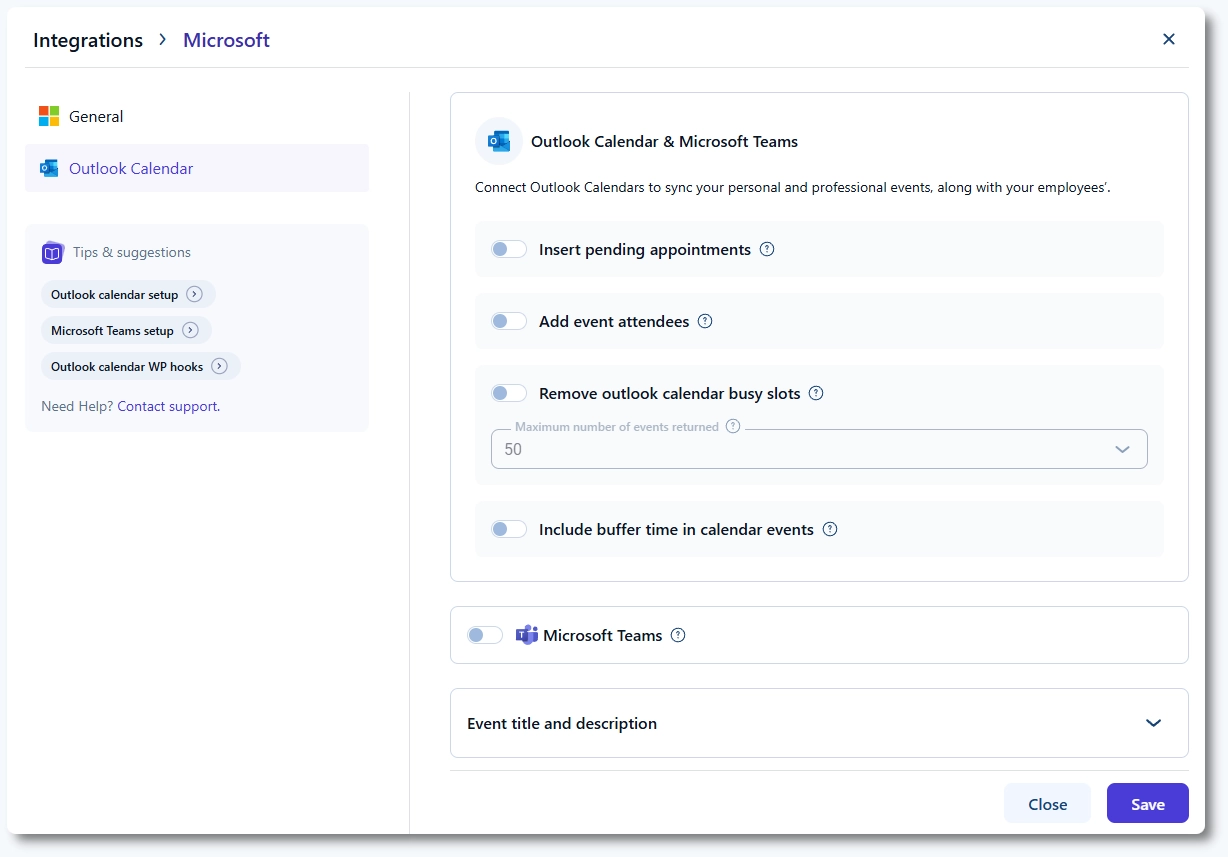
All Outlook Calendar settings are managed from the Outlook Calendar tab after enabling the integration in Features & Integrations → Integrations and clicking Set up.
These settings control how appointments and events created in Amelia are synced with Outlook Calendar. They do not affect Microsoft Teams configuration directly.
Where do I find Outlook Calendar settings?
Open Amelia and navigate to Features & Integrations → Integrations. Enable Outlook Calendar & Microsoft Teams, click Set up, and open the Outlook Calendar tab.
How do Event Title and Event Description work?
The Event Title and Event Description fields define how appointments appear in employees’ Outlook calendars.
Both fields support placeholders from Amelia notifications. To use placeholders, open Notifications and click </> Show Email Placeholders, then copy and paste the desired placeholders into these fields.
Should pending appointments be added to Outlook Calendar?
When Insert pending appointments is enabled, appointments with the Pending status are added to the employee’s Outlook calendar.
If this option is disabled, only Approved appointments are synced to Outlook Calendar.
Can customers be added as Outlook event attendees?
Enable Add event attendees if you want customers to be added as attendees to Outlook events.
This places the event directly on the customer’s calendar. Customers will not be able to see other attendees of the same appointment in Outlook.
How do Outlook busy events affect availability in Amelia?
When Remove Outlook Calendar busy slots is enabled, time slots marked as Busy in employees’ Outlook calendars are removed from availability in Amelia.
This prevents new bookings from being scheduled during those times.
Should buffer time be included in Outlook events?
The Include buffer time in calendar events option controls whether service buffer times are added to Outlook events.
When enabled, buffer times are included together with the appointment in Outlook Calendar, preventing employees from scheduling overlapping events during buffer periods.
What does Maximum number of events returned mean?
The Maximum number of events returned option defines how many events are fetched from an employee’s Outlook calendar into Amelia.
These events are not visible in Amelia, but they are used to calculate unavailable time slots when availability is determined.
Are these settings used for Amelia Events as well?
These settings apply to both appointments and events in Amelia.
For events to be synced with Outlook Calendar, an Organizer must be assigned when creating the event, and that employee must be connected to their Outlook account.
