Limited time discount Book Smarter This Christmas
Up to 50%Off

How to get help and support for Amelia

If you ever need assistance with Amelia, there are several ways to reach us depending on your question, your license, and where you are in the onboarding or purchase process. This guide explains where to find help, how to contact our support team, and what you can expect when you reach out.

Where can I find documentation for Amelia?

Our official documentation covers all features, settings, and workflows in the plugin. For understanding Amelia, this is the top resource.

We also maintain a knowledge base at help.wpamelia.com, where you’ll find frequent questions, troubleshooting steps, and resolutions for common issues.

One feeds into the other: updated docs that stretch from simple install steps to deeper settings tweaks.

Where do paying customers get technical support?

If you already have an active Amelia license, all technical support is provided exclusively through your store account.

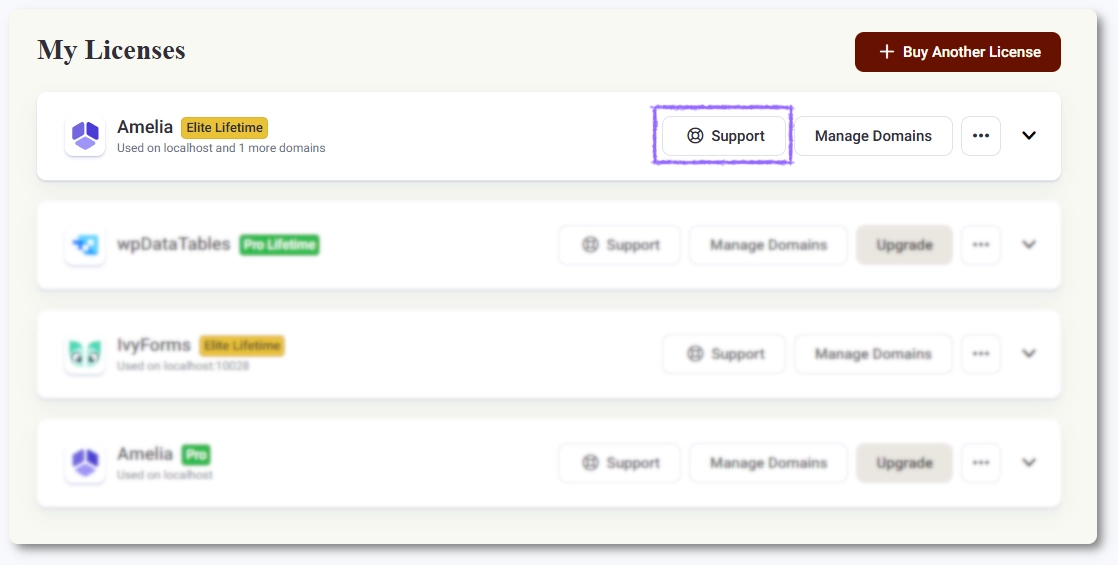
You can access it by logging into the Melograno store and clicking the Contact Support button on your license card. This is where we handle:

  • Technical questions
  • Bug reports
  • Configuration help
  • Plugin-related troubleshooting

Support is not live chat and is not available 24/7. All requests are answered during business hours, in the order they are received.

If your license is expired, some support options may be limited.

The Contact Support button shown on a license card in Melograno store

What questions can we help with if I don’t have an active license?

If you don’t currently have an active Amelia license, our team can still help you with general questions through the support widget available on our website. This type of support is intended to help you understand the product, explore its features, and make an informed purchase decision.

Pre-purchase and general questions

If you are not a customer yet, you can reach us through the support widget available on our pricing page, documentation, and demo pages.

We can help with:

  • Explaining what Amelia does
  • How features work
  • Which plan includes which options
  • General usage questions based on the documentation

Technical troubleshooting and configuration support are not provided before purchase.

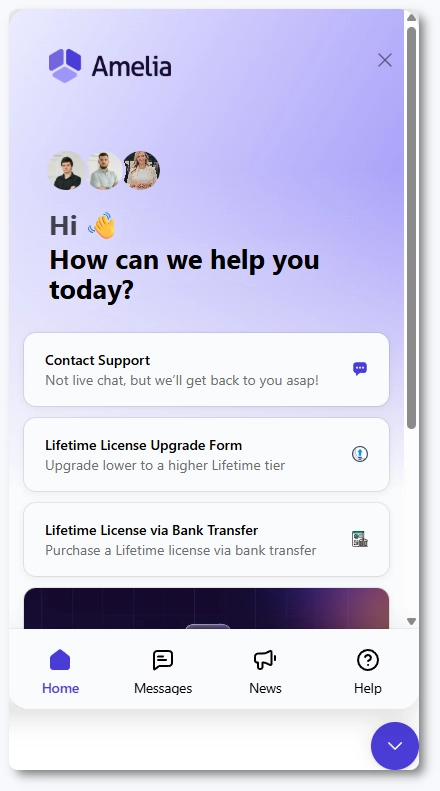
Amelia support widget showing the landing screen with Contact Support button

How does the support widget work?

When you open the widget and click on Contact Support, your first interaction is with our bot. We strongly recommend using it before requesting an agent; the bot is trained by our support team, searches our entire website and documentation, and can often resolve questions faster than waiting for a human reply. After a few replies, you will see an option to contact support if you still need help.

You can type “human assistance” to skip directly to an agent, but please keep in mind that we do not offer live chat or 24/7 coverage. Once the conversation is assigned to the support team, you cannot return to the bot unless you start a new chat.

Each chat also detects where you contacted us from, whether you are logged in, and the status of your license. Depending on that, the widget may ask for details such as your name, email, or remote access credentials.

Remote access helps us troubleshoot your setup more efficiently; we only work inside Amelia and never interfere with any other areas of your site. We never share credentials with any third party.

What questions are not supported?

We generally do not provide:

  • custom code
  • setup assistance for third-party plugins or services
  • support for tools that integrate with Amelia but require configuration outside of Amelia

We can still help with simple CSS or JavaScript tweaks, and we provide full support for integrations that have settings inside Amelia.

When should I use the Contact Us form?

The Contact Us form is primarily intended for collaboration requests, partnership inquiries, or cases where paying customers cannot access their store account. While the form can be used for support, we recommend contacting us through the support widget whenever possible so your question is routed to the right team member automatically.

How can I make sure I get a faster response?

There are a few simple ways to avoid delays:

  • Submit one ticket per topic. Creating several chats for the same issue slows down resolution for you and others.
  • Avoid “bumping” the conversation. Each new message resets the waiting timer in the system, which pushes your chat to the end of the queue.
  • Provide access details when prompted. Many issues require us to check your configuration directly, and filling this in early helps speed up the process.

We are working with the platform provider to prevent the “bump resets timer” behavior, but it is not yet possible on their end.

When will I receive a reply?

Even though the support widget functions as instant messaging, we don’t provide live support. You will always be asked to provide your email address so you can receive our replies even if you close the page or are offline. If you are still on the site when we respond, you will also see the reply directly in the widget.

We are available Monday to Friday, 08:00 to 17:00 CET, and we do not offer support on weekends. Once your message is sent, our team will reply as soon as possible during business hours.

Info Note
  • Please double-check the email address you enter in the support widget so you don’t miss our reply.
  • If you’re still on the site when our team replies, the message will appear directly in the widget. In that case, an email will not be sent, so always check the widget first.