Limited time discount Book Smarter This Christmas
Up to 50%Off

How to set up Facebook social login in Amelia

Facebook social login lets customers and employees sign in with their Facebook accounts, simplifying access to Amelia’s panels and enabling autofill during the booking process. Once the integration is enabled and connected with your Meta app, Amelia can authenticate users based on verified Facebook profile data.

Info Note

Facebook social login is available in the Standard, Pro, and Elite license plans.
How do I enable Facebook social login in Amelia?

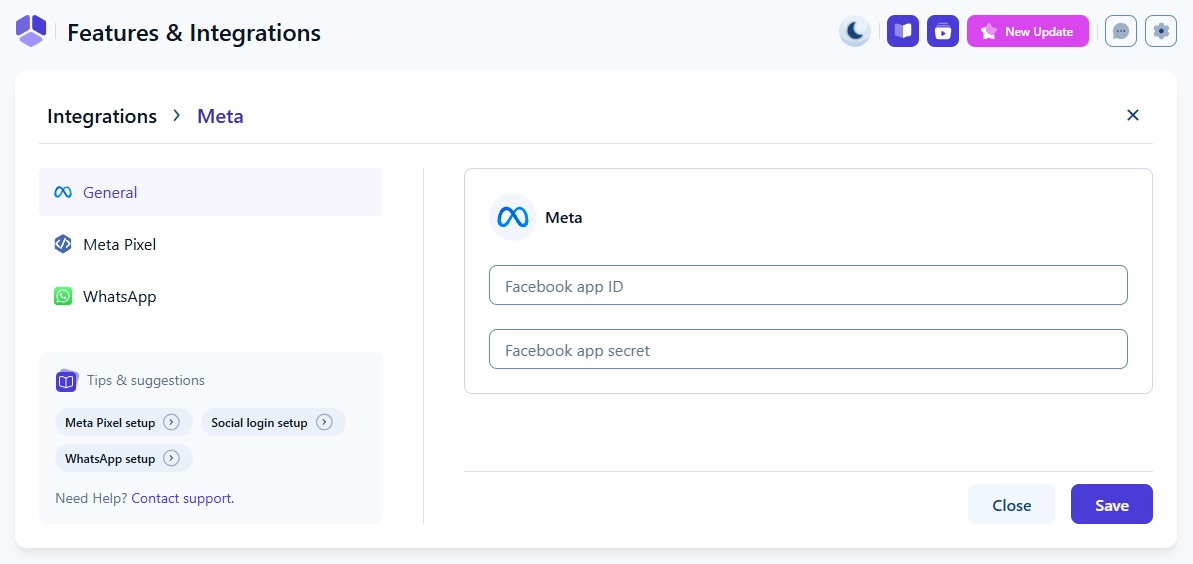
Open Features & integrations → Integrations and enable the Facebook social login feature. Click Set up to open Amelia’s Meta settings page, where you will add the App ID and App secret from your Meta Developer account.

Facebook Login supports panel login for both customers and employees, and it also supports autofill during booking for faster form completion.

Facebook social login settings in Amelia

How do I create a Meta Developer account?

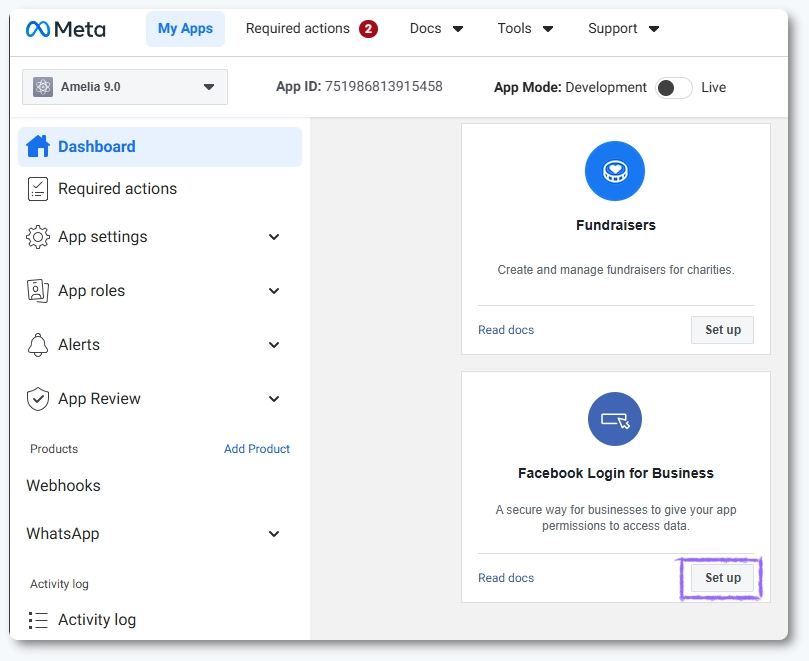
To start the integration, you need a verified Meta Developer account. Visit the Meta for Developers and sign in or create an account. After logging in, you’ll land on the Dashboard screen. Scroll down and click Set up in the Facebook Login for Business card.

Facebook Login app selection in Meta Developer Dashboard

How do I configure OAuth settings for Facebook Login?

On the next screen, scroll down to the Client OAuth settings section.

Enable Client OAuth Login and Web OAuth Login to allow the authentication flow.

Add your website URL in Valid OAuth Redirect URIs so the login process can complete, and enter your domain in Allowed Domains for JavaScript SDK to prevent browser security issues during login.

Facebook Login OAuth configuration fields in Meta Developer Dashboard

Which permissions do I need to request for Facebook Login?

Access App Review → Permissions and Features and search for “email” and “public_profile” in the search field.

Click the Request advanced access on the far right for each permission separately.

These allow Amelia to retrieve the user’s basic profile information so the login and booking autofill can function correctly. Permissions need to be approved before your integration can go live.

Email and public profile permissions in Meta Developer Dashboard

Do I need to verify my Meta business account?

Meta requires business verification for apps that request key login permissions. Follow the verification steps in the Meta Dashboard and upload the requested documentation. Completing this step ensures your Facebook Login integration passes the approval review and can be used in production.

After configuring OAuth settings and requesting the necessary permissions, submit your app for review through the Meta Dashboard. Meta will evaluate your app and confirm that your data usage and authentication settings follow their policies. Approval is required before the app can be used in a live booking environment.

How do I connect my Facebook app to Amelia?

Once your app is approved, go to App → Settings → Basic in your Meta Dashboard and copy your App ID and App secret. Paste both into Features & integrations → Integrations → Facebook social login → Set up in Amelia, then click Save. This completes the connection and enables Facebook Login across customer and employee panels.

Where will users see the Facebook login option?

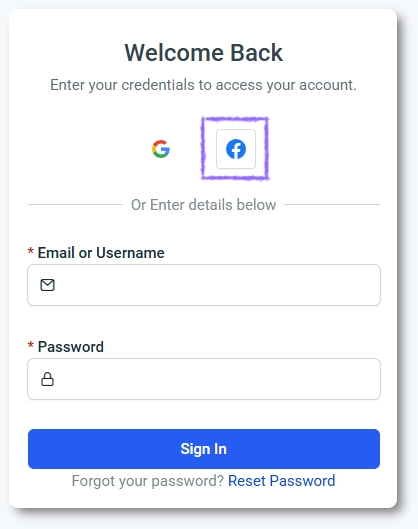
Facebook Login appears in the customer and employee panel login screens. If enabled, it also works during booking to autofill customer information pulled from the Facebook account. The buttons follow Facebook branding guidelines and match the rest of Amelia’s interface.

Facebook Login button on the Amelia login screen

What should I keep in mind when setting up Facebook social login?

  • Your Meta Developer account must be verified before the app can go live.
  • Client OAuth Login and Web OAuth Login must be enabled for authentication to work.
  • Valid OAuth Redirect URIs and Allowed Domains for JavaScript SDK must match your website exactly.
  • Email and public_profile permissions are required for login and autofill features.
  • Only users whose Facebook email matches an existing Amelia profile will be able to access the panels.