How to use the API feature in Amelia
Amelia’s API feature allows external systems to communicate with your Amelia installation through secure, structured requests. This enables developers to build custom integrations, synchronize data, automate workflows, and extend Amelia beyond its standard interface. The API tools available in this section focus on enabling access, generating secure keys, and providing the base URL needed for development.
The API feature is included in the Elite license only. API usage requires coding knowledge and is not covered by regular support.
Where do I enable the API feature?
You can enable the API feature in Features & Integrations under the Features section.
Once enabled, a Set up button appears, which opens the configuration screen where you can generate and manage API keys.
What information is shown in the API setup screen?
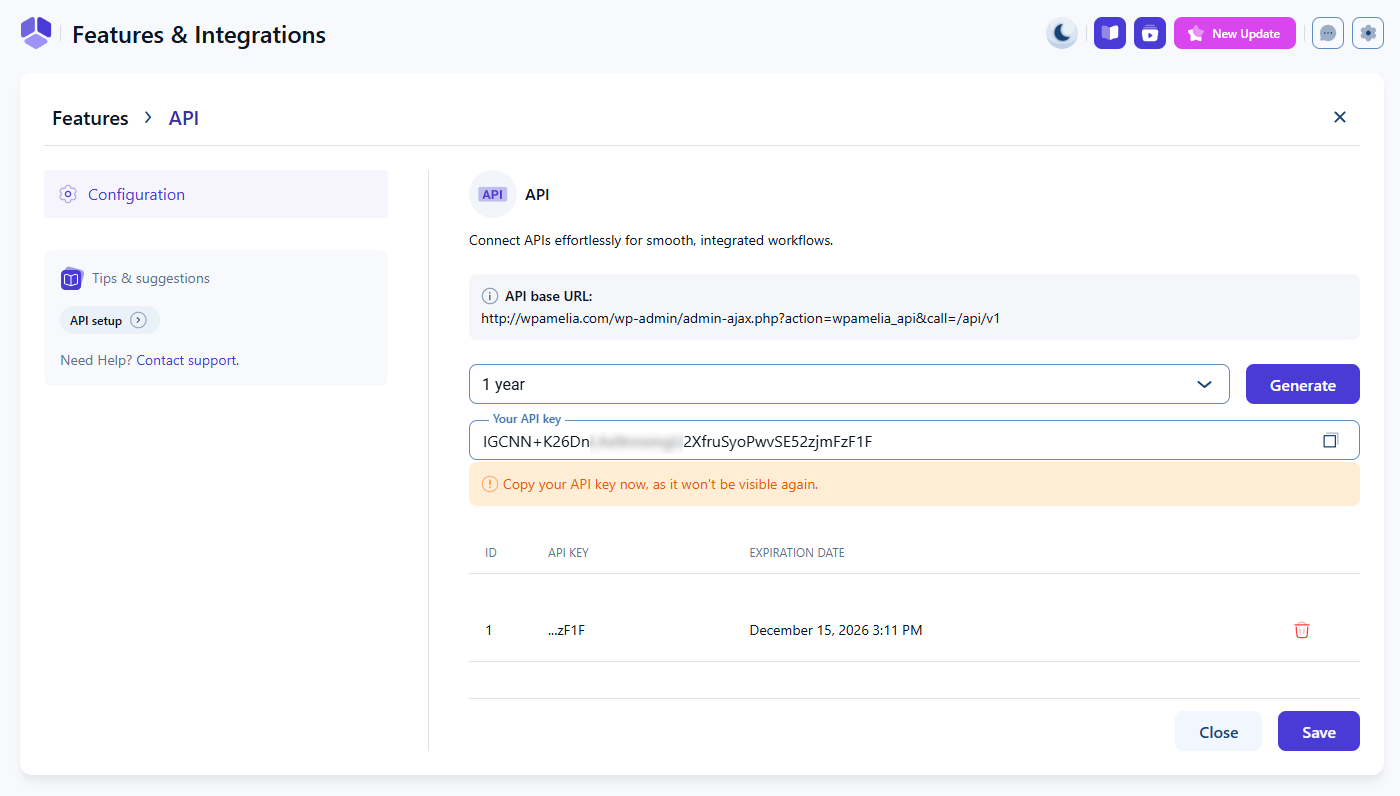
The setup screen provides everything needed to authenticate and connect external applications:
- API base URL – the endpoint root used by all API calls. External systems must use this address to interact with Amelia.
- Expiration period – defines how long a generated API key remains valid. Options include 1 year, 2 years, 3 years, and Unlimited.
- Generate button – creates a new API key using the selected expiration period.
- Your API key field – displays the newly created key once. After the key is saved, it is hidden for security purposes.
- API key list – shows all previously created keys along with their expiration dates and delete actions.
All API keys are managed exclusively from this page.
The API key is shown only once when generated. Copy it immediately before clicking Save, because it will not be visible again.
How do API keys work?
API keys authorize access to Amelia endpoints and must be included in every request. All endpoints use header-based authorization with a header named Amelia, which carries the API key value.
Keys can be generated with limited or unlimited validity, allowing you to control access duration for improved security. Shorter expiration periods are recommended unless permanent access is required.
What is the Amelia API path?
All Amelia API requests begin with the base structure:
{{your_site_URL}}/wp-admin/admin-ajax.php?action=wpamelia_api&call=/api/v1
Developers will append additional endpoints to this base URL depending on the type of data or action they wish to access.
Where can I find the list of supported endpoints?
The full list of available API endpoints, including example requests and responses, is provided in the downloadable Postman collection.
The collection includes examples for:
- Payments
- Appointments
- Bookings
- Entities
- Search
- Timeslots
- Coupons
It is designed to give developers a complete reference for every supported request type.
If you do not already have the Postman application, you can create a free account and download it for Windows, macOS, or Linux.
Where can I learn more about using the Amelia API?
For detailed technical instructions, endpoint usage, authentication examples, and sample integrations, refer to the For developers documentation category. This section covers all API capabilities in depth.
