



How do package bookings work in Amelia
Package bookings are created when a customer purchases a package that includes multiple services or multiple sessions of a service. Each package booking tracks usage, expiration, status, and the appointments created within the package. You can manage these bookings in Amelia → Bookings → Packages.
What does the package bookings list show?
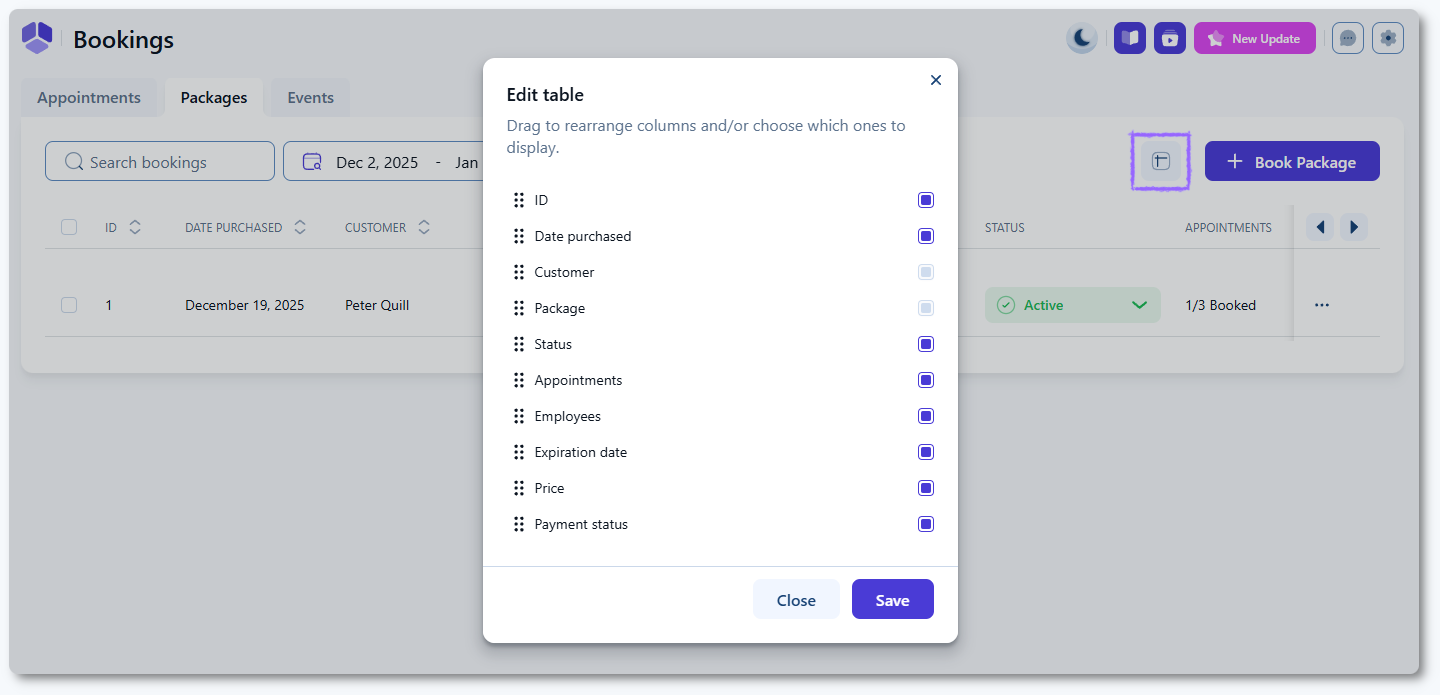
Open Amelia → Bookings and switch to the Packages tab. The table displays the details you configure through the Edit table button. Available columns include:
- ID
- Date purchased
- Customer (cannot be hidden)
- Package (cannot be hidden)
- Status
- Appointments (for example 1/3)
- Employees
- Expiration date
- Price
- Payment status
Use the Edit table button in the top right corner to reorder or hide columns. Customer and Package cannot be disabled.
What actions are available for package bookings?
The three-dots menu on each package booking includes two options:
- Book appointment → creates a new appointment within the package.
- Delete booking → permanently deletes the package booking.
A + Book package button is available at the top of the page for creating new package purchases manually.
What details appear in the package booking popup?
Clicking any booking opens the Package booking details popup on the right. This panel shows:
- Customer details
- Purchased package
- Expiration date
- Booking status
- List of booked appointments within the package
You will also see a + Book button, which lets you schedule an appointment for this package.

How do I book an appointment inside a package?
Click + Book inside the package details popup. This opens the New appointment screen with the customer preselected. Only the services and employees included in the purchased package are available.
Select the date and the time and click Book to complete the appointment booking. The package usage counter updates automatically.
How do package booking statuses work?
Package bookings can be set to the following statuses:
- Active → the package can be used normally.
- Canceled → the package is canceled and cannot be used for new bookings.
- Expired → the expiration date has passed or you set it manually.
Appointments inside the package can have their own statuses, independent of the package status. These include Approved, Pending, Canceled, Rejected, and No-show.
What should I keep in mind when managing package bookings?
- Only services included in the package can be booked through the + Book button.
- The expiration date limits how long customers can use remaining sessions.
- Deleting a package booking removes all package usage records.
- Appointment status changes inside the package work the same as regular appointment statuses.
- Package status does not retroactively change the statuses of individual appointments.