

Limited time discount Book Smarter This Christmas
Up to 50%Off

How to use employee badges in Amelia

Employee badges let you highlight specific employees by assigning a custom label to their profile. Badges can represent skills, specialties, experience levels, or internal distinctions, helping customers quickly identify employees who match their needs during booking.

Info Note

The Employee badges feature is included in the Starter, Pro, and Elite licenses.

Where do I enable employee badges?

Enable the Employee badges feature in Features & Integrations under the Features section.

Once enabled, a Set up button appears, which opens the badge management screen where you can create and edit badges.

How do I create and manage badges?

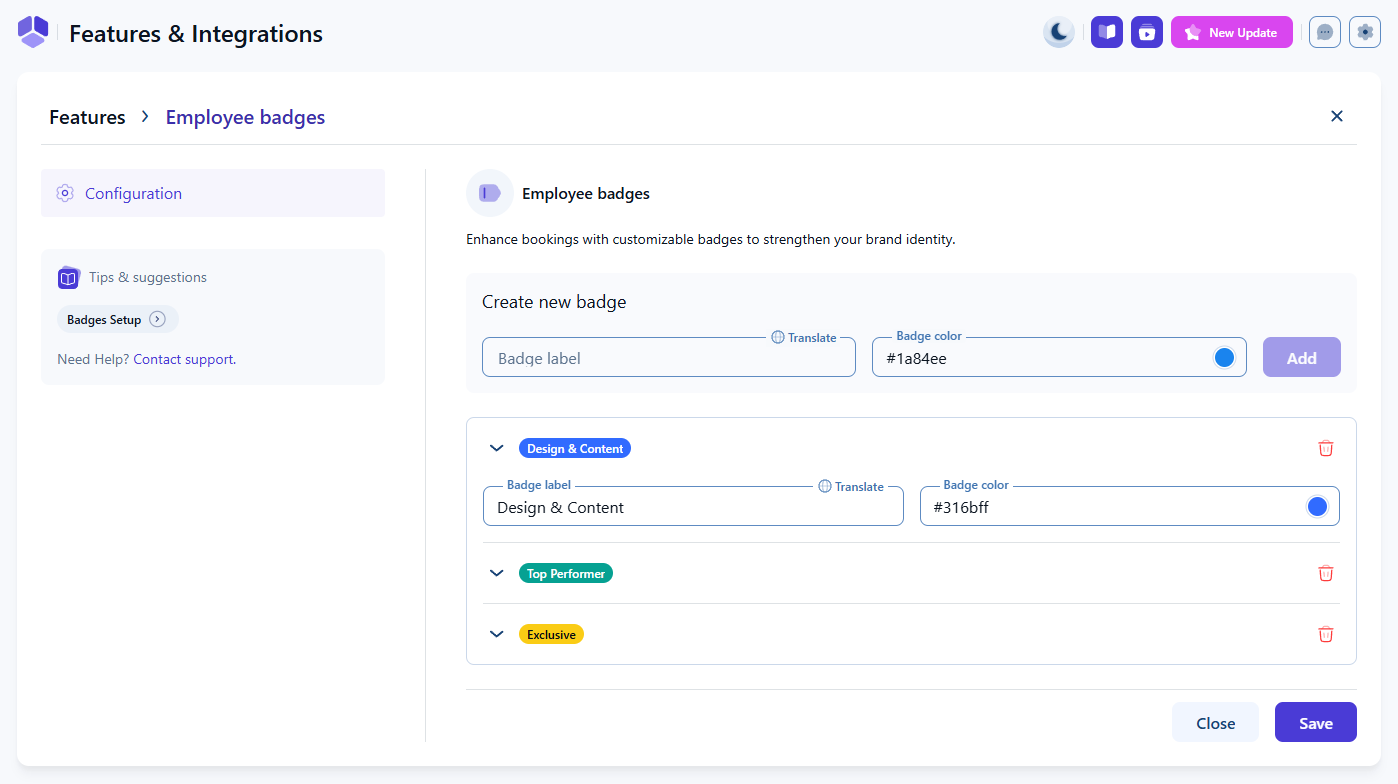
In the Set up screen, you can create new badges or edit existing ones. Each badge includes:

  • Badge label – the text shown to customers.
  • Badge color – the color assigned to the badge.

To create a badge, define the label and color, then click Add.

Existing badges can be expanded for editing or deleted entirely. All changes are saved globally and become available for all employees.

Badge creation and customization options in Amelia’s badge setup screen

How do I assign badges to employees?

Open Employees in the Amelia back end and select an employee.

In the employee profile, use the Badges dropdown to assign one or more badges.

You can also click Manage badges from this dropdown to open the same setup screen used in Features & Integrations.

Employee profile showing the badge selection dropdown in Amelia
Alert Please note

Only Admins and Managers can create, edit, or delete badges. Employees cannot manage badges from the Employee Panel.

Where do badges appear for customers?

Badges are shown anywhere the customer sees employee cards or employee selection options. This includes appointment booking forms:

  • Catalog booking form
  • Step-by-step booking form when employee selection is enabled

Badges help customers quickly understand employee specialties or availability highlights, improving the selection process.

Employee cards in Amelia’s Catalog booking form popup showing assigned badges

Why use employee badges?

  • Highlight skills or specialties – Ideal for employees with unique training or expertise.
  • Guide customer choices – Helps customers pick the right employee when multiple options are available.
  • Increase visibility – Employees with badges stand out in the booking form.
  • Support internal recognition – Badges can reflect performance distinctions set by your business.

Badges offer a simple way to communicate employee strengths and improve the overall booking experience.