


How to configure deposit payments for events in Amelia
Deposit payments for events let you secure attendee commitments by collecting part of the event price upfront. This is especially useful for workshops, classes, and group activities where early confirmation helps you manage attendance and minimize last-minute cancellations. Events follow the same general deposit logic as services but apply it per attendee and through the event’s pricing structure.
The Deposit payment is available in the Standard, Pro and Elite license plans.
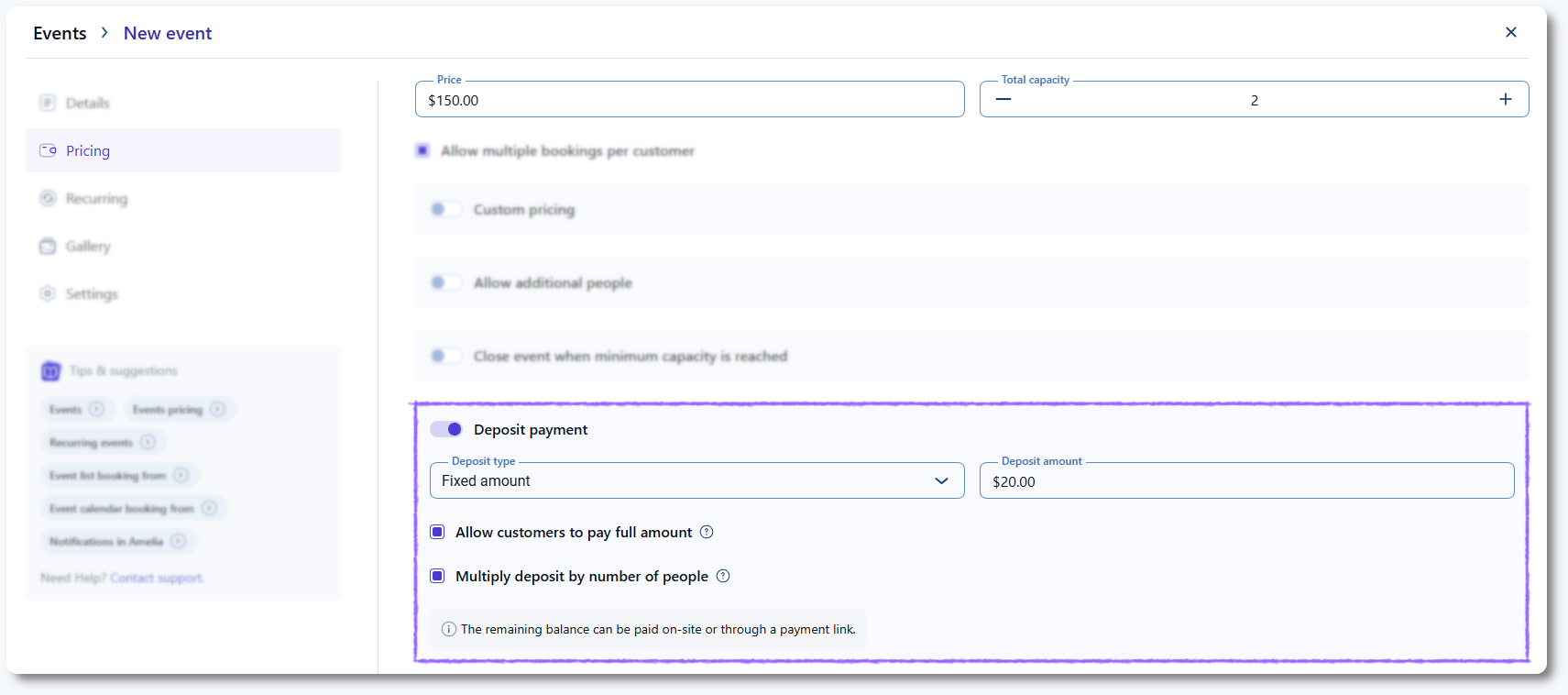
Where do I enable deposit payments for an event?
To begin, make sure the Deposit payment feature is enabled in Features & Integrations.
Then open Events, create a new event or edit an existing one, and switch to the Pricing tab.
Here you will find the Deposit payment toggle along with the options for defining the deposit type and amount.
Which deposit types can be used for events?
Events support two deposit types:
- Fixed amount – A set upfront payment collected for each attendee.
- Percentage – A percentage of the total price that adjusts based on the event’s defined price.
Both deposit types apply per attendee, which means the deposit amount increases automatically as more attendees are added.
How are event deposits calculated?
A percentage deposit automatically adjusts to the total price defined in the event’s pricing settings.
A fixed deposit remains the same per attendee regardless of price adjustments in the event.
If an event has a capacity greater than 1, the Multiply deposit by number of people option becomes available when using a fixed deposit. This ensures the total deposit reflects the number of attendees being booked.
Percentage deposits always include all pricing adjustments and apply per attendee. Fixed deposits only multiply when the event capacity allows it and the multiply option is enabled.
Can attendees choose to pay the full amount instead of the deposit?
Yes. By enabling Allow customers to pay full amount, attendees can choose whether to pay only the deposit or settle the full event price during booking.
If this option is disabled, attendees will always be required to pay only the deposit upfront.
How are deposits shown to attendees during the booking process?
The front end event booking form clearly displays the event price, the required deposit amount, and the remaining balance for each attendee.
If multiple attendees are booked at once, the system calculates the total deposit by multiplying the per-attendee deposit accordingly.
This ensures attendees know exactly what they will pay immediately, as well as what remains to be paid at the event.
What should I keep in mind when using deposits for events?
- Deposits appear only when an online payment method is enabled.
- Fixed deposits apply per attendee and can multiply based on capacity.
- Percentage deposits reflect the event price and always calculate per attendee automatically.
- Attendees clearly see both the deposit and remaining balance before completing the booking.
- The remaining balance must be collected on-site or via a payment link.