


How deposit payments work in Amelia
Deposit payments allow you to collect a portion of the booking price upfront while the remaining balance is paid later on-site or through a payment link. This helps reduce no-shows and cancellations, and provides a more secure and predictable payment structure for your business. Deposits can be used with appointments, events, and packages, and their behavior varies slightly depending on the type of booking.
The Deposit payment feature is available in the Standard, Pro and Elite license plans.
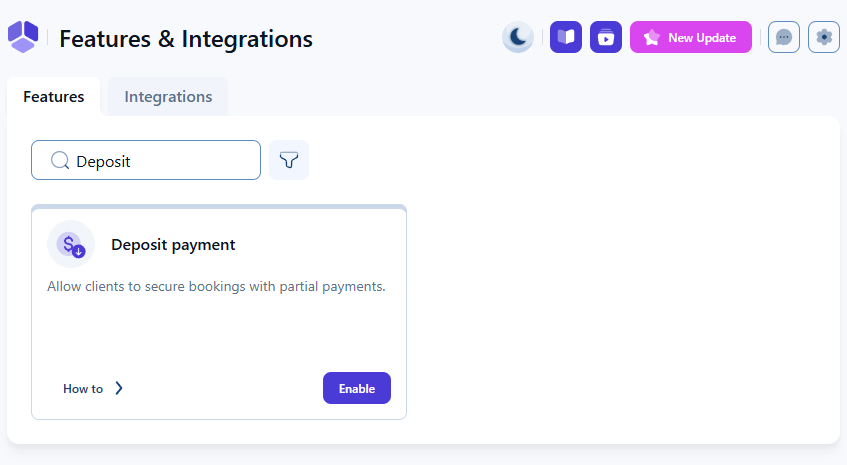
Where do I enable deposit payments?
You can enable deposit payments in Features & integrations under the Features section. Activating the feature makes deposit options available on individual services, events, and packages, where you can configure the specific deposit type and amount.
Enabling the feature does not automatically apply deposits to all bookings. You must configure deposit settings separately for each service, event, or package where you want deposits to be used.
What does the deposit payment feature do?
The deposit feature allows you to collect a fixed amount or a percentage of the booking price during the booking process. Customers pay the deposit upfront, and the remaining balance is due on-site or via a payment link.
Percentage deposits are calculated on the total booking cost, which includes extras and additional people, while fixed deposits include an option to multiply the deposit amount by the number of people.
Deposit amounts are clearly displayed in the front-end booking form so customers can understand what they are paying immediately and what will remain to be paid later.
Deposit payments appear only when at least one online payment method is enabled. If you use on-site payment only, deposit options will not be shown during booking.
Which parts of Amelia support deposit payments?
- Services – You can define fixed or percentage deposits per service, choose whether deposits multiply per person, and allow customers to pay the full amount instead of just the deposit.
- Events – Deposit payments can be configured on the event’s Pricing tab with the same logic as services, including deposit type and amount, and per-person multiplication if capacity is greater than 1.
- Packages – Packages support fixed and percentage deposits, but do not include a “multiply by number of people” option because packages cannot be booked for multiple people.
For detailed setup steps, refer to the corresponding documentation pages for services, events, and packages.
Where can I review and update deposit payments?
Deposit transactions are managed on the Finance page. When a deposit is used, the payment receives a Partially paid status until the remainder of the balance is collected.
Once the customer pays the remaining amount on-site, you can update the payment manually by opening the payment’s Details modal, clicking the edit icon, adjusting the amount and status, and saving the changes. The payment will then be marked as Paid.
Deposits cannot be refunded as a single combined payment when multiple bookings are purchased together. Each appointment or event must be refunded individually.
What should I keep in mind when using deposit payments?
- Deposit type matters – Percentage deposits include extras and additional people; fixed deposits do not unless multiplied by number of people.
- Employee price differences – If employees have different prices, percentage deposits automatically account for the variation.
- Recurring appointments – Deposits for recurring bookings depend on the “Handle recurring appointment payments” setting.
- Packages – Deposits behave similarly to services, but cannot be multiplied by number of people.
- Events – Deposit logic follows services and applies on a per-attendee basis when capacity allows.
- Front-end clarity – Customers always see the deposit amount and remaining balance in the booking summary before completing payment.