


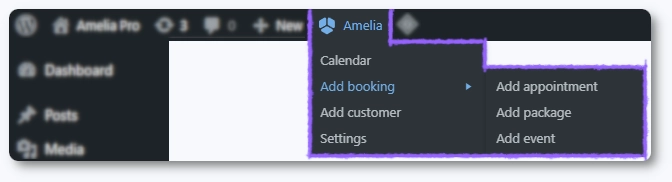
How to navigate the Amelia menus
Amelia includes several menus that help you manage bookings, configure your setup, and control how your business operates. This page gives you a quick overview of what each menu does, so you can easily find your way around before diving into more detailed guides.
Some menus in Amelia appear or disappear depending on which features you enable in the Features & Integrations section.
For example, disabling Custom Fields hides the Custom Fields menu in WordPress, and disabling Coupons removes the coupon tab from Finance. This keeps the interface clean and focused on what you actually use.
Dashboard
The dashboard provides an overview of your booking activity for the selected date range. It includes totals for appointments or events, new vs. returning customers, occupancy rate, revenue, upcoming bookings, and top trends by employees, services, and packages.
Calendar
A visual calendar showing all bookings in daily, weekly, or monthly view. You can filter by appointments or events, employees, services, locations, and more. New appointments or events can be added directly from the calendar.
Bookings
A centralized table showing all appointments, packages, and event bookings. Filters help narrow results by service, customer, employee, location, availability, or status. You can customize table columns, edit bookings, or create new ones from this page.
Events
A list of all events within the selected date range. You can filter by employee, attendee, location, or tags. This is where events are created or edited. Attendees are managed in the Bookings section, not here.
Employees
Add, edit, and manage your employees. Supports list and grid views, filtering by service or location, and customizing the visible columns. This is where you define who provides appointments.
Catalog
The place where you define what you offer: services, packages, and resources. You can create, edit, reorder items for the front end, and configure how they appear. This page is for managing offerings, not bookings.
Locations
Define the places where your appointments or events happen. Locations can later be assigned to employees and events.
Customers
A list of all customers who booked with you. You can add customers manually, import or export via CSV, and customize the table view.
Finance
Shows transactions, invoices, and coupons. Includes filters for customers, employees, services, events, booking types, status, and date ranges. Transactions and coupons can be exported in CSV format.
Notifications
Manage the messages sent to customers and employees. Includes email, SMS, and WhatsApp notifications, as well as scheduled notifications and general sending settings.
Customize
This is where you adjust the appearance and behavior of your booking forms. You can change colors, labels, visibility, ordering of elements, and many layout options for each form type.
Custom Fields
Create additional fields for bookings or customers. Booking fields appear during the appointment or event booking process, while customer fields are linked to customer profiles.
Features & Integrations
Enable or disable specific features or integrations to keep Amelia lean. Disabling a feature removes its menu entry; for example, disabling custom fields hides its menu.
Settings
The main configuration area for Amelia. Includes general settings (time slot step, phone country code, booking rules), activation, company details, working hours, days off, payment settings, notifications configuration, and roles and permissions.
What’s New
A feed of Amelia updates, including new releases, improvements, announcements, and video walkthroughs.