



When2meet has run essentially unchanged for more than a decade, built and maintained by one developer. That’s both its appeal and the whole of its limitation.
It does one job, does it free, and has never tried to do anything else. Which is fine right up until the group you’re scheduling is made of paying customers.
At that point the poll closes and everything after it happens by hand: the invite, the confirmation, the reminder, the payment. That manual tail is what sends people looking for When2meet alternatives.
Nine are covered below, from poll clones like Rallly and LettuceMeet to full booking systems. If you’re on WordPress, Amelia is the one that closes the whole loop. Without a site, Trafft does the same job hosted.
Worth saying up front: Amelia publishes this article, and Trafft comes from the same company. The reasoning sits under every pick and both get an honest note on where they don’t fit. Several tools below beat them outright for specific jobs, and for a free group poll the grid tools beat both of ours comfortably, which we’ve said plainly in each case.
How We Tested These Alternatives
We ran two scenarios in each tool during July 2026. The first was the job When2meet actually does: find one hour that works across five people in three timezones. The second was the job it can’t do: publish a bookable service, connect a calendar, take a deposit, and send a reminder.
Most tools here handle one or the other, which is the whole point of the comparison. Amelia went onto a clean WordPress 6.9 sandbox. The hosted tools were tested on free tiers or trials. Where a feature sits behind a tier we didn’t buy, we’ve said so rather than guessing at it. Findings appear under each tool.
What Is When2meet?
You paint your open hours onto a shared grid, everyone else does the same, and the overlap surfaces as a colour heatmap pointing the group toward the time that works for the most people. No account, no app, no payment.
The scope is narrow on purpose. One event, one grid, one goal.
That’s the entire product. It sits in the same bucket as other lightweight tools built for coordinating a group’s schedule, and for a casual poll it does that one job cleanly.
What we found testing When2meet itself: the group scenario took under two minutes from creating the grid to seeing the overlap, with no account required from anyone. The timezone handling worked correctly, each participant saw the grid rendered in their own local time, so nobody had to do conversion math. That’s the specific thing it does better than the original WhenIsGood grid. On the business scenario there was nothing to test at all: no booking step, no calendar invite, no payment, no reminder. For a free group poll it remains genuinely hard to beat, ours included.

Thank you for subscribing. Check your mail for details
Why Do People Look For When2meet Alternatives?
Because the tool only polls availability. Once the group picks a time, every follow-up step happens manually, which falls apart the moment money or clients are involved.
Modern expectations moved past a shared grid a while ago.
Industry data compiled by SchedulingKit shows 82% of consumers prefer booking online, and 48% have switched providers after a bad booking experience.
A separate Signpost figure puts the average revenue lift from online booking systems at roughly 27%. When2meet captures none of that, because it stops at the poll.
Where When2meet Falls Short For Businesses
The gaps that matter:
- No booking or confirmation after a time is chosen
- No payment collection, no deposits
- No automated reminder tools to cut no-shows
- No calendar sync between Google and Outlook or any other calendar
Text reminders alone reduce no-shows by about 38%, per an Imperial College London study reported by Klara. When2meet leaves that entirely on the table.
Where When2meet Still Works
Friends picking a dinner night. A study group. A club meeting.
Zero setup, zero cost, zero login. For informal group coordination among people who just need one shared time, it’s still hard to beat.
What Makes A Good When2meet Alternative?
The bar is booking the meeting, not just polling for it. That means confirming the slot, collecting payment where needed, syncing to real calendars, sending reminders, and giving you ownership of the data.
| Criteria | Why It Matters |
|---|---|
| Booking + confirmation | Locks the time, no manual follow-up |
| Calendar sync | Google, Outlook, iCloud stay current |
| Payments + reminders | Collects money, cuts no-shows |
| Ownership | Self-hosted vs third-party SaaS |
| Cost model | Free, flat license, or per-seat |
A capable meeting scheduler handles confirmation and reminders automatically. Published research consistently finds that letting clients self-schedule reduces no-show rates on its own, before reminders are even added.
Payment matters too. A booking system with real payment gateways lets you take deposits at the moment of booking, which a poll can never do.
Which When2meet Alternatives Are Worth Using?
They split into two groups. Amelia, Trafft, Calendly, Cal.com, and SimplyMeet.me cover full booking. Rallly, LettuceMeet, Doodle, and Xoyondo replace the group poll itself.
Not every pick fits every job. If you want the wider field, our roundup of the best WordPress booking plugins goes deeper on the self-hosted side.
Amelia
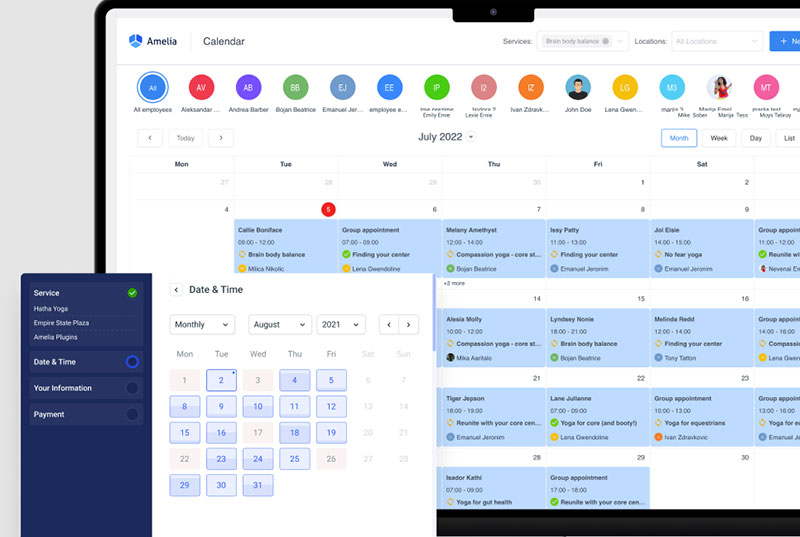
Best overall for WordPress sites. A booking plugin where you own the data on your own domain, handling payments, staff, recurring appointments, and reminders with no per-booking fee.
There’s also a free Lite version on WordPress.org if you want to test before buying, though it’s limited to one employee.
Trust data backs the depth: 4.6/5 from 761 reviews on WordPress.org and 4.9/5 from 245 reviews on Capterra.
What we found testing it: the business scenario went through cleanly on a WordPress 6.9 sandbox. We published a bookable service, connected Google Calendar, required a deposit, and committed a live appointment with a reminder firing on schedule. Booking records sat in our own database rather than a vendor’s, which is the structural argument for a plugin over SaaS. The group scenario is where it lost outright: there’s no availability heatmap, so finding one hour across five people means doing that somewhere else first. Setup also ran closer to half an hour against When2meet’s two minutes, and connecting a calendar for two-way sync needed a tier above Starter.
Trafft
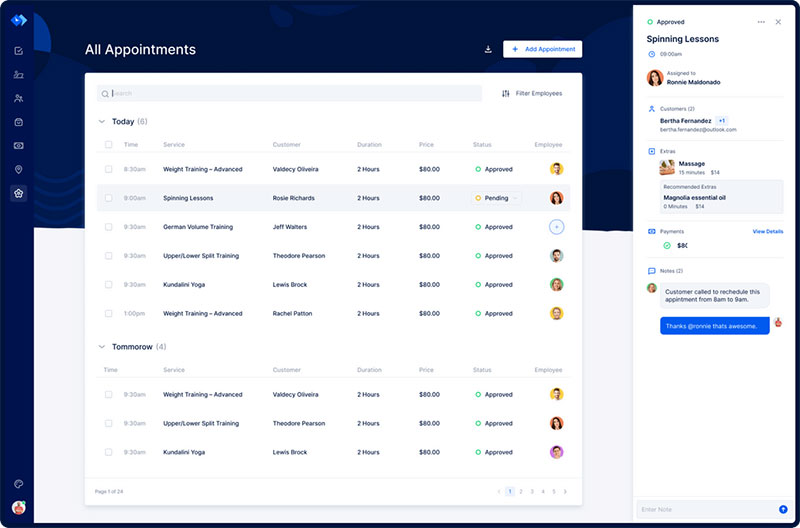
Best for a service business with no website. Trafft is hosted scheduling built around staff, services, and locations, and it generates a booking site for you instead of requiring one. Same company as Amelia, as noted at the top.
The practical difference is that Trafft bundles users into each plan rather than charging per seat, and it ships email, SMS, and WhatsApp reminders, deposits, coupons, gift cards, and invoices. A free forever tier covers one user and 100 appointments a month.
What we found testing it: the free tier generated a working booking website in a few minutes with no site of our own and no card required, which is the fastest route to a paid booking of anything here. WhatsApp reminders worked, and nothing else in this article offers them. The business scenario completed cleanly. The group scenario didn’t run at all: there’s no availability voting, so if the heatmap grid is the part of When2meet you want to keep, this replaces the wrong half. We also hit the free plan’s 100-appointment ceiling faster than expected, and the deposit step required the Professional tier rather than a lower one.
Calendly
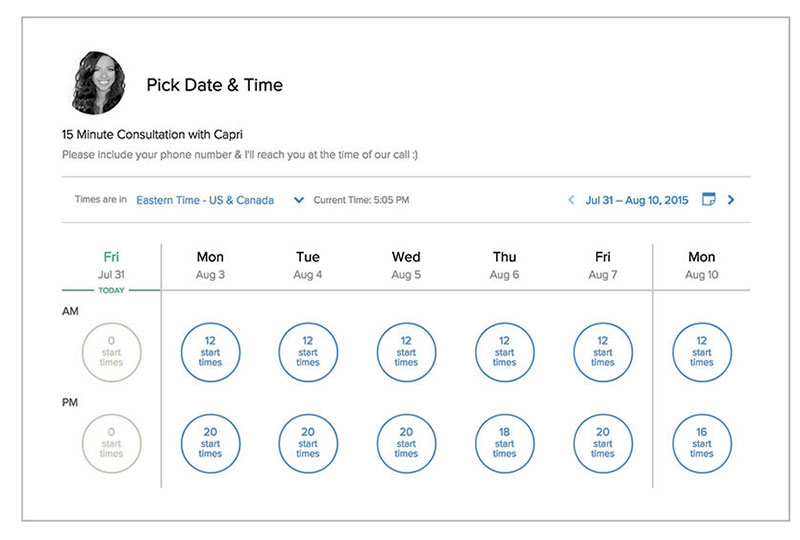
The polished SaaS scheduler most people already recognize. Strong integrations, clean booking pages, and a usable free tier.
The catch is per-user pricing, so cost climbs with every seat you add. It also stopped accepting new iCloud and Apple Calendar connections in August 2024.
What we found testing it: a booking link was live in under five minutes and timezone handling across test invites was flawless, so for 1:1 self-booking nothing here launches faster. The group scenario is where it stops, since Calendly books a person into a slot rather than collecting availability from five people and finding the overlap. On the free tier we confirmed the single-calendar limit: a busy slot on our second, unconnected calendar was invisible and Calendly offered that time anyway. We also verified the iCloud gap directly, there’s no path to add a new Apple Calendar connection.
Find out more about Calendly in our in-depth comparison articles: Calendly vs. Doodle, Calendly vs. Acuity, Calendly vs YouCanBook.me, Calendly vs. OnceHub, or discover some other Calendly alternatives.
Doodle
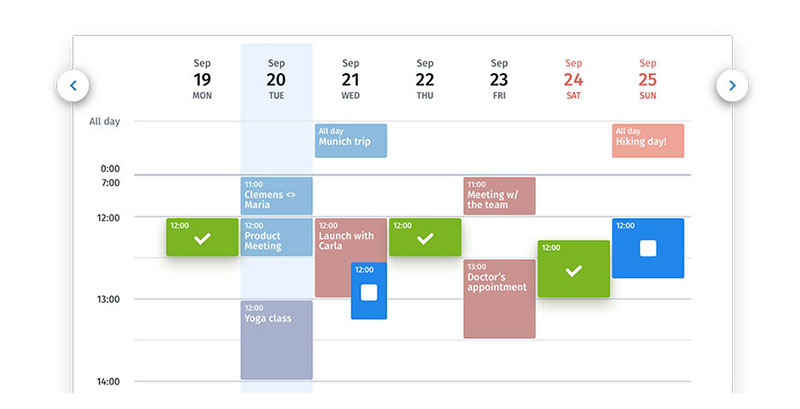
Closest spiritual match to When2meet. It keeps the group-poll idea but adds reminders and a cleaner interface. The free tier now requires an account to create a poll and carries ads. Our Doodle vs When2meet breakdown covers where each one wins.
What we found testing it: the group scenario landed on one slot in a single round, and unlike When2meet the winning time generated a calendar invite automatically, which removes the main manual step after the poll closes. That’s the clearest upgrade path if polls are what you need. Two frictions showed up: creating a poll required an account, which When2meet doesn’t, and the free version served ads on the voting page our participants saw.
Cal.com
Developer-friendly and API-first, with an unusually generous free tier for individuals.
One 2026 change matters here. In April 2026 Cal.com moved its main product to a private repository and relaunched the open-source code separately as Cal.diy under the MIT license. Self-hosting remains possible through Cal.diy, but Cal.com’s own documentation describes it as intended for personal, non-production use, and it excludes Teams and Organizations features. Verify it covers your needs before planning around it.
What we found testing it: the free tier is the most generous of any hosted booking tool here. We created several event types, connected more than one calendar, and took a Stripe payment without hitting a paywall once, which Calendly’s free plan doesn’t allow. Routing forms worked on free too. Setup ran longer than Calendly’s, since several calendar and workflow settings assume more comfort with configuration than a non-technical user would have. We did not stand up a self-hosted Cal.diy instance, so we can’t speak to running it in production.
SimplyMeet.me
- Lightweight one-on-one and group booking, with poll meetings built in
- A generous free tier that covers most solo needs
- Calendar sync, automated reminders, and Stripe or PayPal payments
What we found testing it: this was the only tool in the article that handled both scenarios on a free plan. Poll meetings are built in alongside one-on-one booking, so we ran the group coordination and then booked a confirmed slot without switching tools. Neither half is as deep as the specialists, the poll interface is plainer than When2meet’s grid and the booking side is thinner than Calendly’s, but for a solo operator who occasionally needs both, that combination is genuinely rare at no cost.
Rallly
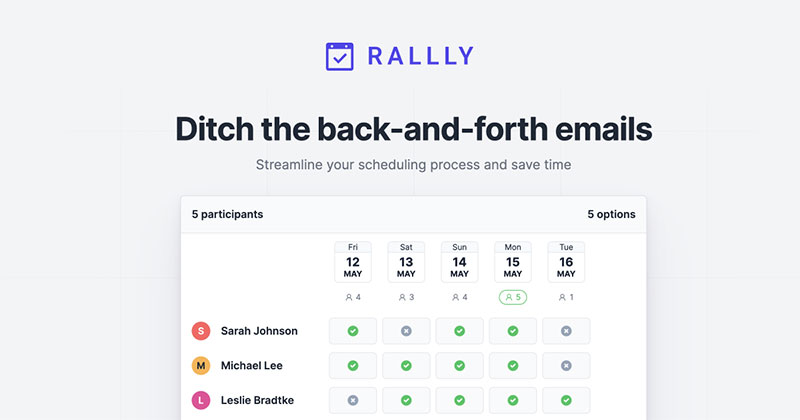
An open-source take on the group-poll concept, licensed under AGPLv3. Self-host it, and voters never need an account.
Free to self-host for single-user instances, though multi-user self-hosted deployments require a paid licence. A hosted version with a free tier is also available.
What we found testing it: we used the hosted free tier rather than self-hosting. The group scenario ran cleanly and participants voted without creating accounts, matching When2meet on that count. The interface is closer to a list of proposed times than a paint-the-grid heatmap, which some testers preferred and others didn’t. Worth being precise about the licensing, since it’s the reason people pick this one: the code is fully AGPL and forkable, and a single-user self-hosted instance is free forever. The paid licence applies to multi-user self-hosted deployments, so it’s a deployment convenience rather than a lock on the source.
LettuceMeet
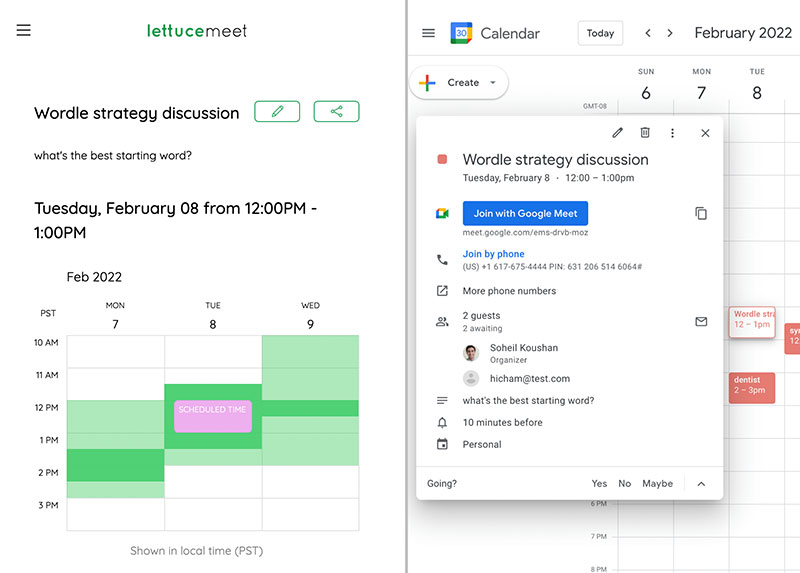
The modern free lookalike. Same availability-grid feel as When2meet with a fresher UI, and the easiest direct swap if all you want is the poll.
What we found testing it: the group scenario ran as smoothly as When2meet, with automatic timezone conversion and no signup needed from participants. The differentiator is the optional calendar sign-in: connecting Google pulled our existing commitments in underneath the grid, so we painted availability against what was already booked rather than from memory. Neither When2meet nor the original WhenIsGood offers that. The interface also felt more modern than either. On the business scenario it does nothing, same as the other grids.
Xoyondo
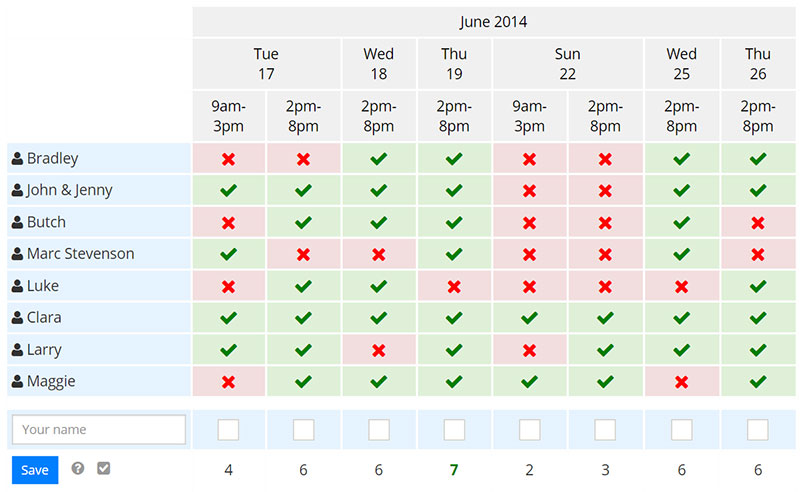
Free group polls, plus message boards and shared to-do lists bolted on. It also combines availability polls with opinion and text surveys, so you can gather agenda input at the same time. A paid Business tier adds custom designs and branded email invitations.
What we found testing it: the availability poll worked fine and sat alongside a text survey, so we collected agenda input in the same pass as the scheduling, which nothing else here attempts. For a committee meeting that needs both a time and a topic list, that’s a real saver. The trade is focus: the extra modules make the interface busier than When2meet’s single-purpose grid, and for a group that only needs a time, they’re clutter rather than value.
Why Is Amelia The Best When2meet Alternative?
Amelia replaces the entire scheduling workflow inside WordPress rather than just the grid. You own the booking data, pay a flat license instead of per-seat fees, and get payments, staff calendars, recurring events, and reminders in one install. No poll-to-manual handoff.
WordPress context matters here. W3Techs data shows the platform powers roughly 41% to 42% of all websites, easing back from a peak above 43%, so most businesses already have somewhere to put it.
How Amelia Handles Payments And Bookings
It collects deposits or full payment at the moment of booking.
Supported gateways cover Stripe, WooCommerce, Mollie, Square, and a PayPal-based booking flow. When2meet has no payment layer at all. Worth knowing that multi-gateway support unlocks on the Standard tier and above, since the free Lite version is Square-only.
Automated email and SMS reminders ship built in, which directly supports getting more confirmed bookings instead of missed slots.
How Amelia Manages Staff And Services
One install runs multiple employees, each with an individual calendar.
Add a service catalog, per-service pricing, group bookings, and recurring appointments without extra add-ons.
For teams juggling shifts and availability, it doubles as staff scheduling software, something no poll tool attempts. The full feature list goes deeper still, into buffer times, custom fields, and event tickets.
How Amelia Compares On Cost To Calendly
Calendly charges by the seat. Amelia charges once per licence period. That difference compounds.
Calendly’s Teams plan runs $16 per user per month on annual billing, so a 10-person team pays $1,920 a year. Amelia’s paid tiers start around $49/year and cover multiple staff on a single license, so past roughly 3 to 5 users the flat license wins on cost and keeps winning as you grow.
The same per-seat problem has a hosted answer if you have no WordPress site. Trafft bundles users into each plan rather than billing per calendar, so a ten-person team sits inside a tier rather than paying ten times over.
How Do When2meet Alternatives Compare On Features?
The divide runs straight down the middle. Amelia, Trafft, Calendly, Cal.com, and SimplyMeet.me handle full booking with payments and calendar sync. Doodle, Rallly, LettuceMeet, and Xoyondo replace the poll only, with no payment or staff tools.
Roughly 40% of bookings happen after hours, per SchedulingKit, so 24/7 booking and instant confirmation carry real weight.
| Tool | Booking | Payments | Calendar Sync | Self-Host | No Account |
|---|---|---|---|---|---|
| Amelia | Yes | Yes | Yes (tier-dependent) | Yes | Yes |
| Trafft | Yes | Yes | Yes (paid tiers) | No | Yes |
| Calendly | Yes | Yes | Yes | No | Yes |
| Cal.com | Yes | Yes | Yes | Via Cal.diy | Partial |
| SimplyMeet.me | Yes + poll | Yes | Yes | No | Yes |
| Doodle | Poll | No | Yes | No | No |
| Rallly | Poll | No | Partial | Yes (AGPL) | Yes |
| LettuceMeet | Poll | No | Partial | No | Yes |
| Xoyondo | Poll + surveys | No | Partial | No | Yes |
Only the booking group syncs fully across Google Calendar, Outlook, iCloud, and Zoom. The poll group stops at finding a time.
How Do When2meet Alternatives Compare On Pricing?
Free covers When2meet, LettuceMeet, and Xoyondo’s core polls. Per-user SaaS covers Calendly and Doodle. License, bundled-user, or self-host covers Amelia, Trafft, Cal.diy, and Rallly, where cost stops scaling with every new person.
| Model | Tools | Cost Behavior |
|---|---|---|
| Free | When2meet, LettuceMeet, Xoyondo core | $0, limited features |
| Per-user SaaS | Calendly, Doodle | Scales with each seat |
| Bundled users | Trafft | Flat within each tier |
| License / self-host | Amelia, Cal.diy, Rallly | Flat, grows with nothing |
The per-seat trap is real. That same 10-person Calendly team hits $1,920 a year, which is why growing teams start hunting for flat-rate Calendly alternatives.
Free tiers usually cap the features that matter: integrations, branding, event limits.
For a small service business, a one-time or annual license reads as the cheaper long game. That’s the core case behind most scheduling software built for small businesses, where flat pricing beats per-seat past the first few users.
Which When2meet Alternative Fits Your Use Case?
The tables above give the mapping. What follows is how to work the decision, since the order you ask the questions in narrows the field faster than any feature list.
Start with the job, not the tool. Are you finding one time for a group, or letting clients book you? Almost nobody needs both, and tools that attempt both do neither especially well. Getting this wrong is why half the recommendations in this category miss.
If it’s group coordination, the decision is nearly made and it’s free. LettuceMeet is the closest direct swap for the When2meet grid, with a fresher interface and optional calendar sign-in that fills in your existing commitments. Rallly is the pick if you want the code to be open and self-hostable, with the caveat that multi-user self-hosted deployments need a paid licence. Reach for Doodle only if you want a calendar invite generated automatically once the winner is clear, and accept the account requirement and ads on the free tier. Xoyondo earns its place when you need agenda input collected alongside the time.
If it’s paid bookings, the next question is whether you have a website. That single fork decides more than anything else. With WordPress, Amelia keeps records in your own database and covers payments, staff calendars, recurring appointments, and reminders on a flat license. Without a site, Trafft does the same job hosted, generates the booking page for you, and bundles users into each plan rather than billing per seat. Neither is the answer if you only need a poll.
If it’s one person booking meetings, you’re in a third category. SimplyMeet.me has the most generous free tier and is the only tool here that handles polls and booking in one place. Calendly is more polished, though per-user pricing starts biting the moment you add help.
If you want to own the stack, Cal.diy is MIT-licensed, API-first, and free to run on your own server. It suits a technical team that can carry the hosting, patching, and monitoring load, and it’s positioned by Cal.com for personal, non-production use with Teams and Organizations features missing. It’s the wrong tool for a quick group poll.
Check the free tier against your real volume before committing. Free means different things across this list: unlimited on the grids, 100 appointments a month on Trafft, one employee on Amelia Lite, one event type on Calendly, and genuinely generous on Cal.com and SimplyMeet.me. That ceiling usually bites before any missing feature does.
For a small service business, getting paid at the point of booking rather than chasing invoices afterwards is the practical win, and it covers the whole workflow When2meet leaves undone. Solid habits around scheduling appointments the right way do the rest. If you’re weighing WordPress plugins specifically, the Amelia vs Bookly vs Booked comparison lays out where each one lands.
Frequently Asked Questions About When2meet Alternatives
Is When2meet free to use?
Yes. When2meet is completely free, with no account, app, or payment required. You paint your availability onto a shared grid, and the overlap shows as a heatmap. It only polls for a time, nothing more.
What is the best When2meet alternative?
It depends on the job. For WordPress sites, Amelia replaces the poll with a full booking system handling payments, staff calendars, recurring appointments, and reminders on a flat license. Without a site, Trafft does the same job hosted. If you only want a better free poll, LettuceMeet or Rallly beat both.
What is the closest free alternative to When2meet?
LettuceMeet is the closest free lookalike, with the same availability grid, a cleaner interface, and optional calendar sign-in that fills in your existing commitments. Rallly is another strong option, open-source and self-hostable, and neither one asks voters to create an account.
Does When2meet have a mobile app?
No. When2meet runs in the browser only, with no dedicated iOS or Android app. The page is mobile-responsive, but you will not find it in any app store. Most poll alternatives share this browser-first approach, though Trafft ships iOS and Android apps for staff.
Can you collect payments with a When2meet alternative?
Yes, with the right tool. When2meet takes no payment at all, but Amelia collects deposits or full payment through Stripe, PayPal, WooCommerce, Mollie, and Square at the moment of booking. Trafft, Calendly, and Cal.com support payments too.
Is Doodle better than When2meet?
Doodle keeps the group-poll idea but adds reminders and a cleaner interface, and the winning time generates a calendar invite automatically. It edges out When2meet on follow-up, though neither one books the meeting or takes payment. Doodle’s free tier also requires an account and carries ads, which When2meet doesn’t.
Is Amelia cheaper than Calendly?
Past a few users, yes. Calendly charges per seat, so a 10-person team pays around $1,920 a year. Amelia uses a flat license, so cost stays put no matter how many people book. Trafft applies the same logic for businesses without a WordPress site, bundling users into each tier.
Which When2meet alternative works without a website?
Trafft generates a booking website for you, so a service business with no site can take paid bookings without building one. Calendly, Cal.com, and SimplyMeet.me are also hosted and need no site of your own. Amelia is the exception here, since it’s a WordPress plugin.
Can you self-host a scheduling tool?
Yes. Rallly is open-source under AGPLv3 and self-hostable, Cal.com’s community edition Cal.diy can be self-hosted under the MIT license, and Amelia runs on your own WordPress site. Self-hosting means you own the booking data instead of handing it to a third-party SaaS platform.
Does Amelia have a free version?
Yes. A free Lite version lives on WordPress.org and covers basic booking for one employee with Square payments. Paid tiers unlock multi-gateway payments, staff scheduling, recurring events, and integrations like Google Calendar, Outlook, and Zoom. Amelia holds 4.6/5 from 761 WordPress.org reviews and 4.9/5 from 245 on Capterra.
Which alternative syncs with Google Calendar and Zoom?
Amelia, Trafft, Calendly, and Cal.com all sync with Google Calendar, Outlook, and Zoom, though on Amelia and Trafft the calendar and video integrations depend on your plan tier. The poll-only tools like When2meet, LettuceMeet, and Rallly do not, since they stop at finding a shared time.
Conclusion
The best When2meet alternatives move you past a plain availability poll and into real scheduling, with calendar sync, deposits, and automated follow-up built in.
Casual groups can stick with LettuceMeet, Xoyondo, or a self-hosted Rallly. Solo bookers do well with SimplyMeet.me or Doodle.
But once appointments, staff, and payments are involved, a full appointment scheduler earns its keep.
Amelia lands on top for one reason: it runs inside WordPress, so you own the data, skip per-seat billing, and get SMS reminders, deposits, and Google Calendar sync in one install.
Pick the poll tools for a quick meetup. Pick Amelia when scheduling is part of how you run the business.

Explore topics

Read Inspiring Customer Stories
Check out how our user set Amelia for his business