



People reach for Doodle and When2Meet to solve the same annoyance: the endless back-and-forth of finding a slot that works for a whole group. Where they split is in how far each one carries you after that.
When2Meet finds the overlap and then stops, handing the confirming, reminding and calendar-wrangling straight back to you. Doodle keeps going, with calendar sync, automated nudges and booking pages, but it wants you to sign up and, beyond the free tier, to pay.
So the real question isn’t which is better. It’s how much of the scheduling chore you want handled for you, and what you’re willing to trade in friction and cost to get it. Get that wrong and you’ll feel it the moment you’re mid-poll with 15 non-responders and no clean way to chase them.
What Is Doodle?
Doodle runs in the browser and is built around time-slot polls: an organizer puts up some options, shares them, and picks the winning time once the group has weighed in. It’s freemium, so the free tier covers basic group polling, and the paid Pro and Team plans pile on calendar sync, automated reminders, custom branding and 1:1 booking pages.
More than 70% of its users are there for professional scheduling, and entrepreneurs, executives and administrative assistants make up the biggest segments (Doodle State of Meetings Report, 2023).
It connects to Google Calendar, Outlook and iCal, and on paid plans it also wires into Zoom, Google Meet, Microsoft Teams and Cisco Webex to generate meeting links automatically.
There are web, iOS and Android versions. Doodle Pro starts at $6.95 per user per month (billed annually), and the Team plan, at $8.95 per user per month, adds admin controls, roles, co-hosting and activity reports (G2, 2024).
What Does Doodle’s Free Tier Actually Give You?
The free plan gives you group polls capped at 10 time slots, one booking page and one 1:1 meeting link. That’s plenty for the occasional schedule, with one catch: Doodle-branded ads that every participant sees when they open your poll.
On the free plan you get:
- Group polls with yes/no voting, up to 10 time slots per poll.
- One booking page.
- One 1:1 meeting link.
- Basic participant response tracking.
What it leaves out is the stuff that makes Doodle feel like a real tool: calendar sync, automated reminders, branding removal, hidden responses, the “if need be” voting option and response deadlines.
The thing that actually pushes people to upgrade is the ads. G2 reviewers across small businesses and education keep naming the free-plan ads as the main irritation before they move to Pro.
Who Uses Doodle?
By Capterra’s 2024 numbers, the heaviest reviewer groups are education management (10%), higher education (8%) and marketing and advertising (7%). The professional core, though, runs across industries, with 55% of reviewers naming scheduling as the main reason they use it.
Where it built its reputation is hybrid and large-group scheduling. Doodle’s own 2023 report has it that 68% of meetings with 5 or more attendees used the tool to coordinate.
It suits businesses that need a tidy, external-facing scheduling flow. When a consultant or recruiter sends a client a Doodle poll, it reads as deliberate rather than thrown together.
What Is When2Meet?
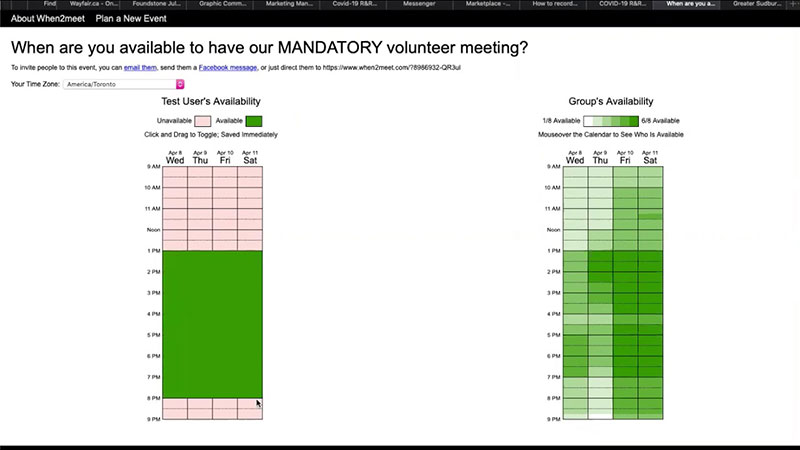
Strip scheduling down to one screen and you’ve basically got When2Meet: a free, no-account tool built on a drag-to-select availability grid. The organizer sets a date range and a time window, shares a link, and people fill in when they’re free. What comes back is a colour-coded heatmap showing where everyone’s availability overlaps.
There’s no paid tier, no calendar sync and no mobile app. It keeps the lights on with display ads and voluntary donations of $5, $10, or $20. It’s run this way since the mid-2000s by a small outfit called 8degreesllc.com, and the interface has hardly moved since launch.
How the Availability Grid Works
Everything hinges on that grid. Participants click and drag across the time blocks to mark when they’re free, and the heatmap shades darker wherever more people are available.
Setting one up takes under 2 minutes. You name the event, pick specific dates or a recurring weekly pattern, set the earliest and latest acceptable times, and share the link it generates.
As each person submits, the group heatmap updates in real time. What it can’t do is tell anyone a time’s been confirmed, or nudge the people who haven’t responded yet.
That gap matters more than it first looks. Around 43% of people spend 3 or more hours per week on scheduling tasks (Calendly, 2024), and a tool that makes you do every bit of the follow-up by hand doesn’t cut into that figure at all.
Who Actually Uses When2Meet?
The core audience is student groups, volunteer organizations, clubs and friend groups. It does well at casual, one-off coordination where everyone already knows each other and nobody’s expecting a confirmation email.
It tends to show up for:
- Academic study groups and project teams.
- Community organizations and clubs.
- Informal team meetings where participants have no external accounts.
- Social gatherings where the organizer would rather collect no data at all.
Most businesses outgrow it fast, not because the grid idea is weak but because the tool finishes at the overlap and does nothing to confirm a time, send a reminder or tie the meeting to anyone’s calendar.
Thank you for subscribing. Check your mail for details
How Does the Scheduling Process Work in Each Tool?
The two handle group scheduling differently at nearly every step, from how an organizer builds the poll to how people respond and how a time finally gets locked in. That process gap is usually where people figure out which tool suits them.
How Doodle Polls Work Step by Step
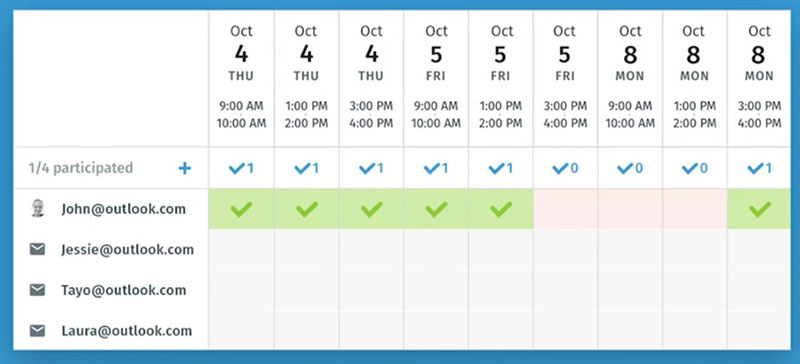
The organizer builds a poll by picking specific date and time slots (up to 10 on free, up to 1,000 on paid), optionally sets a response deadline (a paid feature) and shares the link. Participants vote yes or no on each slot on free, or yes/if-need-be/no on paid plans, and the organizer reads the results and confirms the winning time by hand.
On Pro and Team, Doodle chases non-responders with automated reminders, and once the organizer confirms, it spins up the calendar invite and meeting link on its own.
There’s not much friction for participants. No account is needed to vote, the interface renders cleanly on a phone, and the yes/no or yes/if-need-be/no options let people show partial availability instead of being forced into a hard choice.
The genuine pain point is scale. Pile on many slots and many participants and the results table gets hard to read; a poll with 20 people and 15 options turns into a dense grid you have to squint at.
How When2Meet Grids Work Step by Step
Spinning up a When2Meet event takes roughly 90 seconds. The organizer names it, drags across a calendar to pick possible dates, sets a time window and shares the link, with no account needed on either side.
Responding is all drag-based: you click and drag over your free blocks on the grid, and the heatmap fills in as more people add theirs. Spotting the overlap is instant and visual.
And that’s the end of it. Once the organizer spots the best time, they’re the one notifying everyone, building a separate calendar event, making a meeting link and sending it all out. When2Meet has no part in any of that.
For remote teams, that handoff is where things get messy. 72% of employees say meetings frequently start late because of technical issues (Owl Labs, 2024), and when confirmation is manual and the calendar event lives somewhere else, those errors stack up.
| Step | Doodle (Free) | Doodle (Pro+) | When2Meet |
|---|---|---|---|
| Poll creation | Account required | Account required | No account needed |
| Participant response | Yes / No | YesIf need beNo | Drag on availability grid |
| Automated reminders | No | Yes | No |
| Calendar invite sent | No | Yes auto-generated |
No |
| Meeting link generated | No | Yes Zoom, Meet, Teams |
No |
What Are the Account and Access Requirements for Each Tool?
When2Meet asks for nothing. No account, no email, not even a name unless a participant chooses to type one. An organizer spins up a poll in seconds without registering, and that’s its biggest practical edge for one-off scheduling where there’s no ongoing relationship with the group.
Doodle, even on free, needs an account to create a poll. Participants still don’t need one to respond, but the organizer has to register before building anything.
What the Account Requirement Means in Practice
For organizers, Doodle’s account requirement adds a step before that first poll, which stings when you need to schedule something fast and don’t already have an account. For participants, both tools are equally painless: click a link, respond, no sign-up and no password.
The bigger difference is privacy. When2Meet keeps only the name someone volunteers and their grid selections. No email capture, no cross-session tracking, no third-party integrations shipping data elsewhere.
Doodle gathers account data and usage data and plugs into third parties like Google, Microsoft and Zoom. In a GDPR-sensitive environment, or anywhere with strict IT procurement, that integration stack can set off a review that When2Meet would simply never trigger.
When Zero Friction Matters Most
In casual settings, the no-account model pulls higher response rates. Send a When2Meet link to 15 people who’ve never touched a scheduling tool and more of them answer, because there’s literally nothing to sign up for.
Doodle’s 2023 State of Meetings report found users save up to 45 minutes per week against scheduling over email. That payoff assumes consistent use, though, which means buy-in from every participant on every poll.
When the group is unpredictable or new to scheduling software, that zero-barrier access counts for more than any of Doodle’s extra features.
How Do Doodle and When2Meet Handle Calendar Integrations?
This is the clearest capability gap of the lot. Doodle talks to external calendars and When2Meet doesn’t touch them at all, and that one difference is most of what sorts professional workflows from casual coordination.
Doodle’s Calendar Sync Capabilities
On Pro and Team, Doodle connects to Google Calendar, Outlook and iCal. With sync on, it reads your existing events and greys out the slots you’re not actually free, so participants only ever see real openings.
The paid plans connect to:
- Google Calendar (GetApp reviewers rate its integration quality 4.8/5).
- Microsoft Outlook and Office 365.
- iCal.
- Zoom, Google Meet, Microsoft Teams and Cisco Webex, for meeting-link generation.
- Stripe for payment collection, on select plans.
None of that reaches the free tier, which is a real limitation. Free-plan organizers have to cross-check their own calendars by hand before setting slots, which quietly puts back the manual work the tool was meant to remove.
When2Meet’s Integration Model
When2Meet integrates with nothing. There’s no Google Calendar, no Outlook, no Zoom links, no Slack pings, no CRM hook of any kind. People enter availability by hand, either from memory or with their real calendar open in a second tab.
The specific failure that creates is stale data. Fill in the grid on Monday, pick up a new conflict on Tuesday, and the grid still has you down as free, with nothing to update or re-sync it.
For remote teams with fast-moving schedules, that’s a genuine problem. 35% of meeting invites go out with less than 24 hours’ notice (Flowtrace, 2025), so availability can move between the moment someone fills in the grid and the moment the meeting’s confirmed.
What This Means for Professional vs. Casual Use
Calendly and the other enterprise tools own client-facing workflows partly because calendar sync rules out double-booking completely. Doodle’s paid-plan sync nudges it into the same territory.
When2Meet sits in a different lane entirely, the fast, disposable poll where speed and zero friction beat precision. A study group meeting once has no use for calendar sync; a sales team booking demos every day can’t really live without it.
The scheduling software choices small businesses make usually turn on exactly that: is this recurring professional coordination, or a one-off check on who’s free?
How Does the User Interface Compare Between Doodle and When2Meet?
Doodle’s interface is modern and polished; When2Meet looks like a site from 2008. The gap isn’t only cosmetic, since it shapes how external participants read the organizer and how cleanly people can respond on a phone.
Doodle’s Interface Design
Creating a poll follows a clean, guided flow, with step-by-step prompts for the title, the time slots and participant settings. The results view lays availability out in a colour-coded table with each participant’s name showing against the slots.
On mobile there are proper iOS and Android apps. They match the web version closely and cover the core jobs, including creating polls, viewing responses and managing booking pages.
The recurring interface gripe from G2 and Capterra reviewers is free-tier clutter, since ads turn up both in the creation flow and in the shared poll participants open. Pay, and that vanishes.
When2Meet’s Interface Design
When2Meet’s interface is minimal on purpose. Setup is a single form; the response screen is the grid and the heatmap. That’s the whole thing.
On desktop that simplicity works fine. On mobile it falls apart.
The mobile issues are specific:
- The drag-to-select grid needs precise touch input on a small screen.
- Accidental selections happen constantly while scrolling.
- There’s no swipe support and no mobile-optimized layout.
- On scheduling comparison sites, plenty of users name the mobile experience as the exact reason they switched tools.
Meetergo’s 2024 review calls the interface a website from 2008, which is fair given how little the design has shifted since launch. For any group with several people on mobile, which is most groups now, that means dropped responses and patchy data.
Only 14% of meetings today are fully in-person (Owl Labs, 2024). When most of the coordinating happens on phones, a tool that ignores mobile loses real participation.
Branding and External Presentation
Doodle Pro strips the Doodle branding off polls, so organizers can hand external clients or candidates a clean, unbranded experience.
When2Meet offers no branding controls at all. The URL, the interface and the look are fixed. In a professional context, dropping a When2Meet link on a client sends a casual signal that may not fit the relationship.
| Interface Attribute | Doodle Free | Doodle Pro+ | When2Meet |
|---|---|---|---|
| Visual design | Modern, clean | Modern, branded | Minimal, dated |
| Mobile app | Yes iOS + Android |
Yes iOS + Android |
No |
| Mobile web experience | Good | Good | Poor grid input issues |
| Ads visible to participants | Yes | No | Yes display ads |
| Custom branding | No | Yes | No |
What Are the Pricing Differences Between Doodle and When2Meet?
When2Meet is free, completely and permanently, with no upgrade path. Doodle gives you a free tier with real limits and paid plans that switch on the features that make it a professional tool. That cost gap decides fit more than any single feature does.
When2Meet Pricing
There’s nothing here to lay out. When2Meet costs nothing and has no paid tier. It runs on display ads shown to everyone and takes voluntary donations of $5, $10, or $20 to keep going.
Total cost of ownership lands at $0, with no contracts, no seat counts, no per-user fees and no enterprise negotiation.
For student groups, community organizations, nonprofits with no budget, or anyone scheduling only now and then, that’s a genuinely strong position. It does its one job for free, indefinitely.
Doodle Pricing Breakdown
Beyond free, there are a few paid tiers (SaaSworthy, updated August 2025):
- Free covers group polls (up to 10 time slots, yes/no voting only), one booking page and one 1:1 meeting, with ads.
- Pro at $6.95/user/month (billed annually) drops the ads and adds calendar sync, reminders, unlimited booking pages, “if need be” voting, custom branding, Zoom and Teams integrations and deadlines.
- Team at $8.95/user/month brings everything in Pro plus an admin console, roles and permissions, co-hosting and activity reports.
- Enterprise is custom-priced for organizations of 50+.
A 5-person team on the Team plan runs about $537 a year. That’s cheap next to most SaaS, but it’s still a budget line that When2Meet will never put on your books.
The Hidden Cost of the Free Tier
Doodle’s free tier shows ads to every participant. For internal scheduling that’s a minor annoyance. For client-facing polls it quietly says you’re on the unpaid tier, which can read as unprofessional in the wrong relationship.
G2 reviewers keep naming ad removal as the clearest single reason to go Pro. The feature gap between free and Pro is real enough, but in external-facing use it’s usually the perception gap that actually tips people over.
The average employee burns 146 hours a year in meetings, roughly $6,280 per head in salary. Against overhead like that, paying for a tool that stops double-booking and automates the follow-up is easy to justify. For a group with no budget and only occasional scheduling, When2Meet’s $0 wins by default.
Which Tool Handles Large Group Scheduling Better?
Large groups are where the difference gets most visible. When2Meet’s heatmap actually gets more useful as the headcount climbs, while Doodle’s slot-voting table gets harder to read once the group passes a certain size.
Nearly a third of all meetings now span multiple time zones, up 35% since 2021 (Microsoft, 2025). For distributed groups, the overlap-at-a-glance approach earns its keep.
When2Meet’s Heatmap Advantage at Scale
Past 20 participants, the heatmap shows availability density in one look. Darker cells mean more people free, so there’s nothing to count and no results table to scroll.
It holds up well for:
- Academic cohorts of 15 to 50 marking weekly availability.
- Volunteer organizations scheduling recurring events.
- Clubs or community groups with no shared calendar between them.
With the visual overlap, the organizer isn’t interpreting anything. The darkest block on the grid is the answer.
Doodle’s Large-Group Limitations
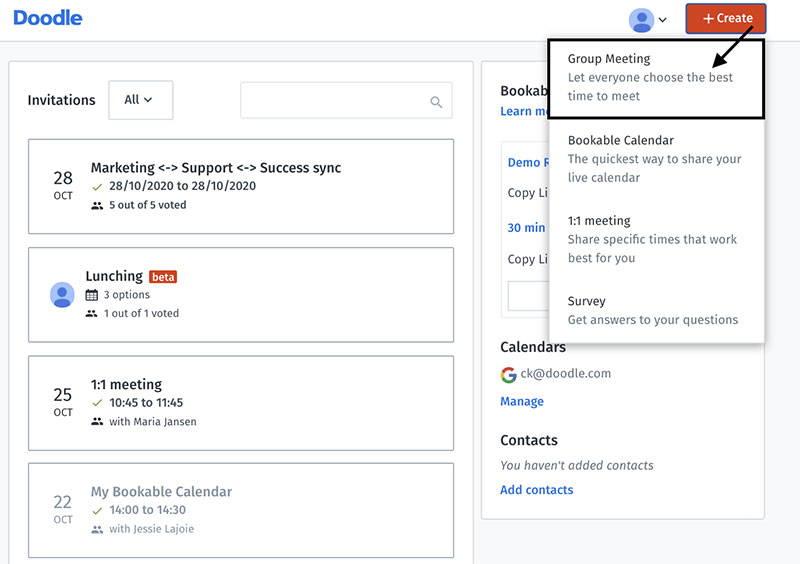
Doodle’s free tier caps a group poll at 10 time slots. Pro lifts that to 1,000, though a poll with anywhere near that many options is unusable in practice, and Doodle’s own research says 5 options gets the best response rates (Doodle Help Center, 2025).
Once you’ve got 20-plus people, the results grid runs names across the top and slots down the side, and reading it turns into a spreadsheet exercise rather than a quick glance.
68% of meetings with 5 or more attendees used Doodle to coordinate, per its 2023 State of Meetings Report, but “used” isn’t the same as “was the right tool.” For a group that’s both large and casual, When2Meet’s grid carries the visual load better.
Reminders and Response Tracking
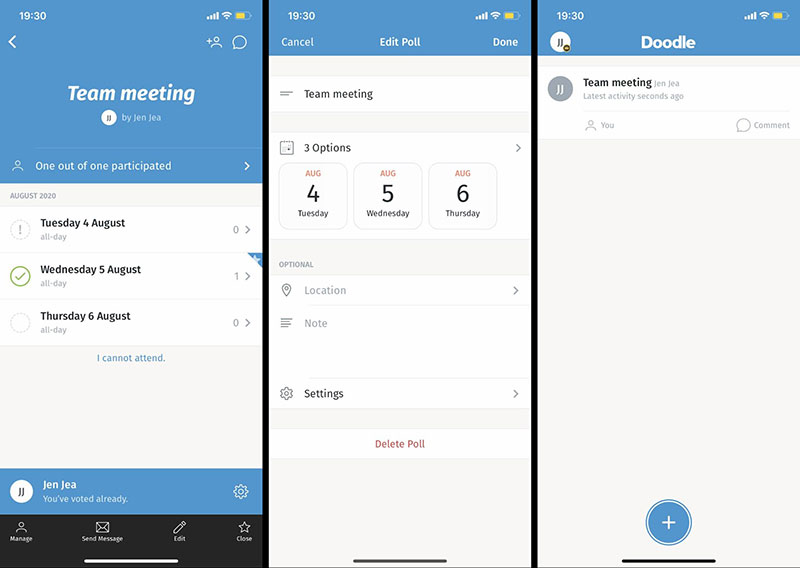
Doodle Pro nudges the people who haven’t responded. When2Meet sends nothing.
86% of scheduling software users rate automated reminders as important or highly important (GetApp, 2024), and with large groups it’s the manual chasing of non-responders that quietly wrecks your efficiency. A dedicated appointment reminder app solves this completely for teams that need it at scale.
A hiring team running an 8-person panel interview on When2Meet would lose real time on follow-up. Doodle Pro just does it for them.
How Do Doodle and When2Meet Approach Privacy and Data?
The privacy gap here is wide and easy to miss. When2Meet collects almost nothing, while Doodle gathers account data, usage data and email addresses, and shares identifiers with advertising partners including LiveRamp (Doodle Privacy Policy, 2024).
What Doodle Collects
Doodle is GDPR-compliant and encrypts data in transit and at rest with SSL on AWS. Compliance and collecting little data aren’t the same thing, though.
What it collects and processes runs to:
- Account registration data, meaning name, email and company.
- Invitee email addresses that organizers type in.
- Usage and log data for internal analytics.
- Hashed email identifiers passed to LiveRamp for targeted advertising.
- Browser, IP and device data for session management.
Poll data gets deleted after 90 days of inactivity, but log data is kept indefinitely. For EU organizations, Doodle’s reliance on US-based sub-processors (AWS among them) means Standard Contractual Clauses come into play, which meetergo’s 2026 GDPR analysis flags as a compliance risk for data controllers.
What When2Meet Collects
When2Meet keeps only what people choose to enter, a display name and their grid selections. No email, no account, no cookies wired to external ad networks.
There’s barely a privacy policy to assess in the corporate sense, because there’s almost nothing being collected. The site runs on display ads, but participant identity data isn’t part of that.
From an IT procurement angle, When2Meet usually needs no review at all. Doodle often does, especially in regulated sectors like healthcare, finance or government, where the sub-processor chain and the ad-data sharing create due-diligence obligations.
What Are the Main Limitations of Doodle?
Doodle is good at one specific thing, finding a time slot across a group. Step outside that and the limitations pile up quickly.
Free Tier Friction
The 10 time-slot cap on free polls is a real constraint for anything complex. Doodle’s own data says 5 options works best, but plenty of organizers want 8 to 12 to give people genuine room, and getting there means Pro.
Free also holds back the maybe vote, since the “if need be” option is paid-only. Its ads show up both in the creation interface and in the shared poll everyone sees, and some G2 reviewers call the free plan “unprofessional” for external-facing scheduling (G2, 2024).
Calendar Sync Reliability
Calendar sync is paid-only, and even when you’re paying it sometimes lags. Capterra and G2 users report sync delays where a freshly created conflict still shows as free until the next manual refresh.
It also doesn’t support CalDAV, which Proton Mail, Fastmail and self-hosted calendars rely on. For anyone outside the Google and Microsoft orbit, that’s a hard gap (meetergo, 2026).
What Doodle Cannot Do
A few things sit outside what it can do:
- No recurring meeting creation inside Doodle itself, so you fall back on a manual calendar workaround.
- Poll non-responders get no calendar invite when a time is confirmed.
- No payment collection on standard plans.
- No built-in approval workflows or role-based access on free or Pro.
For teams that need a more structured appointment scheduling workflow, the polling model on its own may not cover the whole coordination cycle.
What Are the Main Limitations of When2Meet?
When2Meet does exactly one thing, which is both its strength and its hard ceiling.
No Confirmation or Follow-Through
The moment the organizer reads the best time off the heatmap, When2Meet’s job is finished. No confirmation email, no calendar-invite generator, no meeting-link creation, no reminders.
Online booking systems pull median no-show rates down to 1.8%, against 5.9% for traditional scheduling (Koalendar, 2025). When2Meet supplies none of the confirmation machinery behind that gap. A proper appointment confirmation system is one of the simplest ways to close that no-show gap, and it’s something When2Meet doesn’t touch.
Everything after the overlap lands on the organizer by hand: telling people the confirmed time, creating the calendar event, making a video-call link and sending a reminder before the meeting.
Mobile and Time Zone Problems
Half of all meetings start late (Flowtrace, 2025). A tool that’s awkward on mobile and muddled across time zones actively feeds that.
On a phone, the drag-to-select grid throws up accidental selections constantly. And the time zone picker lists cities in an odd order, which causes real scheduling mistakes for distributed groups (Bloom.io review, 2022).
There’s no auto-detection of anyone’s time zone either. Each participant sets their own at login, and if they pick the wrong one their availability shows up wrong, with no flag and no way to fix it.
What When2Meet Cannot Do
These gaps are total rather than partial:
- No calendar sync of any kind.
- No automated reminders or follow-up notifications.
- No meeting-link generation.
- No booking page or recurring scheduling.
- No way to confirm or lock a final time inside the tool itself.
For anyone weighing a When2Meet alternative with more automation, those gaps are the usual reasons people leave.
When Should You Use Doodle Instead of When2Meet?
Use Doodle when the context is professional or recurring, or when you need actual confirmation infrastructure. It earns the paid-tier cost the moment it takes manual follow-up off a team that schedules meetings often.
| Scenario | Why Doodle Fits |
|---|---|
| Client-facing meeting coordination | Branded polls No ads Polished participant view |
| Teams using Google Calendar or Outlook | Calendar sync Auto double-booking prevention |
| Recruiting and interview scheduling | Automated reminders Reduces no-shows |
| 1:1 booking pages for consultants | Real-time availability No back-and-forth |
| Teams needing admin controls | Roles & permissions Activity reports |
Professional and Business Contexts
It fits when the organizer has an ongoing scheduling relationship with the people involved, not a single coordination event. A recruiter booking 10 candidate interviews a week gets real value out of calendar sync, automatic reminders and response tracking.
Consultants and coaches who want a dedicated scheduling solution for client bookings get good use from the booking page, which lets clients pick a slot straight off a live availability calendar.
When the Paid Plan Justifies the Cost
Doodle reckons it saves up to 45 minutes per week against email scheduling, per the 2023 State of Meetings Report. For a freelancer billing $75/hour, that’s roughly $3,375 of recovered time a year from a tool costing under $84/year on Pro.
That math holds when scheduling is frequent and high-friction. It doesn’t hold for someone running 3 group events a year with no client-facing scheduling to speak of.
When Should You Use When2Meet Instead of Doodle?
When2Meet wins anywhere zero friction and zero cost matter more than features, and that’s a common situation rather than some edge case.
Casual and One-Off Group Coordination
A study group, a club committee, a handful of friends planning a trip. In all of these, asking for an account or a fee would simply kill participation.
It’s the right call when:
- Participants probably don’t have a Doodle account.
- The event is a one-time thing.
- There’s no ongoing scheduling relationship with the group.
- Privacy matters and the group would rather collect as little data as possible.
The heatmap also wins on clarity for big, loosely connected groups. When 30 people from different organizations are hunting for one shared window for a community event, the density map reads faster than a Doodle results table.
Zero-Budget and Privacy-First Contexts
Nonprofits, student organizations and volunteer-run groups often have neither a software budget nor an IT procurement process. When2Meet slots in with nothing to negotiate.
For privacy-sensitive groups, that near-zero data collection is something no Doodle tier can match. There’s no account system to breach and no ad network to hand identifiers to.
Remote employees attend 50% more meetings than in-office staff (Flowtrace, 2025). For distributed community groups running a lot of meetings without a corporate budget, a free tool with no overhead isn’t a compromise; it’s the right fit.
How Do Doodle and When2Meet Compare Overall?
These two aren’t competing for the same user, so framing it as “which is better” misses the point. The question that helps is which workflow each one actually fits.
| Attribute | Doodle (Free) | Doodle (Pro+) | When2Meet |
|---|---|---|---|
| Cost | $0 with ads |
$6.95 /user/mo | $0 always |
| Account required | Organizer only | Organizer only | No one |
| Calendar sync | No | Google Outlook iCal |
No |
| Automated reminders | No | Yes | No |
| Mobile experience | Good app |
Good app |
Poor grid issues |
| Voting options | Yes No |
Yes If need be No |
Drag to select |
| Availability view | Slot-voting table | Slot-voting table | Heatmap grid |
| Best fit | Basic team polls | Professional teams | Casual groups |
Narrowing the Decision
Well, in the end it leans on context more than features. A few things usually settle it.
Start with whether you need calendar sync or automated reminders at all. If you do, it’s Doodle Pro, since When2Meet can’t help there. Then think about who’s responding: if everyone’s likely to be on a phone or new to scheduling tools, When2Meet’s zero-barrier model gets you higher response rates, because Doodle’s account requirement adds friction even when participants themselves never register.
And consider whether this is a one-off or an ongoing workflow. One-time, casual or budget-zero points to When2Meet; recurring professional coordination points to Doodle Pro, or to a more capable group scheduling tool that handles the full booking cycle.
Where Both Tools Fall Short
Neither one is a complete scheduling solution; both stop at finding the overlap. Doodle Pro gets closer to a full workflow with sync and reminders, but it still has no payment collection on standard plans, no recurring event creation and none of the booking-management features dedicated appointment tools include.
For a business that needs a full meeting scheduling workflow with automated confirmations, payments and staff management, both tools hit their ceiling fast. 44% of workers say they dread meetings, and time lost to unproductive ones has doubled since 2019 to 5 hours per week (Asana, 2024).
The right infrastructure trims that overhead; Doodle and When2Meet each trim a slice of it, in different contexts, for different people.
FAQ on Doodle vs When2Meet
Is Doodle better than When2Meet?
That depends on context. Doodle suits professional teams that need calendar sync, reminders and booking pages, while When2Meet suits casual, one-off coordination where zero friction and zero cost beat features.
Is When2Meet completely free?
Yes. There’s no paid tier, no premium upgrade and no hidden costs; it runs on display ads and optional donations. Every feature it has is available to everyone for free, permanently.
Does Doodle require an account?
Organizers do, to create polls; participants don’t. They click the shared link and vote without registering. A free account covers basic group polls (up to 10 time slots, yes/no voting), one booking page and one 1:1 meeting link.
Does When2Meet work on mobile?
Not well. The drag-to-select grid needs precise touch input on a small screen, so accidental selections are common. Doodle, by contrast, has iOS and Android apps. When most of a group responds on mobile, When2Meet finishes with lower completion rates.
Does Doodle sync with Google Calendar?
Yes, but only on paid plans. Pro and Team sync with Google Calendar, Outlook and iCal, while the free tier has none, so organizers there cross-check their availability by hand before setting slots. If you’re working primarily in Google’s ecosystem, it’s also worth knowing how to send a Google Calendar invite directly for simpler internal meetings where Doodle isn’t needed.
Can When2Meet handle time zones?
Partly. Participants set their time zone at login, but nothing auto-detects it, and the picker lists cities in an odd order. Across multiple time zones that produces real scheduling errors, with no built-in way to correct them.
What is the main difference between Doodle and When2Meet?
Doodle is a scheduling platform, with integrations, reminders and a booking workflow. When2Meet is a bare availability poll. Doodle actually confirms meetings; When2Meet just finds the overlap and leaves every follow-up step to the organizer.
Does Doodle send reminders to participants?
Only on paid plans. Doodle Pro sends automated reminders to non-responders ahead of a poll deadline. When2Meet sends none at any point, so all of that chasing falls on the organizer. Teams dealing with a lot of cancelled appointments and no-shows often find that automated reminders are the single biggest lever available to them.
Which tool is better for students?
When2Meet. No account, no cost and no setup make it the obvious pick for study groups and project teams, and the heatmap handles large groups clearly. Doodle’s free-tier limits and account requirement just add friction for casual student scheduling.
Are there better alternatives to both Doodle and When2Meet?
Yes. For professional scheduling with payments, confirmations and staff management, dedicated booking tools cover the full workflow neither of these finishes. Both stop at finding a time; neither manages what happens after the overlap shows up. If you’re ready for something more capable, comparing the best WordPress booking plugins is a good starting point for service businesses that need the full stack.
Conclusion
This conclusion is for an article presenting the core difference between two group scheduling tools that serve genuinely different needs.
When2Meet wins on availability overlap visibility, zero cost, and anonymous participation. Doodle wins on calendar integration, automated reminders, and professional polish.
Neither tool covers the full booking workflow on its own.
For student groups, volunteer teams, and one-off coordination, the heatmap poll is enough. For recurring team meetings, client-facing scheduling, or anything requiring a meeting confirmation and follow-up, Doodle Pro earns its cost.
Match the tool to the context. Use the scheduling software that fits your participant group, your budget, and how much of the coordination process you need automated.

Explore topics

Read Inspiring Customer Stories
Check out how our user set Amelia for his business