



The Doodle vs Google Calendar comparison comes up a lot, usually from teams juggling meetings across organizations, time zones and a patchwork of calendar apps. The thing is, it’s a slightly off question, because these two aren’t really rivals. Doodle exists to work out when a group can meet. Google Calendar is for holding and running your own time once the meeting’s set, alongside everything else in your week.
Most teams end up using both anyway, Doodle to pin down the time and Google Calendar to keep the event once it’s confirmed. So the question worth asking isn’t which one to pick. It’s which job each should own.
What Is Doodle?
Group availability polling is the whole idea behind Doodle. Rather than managing a personal calendar, an organizer proposes a handful of time slots, shares a link, and lets everyone vote on what works.
At the centre of it is the Doodle Poll, a shared grid where invitees mark themselves available or not, no Doodle account required. That no-login bit turns out to be one of its biggest practical wins when you’re coordinating across different organizations.
Beyond that core poll, the platform covers a few scheduling formats:
- The group poll, where multiple participants vote on proposed time slots.
- A booking page, a personal scheduling link tied to your real-time availability.
- A 1:1 invite for proposing specific times for one-on-one meetings.
- A sign-up sheet that collects attendee registrations for events or workshops.
It’s been around since 2007 and now sees over 30 million people a month (Doodle, 2025). The use is overwhelmingly professional: more than 70% come for work scheduling, and executive assistants, entrepreneurs and business leaders make up the biggest groups (Doodle State of Meetings Report, 2023).
Calendar sync with Google Calendar, Outlook and iCal is there, but only on a paid plan. The free tier shows ads and keeps integrations limited.
How Does Doodle’s Booking Page Work?
With the Booking Page, Doodle drops the voting entirely and handles async one-on-one scheduling. The difference from the group poll is that the organizer sets the available windows ahead of time, and the other person just picks one, with no back-and-forth.
Setting it up means connecting your calendar so it pulls real availability, marking out your open windows and sharing the link. From there the other person picks a slot and it drops onto both calendars on its own.
This is the piece that lines up most directly with Google Calendar’s Appointment Schedule, and using it with live calendar sync means paying for Doodle Pro ($6.95/month per user, billed annually).
What Is Google Calendar?
Most people already know Google Calendar as the time-management and event app baked into Google Workspace. The job it’s built for is personal and team calendar management, the everyday stuff: creating events, setting reminders, running recurring schedules and tracking who’s free across an organization.
It plugs natively into Gmail, Google Meet, Google Tasks and Google Drive, and that tight coupling is the main reason teams already on Workspace rarely bother with a separate calendar tool for anything internal.
It carries over 500 million active users a month (Patronum, 2023), which puts it among the most-used productivity tools anywhere.
| Plan | Access to calendar | Appointment scheduling |
|---|---|---|
| Free (personal Google account) | Yes | 1 booking page |
| Workspace Business Starter ($7/user/mo, annual) | Yes | 1 booking page |
| Business Standard ($14/user/mo, annual) | Yes | Multiple booking pages Premium features |
| Business Plus / Enterprise | Yes | Full scheduling DLP Compliance controls |
One calendar can be shared with up to 75 people, and the permissions run from full edit rights down to view-only (EarthWeb, 2023).
What Is Google Calendar’s Appointment Scheduling Feature?
In July 2024, Google swapped its older “appointment slots” for Appointment Schedules. The replacement spins up a public booking page wired straight to your calendar availability. Book a slot and it blocks your calendar automatically and fires a confirmation to both sides.
There are a couple of catches. Business Starter accounts only get 1 booking page, and you need Business Standard ($14/user/mo annual) before you can run multiple. And the booking page itself is plain, since you’re stuck with Google’s default layout and no real design control.
For purely internal scheduling, the more useful tool is “Find a Time”, which lays out an availability grid across everyone invited so you can spot the open windows at a glance.
What Is the Core Difference Between Doodle and Google Calendar?
They’re aimed at different problems. Doodle is trying to answer when can everyone meet, while Google Calendar is busy keeping track of what you’re doing and when. That sounds like a small distinction, but it’s the whole thing. It’s why the two usually end up side by side, with Doodle nailing down the time and Google Calendar holding the event afterward. Framing it as a straight pick rarely helps; the better question is which workflows belong to which tool.
| Dimension | Doodle | Google Calendar |
|---|---|---|
| Primary function | Group availability polling and meeting coordination | Personal and team calendar management |
| Requires participant account | No poll response only |
Yes for full invite functionality |
| Recurring event management | Not supported natively | Full support daily, weekly, custom |
| Cross-organization scheduling | Strong | Limited Google account required |
| Base cost | Free with ads |
Free with Google account |
If you live inside a Google Workspace org and everyone you meet with is on Google Calendar too, Doodle doesn’t add much to routine internal meetings. The moment you’re regularly coordinating with people outside your walls, on whatever calendar apps they happen to use, the poll model starts removing a lot of friction.
Calendly’s 2024 State of Meetings report put it at 43% of workers spending more than 3 hours per week just scheduling and organizing meetings. That overhead is exactly what a tool like Doodle is built to cut into.
How Does Doodle Handle Group Scheduling?
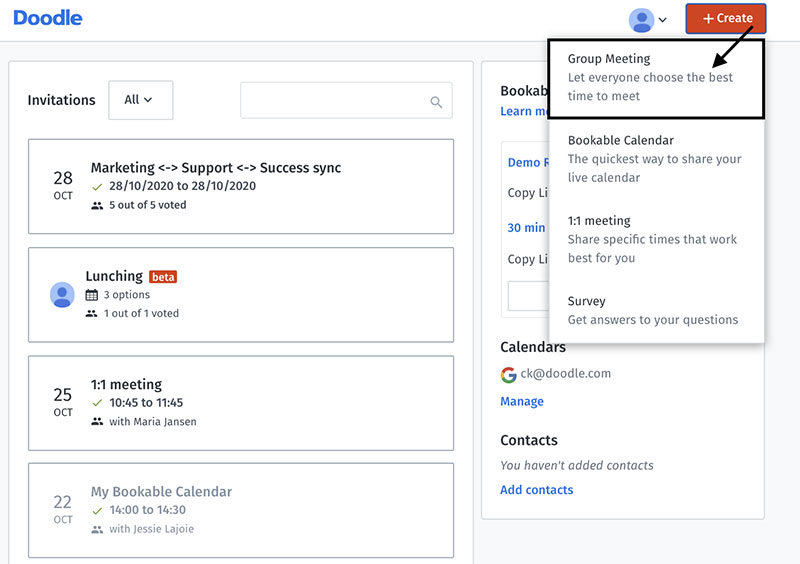
The group poll is the heart of Doodle. An organizer puts up to 10 time slots on the free plan (more if you pay), shares the link, and people mark when they’re free, with no account needed on their end. Then the organizer looks over the responses and locks in the best time.
Every GetApp reviewer who wrote in detail about Doodle’s group scheduling rated it important or highly important, a full 100% (GetApp, 2024). You rarely see a number that clean, and it’s a fair signal that the tool is solving something people actually struggle with.
It earns its place in a handful of ways:
- It handles large groups, well past 10 participants, without the visual mess of a calendar grid.
- Participants can answer “yes,” “no,” or “if need be,” which captures soft preferences a hard yes/no can’t.
- It detects and converts time zones automatically for international invitees.
- It runs entirely in a browser, with no login for the people responding.
Where it stops short is recurring schedules. Every round of coordination is a fresh poll, so teams running the same weekly meeting don’t manage it in Doodle. They use it to find the first slot, then move the ongoing series over to Google Calendar.
How Does Doodle’s Booking Page Work?
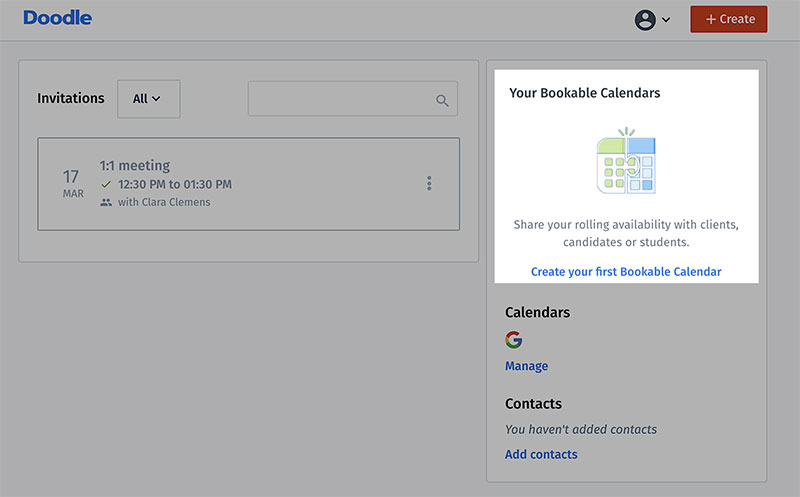
The Booking Page does one-on-one async scheduling without any voting. You set the windows you’re open, Doodle reads your connected calendar to block off anything already booked, and the other person picks from what’s left. The contrast with the group poll is that here the organizer fixes the options in advance instead of floating a list to vote on, which makes it behave much like booking through Google Calendar’s Appointment Schedules.
It needs Doodle Pro, though. Without a paid account you can’t connect a calendar at all, so the page can’t block confirmed times for you.
How Does Google Calendar Handle Scheduling?
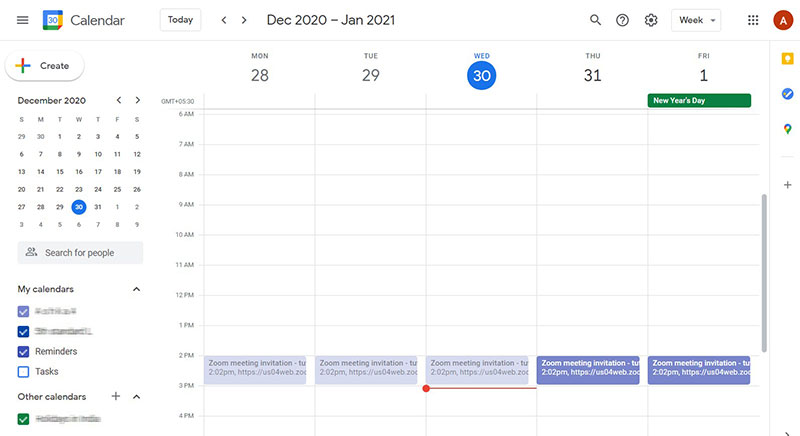
Google Calendar works scheduling from the inside out. It begins with your own calendar and moves outward to attendees, instead of starting from a coordination problem and building back from there.
Most of the scheduling work lands in a few patterns:
- Creating an event, adding attendees and sending invites by email, after which people accept, decline or propose a new time.
- Using Find a Time when there are multiple attendees, to read a shared availability grid and spot open windows.
- Setting up an Appointment Schedule, a public booking page tied to your live availability that you share with clients or outside contacts.
Where it gets rough is external participants. The invite system runs smoothly as long as everyone’s on Google Workspace. Step outside that, and people without Google accounts can still get an email invite, but it’s a clunkier experience for them.
A more recent addition is smart meeting-time suggestions, where it looks at attendee availability and recommends slots as you build the event. It’s a small thing that earns its keep once you’re juggling a team of five or more.
What Is Google Calendar’s Appointment Scheduling Feature?
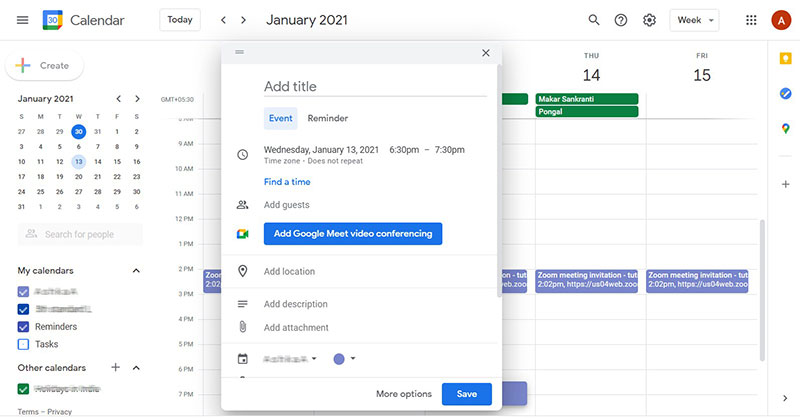
Since July 2024, Appointment Schedules is the only option here, the old appointment-slots system having been retired (Google Workspace Updates, 2024). You set your available hours, Google checks your existing events for clashes, and the booking page surfaces only the slots that are truly free. A booking updates both calendars on its own.
The limitation is cosmetic but real: the page looks like a plain Google Calendar event, with no branding, no custom URL and no form fields past the basics. If a polished, client-facing booking experience matters, this is the spot where Google Calendar trails Doodle’s Booking Page and the dedicated tools.
Teams that want a heavier client-facing setup tend to look at dedicated WordPress booking plugins that sit on top of their calendar and open up full customization.
How Do Doodle and Google Calendar Compare on Integrations?
Integration depth is one area where Google Calendar has a built-in edge. Living inside Google Workspace means Gmail, Google Meet, Google Drive and Google Tasks all connect natively with zero setup. Doodle’s reach is narrower, though it covers what scheduling coordination actually needs.
| Integration | Doodle | Google Calendar |
|---|---|---|
| Google Calendar sync | Yes paid |
Native |
| Microsoft Outlook / iCal | Yes paid |
Limited via import/export |
| Zoom | Yes free and paid |
Yes via Google Workspace Marketplace |
| Microsoft Teams | Yes paid plans |
Yes via third-party connector |
| Zapier / Make | Yes | Yes |
| Slack | Basic | Deeper via Google Chat |
In a Microsoft 365 shop, Doodle’s Outlook integration holds up. Google Calendar’s reach into non-Google calendars is thinner by design, since the whole Workspace setup is built to keep you inside it.
Teams on hybrid stacks, some people on Google and some on Outlook, often find Doodle Pro’s multi-platform sync more workable than trying to bridge the two through Google Calendar on its own. You see this a lot in professional services and consulting, and anywhere that works closely with outside clients on different platforms.
If you’re building this on WordPress and need payments sitting alongside calendar management, a WordPress booking system with payment support may do better than either Doodle or Google Calendar for client-facing work.
Google Calendar links to 30+ tools through the Workspace Marketplace. Doodle leans on Zapier and Make for custom automation, but its native integrations outside scheduling are slim.
How Do Doodle and Google Calendar Compare on Pricing?
Both have a free tier you can actually use. The difference shows up once you need calendar sync, multiple booking pages or team-level controls.
On the Doodle side (2025 pricing):
- Free gives you unlimited polls, capped at 10 time slots per group poll, with no calendar sync and ads shown to participants.
- Pro ($6.95/month per user, billed annually; $14.95/month billed monthly) adds calendar sync, unlimited booking pages, an ad-free experience and Zoom and Google Meet integration.
- Team ($8.95/month per user, billed annually) layers on admin controls, team management, shared team availability and Microsoft Teams and Webex integration.
On Google’s side (2025 pricing):
- Free, with a personal Google account, covers full calendar functionality and 1 booking page.
- Google Workspace Business Starter ($7/user/month, annual) includes Calendar with 1 appointment schedule per user.
- Business Standard ($14/user/month, annual) brings multiple booking pages, custom meeting durations and payment collection via Stripe.
If you’re already paying for Google Workspace, the scheduling features cost nothing extra at Starter and get genuinely more capable at Standard. Doodle’s pricing starts to justify itself when your team spans multiple calendar platforms or keeps scheduling with external people who aren’t on Google.
Small businesses weighing up scheduling software options often land on the same realization: the right pick has less to do with price than with whether most of their scheduling happens inside one organization or across many.
Which Tool Works Better for Teams Without a Shared Calendar System?
This is the scenario Doodle was built for. When the participants come from different organizations, use different calendar apps, or share no scheduling infrastructure at all, the poll model knocks down every account-based barrier.
86% of workers now sit in meetings with at least one remote participant (Owl Labs, 2023). That’s relevant here because remote and cross-organization meetings are precisely where shared calendar access falls apart.
When Doodle Wins on Cross-Organization Scheduling
There’s no Google account to make and no Outlook login to chase down. People open a link and click the slots that work. That near-zero entry barrier is Doodle’s clearest advantage over Google Calendar when the meeting reaches outside your organization.
It pulls ahead in situations like these:
- Client discovery calls with people outside your organization.
- Recruiting interviews where candidates are using personal email accounts.
- Multi-organization project kick-offs across consultants, agencies and vendors.
- Event coordination among teams that share no calendar platform.
McKinsey’s hybrid-work research found that close to a third of all meetings now cross multiple time zones (Microsoft, 2025). Doodle’s automatic time zone detection does that conversion for each participant, whatever their calendar setup looks like.
When Google Calendar Works Better for Internal Teams
When everyone you’re scheduling with already lives on Google Workspace, Doodle just adds a step. “Find a Time” shows a live availability grid across all the invited Workspace users in seconds. You skip the poll, the link sharing and the wait for replies entirely.
How Do Doodle and Google Calendar Handle Recurring Meetings?
This is the sharpest functional gap of the lot. Google Calendar handles recurring meetings natively and in full, while Doodle has no recurring polls or recurring events of any kind.
Remote employees now sit through an average of 25.6 meetings per week, against 14.2 for people fully in the office (Claryti, 2024). Plenty of those repeat, the standups and 1:1s and weekly syncs, and that’s the kind of thing Google Calendar manages and Doodle simply can’t.
Google Calendar’s Recurring Event Controls
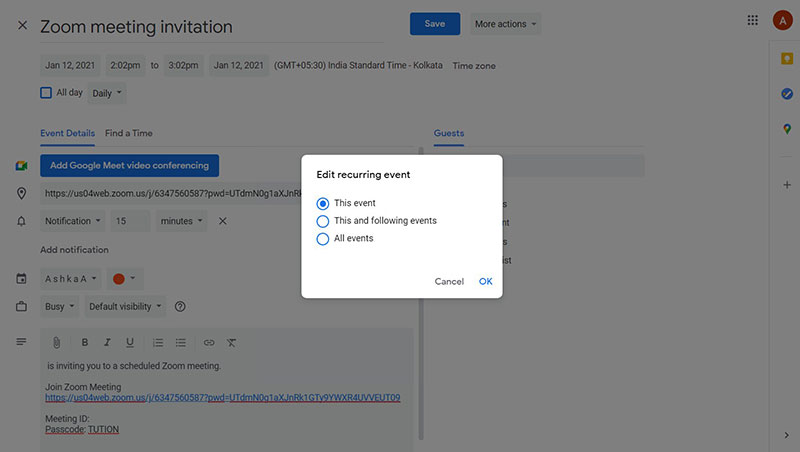
Recurring support runs daily, weekly, monthly, yearly and custom intervals, and you can edit a single instance or every future one from any occurrence. In practice that covers:
- Setting an end date or letting it repeat indefinitely.
- Editing one event without touching the rest of the series.
- Custom recurrence rules like every 2 weeks or the first Monday of the month.
Google also brought custom recurrence to Appointment Schedules in July 2024 (Google Workspace Updates), so the booking page picked up recurring functionality too.
What Doodle Does Instead
Every Doodle round stands on its own. There’s no “repeat this poll” or “set up a recurring series” button anywhere. So teams use it to find the first meeting time and then build the recurring series by hand in Google Calendar or Outlook, which is the division of labour these two keep falling into.
For a team with a steady weekly standup or monthly review, that hand-off costs nothing once it’s set. But if your cadence keeps shifting and every change means re-coordinating, the missing recurring support turns into a real limitation, and it’s worth weighing before you commit to either.
How Do Doodle and Google Calendar Compare on Privacy and Data Control?
For enterprise and regulated-industry buyers, data privacy is where the two pull apart most sharply.
Google Workspace Enterprise carries SOC 2, ISO 27001 and a HIPAA Business Associate Agreement (BAA), and the Enterprise tier adds Data Loss Prevention controls, audit logs and data-residency options (Google Workspace Security documentation, 2024).
| Privacy Factor | Doodle Free | Doodle Paid | Google Workspace Enterprise |
|---|---|---|---|
| Ads shown to participants | Yes | No | No |
| GDPR compliance | Partial DPA available on request |
Yes DPA included |
Yes full DPA |
| HIPAA BAA available | No | No | Yes |
| Data residency control | No | No | Yes Enterprise Plus |
| Audit logs | No | No | Yes |
For an EU-based organization, Doodle’s free tier carries a specific risk. It runs advertising services including Google AdSense, and its own privacy policy confirms ads can be targeted on poll content (Doodle Privacy Policy, 2024). Any GDPR-bound organization that puts participant email data into polls is opening a compliance exposure there, one the paid tiers close off with a formal Data Processing Addendum.
The infrastructure runs on Amazon Web Services with EU servers in Ireland, data in transit is encrypted with TLS 1.2, and stale polls auto-delete after 90 days of inactivity (Doodle Help Center).
For healthcare, legal and financial organizations, Google Workspace Enterprise’s compliance stack is meaningfully stronger than Doodle’s on every certification that counts. Any healthcare team that needs HIPAA compliance has no real path with Doodle, at any tier.
When Should You Use Doodle Instead of Google Calendar?
Reach for Doodle when the problem is coordination, across different people, platforms or organizations, rather than managing your own time.
Nearly a third of meetings now span multiple time zones, a 35% jump since 2021 (Microsoft, 2025). That rise in distributed, cross-platform coordination is the exact use case Doodle was designed around.
The Right Scenarios for Doodle
The strongest case is external participants with no shared calendar: clients, vendors, candidates or collaborators who’d otherwise hit friction just accepting a Google Calendar invite.
Large groups are another, since the “Find a Time” grid gets hard to read and act on much past five or six people, whereas a poll scales cleanly to 15 or 20 without the visual overload. And it shines when the meeting time is genuinely undecided and the organizer needs input, because the “if need be” option gathers the soft availability signals a plain calendar invite never captures.
Consulting firms are a good live example. They lean on Doodle to set up the first client discovery calls across organizations, before any shared calendar relationship exists, then shift to Google Calendar once the ongoing project meetings settle in.
When Doodle Adds No Value
Scheduling a 1:1 with a colleague who’s already in your Google Workspace org is one: Doodle just adds a step, so use Google Calendar.
The same goes for managing recurring internal meetings, event reminders or daily schedules, which all belong in a calendar app rather than a coordination tool. Running your own schedule through Doodle polls only piles on overhead and costs you the visibility a real calendar platform gives you.
When Should You Use Google Calendar Instead of Doodle?
Use Google Calendar when the job is managing time rather than negotiating it.
Employees clocking over 392 hours per year in meetings need a calendar that keeps all of it visible, manageable and tied to the rest of their work (Flowtrace, 2025). That’s not a job Doodle does; it’s squarely Google Calendar’s.
The Right Scenarios for Google Calendar
Internal team scheduling is the obvious one: when everyone’s on Google Workspace, they already see each other’s availability, and “Find a Time” settles group scheduling inside the org in seconds. Recurring meetings and standing schedules are another, the weekly standups, monthly reviews and quarterly planning that Google Calendar handles natively with full edit controls.
And if your clients have Google accounts and you just want a simple, no-cost booking page tied to your calendar, the Appointment Schedule feature gets you there with no extra tool.
Service-based businesses that need a booking flow with payment processing and client management often extend Google Calendar with a dedicated WordPress calendar plugin to round out the client-facing side.
When Google Calendar Falls Short
Coordinating outside Google Workspace is the main weak spot. People without Google accounts can get an email invite, but they can’t touch “Find a Time,” see the shared availability grids or go through the native invite flow. If half your meetings involve external contacts, Google Calendar on its own gives you a two-tier experience: internal meetings run clean, external ones need manual workarounds. That gap is exactly where Doodle steps in.
Teams trying to schedule appointments more effectively often arrive at the same setup: both tools at once, Google Calendar for internal scheduling and personal time management, Doodle for anything that crosses an organizational boundary. Neither one covers the whole range by itself.
Well, the honest answer is that most professionals who think they’re choosing between these two actually need both. It’s less about which one wins and more about handing each the work it’s good at.
FAQ on Doodle vs Google Calendar
Is Doodle the same as Google Calendar?
No. Doodle is a group-scheduling coordination tool built around availability polling, while Google Calendar is a full calendar management platform. They tackle different problems, and most teams run both instead of picking one.
Can Doodle sync with Google Calendar?
Yes, though only on paid plans. Doodle Pro ($6.95/month billed annually) connects to Google Calendar with two-way sync, so a confirmed poll drops the event onto your calendar automatically. The free tier doesn’t sync at all.
Which is better for scheduling a meeting with multiple people?
Doodle. The group poll handles large groups cleanly, asks nothing of participants account-wise and includes that “if need be” response. Google Calendar’s “Find a Time” grid is fine internally but starts to struggle past five or six attendees. For more options in this space, it’s worth looking at dedicated group scheduling apps alongside both tools.
Does Google Calendar have a feature like Doodle polls?
Not really. The closest thing is the Appointment Schedule booking page, which lets people pick from your open slots. It doesn’t do group voting on proposed times the way a Doodle poll does.
Is Doodle free to use?
Yes. The free tier runs unlimited polls, capped at 10 time slots per group poll, with no participant account needed. What you give up is an ad-free experience and calendar sync. Paid plans start at $6.95/month per user (billed annually) and lift both limits.
Can you use Doodle without a Google account?
Yes. Anyone responding to a poll needs no account of any kind, Google included. That zero-login setup is one of Doodle’s strongest cards for scheduling across organizations or with outside contacts.
Does Google Calendar work with Outlook and iCal?
Partly. It does iCal import and export but only limited native two-way sync with Outlook. If you need to sync Google Calendar with Outlook reliably, there are dedicated methods worth exploring. Doodle Pro actually handles Outlook more directly, which helps teams running mixed Google and Microsoft setups.
Which tool is better for recurring meetings?
Google Calendar, easily. It supports daily, weekly, monthly and custom recurring events with full series editing, while Doodle has no recurring poll or event at all. Teams usually use Doodle once to find the time, then run the series in Google Calendar.
Is Doodle GDPR compliant?
On paid tiers, yes; on the free tier, only partly. The free plan uses ad-targeting services that raise compliance concerns for EU organizations, whereas paid plans include a formal Data Processing Addendum. Google Workspace Enterprise goes further still, with certifications like HIPAA and SOC 2.
Should I use Doodle or Google Calendar for client meetings?
Use Doodle when clients sit outside your organization or on different calendar platforms. Use Google Calendar’s Appointment Schedule when they have Google accounts and a simple booking page does the job. For service businesses that need full booking flows, a dedicated meeting scheduler often beats both.
Conclusion
This conclusion is for an article presenting the core differences between Doodle vs Google Calendar and how each tool fits a specific scheduling workflow.
Neither tool is universally better. Doodle handles cross-organization meeting coordination, group availability polling, and external participant scheduling without requiring any account setup.
Google Calendar owns recurring event management, internal team scheduling, and long-term calendar visibility, especially inside a Google Workspace environment.
Most teams need both. Use Doodle to coordinate across organizations and platforms. Use Google Calendar to manage everything after the time is confirmed.
If your scheduling needs go beyond what either tool offers, dedicated meeting scheduler solutions or a group scheduling app may cover the gaps.

Explore topics

Read Inspiring Customer Stories
Check out how our user set Amelia for his business