



Photographers rarely lose a booking because they’re slow at the shoot. They lose it in the emails. The client asks about a date and you send your availability. They go check with their partner, and by the time the contract and deposit are sorted, a week has gone by.
That back-and-forth after a client inquiry ranks as the single biggest workflow challenge for 36% of U.S. professional photographers, according to a 2026 HoneyBook study of 425 professionals in the field.
Photography booking apps are built to shorten that stretch. Scheduling, contracts, deposits and client galleries sit in one connected workflow, so an inquiry can become a signed, paid session on the calendar without a dozen emails in between. Solo shooters use them. So do wedding studios and teams with several photographers booking from one account.
Photography Booking Apps To Try
The list below is ranked from best overall down, not sorted by price or niche.
I put Amelia and Trafft first on purpose. With both of them, the photographer owns the booking system instead of renting space on someone else’s platform, and both have a free starting point.
After those two, the order follows how much of a working studio each tool actually covers. The proposal-to-payment CRMs come first, and the tools that only handle one part of the job sit near the bottom.
- Amelia, if you want to own your booking system on WordPress. There’s a free Lite plan, and paid plans start at $49/year.
- Trafft is the one to try free before paying for anything. Free plan; paid from around $8/month.
- HoneyBook, for proposals and invoicing inside one CRM. From around $29/month billed annually.
- Pixieset puts gallery design and print sales first. Free tier with commission; paid from $10/month ($8/month billed annually).
- Tave (VSCO Workspace), built for complex, multi-brand studios. From $22.49/month.
- Sprout Studio, when you want CRM and galleries under one login. From $19/month billed annually.
- Studio Ninja uses photographer-specific language and costs less to start. From $16/month.
- Iris Works, for lead capture straight from social media. From $14.95/month.
- ShootProof, for print sales with zero commission. Free tier; paid from $10.99/month billed annually.
- Acuity Scheduling handles pure scheduling and isn’t photography specific. From $16/month billed annually.
Amelia, best for photographers who want to own their booking system on WordPress
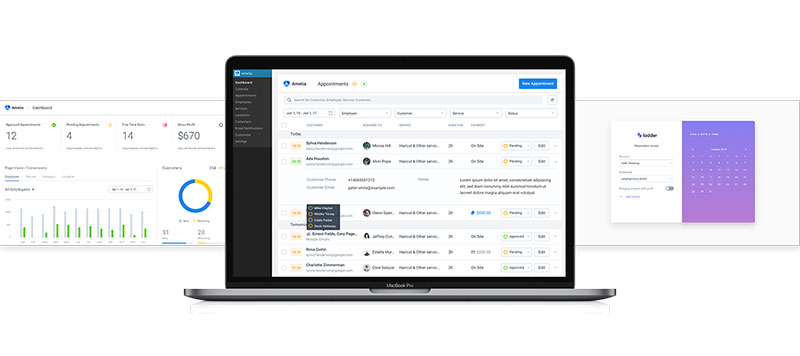
Amelia lives inside the WordPress dashboard as a self-hosted plugin. Appointments and packages run from there, and so do ticketed events if you host workshops.
If your site is already on WordPress, the appeal is simple. Booking data stays on your server, not a third party’s.
If you already maintain a stack of WordPress plugins for photographers, Amelia installs into that same environment. You don’t get another login or another monthly bill.
- Google Calendar and Outlook sync, both directions
- Stripe, PayPal, and card payments through a WordPress booking system with payment gateways built into the widget
- Zoom integration for remote consultations
- Group bookings and ticketed events for workshops
- Standing shoots handled through recurring appointment scheduling, so you’re not rebuilding the form every time
A free Lite version is on WordPress.org with one employee and basic booking.
Paid plans run $49 to $259 a year across Starter, Standard, Pro, and Elite, and Standard, Pro, and Elite also come as lifetime licenses. Watch the tiers, though. Starter only supports Square for payments. Stripe and PayPal start at Standard, and video meetings such as Zoom need Pro or above. The pricing page lists what each one unlocks.
| Pros | Cons |
|---|---|
| Data ownership since it runs on your own WordPress install | Integrations like Zoom and WooCommerce sit on higher tiers |
| Polished booking widget, praised for its front-end flow | Free Lite plan covers one employee |
| Annual pricing rather than monthly subscription creep | Some setup time on first install |
On Capterra, reviewers keep calling the pricing reasonable. The same reviews mention setup time on the admin side, which matches my experience with most feature-heavy WordPress plugins. The demos are the quickest way to see the client-facing flow before installing.
Worth knowing who stands behind the plugin: Amelia has shipped from the same company since 2018. Touch Me Soft d.o.o., the Belgrade studio that launched it at WordCamp Europe, now trades as Melograno Venture Studio, so the name changed rather than the owner. Comparison pages that only list features almost never mention it.
Trafft, best for photographers who want to start free before paying for anything
You can run Trafft as a WordPress plugin or as a hosted SaaS platform. So the free tier works even if your site isn’t on WordPress at all.
It makes sense for photographers who aren’t sure online booking fits how they work yet and don’t want to spend money finding out.
The free tier is the reason to look. It’s a usable starting point, not a stripped demo that expires after two weeks.
- Stripe and PayPal payment collection on Growth and above, with Square payments on the entry Mini plan
- SMS and email reminders to cut down on missed sessions
- Google Calendar sync for real-time availability
- Zoom integration for virtual portfolio reviews or consultations
Basic booking is covered on the free plan, with a capped feature set. Deposits and the deeper integrations need a paid tier.
Paid tiers run from $7.99 a month on Mini (calendar sync, Square payments) through Growth at $19.99 (multiple payment methods, custom fields) and Professional at $39.99 (deposit payments, recurring appointments, packages) up to $64.99 a month on Business (API, webhooks, WhatsApp messaging), per Trafft’s 2026 Capterra listing.
What you get on the free plan is real functionality. Payment collection is built in, SMS reminders are there, and you can pick the plugin or the standalone SaaS.
Plan around the deposit feature if that matters to you. It’s what most photographers want at booking, and it starts on the $39.99 Professional plan. Published pricing also varies between review sites, so check Trafft’s own pricing page before you commit. And if you go with the WordPress plugin, uptime depends on your own hosting.
Capterra reviewers rate Trafft 4.9 out of 5 across 49 reviews, with value for money its strongest sub-score. The demos show the booking flow end to end.
A lot of “free plan” booking tools quietly switch off payment collection or calendar sync. Trafft’s free plan is limited, but it isn’t crippled on purpose. A solo photographer can take real bookings on it while deciding whether to upgrade.
HoneyBook, best for photographers who want proposals and invoicing bundled with booking
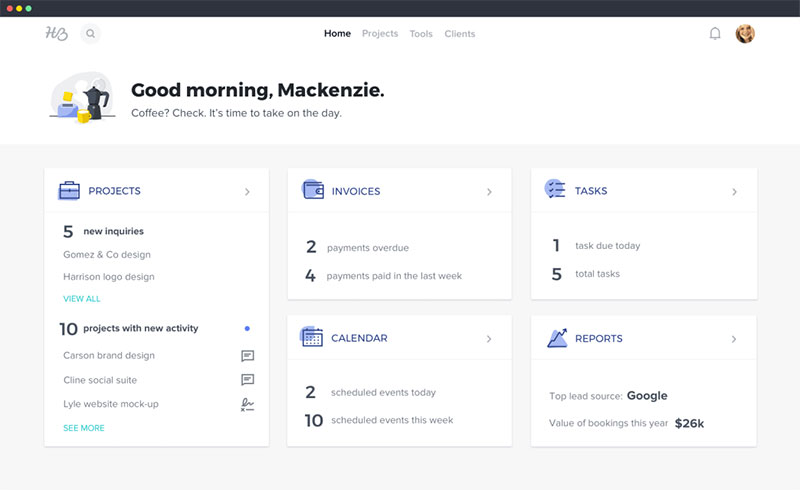
HoneyBook wasn’t built for photographers specifically. It’s a client-experience platform for creative freelancers in general.
Still, if you care about the sales side of the business as much as the calendar, it’s the strongest option here. Proposals, contracts, invoicing and a visual CRM pipeline all live in the same place.
| Best for | Proposals, contracts, and invoicing under one roof |
| Standout | Smart Files combining a proposal, contract, and invoice into one client document |
| Pricing | From around $29/month annually, up to around $109/month for Premium |
- Automation workflows that trigger emails after a booking is signed
- QuickBooks integration on Essentials and above
- Client portal with mobile app access
- Reports and analytics on booking conversion
The mobile app is polished and the automation library is big. It also works well if you shoot photos but also do design, planning or DJ work under the same brand.
There’s no free plan, only a free trial. Automation needs the Essentials plan. And the native galleries are brand new and launched without a print store.
HoneyBook’s Starter plan price nearly doubled during a February 2025 restructuring, according to Agiled’s 2026 comparison guide. If budget is the deciding line for you, factor that in.
Native client photo and video galleries arrived in July 2026, with unlimited storage on Premium plans. Because early feedback confirms there’s no print store yet, photographers who rely on print sales may still pair HoneyBook with a dedicated gallery platform such as Pic-Time.
Pixieset, best for photographers who prioritize gallery design and print sales
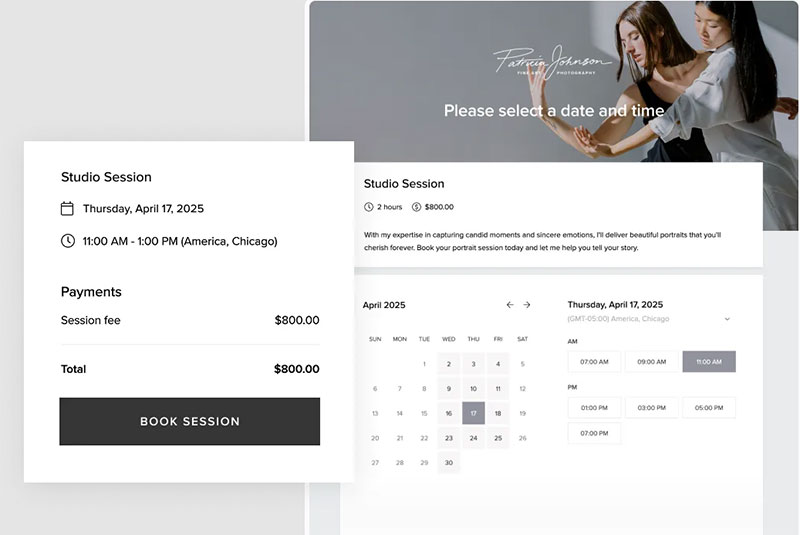
Pixieset made its name on gallery presentation. Business management came later, and you can see that in how the pricing tiers are built.
You get a client gallery, a portfolio website and a print store on one platform. That suits photographers who mostly need a nice way to deliver and sell images and don’t want a full CRM.
The print store has lab fulfillment built in, so clients order prints right from their gallery without a separate checkout. That matters especially for wedding photographers, whose clients may want physical products such as prints, albums, and wedding photo books after the final gallery is delivered.
| Plan | Price | Notes |
|---|---|---|
| Free | $0 | 3GB storage, 15% commission on store sales |
| Basic | $10/mo | 10GB storage, removes commission and Pixieset branding, adds custom domain |
| Plus | $20/mo | 100GB storage |
| Pro | $30/mo | 1TB storage |
| Ultimate | $50/mo | Unlimited storage |
Those are monthly prices. Annual billing lowers each tier, with paid plans starting at $8 a month.
The gallery builder is easy to pick up, and clients get a good experience on mobile. Since the website and store are included, you don’t need a separate portfolio site.
On the downside, the free tier’s 15% commission eats into print sales fast. Capterra reviewers also keep flagging slow support responses.
Another complaint that comes up again and again is that bulk downloading is deliberately awkward. Once you have years of galleries on the platform, photographers say that makes leaving hard.
Paid plans drop the 15% commission completely. So the real question isn’t $0 versus $10 a month. It’s whether your print sales are high enough that the commission would cost more than the subscription.
Tave, now VSCO Workspace, best for established studios running complex, multi-brand workflows
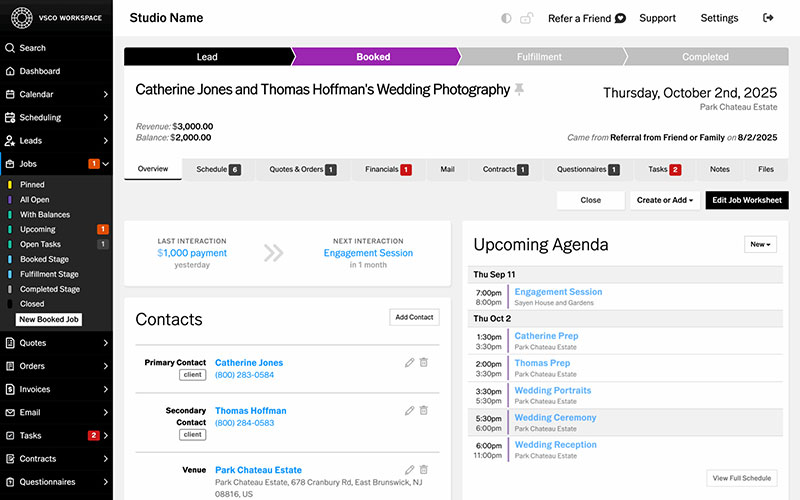
VSCO acquired Tave in May 2025 and completed a rebrand to VSCO Workspace in August 2025, though the underlying product and pricing structure carried over largely unchanged (Agiled, 2026).
It’s a photography-only CRM, and customization is the whole point. Contracts, questionnaires and payments can be configured down to small details. Established studios with multiple brands or associate photographers under one account get the most out of it.
- Questionnaires that auto-fill into contracts
- Online scheduling where clients book and pay without staff involvement
- Workflow automation tied to a job’s stage
- Client text messaging for US and Canada numbers
Solo runs $22.49 a month for 2 users, Boutique $31.49 a month for 6 users, and Studio $44.99 a month for 10 users, with extra seats at $4.99 each.
Established wedding and portrait studios have trusted it for years, and the higher tiers support multiple brands.
There’s no mobile app, though. Contracts and quotes open in mobile Safari instead. You also won’t find project management, task boards or built-in accounting.
The acquisition split long-time users in transition reviews. Some care most about feature continuity. Others are uneasy that the new parent company is a creative editing brand, not a business software one.
A studio CRM without a mobile app is unusual at this price in 2026. If you manage jobs from your phone between shoots, you’ll notice that gap more than any feature chart suggests.
Sprout Studio, best for photographers who want CRM and galleries under one login
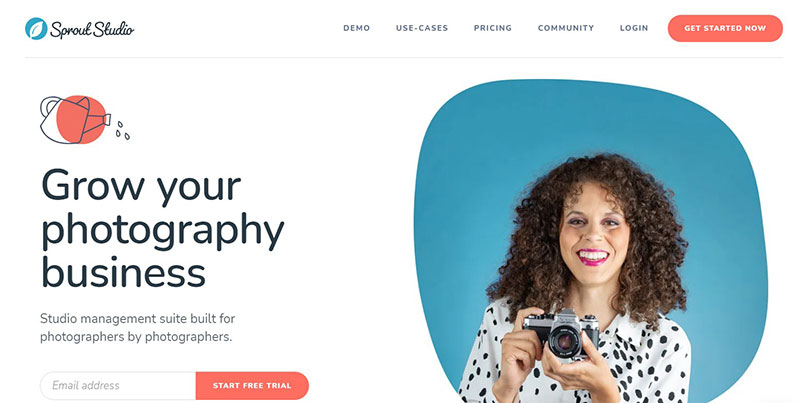
Sprout Studio calls itself studio scheduling software made around photography. It isn’t a general calendar tool with a photography skin.
CRM, online galleries, proofing and print fulfillment share one dashboard. If you’re tired of stitching a gallery tool to a separate CRM, this is the kind of tool to look at.
| Plan | Price, annual billing | Storage |
|---|---|---|
| Lite | $19/mo | 50GB, 10 active shoots |
| Basic | $36/mo | 100GB, 20 active shoots |
| Pro | $51/mo | 200GB, unlimited shoots |
| Unlimited | $69/mo | Unlimited storage, users, and brands |
Monthly billing runs $24, $46, $66, and $89 respectively.
Leads, galleries and print orders are all in one hub, and lab integration handles fulfillment. Every tier includes email marketing, which I didn’t expect at the Lite price.
Going from Lite to Basic nearly doubles the price for not much more storage. And if you switch platforms later, you’ll be exporting years of client jobs, galleries and records in one go.
Sprout Studio is based in St. Catharines, Ontario, and its reviews consistently rate customer support above every other category.
Keeping CRM and galleries this close together is handy day to day. The flip side is that client history and photo delivery end up in the same export file, which is a real trade-off compared to tools that keep them apart.
Studio Ninja, best for photographers who want industry-specific language at a lower entry cost
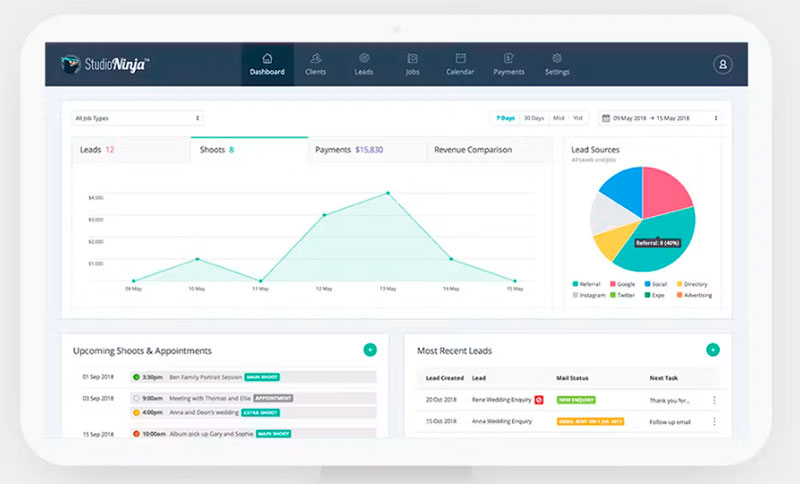
Studio Ninja was acquired by ImageQuix in December 2023 and now operates under the Captura brand, though it kept its original name and photographer-focused interface (Agiled, 2026).
The interface talks about jobs, shoots and galleries instead of generic CRM terms. It also connects directly with Pic-Time, ShootProof and Pixieset.
Those gallery integrations are why most people choose it. You keep the gallery platform you already use and don’t have to build galleries from scratch.
- Xero and QuickBooks sync for accounting
- Client portal with multilingual forms
- Workflow automation for shoots, emails, and tasks on Pro and above
- Online booking forms on Pro and above
Starter runs $16 a month for 1 user and 5 active jobs, Pro $27 a month for 3 users and unlimited jobs, and Master $40 a month for unlimited users across 3 brands.
It’s cheaper to get into than most CRM competitors, and the referral program can lower your subscription further.
The catch is the Starter plan. It doesn’t just limit online booking forms and workflow automation, it leaves them out entirely. Most solo photographers end up on Pro by default.
Reviewers like the client management and workflow creation, although overall satisfaction trails a few competitors.
That Starter gap is easy to miss on a features page. If you picked Studio Ninja to save money, you may find the “clients book themselves” workflow you assumed was standard isn’t there.
Iris Works, best for portrait and wedding photographers who want built-in lead capture
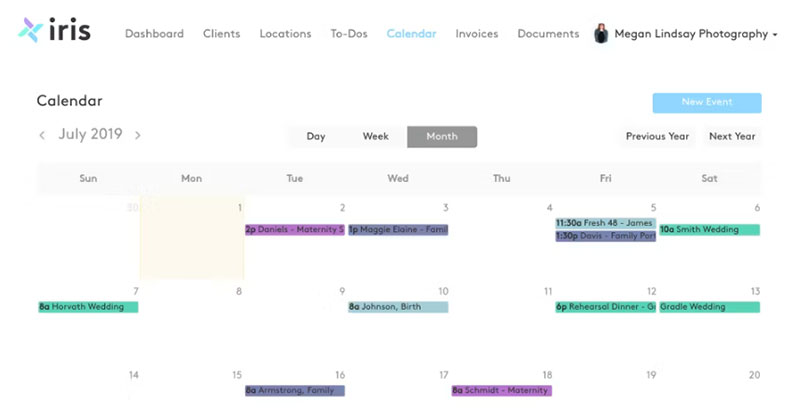
Iris Works is mostly about leads. New inquiries from your website and social accounts land on one lead page, making it easier to keep track of leads as they move from an initial inquiry toward an actual booking.
If you’re still copying inquiries out of Instagram DMs by hand, that’s the problem it fixes. Portrait and wedding photographers get the most out of it.
The lead page connects straight to Facebook and Instagram, so photography marketing posts turn into bookable leads without a separate automation tool in the middle.
- Integrated scheduling where clients pick their own open slot
- Location scouting and management for on-location sessions
- Custom questionnaires tied to each booking
- E-contracts with free templates included
Starter runs $14.95 a month, Basic $29.95 a month with workflow automation, Pro $39.95 a month adding either online booking or email marketing, and Pro Plus $49.95 a month with both.
That’s the lowest official entry price among the CRM-style tools here. Lead capture is built in, not bolted on, and support gets strong ratings.
The plan structure is confusing, though. Starter includes online booking but no workflow automation. Basic adds automation and drops online booking. Pro makes you choose between online booking and email marketing, so if you want both you’re paying for Pro Plus. There’s also no built-in gallery delivery, so you’ll need an integration such as Pic-Time or ShootProof.
Iris Works holds a 4.6 out of 5 rating across 218 Capterra reviews, with customer service its highest-rated category at 4.8.
Social lead capture without a Zapier bridge is rare at this price. Most competitors skip social integration or save it for the top tier.
ShootProof, best for photographers who sell prints and want zero commission
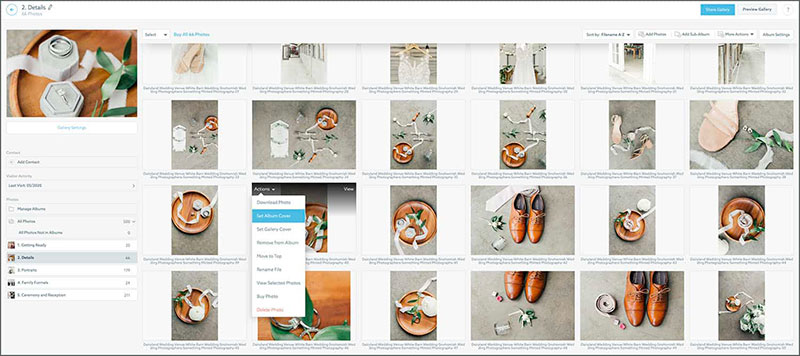
ShootProof doesn’t take a commission on sales. Not on any plan, and that includes the free tier, which is where most gallery competitors keep a percentage.
Client galleries, proofing, contracts, invoicing and lab-fulfilled print sales are all on one platform. Pricing goes by photo volume instead of feature tier.
If you sell prints regularly and want to keep all of that revenue, start here.
| Plan | Photos | Price, annual billing |
|---|---|---|
| Free | 100 | $0 |
| 1,500 Photo Plan | 1,500 | $10.99/mo |
| 5,000 Photo Plan | 5,000 | $19.99/mo |
| 25,000 Photo Plan | 25,000 | $26.67/mo |
| Unlimited | Unlimited | $50.00/mo |
Clients can install the mobile gallery apps on their home screen, and partner labs cover the US, Canada, Australia, and Europe.
Because pricing scales with photo count, high-volume wedding shooters hit the ceiling a lot faster than portrait photographers.
ShootProof was founded in Atlanta, Georgia in 2010. It owned the Tave CRM from 2019 until VSCO bought it in 2025, and today its own platform focuses on gallery delivery and print sales rather than a full CRM.
Once print sales pick up, a commission-based competitor can cost more than a flat subscription. With zero commission on every tier, what you pay ShootProof stays the same whether you had a good month or not.
Acuity Scheduling, best for photographers who only need scheduling, not a full studio CRM
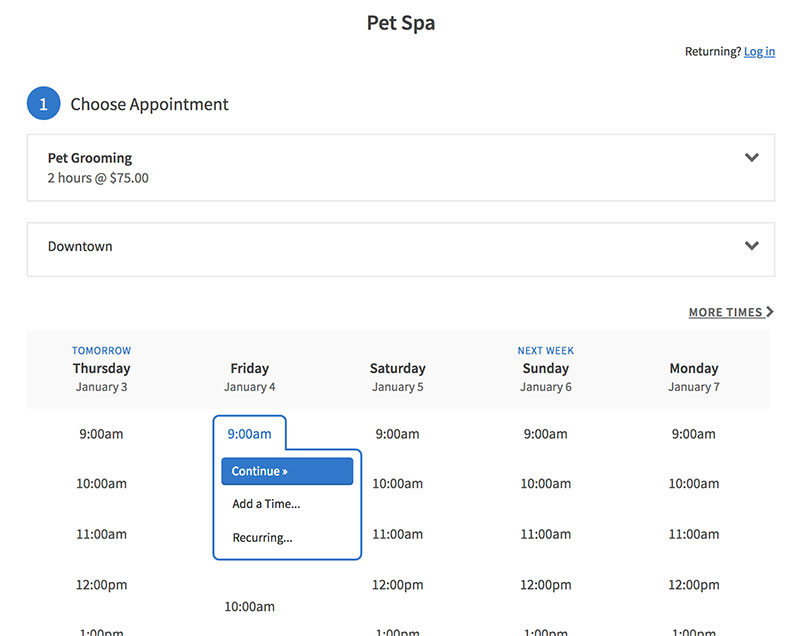
Squarespace acquired Acuity Scheduling in 2019, but you can still buy it as a standalone booking tool. You don’t have to use Squarespace’s website builder to get it.
Appointment booking, payments and reminders work for any service business, photographers included. Galleries and contracts aren’t part of it.
You can tell from the feature list that Acuity Scheduling was built as scheduling software for small businesses in general.
| Plan | Price, annual | Staff limit |
|---|---|---|
| Starter | $16/mo | 1 |
| Standard | $27/mo | 6 |
| Premium | $49/mo | 36 |
Monthly billing runs $20, $34, and $61 respectively.
Payments go through Stripe, Square or PayPal. Premium offers a HIPAA-compliant BAA, and after years as a standalone product the integration ecosystem is mature.
You won’t get client galleries or contract and e-signature tools. There’s also no free plan, just a 7-day trial.
For a closer look at how it compares with another popular scheduler on staff limits and payment options, the Acuity Scheduling vs Square Appointments comparison covers that directly.
Acuity Scheduling holds a 4.8 out of 5 rating across more than 5,700 Capterra reviews. No other tool on this list comes close on review volume, mostly because so many of its users aren’t photographers.
Almost no photographer needs the HIPAA BAA. It does tell you something, though. Acuity serves therapists and salons as much as photographers, so anything photography-specific has to come from a second tool on top.
What Is a Photography Booking App?
Think of it as business software for photographers where scheduling, contracts, payments and client galleries share one system.
The bundling is what separates it from other tools. A plain calendar tool handles time slots, and a gallery tool handles photo delivery. Neither one also deals with contracts and deposits the way these apps do.
266,831 photography businesses operated in the US in 2025, an increase of 2.6% from the year before (IBISWorld, 2025).
Most of them are small and many are run by one person. That’s the market these apps are built for.
| Tool type | Scheduling | Galleries | Contracts |
|---|---|---|---|
| Photography booking app | Yes | Often | Often |
| Bare appointment scheduler | Yes | No | No |
| Gallery-only tool | No | Yes | No |
The benefits of scheduling are the same as with general business software. You get automated confirmations and fewer missed sessions, and clients can see your calendar in real time.
The difference in the photography version is what happens after the booking. The gallery, the print order and the signed release form are all part of it.
Sprout Studio markets itself as an all-in-one CRM built by photographers for photographers. That bundling is what the category is named for.
How Does Calendar Sync Prevent Double-Booked Sessions?
With two-way sync, the tool checks your existing commitments before a client can pick a time slot.
That check is what stops double booking appointments from happening at all.
One-way sync only pushes new bookings out to your calendar. It doesn’t pull existing events back in. So a client can still book over a shoot you never entered into the tool itself.
- Most tools in the category, Amelia among them, sync with Google Calendar and Outlook in both directions
- Buffer time between sessions leaves room for travel between locations
- Staff-level calendars keep availability separate when more than one photographer books from the same account
Here’s a number that makes the case. Photographers who hold in-person viewing appointments after a session see up to 20% higher revenue than those who rely on online delivery alone, per the 2025 State of the Photography Industry report from Zenfolio and its partners Format, ShootProof, and PPA.
That only works if the appointment actually happens on time. It’s a better argument for calendar sync than any shared spreadsheet could make.
Most double-booking problems come from a calendar that looked connected but only synced one way. For other common failure points, how to avoid appointment scheduling mistakes covers what usually breaks first.
How Do Contracts, E-Signatures and Deposit Payments Fit Into the Booking Flow?
In most of these tools, the contract and the deposit are part of the booking step itself. They don’t go out later in a follow-up email.
The client picks a session type, signs an e-contract and pays a deposit. Only after that does the slot confirm on your calendar.
| Payment gateway | Common on | Typical use |
|---|---|---|
| Stripe | Amelia, Trafft, Tave | Cards and deposits |
| PayPal | Amelia, Trafft, Acuity Scheduling | Cards and balance payments |
| Square | Acuity Scheduling | In-person and online payments |
E-signatures are close to universal at this point. 95% of organizations are either using e-signatures, evaluating providers, or planning a purchase, according to DocuSign’s own research.
Mailing a paper contract or attaching a PDF is getting rare, even for one-person studios.
HoneyBook’s Smart Files put a proposal, contract and invoice into one client-facing document. It’s one attempt at turning what used to be separate steps into a single one.
Once the contract is signed and the deposit clears, a confirmation message closes the loop. Often that’s an appointment confirmation text.
Of everything in this flow, the deposit does the most against no-shows. Money is on the line before the session date arrives.
How Much Does a Photography Booking App Cost?
Prices go from free up to roughly $110 a month. The gap usually comes from staff seats, storage and automation, not from one premium feature.
- You can start at $0. Amelia’s Lite plan covers one staff member with basic booking, and Trafft’s free plan covers basic booking with a capped feature set.
- A single-user CRM costs around $14.95 to $19 a month (Iris Works Starter, or Sprout Studio’s Lite plan with galleries included).
- Multi-user plans with automation land at $27 to $34 a month, for example Studio Ninja Pro or Acuity Scheduling Standard.
- At the top, unlimited users or a top CRM tier run $69 to $109 a month (Sprout Studio’s Unlimited plan, HoneyBook Premium).
Between 65% and 77% of photographers reported higher business costs in 2024, while their pricing did not keep pace, part of why the free and low-cost tier in this category draws so much attention (Zenfolio State of the Photography Industry, 2025).
Commission-based gallery pricing works differently.
Pixieset’s free tier, for example, takes a percentage of print and digital sales instead of a flat fee. Once sales pick up, that can cost more than a subscription would.
How Do You Set Up a Photography Booking App on Your Website?
- Define session types and durations first (mini session, full portrait photography, wedding day) before you touch the booking form.
- Connect a payment gateway and set a deposit rule, either a flat amount or a percentage of the session price.
- Sync the calendar, following the same logic as scheduling appointments with Google Calendar, so existing commitments block new bookings automatically.
- Add the contract and any required questionnaire to the sequence. They go before payment, not after.
- Publish the booking widget or a schedule an appointment button on the site, then test it the way a client would.
- Confirm reminder emails and texts go out on schedule, typically 48 hours ahead and again a few hours before the session.
Amelia’s booking widget publishes through a single shortcode, which is about as simple as it gets in this category.
Step three is where most setups go wrong. The calendar looks connected, but it’s only syncing in one direction.
I always run one full test booking from a separate email address. It catches most of these errors before a real client finds them.
When a Photography Booking App Is Not the Right Tool
No tool on this list runs an entire photography business on its own. The gaps tend to show up in the same places.
- Accounting is one. Most of these apps sync with QuickBooks or Xero instead of replacing them, so you’ll still need a dedicated accounting tool at tax time.
- Tools made for a solo studio or small team, Iris Works and Studio Ninja’s Starter tier included, start to struggle once you pass three or four staff members or add more locations.
- If you run your own print lab instead of using a partner lab, you need dedicated print-shop software. A gallery platform’s built-in store won’t cover it.
- Commercial and corporate photographers often have several stakeholders per shoot, and they outgrow single-client questionnaire and contract flows pretty quickly.
In those cases the booking app becomes one piece of a larger stack, not the whole business system.
Plan for that before you commit to an annual plan, not after the first invoice renews.
FAQ on Photography Booking Apps
What is the difference between a photography booking app and a photography CRM?
Mostly it’s how much lead management you get. Booking apps focus on scheduling, deposits and calendar sync. A CRM adds lead pipelines, proposal tracking and long-term client data. Most tools blend the two, but the CRM label usually means deeper lead handling than a scheduler alone.
Do photography booking apps replace a photographer’s website?
No. Most of them embed as a widget or a page on your existing WordPress or portfolio site. The booking app takes care of scheduling and payment, and the website still carries your portfolio, pricing pages and brand story.
Do photography booking apps take a commission on print or digital sales?
Some do. Gallery-first tools like Pixieset’s free tier take a percentage of sales. ShootProof charges zero commission on every plan, including the free tier. Check whether a plan uses commission or a flat subscription before you pick it.
Is Calendly enough for a photography business, or is a dedicated tool needed?
Calendly is good with time slots and that’s about it. It has no contracts, deposits or galleries. If you need those built in, the Calendly alternatives designed for session packages and print sales cover more ground than a bare scheduler.
Do these apps work for videographers as well as photographers?
Most do. Session types, contracts and deposits work the same way for video bookings, and Iris Works and Studio Ninja both support mixed photo-and-video studios. Gallery delivery is where it gets harder, since video hosting sometimes needs a separate tool.
How long does setup typically take?
On most tools, a basic flow with session types, calendar sync and one payment gateway takes under an hour. Add contracts, questionnaires and full automation and you’re looking at an afternoon, especially on CRM-style platforms with more settings to go through.
What happens if two clients try to book the same slot at once?
A good tool locks the slot as soon as the first client starts checkout. The second client sees it as unavailable before they can pay. Weaker tools only lock the slot after payment clears, and that’s where real double-bookings still get through.
What Should You Check First in Photography Booking Apps?
Check calendar sync accuracy first, before pricing or design. If the tool can’t block double-booked slots, the contracts, deposits and galleries built on top of it don’t help much.
Make sure the sync works in both directions. After that, check whether the deposit gets collected at booking, and then whether the contract and e-signature are captured before the slot confirms.
With a flat-fee CRM instead of a commission-based gallery, you get a fixed monthly cost. The platform also has less reason to push every print sale, because it earns the same no matter how many orders come in.
A booking app only closes leads that are already in your pipeline. Pairing it with a plan to get more photography clients matters as much as which software you choose.

Explore topics

Read Inspiring Customer Stories
Check out how our user set Amelia for his business