



Appointment scheduling software is business software that automates client booking, calendar coordination, and confirmation without manual back and forth between a business and its customers.
Service businesses such as salons, clinics, and consultancies run it across staff calendars, service menus, and multiple locations, pairing an online booking page with two way calendar sync and automated reminders.
Adoption gets weighed against two outcomes: fewer no-shows and less staff time spent confirming appointments by phone.
Experian Health’s State of Patient Access 2.0 survey found that 73 percent of consumers want to schedule their own medical appointments online, a preference most providers still don’t fully accommodate (Experian Health, 2021).
Appointment Scheduling Software To Use
Ranked by overall merit, in the same order as the shortlist above.
Each pick targets a distinct primary user, so the positioning below doesn’t overlap from one entry to the next.
Getting appointment scheduling right changes two numbers most owners actually care about: no-shows and admin hours.
The real benefits of scheduling software show up in fewer double bookings, automatic reminders, and a booking page that works while the business is closed.
Key figures at a glance:
- Acuity Scheduling: 75% of businesses on the platform report fewer no-shows using deposits and reminders (Acuity data, cited by ZoomInfo, 2026)
- Square Appointments cut its top-tier price 53.7%, from $149 to $69/month, in February 2026 (CostBench)
- Setmore’s free plan covers up to 200 appointments a month across 4 staff logins (Capterra, 2026)
- Calendly holds a 4.7-star rating across more than 4,100 Capterra reviews (Capterra, 2026)
| Software | Starting price | Free plan | Best for |
|---|---|---|---|
| Trafft | ~$13.30/mo | Limited | Multi-location teams |
| Amelia | $49/yr | Lite tier | WordPress site owners |
| Calendly | $10/seat/mo | Yes, limited | Sales and consulting teams |
| Acuity Scheduling | $16/mo | No (trial only) | Package and membership sales |
| Square Appointments | $29/location/mo | Yes, usable | Existing Square users |
| Setmore | $5/user/mo | Yes, generous | Small teams testing booking |
| SimplyBook.me | ~€9.90/mo | Yes, 50 bookings/mo | Niche industry add-ons |
| Zoho Bookings | $6/staff/mo | Yes, 1 staff | Existing Zoho users |
| Microsoft Bookings | Bundled, ~$6/user/mo | No standalone plan | Existing Microsoft 365 shops |
| Mindbody | $79/location/mo | No | Studios wanting marketplace reach |
Trafft – Best for multi-location teams that want staff management without enterprise pricing
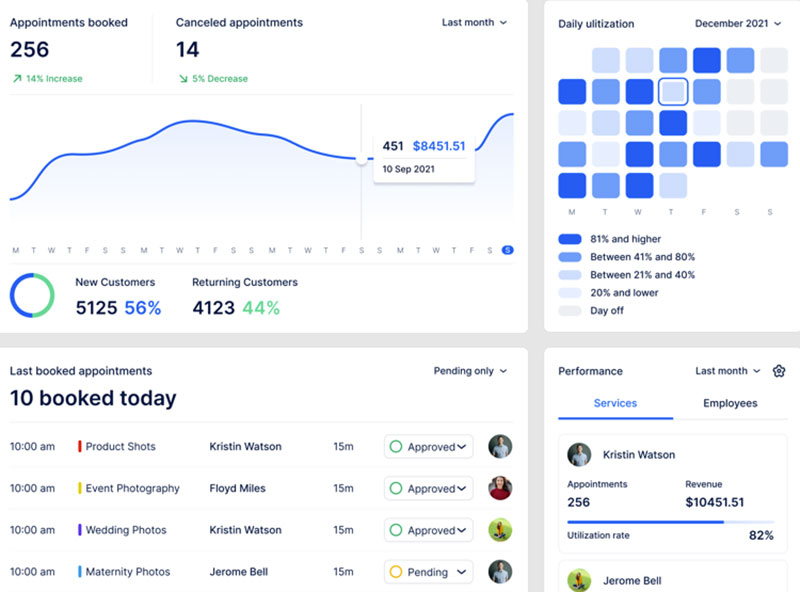
Verdict: Trafft is a cloud scheduling platform built for service businesses running more than one location or staff calendar.
It stands out for putting staff management, payments, and Zoom integration on its entry paid tier instead of gating them behind an enterprise plan.
Best for: salons, clinics, and consultancies managing multiple staff calendars or locations from one dashboard.
Standout capability: full staff and multi-location management available on its cheapest paid tier, not reserved for a top plan.
Key features:
- Online booking widget with real-time availability
- Stripe payment collection at booking
- Google Calendar and Zoom sync
- Employee scheduling and group appointments
Pricing: plans start around $13.30/month, with a limited free tier and a Pro plan near $60/month for advanced reporting and multiple locations. Current tiers sit on the pricing page.
Pros:
- Staff and location management included early, not gated to a top tier
- No coding required for setup
- Available as either a hosted SaaS tool or a WordPress plugin
Cons:
- Advanced reporting and unlimited locations sit on the Pro tier rather than Basic
- SMS reminders run through a third-party provider on credits
Our experience/evidence: Independent reviewers highlight the setup speed and staff-scheduling depth as consistent strengths, with fewer complaints about the interface than pricier competitors. The demos show that setup across industries.
Why it’s on this list: Most budget scheduling tools save staff and multi-location management for a top tier. Trafft doesn’t, which is unusual at this price point.
Amelia – Best for WordPress site owners who want to own the booking system outright
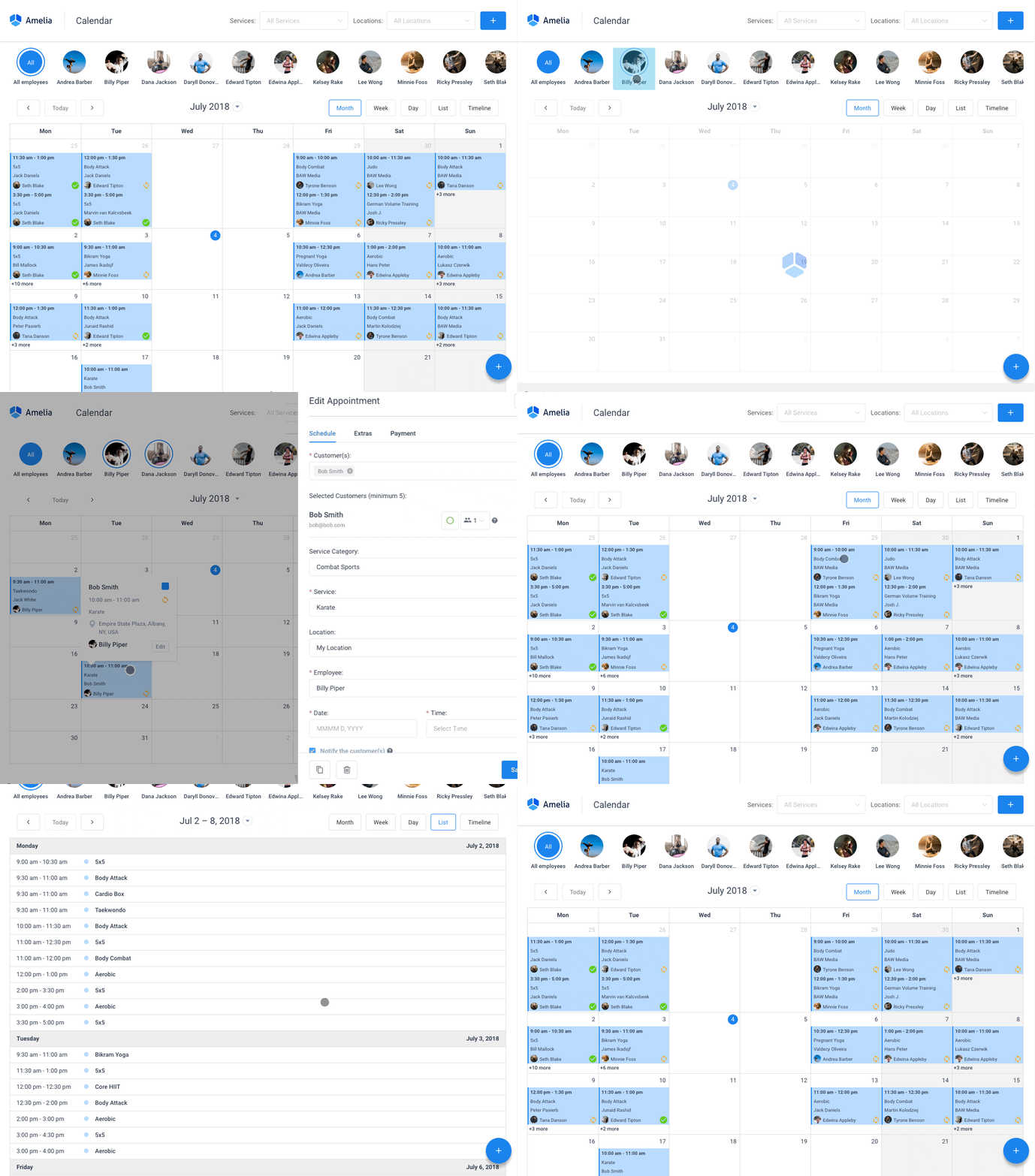
Verdict: Amelia is a WordPress booking plugin sold as a one-time license instead of a subscription.
The appeal is simple: pay once instead of monthly, which changes the long-term cost math for owners already running WordPress.
Best for: WordPress-based salons, clinics, and studios that want to buy a booking system rather than rent one.
Standout capability: one-time license pricing on the plugin tiers, with an optional hosted SaaS version for anyone who’d rather skip WordPress entirely.
Key features:
- Booking wizard with a polished client-facing interface
- Employee management with individual schedules and days off
- Google Calendar and Zoom sync
- Multilingual booking pages
Pricing: paid tiers run as a WordPress booking system with payment gateways built in (Stripe, PayPal, Razorpay), sold as annual or lifetime licenses, with a hosted SaaS option near $60/month. Check the pricing page for the current grid.
The Lite tier works as a free WordPress booking plugin, covering one employee with Square payments.
Pros:
- No recurring fee on the lifetime license tiers
- Polished, modern booking wizard
- Unlimited site licenses on the top tier
Cons:
- Annual licenses cover a year of updates and support, with renewal after that
- WordPress hosting is a separate cost from the license
Our experience/evidence: Amelia has shipped from the same company since 2018. Touch Me Soft d.o.o., the Belgrade studio that launched it at WordCamp Europe, now trades as Melograno Venture Studio, which also builds wpDataTables, MapSVG, Ivy Forms, and Trafft. The release cadence has stayed active throughout.
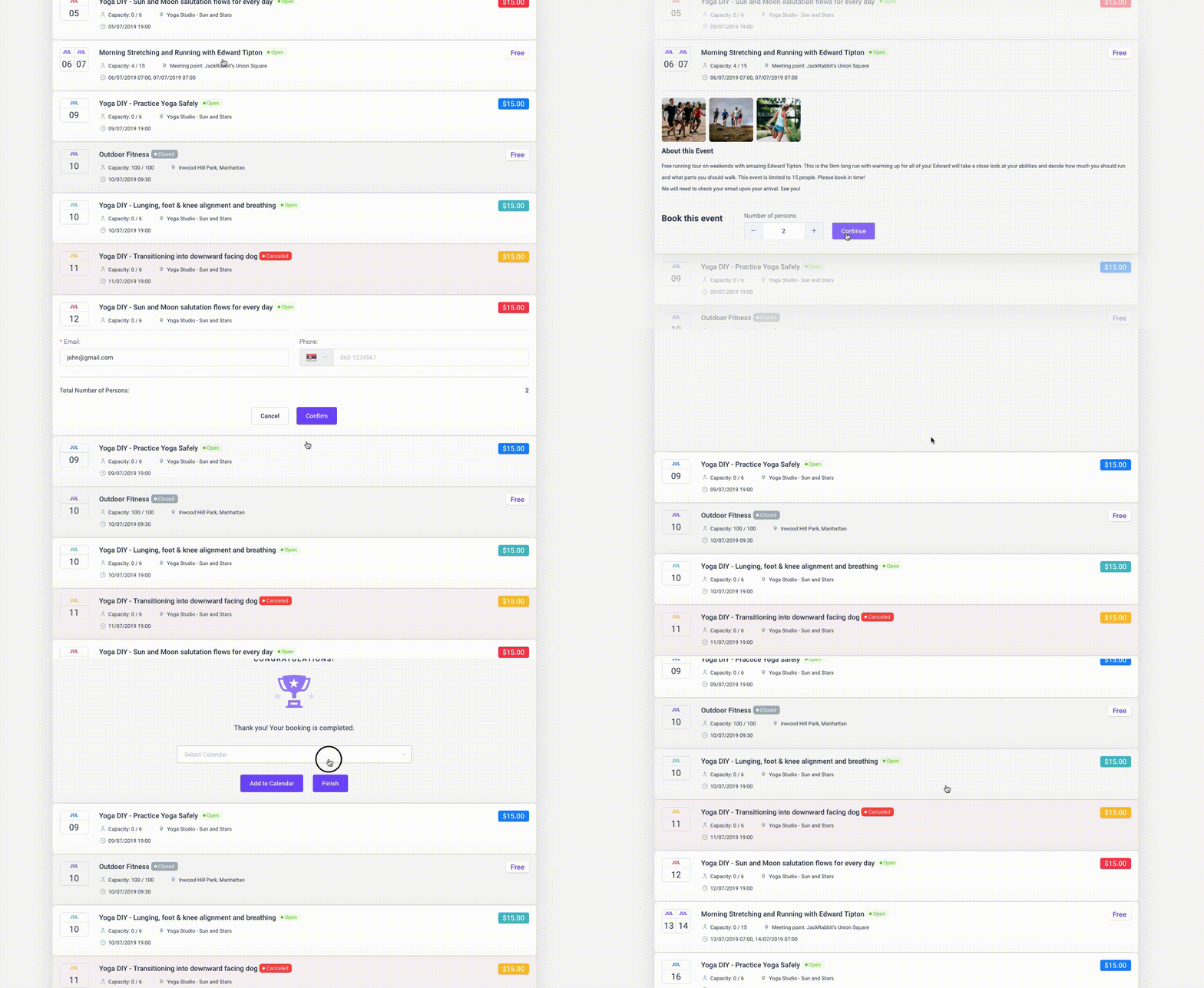
Why it’s on this list: It’s one of the few tools here where the free tier and the paid tier are genuinely the same plugin, not a crippled trial version. The demos cover both.
Calendly – Best for sales teams and consultants scheduling external meetings at volume
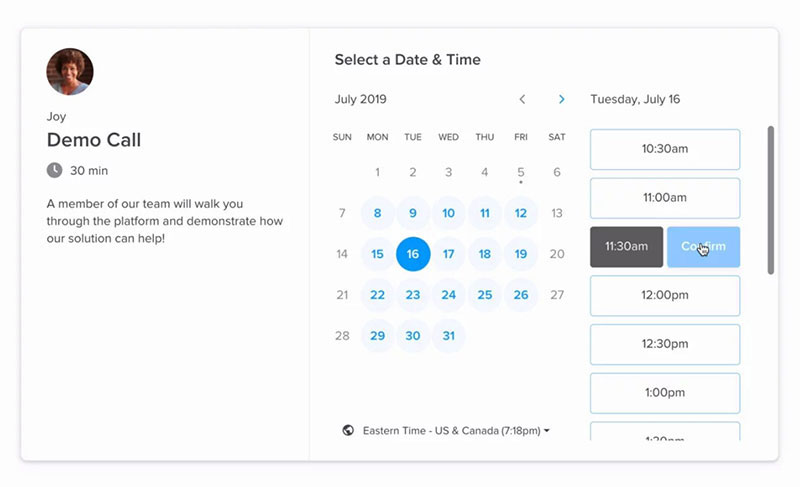
Verdict: Calendly replaces the email back-and-forth of finding a meeting time with a single shareable link.
It separates from the pack once routing and CRM lookups matter, matching leads to the right rep automatically.
Best for: sales reps, recruiters, and consultants booking external meetings with people outside their own calendar system.
Standout capability: routing forms that qualify leads and match them to a rep through live Salesforce or HubSpot lookups.
Key features:
- Unlimited event types on paid tiers
- Multi-calendar sync (up to 6 calendars on Standard)
- Round-robin scheduling
- Zoom and Google Meet integration
Pricing: free for one event type and one calendar. Standard runs $10 per seat monthly and Teams $16 per seat monthly, both billed annually.
Pros:
- 4.7-star rating across more than 4,100 Capterra reviews
- Deep CRM and routing integrations
- Minimal setup time for individual users
Cons:
- Per-seat pricing scales fast for larger teams
- Free tier limited to a single event type
- Advanced routing gated to Teams and above
Our experience/evidence: In a published case study, knowledge-automation company 1up.ai cut missed meetings by 50% and grew international bookings by 40% after adopting Calendly’s round-robin scheduling.
Why it’s on this list: Its newer meeting-package feature (bundled prepaid sessions) now overlaps with a capability most comparison pages still describe as Acuity-only territory. Anyone priced out of the per-seat model can check Calendly alternatives before committing to Teams.
Acuity Scheduling – Best for practitioners selling packages, memberships, or gift certificates
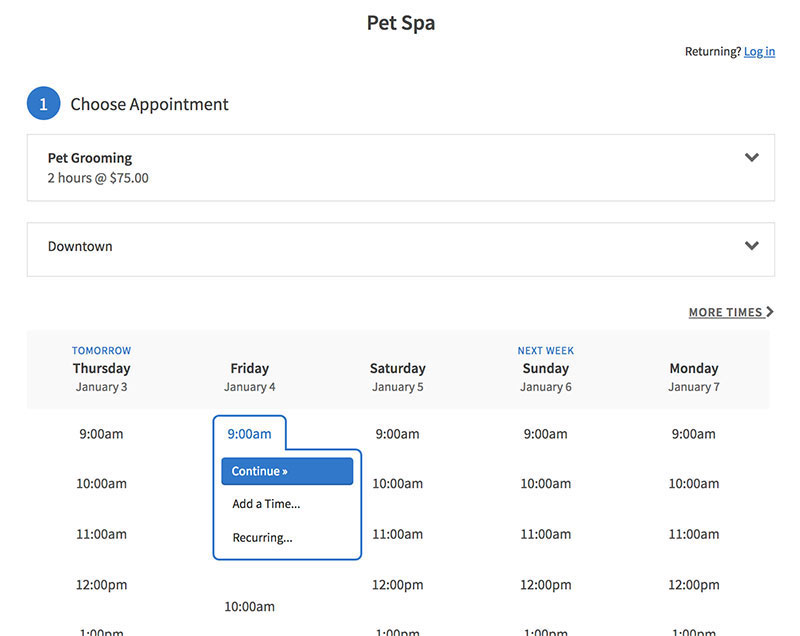
Verdict: Acuity Scheduling, owned by Squarespace, is built for practitioners monetizing repeat visits, not just single appointments.
Packages, subscriptions, and gift certificates all run through the same booking page a client uses to schedule.
Best for: therapists, stylists, and coaches who sell session bundles or memberships alongside one-off bookings.
Standout capability: package and membership sales built into the booking flow, with automatic session tracking.
Key features:
- Client self-scheduling with unlimited services
- Stripe, Square, or PayPal payment collection
- Custom intake forms
- Classes and group scheduling on the Growing tier
Pricing: Starter plan begins at $20/month with no free tier, only a 7-day trial. Growing and Powerhouse tiers add staff seats and SMS reminders.
Pros:
- Package and subscription billing live inside the booking flow itself
- Strong fit for anyone already on Squarespace
- Wide payment processor choice
Cons:
- No free forever plan
- SMS reminders locked to mid and top tiers
- Thinner CRM and routing tools than Calendly
Our experience/evidence: Acuity reports that 75% of businesses on its platform reduced no-shows through deposits, reminders, and cancellation policies, across a base of more than 280,000 businesses booking roughly 15 million appointments a month.
Why it’s on this list: A $200-an-hour therapist selling five-session bundles never sends a client to a separate checkout page here, a detail most side-by-side comparisons skip. The choice between weighing Acuity Scheduling against Square Appointments usually comes down to package sales versus built-in POS.
Square Appointments – Best for businesses already using Square for payments

Verdict: Square Appointments extends Square’s existing payments and POS system into scheduling.
It stands out for a free plan that includes real online booking, not a stripped-down demo of one.
Best for: solo or single-location businesses already processing payments through Square.
Standout capability: native POS tied directly to bookings, plus Instagram and Google profile booking on the free tier.
Key features:
- Online booking with unlimited appointments (Free)
- No-show protection via card on file
- Instagram booking integration
- Resource management on Premium
Pricing: free for one location and one staff member. Plus runs $29 per location monthly and Premium $69 per location monthly.
Pros:
- Genuinely usable free plan, not just a trial
- Tight integration with Square’s existing POS
- Transparent, flat per-location pricing
Cons:
- Google Calendar sync locked behind the Plus tier
- Payment processing fees (2.6% plus $0.10) apply even on the free plan
- Locked into Square as the only payment processor
Our experience/evidence: Square Appointments cut its Premium tier price by 53.7%, from $149 to $69 a month, in February 2026, a rare downward move in a category where prices usually climb.
Why it’s on this list: The free plan’s Instagram integration is a legitimate way to get more bookings straight from a social profile, without buying a separate scheduling link.
Setmore – Best for small teams that want a usable free plan before paying anything
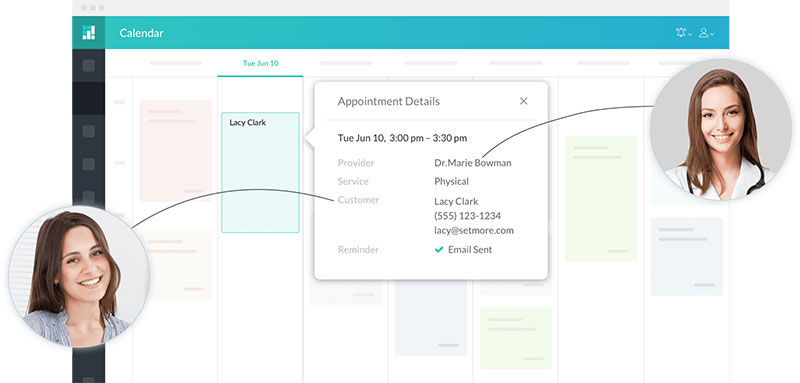
Verdict: Setmore’s free plan supports up to four staff logins and real booking volume, not a single calendar with a watermark.
It stays usable at zero cost longer than most competitors before pushing an upgrade.
Best for: small teams of up to four people testing online booking before committing to a subscription.
Standout capability: a free plan that includes video meetings and social media booking, not just a bare booking page.
Key features:
- Customer self-booking with unlimited appointments on Free
- Free video meetings through Teleport
- Two-way calendar sync on Pro, which stops double booking appointments across connected calendars
- SMS reminders on Pro
Pricing: free for up to 200 appointments a month across 4 staff logins. Pro runs $12 per user monthly, or roughly $5 per user monthly billed annually.
Pros:
- Unusually generous free tier for a four-person team
- No per-user charge until Pro
- Includes free video meetings without a separate Zoom subscription
Cons:
- 200 monthly appointment cap on the Free plan
- Setmore branding stays visible until Pro
- Reporting is thinner than Acuity’s
Our experience/evidence: Capterra’s 2026 listing puts Setmore’s free plan at up to 200 appointments a month, a volume most competitors reserve for a paid tier.
Why it’s on this list: Most “free forever” scheduling plans cap out at one staff member. Setmore’s supports four, which changes who can actually run a small team on it without paying.
SimplyBook.me – Best for niche industries that need add-ons beyond basic booking
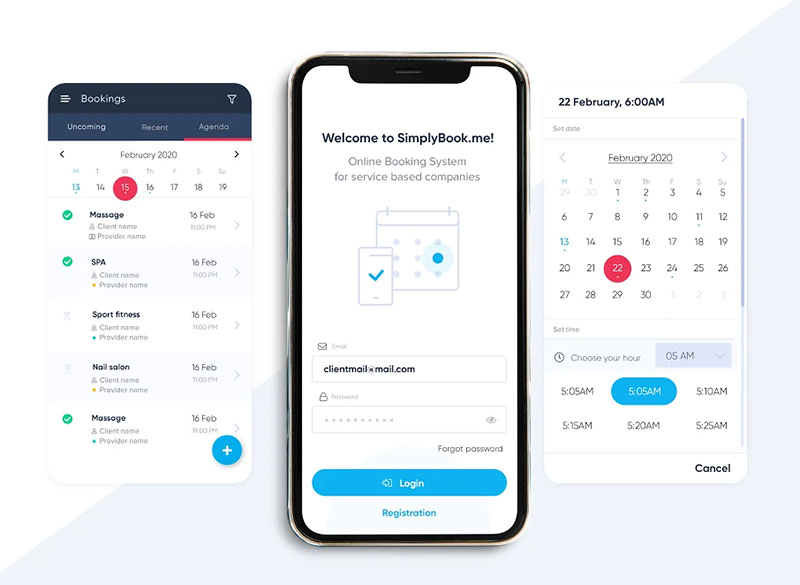
Verdict: SimplyBook.me sells scheduling through a “custom features” model instead of flat feature bundles.
A business picks add-ons like memberships, coupons, or POS rather than paying for a bundle it won’t use.
Best for: multi-location or industry-specific businesses (medical, fitness, beauty) needing niche add-ons like HIPAA support.
Standout capability: modular pricing built around custom feature slots rather than fixed tiers.
Key features:
- Customizable booking widgets and forms
- Multi-location and staff scheduling
- Memberships and class booking
- Point-of-sale add-on
Pricing: free for 50 bookings a month. Paid plans start near €9.90/month for Basic, scaling to €59.9/month for Premium.
Pros:
- Connects with more than 20 third-party tools, including Stripe, PayPal, and WordPress
- Strong fit for niche industries with unusual booking rules
- Flexible add-on model instead of forced bundling
Cons:
- Booking-volume caps rather than user caps can surprise high-volume solo users
- Lower tiers cap custom features at three
Our experience/evidence: Review data based on 547 responses shows SimplyBook.me integrating with more than 20 external tools, more than most flat-tier competitors on this list.
Why it’s on this list: Because pricing ties to booking volume instead of user seats, a solo practitioner with heavy volume can hit the cap faster than a five-person team on the same plan. That’s the inverse of how most competitors price.
Zoho Bookings – Best for teams already running other Zoho apps
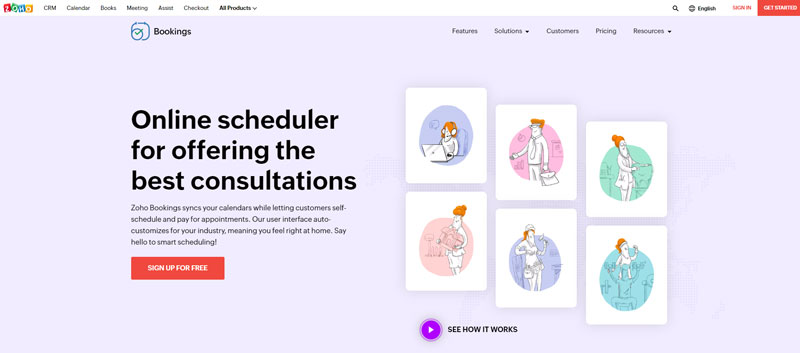
Verdict: Zoho Bookings is the scheduling module inside the wider Zoho suite.
It’s built to hand off into Zoho CRM and Zoho Meeting natively, not as a bolted-on integration.
Best for: small teams already using Zoho CRM or other Zoho apps who want scheduling in the same ecosystem.
Standout capability: native handoff into Zoho CRM records without a separate integration step.
Key features:
- Online booking page with basic customization
- Two-way calendar sync on paid tiers
- Custom intake forms
- Zoho Meeting integration on Premium
Pricing: free for one staff member. Standard runs $6 per staff monthly and Premium $9 per staff monthly, among the cheapest paid entry points in this list.
Pros:
- Cheapest per-seat paid tier here
- Works well as scheduling software for small businesses already inside Zoho
- Straightforward setup for existing Zoho users
Cons:
- Free plan limited to one staff member
- Group bookings gated to Premium
- Full value depends on paying for other Zoho products too
Our experience/evidence: Reviewer sentiment on Capterra skews positive, with most complaints tied to features that require a separate Zoho subscription rather than to the scheduling tool itself.
Why it’s on this list: It’s rarely worth adopting in isolation. Its value climbs sharply once a business already runs Zoho CRM, a dependency most standalone reviews don’t spell out.
Microsoft Bookings – Best for businesses already paying for Microsoft 365
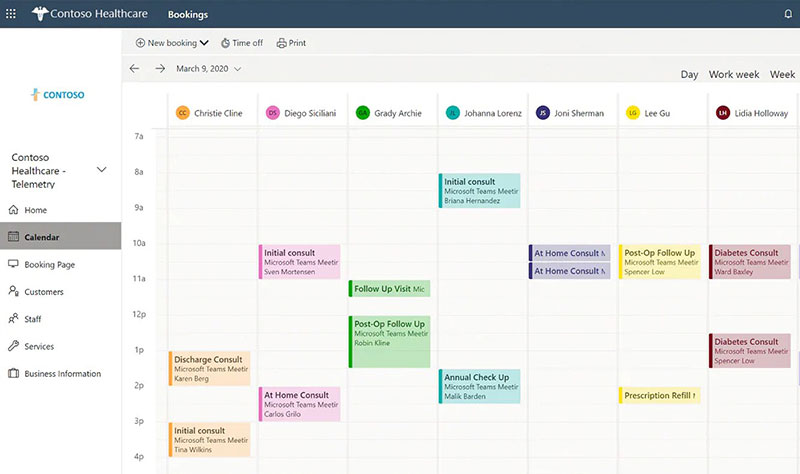
Verdict: Microsoft Bookings comes bundled inside qualifying Microsoft 365 Business plans instead of selling separately.
It works as a no-extra-cost meeting scheduler for anyone already paying for Outlook and Teams.
Best for: businesses and clinics already on Microsoft 365 that want scheduling tied to Outlook and Teams.
Standout capability: zero incremental cost for organizations already on a qualifying Microsoft 365 plan.
Key features:
- Booking page with staff scheduling
- Outlook and Teams calendar sync
- Automated confirmation emails
- Teams meeting links for virtual appointments
Pricing: included starting with Microsoft 365 Business Basic at roughly $6 per user monthly on an annual commitment. No standalone Bookings-only price exists.
Pros:
- Zero added cost for existing Microsoft 365 subscribers
- Tight Teams and Outlook integration
- Familiar interface for staff already using Microsoft tools
Cons:
- No way to buy Bookings without a Microsoft 365 subscription
- Thinner payment processing than dedicated scheduling tools
- Basic feature set next to Acuity or SimplyBook.me
Our experience/evidence: Pricing trackers consistently show the qualifying Microsoft 365 Business Basic tier at around $6 per user monthly on an annual commitment, with no path to buying Bookings on its own.
Why it’s on this list: Because Bookings can’t be purchased alone, the real decision isn’t about scheduling features. It’s whether the business already needs the rest of Microsoft 365.
Mindbody – Best for studios wanting marketplace exposure alongside scheduling
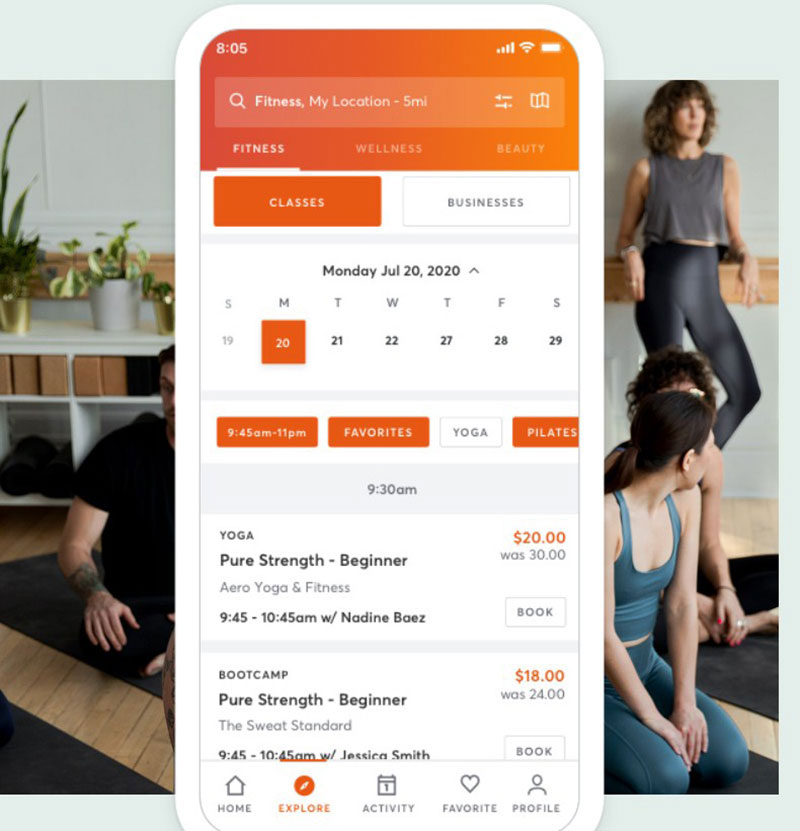
Verdict: Mindbody pairs scheduling with a consumer-facing marketplace app used by people actively searching for classes nearby.
It suits studios where being found matters as much as being booked.
Best for: multi-location fitness, wellness, and beauty businesses wanting new-client discovery built in.
Standout capability: a listing inside the Mindbody consumer app, exposing a business to an existing base of people searching for classes.
Key features:
- Class and appointment scheduling with waitlists
- Integrated payments and staff management
- Marketplace listing in the Mindbody app
- Branded mobile app on the top tier
Pricing: starts at $79 per month per location as of mid-2026, down from an earlier $99 starting point. Higher tiers add marketing automation and a branded app.
Pros:
- Marketplace exposure competitors in this list don’t offer
- Mature class-scheduling tools built for group fitness
- Strong brand recognition in the wellness industry
Cons:
- No free plan or trial
- Long-term contracts common at higher tiers
- Reviewer feedback on ease of use trails most tools on this list
Our experience/evidence: Mindbody’s own pricing update puts its entry tier at $79 per month per location, down from an earlier $99 starting point, while Capterra reviewers give it a comparatively low value-for-money score against competitors like Acuity.
Why it’s on this list: It’s the only tool here selling audience access alongside scheduling. The real comparison against Acuity or SimplyBook.me isn’t features, it’s whether marketplace exposure justifies the higher price. It’s also routinely benchmarked against Vagaro, another salon and spa platform, in Vagaro vs Mindbody comparisons.
When off-the-shelf scheduling software isn’t enough
None of these ten tools replace a full practice-management or EHR system for regulated healthcare providers.
Acuity and SimplyBook.me offer HIPAA-ready options, but that covers booking data, not clinical records.
Situations where these tools fall short:
- Enterprise sales orgs needing deep lead-routing beyond Calendly’s Teams tier usually move to dedicated revenue-operations platforms
- Clinics needing full patient records, billing, and insurance claims need practice-management software, not a booking layer
- Franchises with dozens of locations often outgrow per-location pricing models like Square’s or Mindbody’s
Software also won’t fix process problems on its own. Avoiding common scheduling mistakes still depends on how a business sets buffer times, cancellation windows, and reminder timing, regardless of which tool runs it.
What Is Appointment Scheduling Software
Appointment scheduling software is business software that automates client booking, confirmation, and calendar coordination without manual back-and-forth between a business and its customers.
The category covers a booking page, calendar synchronization, automated reminders, payment collection, and staff management as a single connected system rather than five separate tools.
It’s not the same as a plain calendar app.
A calendar app tracks a person’s own time. Appointment scheduling software lets other people book into that time, then handles the confirmation, reminder, and payment steps that follow.
Who typically runs on it: salons, clinics, consultants, studios, and any service business that sells time slots rather than physical goods.
How Appointment Scheduling Software Works
Two mechanisms sit underneath almost every scheduling tool: the client-facing booking page and the calendar sync that keeps it accurate.
Online Booking Pages
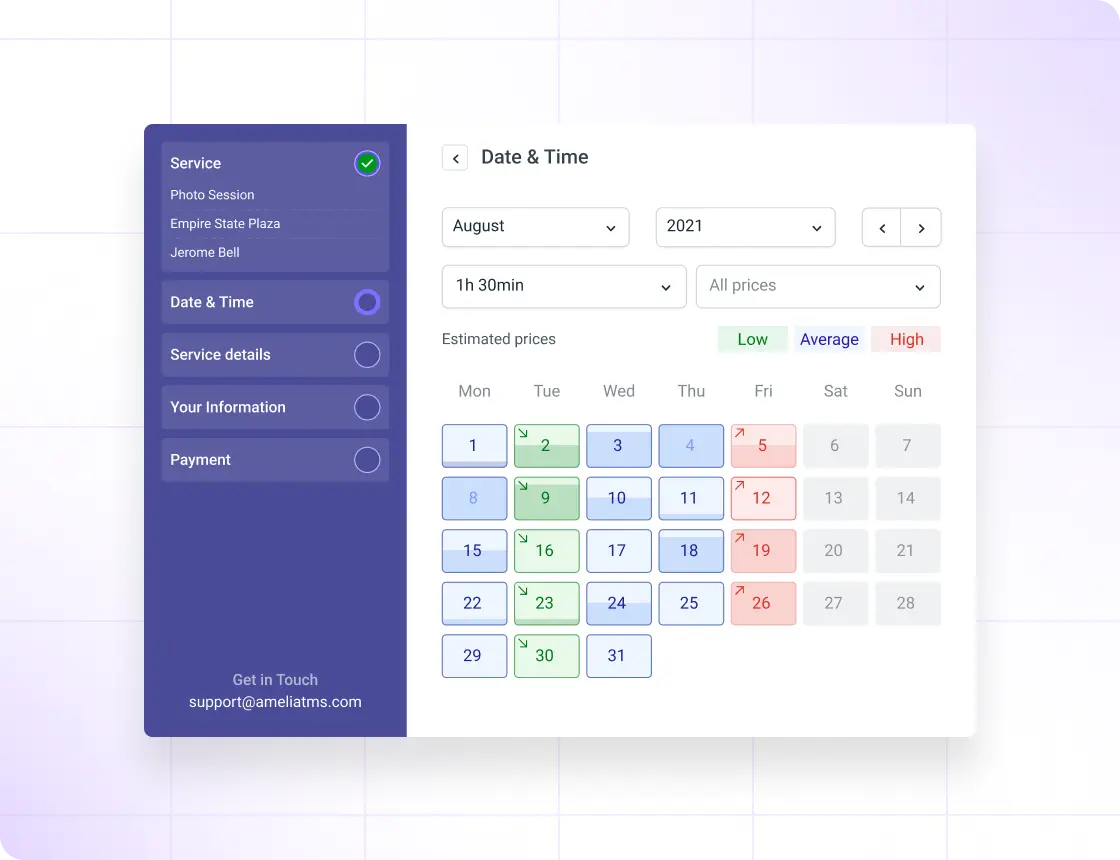
Booking flow: a client picks a service, sees real-time availability, selects a slot, and gets a confirmation, all without a phone call.
- Service selection with duration and price shown upfront
- Live availability pulled from connected calendars
- Time zone detection for remote or out-of-area clients
- Custom branding so the page matches the business, not the software vendor
Recurring appointments and group bookings run through the same page, just with different rules attached to the service itself. The newest platforms go a step further with AI-powered appointment booking, letting a customer describe what they need in one sentence while an AI assistant checks the calendar and confirms the slot.
How Automated Reminders Cut No-Shows
Reminders work because forgetting, not refusing, drives most missed appointments.
A systematic literature review of 105 studies drawn from the Scopus database found the global average no-show rate runs at 23%, ranging from 13.2% in Oceania to 43.0% in Africa (Health Policy, 2018).
Key figures on reminder effectiveness:
- Attendance rose from 67.8% with no reminder to 78.6% with a mobile text reminder (Cochrane Database of Systematic Reviews, 2013)
- Global average no-show rate: 23%, based on 105 studies across all medical specialties (Health Policy, 2018)
- Regional spread: 13.2% (Oceania) to 43.0% (Africa) for the same measure (Health Policy, 2018)
A community mental health clinic in Dublin cut non-attendance from 22.2% to 13.9% within six months of introducing SMS reminders.
Timing and channel both matter less than whether a reminder exists at all. Most scheduling tools send one email confirmation at booking and a second SMS or email 24 hours out, with a same-day nudge on higher tiers.
How Payment Processing Works at the Point of Booking
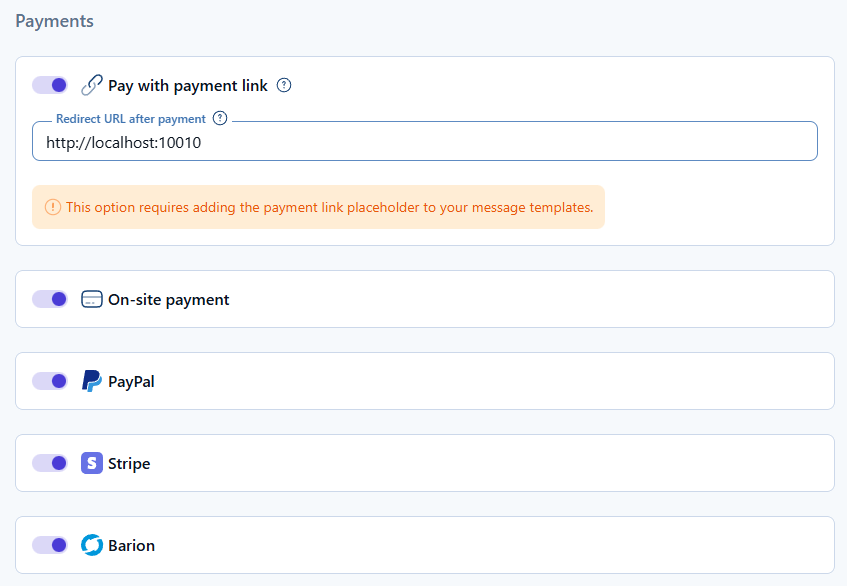
Payment happens inside the booking flow itself, not on a separate checkout page, on any tool worth using.
Two models cover most businesses:
- Full prepayment, common for classes, workshops, and high-value consultations
- Partial deposit, common for salons and clinics protecting against no-shows without demanding full payment upfront
Gateways vary by tool. Stripe and PayPal cover most SaaS platforms, while some route through a dedicated PayPal booking system instead of a multi-gateway setup.
Processing fees sit on top of the software’s own subscription cost, typically in the 2.6% to 2.9% range plus a small fixed fee per transaction. Package and membership billing differs from single-transaction payment because the software has to track remaining sessions, not just confirm a charge.
Managing Staff and Multiple Locations
Staff scheduling inside a booking tool borrows directly from general shift management practice, just applied to client-facing time instead of internal labor coverage.
Round-robin assignment distributes new bookings evenly across available staff, useful for teams where any qualified person can take the appointment.
Fixed staff calendars work better where clients expect to see the same specialist every time, common in therapy and personal training.
Multi-location businesses hit a pricing fork here. Some tools charge per location, some per staff seat, and the difference changes the total cost fast once a business opens a second site.
Buffer time, the gap left between bookings, is technically a calendar setting but functions as a staff-management decision, since it controls how many clients one person can realistically see per day.
Which Integrations Actually Matter
Three integration categories decide whether a scheduling tool fits into an existing workflow or sits apart from it.
| Integration type | What it connects | Typical tool | When it decides the purchase |
|---|---|---|---|
| CRM handoff | Booking data to customer records | Salesforce, HubSpot | Sales and consulting teams |
| Video conferencing | Virtual appointment links | Zoom, Google Meet | Remote consultations, telehealth |
| Automation platform | Workflow triggers to other apps | Zapier, webhooks | Tools with thin native integrations |
Native CRM handoff beats a workaround almost every time. A booking that pushes straight into a CRM record saves a manual data-entry step a Zapier connection still requires.
Zoom integrations matter most for consultants and telehealth providers who run the whole appointment as a video call rather than an in-person visit.
WordPress-based businesses often add a scheduling layer through WooCommerce appointments when they already sell physical products and want bookings inside the same storefront.
Data Security and Compliance Standards
Three standards come up constantly in scheduling software marketing, and they cover different things.
GDPR applies to any business processing the personal data of EU residents, regardless of where the business itself is based. Violations can draw fines up to €20 million or 4% of global annual turnover, whichever is higher (EU General Data Protection Regulation, Article 83).
HIPAA applies specifically to protected health information in the US. A scheduling tool touching patient data typically needs a signed business associate agreement with the vendor, not just a marketing label reading “HIPAA-ready.”
PCI DSS governs payment card data. Version 4.0, mandatory since March 2025, groups its rules into 12 core requirement areas covering network security, access control, and ongoing monitoring (PCI Security Standards Council).
None of these three standards overlap completely, so a tool compliant with one isn’t automatically compliant with the others.
How Much Does Appointment Scheduling Software Cost
Four pricing models cover almost the entire category, and they don’t compare cleanly against each other.
| Pricing model | Typical range | Best fit | Main limitation |
|---|---|---|---|
| Free (freemium) | $0 | Solo users, low volume | Caps on staff or bookings |
| Per-seat subscription | $6 to $20/user/month | Small to mid teams | Cost scales with headcount |
| Per-location subscription | $29 to $79/location/month | Multi-site retail, fitness | Cost scales with locations, not staff |
| One-time license | $79 to $279 | Single-site WordPress owners | Renewal fees after year one |
Hidden costs cluster in three places: SMS credit charges billed separately from the subscription, payment-processing fees layered on top of the software price, and add-on features locked behind a higher tier than the one a business actually needs.
Free-plan limits split the same way. Some cap the number of staff, others cap monthly booking volume, and a solo user with high volume can hit a booking cap faster than a five-person team on the identical plan.
How to Choose the Right Scheduling Software for Your Business
Four criteria decide this in order of weight: business size, industry compliance needs, integration dependencies, and budget.
Deployment type follows from those criteria more than personal preference does.
WordPress plugin
- Pros: one-time cost option, full data ownership, works inside an existing site
- Cons: hosting and updates become the business’s responsibility, migration risk if ownership changes
Hosted SaaS
- Pros: no server management, automatic updates, fastest setup
- Cons: recurring cost that never stops, less control over data location
Industry-specific platform
- Pros: built-in compliance and features for one vertical (memberships, classes, HIPAA options)
- Cons: paying for features outside that vertical if the business doesn’t fit it exactly
A consultant scheduling software pick usually leans toward hosted SaaS with strong CRM routing, since consultants rarely need industry-specific compliance features a general tool lacks.
How to Set Up Appointment Scheduling Software
Order matters here. Skipping a step out of sequence causes most of the setup errors that surface in week one.
- Connect the primary calendar (Google, Outlook, or iCloud) before anything else, since every later step reads availability from this connection
- Define services with duration, price, and buffer time attached to each one
- Assign staff to services and set individual availability rules
- Connect a payment gateway and decide between deposit or full prepayment
- Publish the booking page and place a schedule an appointment button on the site or social profiles
- Send a test booking through the full flow, including the reminder sequence, before going live
Calendar connection has to happen first because staff availability rules, buffer times, and reminder timing all depend on an accurate calendar feed to calculate against.
Common Appointment Scheduling Mistakes
Zero buffer time causes back-to-back overruns that cascade through an entire day once one appointment runs long.
Weak cancellation policies undermine the reminder system entirely, since a client can cancel or no-show with no consequence attached.
Poor handling of cancelled appointments compounds this. Without an automatic waitlist fill, every cancellation becomes lost revenue instead of a slot offered to someone else.
Ignoring time zone detection breaks bookings for remote or multi-region clients, showing them a slot that doesn’t match their actual local time.
Calendar sync failures go unnoticed until a double-booking actually happens, usually traced back to a one-way sync connection mistaken for a two-way one.
When Appointment Scheduling Software Doesn’t Work
These tools stop short of several jobs businesses sometimes expect them to cover.
What it doesn’t replace:
- Full patient records, insurance claims, or clinical documentation, which require practice management software instead
- Enterprise lead-routing and revenue-operations workflows once a sales team scales past what booking links handle
- Franchise-scale coordination across dozens of locations, where per-location or per-seat pricing stops making financial sense
Enterprise teams doing heavy B2B appointment setting at volume typically outgrow scheduling-link tools and move to dedicated revenue-operations platforms with deeper qualification and routing logic.
The ROI claimed in most scheduling software marketing (hours saved, no-shows reduced) doesn’t show up automatically either.
It depends on a business actually setting buffer times, cancellation windows, and reminder timing correctly, not on the software running in the background by itself.
FAQ on Appointment Scheduling Software
Is a Free Plan Enough, or Do You Need to Pay?
A free plan covers solo users with light volume: one staff member, a basic booking page, and email confirmations.
Paying unlocks SMS reminders, payment collection, and multi-staff calendars. Most businesses outgrow the free tier once bookings or staff count exceed that single-user cap.
Is Scheduling Software Cheaper Than Hiring a Receptionist?
Scheduling software runs $0 to roughly $80 a month per location, far below a receptionist’s salary.
It doesn’t replace judgment calls or complex client conversations. Most service businesses run both: software for routine appointment scheduling, staff for exceptions software can’t resolve.
How Do You Migrate from Manual Booking or Spreadsheets?
Export existing client contacts and recurring appointment patterns into a spreadsheet first.
Import that list into the new platform, then rebuild service menus, staff calendars, and buffer time rules. Run both systems in parallel for one cycle before retiring the spreadsheet.
What Does Appointment Scheduling Software Cost to Maintain?
Appointment scheduling software costs more to maintain than its listed subscription price once per-message SMS reminders and payment-processing fees start accumulating, since vendors bill the reminder channel and the card transaction separately from the monthly license.
Twilio’s own pricing page lists US SMS at $0.0083 per outbound message plus carrier fees, a rate that scales directly with reminder volume, not with staff count (Twilio, 2026).
Three costs compound in this order:
- Reminder volume, billed per message
- Payment-processing percentage, billed per transaction
- Staff-seat additions, billed per license
Reminder volume moves first because it scales with bookings, not with growth decisions a business controls directly.
Staff-seat pricing scales fastest once a location adds part-time coverage, a cost better managed through dedicated employee scheduling software than through a booking platform’s built-in staff calendar.

Explore topics

Read Inspiring Customer Stories
Check out how our user set Amelia for his business