



Plenty of events still run on a Google Form, a spreadsheet, and a PayPal link. That works for a while. Then someone pays twice, someone registers after the room is already full, and the list at the door doesn’t match the payments.
Event registration software puts sign-ups and payments in one connected system, and check-in usually runs from the same place. Associations and marketing teams use it for conferences. Plenty of solo organizers use it for a Saturday workshop with 20 seats.
The choice usually comes down to how flexible the registration form is and which payment gateways the platform supports. People tend to think about check-in last, often the week before the event.
Late sign-ups make the spreadsheet approach harder to keep up. According to Bizzabo’s 2025 State of Events report, 59 percent of organizers report an increase in last-minute registrations for in-person conferences compared to previous years. If a person updates your capacity numbers by hand, you’ll end up oversold at some point.
The Best Event Registration Software
The category covers a wide range. On one end are lightweight event ticketing apps. On the other are enterprise suites that also handle venue sourcing and badge printing.
The tools below are ordered by use case, not ranked. First come the tools that add registration to a business you already run. Then platforms built only for events, and last, the big enterprise suites. A solo studio owner and a 3,000-person conference team aren’t shopping for the same thing, so one “best overall” winner wouldn’t help either of them.
A few numbers first, since pricing models vary a lot across this list:
- Cvent’s median annual contract is $19,550, with a full range of $5,400 to $94,642 across 193 tracked purchases (Vendr, February 2026)
- On Eventbrite, paid tickets carry a 3.7% + $1.79 service fee plus 2.9% payment processing per order (Eventbrite, 2026)
- Whova charges a registration fee of 3.0% + $0.99 per paid ticket; free events pay nothing (Whova, 2026)
- Bizzabo reports that dynamic registration flows with conditional logic convert at roughly 24.4% versus 11.6% for static flows (Bizzabo, 2026)
| Team type | Best fit | Why |
|---|---|---|
| Solo or small WordPress business | Trafft or Amelia | Registration lives inside the site and calendar you already run |
| Public ticketed event needing reach | Eventbrite | Free publishing plus marketplace discovery traffic |
| Multi-track conference, in-house team | Cvent or Bizzabo | Deep agenda, sponsor, and badge tooling |
| Tight budget, custom form needed | JotForm | Generous free tier, no ticketing lock-in |
Trafft – Best for service businesses folding class or workshop sign-ups into an existing calendar
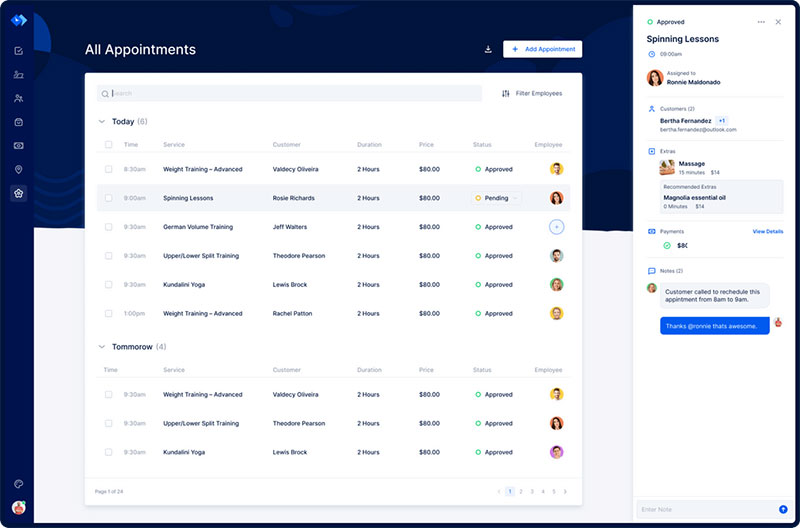
Trafft started as appointment scheduling software. Its Group Booking and Special Days settings let it handle registration for classes and workshops too. There’s a free single-user plan, and the group features sit in the paid tiers.
If you run a gym, a studio, or a consulting practice and you already book appointments in Trafft, it’s the obvious option. Your Tuesday evening class can go on the same calendar as your one-on-ones, and you don’t need a second platform just for sign-ups. Large public ticketed events are a different story. It isn’t built for those.
Group Booking is the feature that makes this work. One calendar slot can hold several attendees, with a minimum and maximum you set, so a single entry turns into a class roster.
Other things you get:
- Staff and location scheduling across multiple branches
- Automated SMS and email reminders
- Stripe and PayPal payment collection at booking (Growth plan and up)
- Google Calendar sync (paid plans)
- Custom booking forms with min/max group capacity
It’s free for one user with up to 100 appointments a month. Paid tiers (Mini, Growth, Professional, and Business) start at about $7.99 a month (Capterra, 2026). Group Booking starts on Mini, while Special Days, Stripe, and PayPal come with Growth or higher (Trafft, 2026).
Setup is fast, and the flat monthly price beats per-ticket fees if you run the same class every week. Know the boundary, though: there’s no dedicated ticketing engine with unique ticket codes, so it complements a public ticketing platform rather than replacing one. Recurring classes and private workshops are where it fits.
Most roundups only list dedicated ticketing platforms. Trafft is here because a lot of small businesses would rather not add a second tool at all, and for them it’s the honest recommendation. The demos show the group booking flow.
Amelia – Best for WordPress businesses that want ticketed events and appointment booking in one plugin
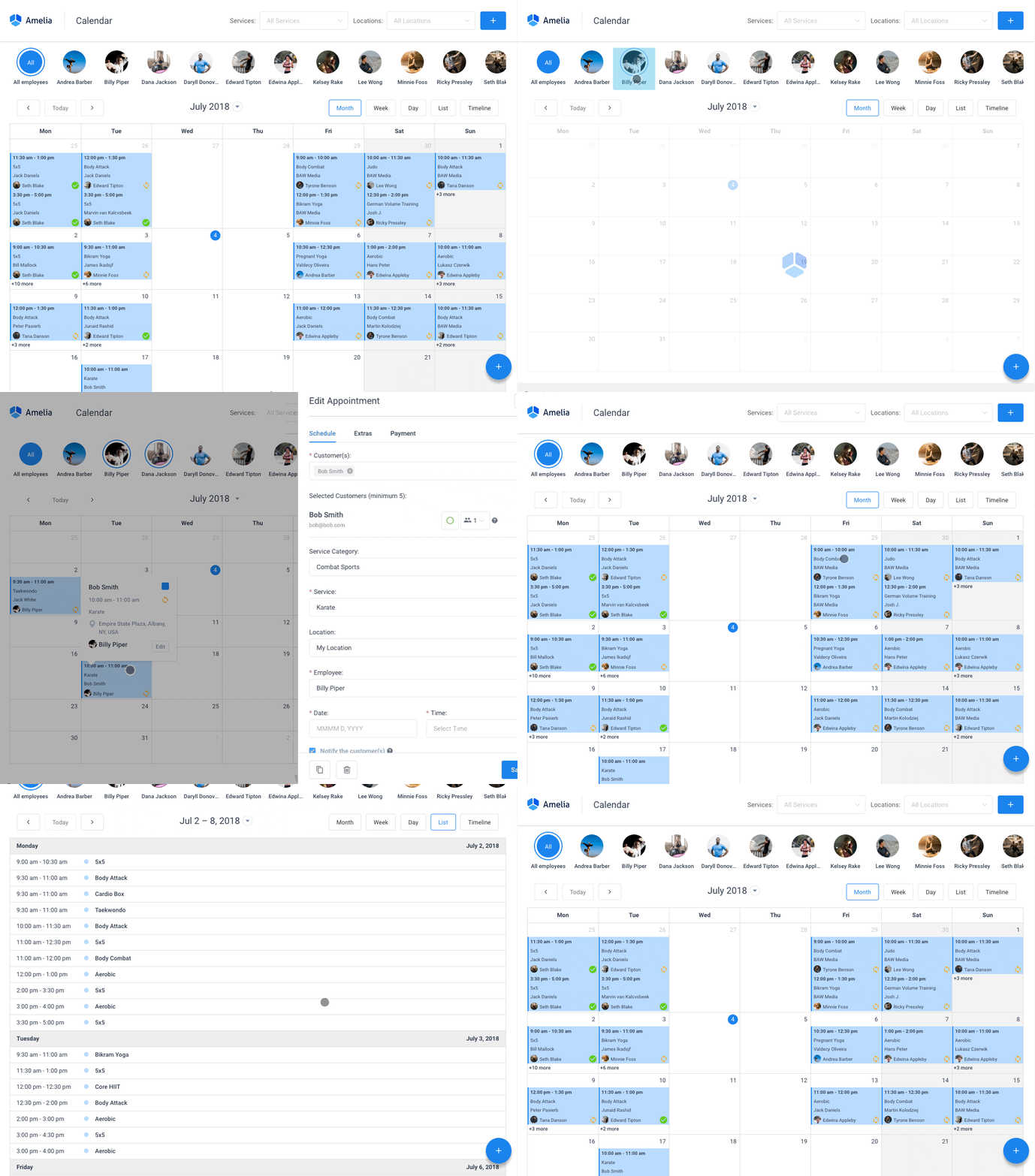
Amelia is a self-hosted WordPress plugin. Appointments, packages, and an actual ticketed events module share one admin screen, and you can start on the free Lite version.
That events module is what sets it apart. Ticketed sign-ups with capacity limits run next to regular appointment booking, which most competing WordPress plugins split into two separate products. For a studio or agency already on WordPress, it means no second SaaS subscription for event sign-ups.
- Drag-and-drop tools for building an event registration form inside WordPress itself
- Recurring appointments and packages
- WooCommerce, Zoom, and Elementor integrations
- Google and Outlook calendar sync
Because Amelia is a WordPress booking system with payment gateways built in, Stripe, PayPal, and Razorpay connect without any middleware on the Standard plan and above.
The free Lite version on WordPress.org covers one employee and Square payments only. Paid plans run Starter $49/year, Standard $89/year, Pro from $149/year, and Elite from roughly $259 to $339/year depending on current promotions. Calendar sync, video meetings, and event tickets generally come with Pro or higher. The same company sells a separate hosted SaaS product, Trafft, for businesses that do not want a WordPress install.
The front-end booking widget looks polished and updates ship often. Map the tier structure to your needs before you buy: Lite covers one employee, and several integrations arrive on the pricier plans, so check your integration list against the tier you’re choosing.
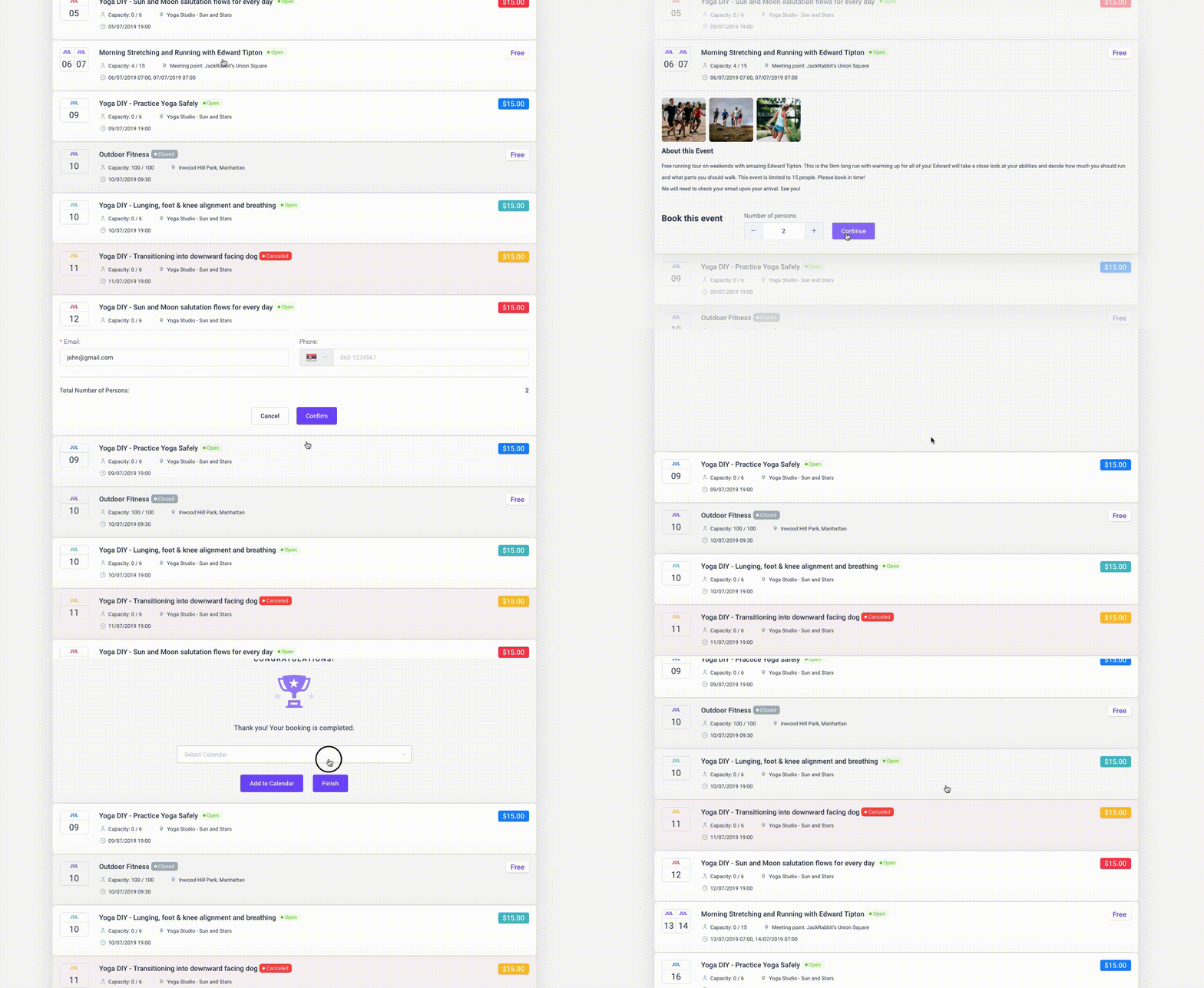
A 2026 hands-on review that ran a full booking through Amelia’s widget said the same thing: the admin is polished, and matching a plan tier to your actual integrations takes some planning before checkout (fs-code.com, 2026). Amelia’s Capterra profile, built from 245 verified reviews averaging 4.9 out of 5, backs this up, with “reasonable pricing” coming up again and again. The demos are the quickest way to judge the fit.
Independent write-ups that weigh Amelia against Bookly and Booked usually treat it as a pure appointment tool. That misses the events module, which is the whole reason a WordPress business could skip a separate registration platform.
Eventbrite – Best for public ticketed events that need broad discovery reach
You can publish an unlimited number of events on Eventbrite for free, with no subscription. If your first event is free, it costs you nothing. Paid tickets get a percentage plus a flat fee.
What you’re really paying for is the audience. Eventbrite runs a marketplace, so a public workshop or community meetup can get seen by people who aren’t on your mailing list.
- Drag-and-drop event pages and multiple ticket types
- Mobile check-in with QR code scanning
- Promo codes and automated waitlist management
- Built-in discovery marketplace
Organizers running WordPress sites often pair Eventbrite’s checkout with a dedicated WordPress Eventbrite integration so they keep control over page design.
Paid tickets carry a 3.7% + $1.79 service fee plus 2.9% payment processing per order (Eventbrite, 2026). Optional Eventbrite Pro email marketing plans start at $15 a month.
Those fees add up fast on cheaper tickets. A 2026 fee breakdown calculated that a $50 ticket nets roughly $5.20 in combined fees, about 10.4% of face value (Hi.Events fee calculator, 2026). On a $15 ticket the percentage gets worse.
There’s another downside people don’t always notice. Eventbrite’s discovery pages can show competing events to the same people you’re trying to reach.
The check-in app is mature, though, and the reach is real. It’s on this list mainly for the free tier. No other platform here lets you publish and sell a first event at zero subscription cost.
Whova – Best for conferences that prioritize attendee networking over ticket volume
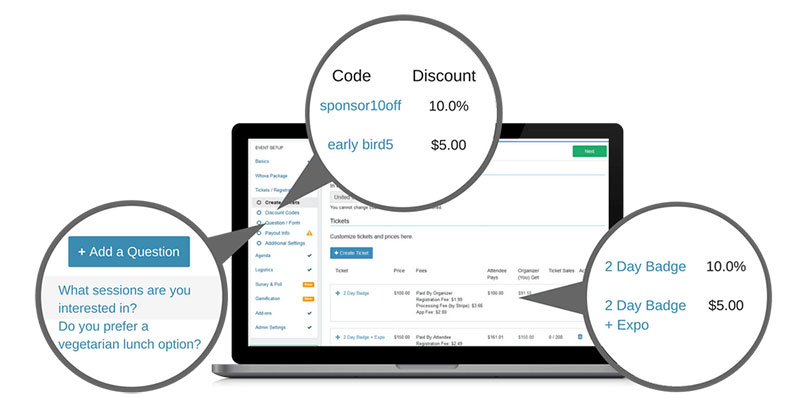
Whova is mostly an event app. Registration is part of it, but the reason people buy it is the networking side: AI-based attendee matching inside the mobile app, community boards, live polls. Ticketing-only platforms don’t try to do any of that.
It covers in-person, virtual, and hybrid formats, a mix that tracks with recent virtual event statistics on format demand.
- Registration and ticketing with badge or kiosk check-in
- Live polls, Q&A, and community boards
- Exhibitor lead retrieval and sponsor visibility tools
- Speaker and session scheduling
There are no published tiers. Cost is quoted per event based on format, duration, and attendee count. Free tickets carry no fee; paid tickets carry a 3.0% + $0.99 registration fee on top of payment processing (Whova, 2026).
Reviews are strong, a 4.8-star average across more than 2,400 Capterra reviews. Still, “overwhelming and persistent notifications” shows up as a recurring complaint, even from reviewers who rate it above 4 stars overall.
The quote-based pricing makes early budgeting hard. And most of the value depends on attendees actually installing the app, which you can’t control. A separate requirement check found Whova does not support reserved seating, season passes, or PayPal, which rules it out for commerce-heavy ticketing (FitGap, 2026).
If you’re comparing Whova on checkout features alone, you’re comparing it to the wrong category.
Cvent – Best for enterprise teams running complex multi-track conferences in-house
Cvent is built for large organizations running dozens of events a year, with a dedicated team to configure and maintain it. Registration, venue sourcing, and onsite badging are all part of the suite, under a custom annual license.
Licensing is modular. Registration, Attendee Hub, and OnArrival are separate pieces, so a big team can license only the parts of the event lifecycle it runs in-house.
- Drag-and-drop registration website builder
- Multi-track session and speaker management
- Venue sourcing and exhibitor management
- Salesforce and HubSpot CRM integrations
Cvent does not publish pricing, and you won’t see a number until you get on a sales call. Procurement data from 193 tracked purchases puts the median annual contract at $19,550, with a full range of $5,400 to $94,642 (Vendr, February 2026). Implementation alone can run $5,000 to $50,000 in year one.
Per-registrant fees come on top of the license. Attendee Hub and the mobile event app run about $7 per registrant per event, and registration fees have been quoted as high as $12 per registrant. Most reviews skip this part, and for high-attendance programs it can add tens of thousands of dollars a year. Vendr’s data puts mid-market buyers running 20 to 50 events a year at roughly $30,000 to $150,000 a year once modules and per-registrant fees are added (Vendr, 2026).
The feature depth is hard to match, and there are decades of enterprise event data behind the platform. Buyers do report confusing registration flows for attendees, though, and exhibitor profile setup is clunky.
Bizzabo – Best for B2B marketing teams running large branded conferences
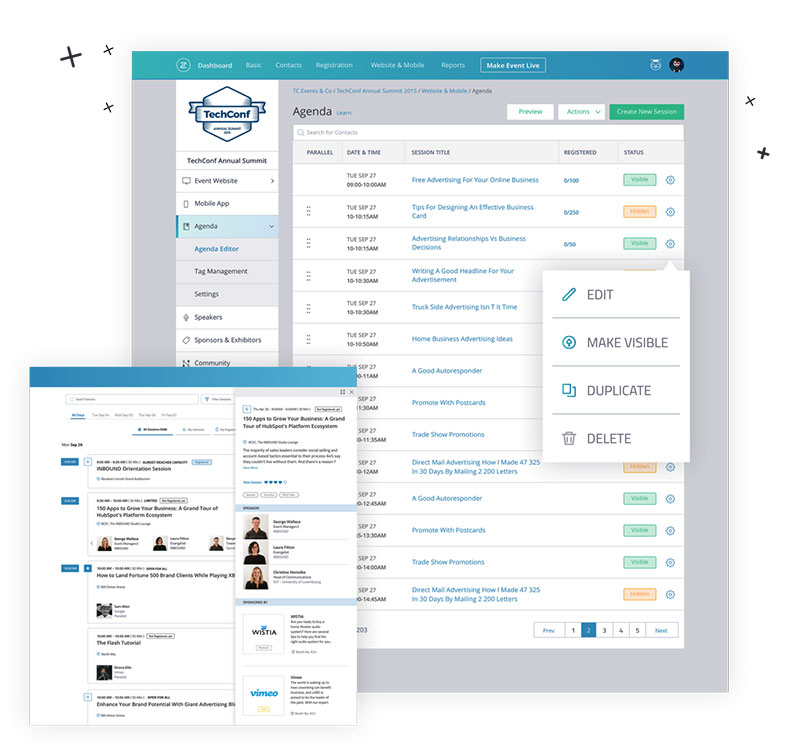
Bizzabo calls itself an Event Experience OS. In practice it’s aimed at mid-market and enterprise B2B conferences, especially flagship annual events with sponsor and exhibitor programs, and it’s billed per seat on an annual contract with a three-user minimum.
For teams building those programs, knowing how to get sponsors for an event matters as much as the software managing the relationship.
The unusual piece here is Klik SmartBadge, a wearable that captures engagement data from check-in onward and feeds it into post-event ROI reporting.
- Dynamic registration forms with conditional logic
- Drag-and-drop event website builder
- Mobile event app with live streaming for hybrid sessions
- Salesforce, HubSpot, and Marketo integrations (sold as a premium add-on)
It costs $499 per user per month, billed annually with a three-user minimum, which puts the starting price at $17,999/year. Klik SmartBadge pricing is quoted separately (Capterra, 2026).
That’s out of reach for most smaller organizers. The upside is predictable budgeting, since you get unlimited events and registrations instead of per-ticket fees. Reviewers also mention a real learning curve, which isn’t surprising given how much is in there.
Bizzabo’s own 2026 benchmark data shows dynamic registration flows convert at roughly 24.4%, versus 11.6% for static flows. That’s a good argument for conditional logic. It only pays off at volume, though. You need enough registrations for that conversion lift to cover a five-figure annual license.
Splash – Best for marketing teams running many branded event pages a year
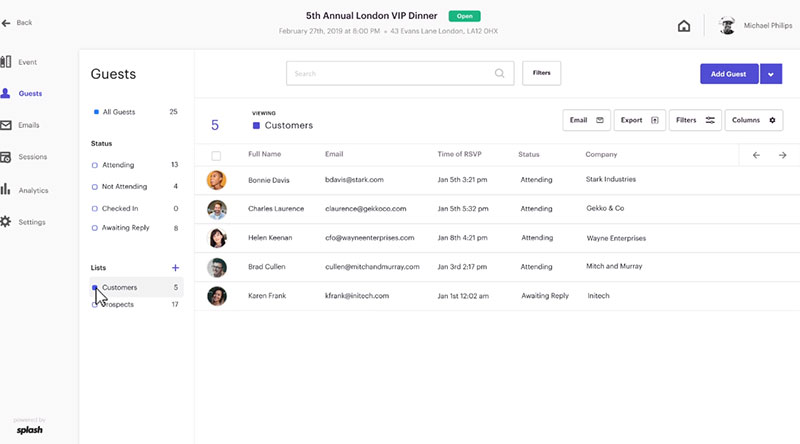
Splash works best for a marketing team that runs 40 mid-size branded events a year, not one big flagship. It’s an event marketing platform first: branded landing pages, registration, and reporting tied into your CRM. A free tier covers basic pages.
Non-designers can launch a templated, on-brand event registration landing page without waiting on a developer. For field marketing teams, that’s most of the appeal.
- Customizable landing page templates
- On-site check-in and badge tools
- Built-in email scheduling and reminders
- Salesforce and Marketo integrations
Pro and Enterprise tiers require a custom quote, and every plan includes unlimited events and attendees (Splash, 2026). Quote-only pricing makes early budgeting harder, and reviewers mention a learning curve.
Capterra’s Splash profile shows 53% of reviewers come from enterprise companies. Registration Management gets a lower rating (4.0/5 from 10 raters) than the platform’s broader satisfaction scores, which fits how the product is built. Splash is a marketing tool that includes registration, not a registration tool with marketing added on. That also changes which team should own the subscription.
RSVPify – Best for organizers who need heavy customization on private or professional RSVP events
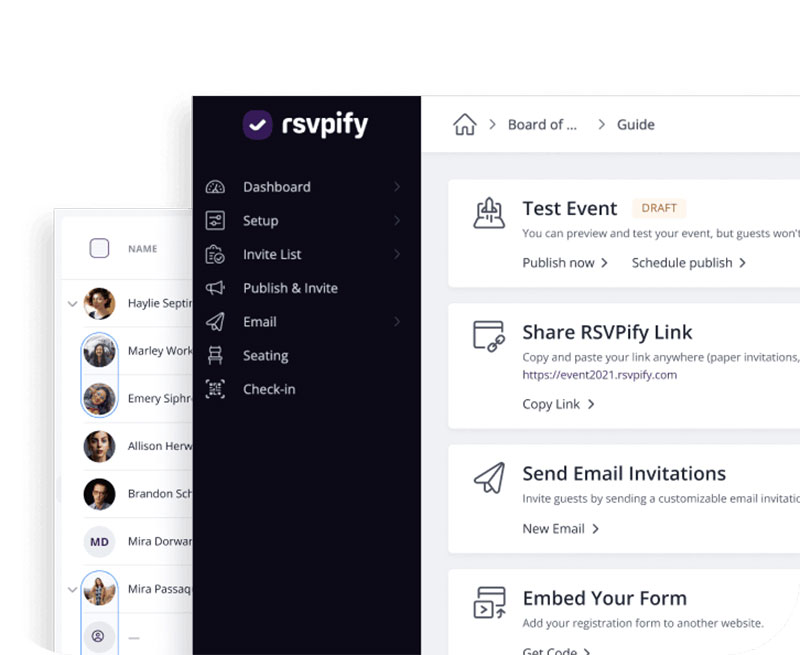
Weddings, private galas, and professional associations tend to need seating charts and password-protected pages more than marketplace ticket sales. RSVPify is built around that kind of guest-list control, with six pricing tiers from personal events up to enterprise.
Its best feature is drag-and-drop seating charts combined with sub-event management. One RSVP can cover several linked sessions per guest, which is useful for something like a rehearsal dinner plus ceremony plus brunch.
- Custom registration questions and capacity limits
- Advanced password protection
- Event collaborator accounts
- Embeddable RSVP forms
A free version exists. Business & Nonprofit plans start at Starter $39/month for 150 registrations, Plus $125/month, Professional $409/month, with custom Enterprise pricing above that (Capterra, 2026). Ticketed events also carry a 1.95% + $0.90 per-ticket fee plus Stripe processing (RSVPify, 2026).
It has a 4.8-star Capterra rating, and support gets praised a lot. The pricing gets complaints. Software Advice’s summary of RSVPify reviews lists “high and unclear pricing structure” as a specific, repeated con, right next to praise for customizable event pages. First-time organizers also find the navigation takes some getting used to.
Most roundups compare RSVPify directly against high-volume platforms like Eventbrite. That isn’t a fair test. It’s here for guest-list complexity, not ticket volume.
Swoogo – Best for teams that need unlimited conditional logic in registration forms
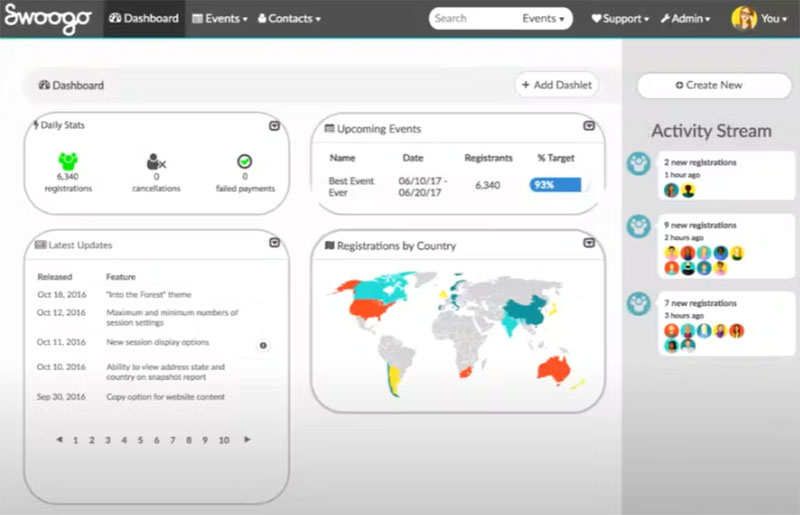
Here’s the detail competing roundups skip. Swoogo’s conditional logic is unlimited at every tier, not just the top one, and so are registrant types and custom questions. Several competitors lock advanced logic behind higher plans.
If you run lots of different event formats, that matters more than the sticker price. You clone a form template and adjust it instead of rebuilding from scratch every time.
- Cloneable registration form templates
- No-charge custom branding per form
- Sponsor portal and email automation
- Session scheduling
Pricing is quote-based and user-based, with unlimited events and registrations included. Buyer data on TrustRadius puts plans at roughly $11,800 to $26,000 a year; Swoogo itself lists pricing as available on request. There’s no free trial on the core plan, and every quote means a sales conversation.
Reviewers rate ease of use and support highly, with a 4.7-star average across 82 verified Capterra reviews and good feedback on payment processing. Head-to-head G2 comparison data shows Swoogo outscoring Bizzabo on ease of setup, 9.6 versus 8.6, and quality of support, 9.9 versus 8.9, across their respective reviewer bases.
JotForm – Best for budget-limited teams building a custom registration form from scratch
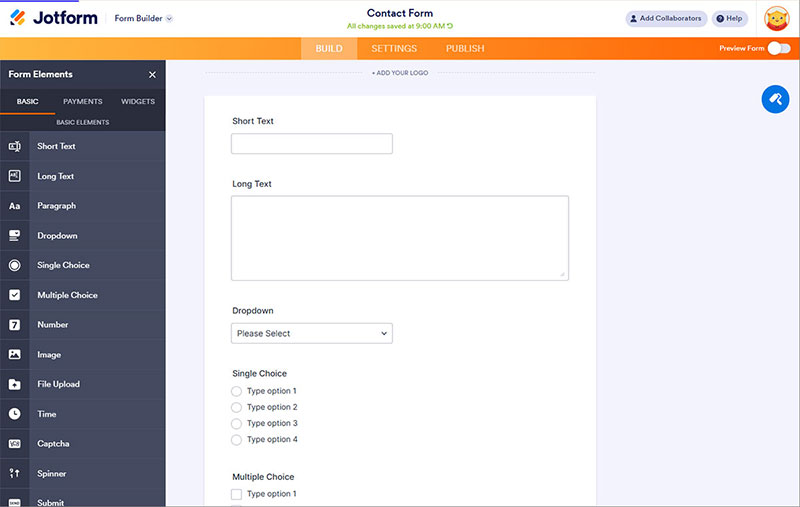
JotForm isn’t built for events, and that’s why it’s on the list. It’s a general form builder with a free tier you can actually use, and drag-and-drop event registration templates. It’s the fallback when you need a registration form fast and aren’t ready to commit to an events platform.
There are over 10,000 templates plus conditional logic, so a working form, including layouts built for creating tickets for events, can go live in minutes without custom code.
- Drag-and-drop form builder with conditional logic
- Support for using PayPal for event registration alongside Stripe and Square
- E-signature and document tools
- Google Drive integrations
The free Starter plan gives you 5 forms and 100 submissions a month. Paid plans run Bronze $34/month, Silver $39/month, Gold $99/month on annual billing, with custom Enterprise pricing above that (Jotform, 2026).
The limits are clearly listed, which I like. The problem is that JotForm meters forms, submissions, storage, and views separately, and an active event can hit a cap mid-campaign. Independent 2026 pricing audits note that whichever meter fills first decides when you’re forced to upgrade. For a registration page, that’s almost always the submission count.
There’s also no event check-in or badge tooling built in.
What Is Event Registration Software
Put simply, it’s the part of running an event where someone signs up, pays, and gets a confirmed spot. All of that happens in one workflow instead of across a form, an inbox, and a payment app.
It’s the entry point, not the whole operation behind the event.
Event management software is broader. It usually covers budgeting, staffing, vendor coordination, and run-of-show too, and registration is just one module inside it.
A generic form builder sits on the other side. It collects data and stops there. Registration software adds ticket types, capacity limits, payment, and check-in on top of that same data.
A spreadsheet and a payment link can handle a handful of RSVPs. It falls apart once you have ticket tiers and a capacity cap, and it gets worse when people show up at the door.
What Features Does Event Registration Software Need
A real registration platform does more than a plain form. It builds the form and takes the money. It checks people in, connects to your other tools, and reports on what happened afterward.
Not every event needs all of that at full strength. A private RSVP page has no use for badge printing, and a free internal meeting doesn’t need payment processing.
| Feature | What it handles | Depends on |
|---|---|---|
| Registration forms | Ticket types, custom fields, conditional logic | Form builder, pricing rules |
| Payment processing | Card, digital wallet, and invoice collection | A connected payment gateway |
| Check-in | QR scanning, kiosks, badge printing | A mobile app or on-site device |
| Integrations | Syncing registrants to CRM and email tools | Native connectors or an API |
Registration Forms And Ticket Types
The form is where a visitor becomes a registrant. It’s also where most people drop off.
- Multiple ticket types: general admission, VIP, group, and free
- Early bird and tiered pricing with automatic cutoff dates
- Conditional logic that skips irrelevant fields based on earlier answers
- Custom fields for session picks, dietary needs, or company details
Keep required fields to a minimum. Every extra one is another reason to quit before reaching the payment step.
For a WordPress setup, guides on how to sell tickets on WordPress go through the same ticket-type decisions in more platform-specific detail.
Payment Processing
Most event registration software doesn’t store card data. It passes it straight to Stripe, PayPal, or a similar processor. Because the platform never touches raw card numbers, it stays out of the heaviest tier of PCI DSS obligations.
Where payment setups usually break is reconciliation.
IMS Management Services previously ran a system that could not match payment data across its ticketing platform, on-site point of sale, and processor cleanly, and that gap delayed settlement after every event (Softjourn, 2026).
Check-In And Badging
Attendees remember the line at the door. 71% of attendees say the ease of check-in can make or break their experience at an in-person event (Bizzabo, 2025 State of Events report).
QR codes are the default now. A unique code gets generated at registration and tied to a single check-in record.
- Self-service kiosks for high-volume arrival windows
- On-demand badge printing with attendee type and branding
- Real-time attendance syncing back to the registration dashboard
Integrations
Two 2025 surveys come to opposite conclusions here.
79% of B2B event organizers say their event platform is integrated with their CRM or marketing automation system (Bizzabo, 2025 State of Events report). But a separate survey found 44% of event professionals have no CRM connection at all, and 69% have no marketing automation connection (Swoogo, 2025 Eventscape survey).
My guess is it comes down to what each survey counted as “connected.” A native Salesforce sync and a one-off CSV export can both get reported as an integration.
So when a vendor says it integrates with your CRM, ask what that actually means before you sign.
Reporting And Analytics
- Registration-to-attendance conversion rate
- Revenue by ticket type
- Traffic source for each registration
- No-show rate by segment
Having this data doesn’t solve the ROI problem. 70% of B2B event organizers reported difficulty demonstrating event ROI, even with it available (Bizzabo, 2025 State of Events report). Bizzabo’s 2026 report shows that share falling to 40%, which is better, but it’s still a common struggle.
The missing piece is usually the link between registration numbers and something the rest of the company already tracks, like pipeline or renewal revenue.
For numbers beyond registration, a wider collection of event statistics fills in the rest.
FAQ on Event Registration Software
Does event registration software work for virtual and hybrid events
Yes, in most cases. Platforms add a Zoom, Google Meet, or built-in streaming link to the same registration form used for in-person tickets.
Whether someone attends in person, virtually, or both just becomes a ticket option. You don’t need a separate system.
Do you need a separate check-in app on top of your registration software
Usually not. Most tools come with their own QR code check-in app or kiosk mode that runs off the same attendee database.
A standalone check-in tool only makes sense for very large venues with multiple entrances and their own access control.
What information should you collect before building the registration form
Settle your ticket types, pricing tiers, and capacity limits first. After that, list only the fields you need for badges, catering, or session picks.
A shorter form means fewer people abandoning it halfway.
How long does setting up event registration software actually take
A single-event form with one ticket type and a connected payment gateway can go live in under an hour on tools like JotForm or Eventbrite.
Multi-track conferences with badge printing and CRM sync typically take one to two weeks to configure properly.
What happens to registration data after the event ends
Most platforms keep attendee records in your account until you delete them. You can export the full list to CSV or sync it to a CRM.
If you have EU attendees, GDPR means you need a stated retention period. Keeping the data forever by default isn’t allowed.
When Do You Outgrow an Event Registration Software?
You usually find out from a limit, not a renewal date. You hit a submission cap mid-campaign, or the integration you need turns out to be locked in a higher tier. That happens once monthly registrations, the number of events running at once, or your integration needs grow past what your plan covers.
Moving registration data in the middle of an event series costs more than choosing well before launch. So start with the lowest lock-in and only move up when you need to:
- Use a free or submission-based form builder while registrant volume stays low
- Switch to a dedicated ticketing platform when check-in logistics need a purpose-built module
- License an enterprise suite only when venue sourcing or CRM-bound reporting become recurring needs
You’ll wait longer for advanced features this way. In exchange, you’re never paying enterprise per-registrant fees on volume your events never reach.
At some point the platform stops being the limit and demand becomes the problem. That’s covered in marketing strategies for ticket sales.

Explore topics

Read Inspiring Customer Stories
Check out how our user set Amelia for his business