



Two tools with nearly identical features can land at very different monthly bills, because one charges per head and the other per site. That’s the decision that actually moves the number, more than anything on a feature list.
The best employee scheduling apps all do the core job: turn overlapping time off requests and twenty open shifts into a rota your team can trust, with drag-and-drop building, shift swapping, and notifications straight to phones.
Where they diverge is the billing model, the compliance depth, and whether they handle client bookings alongside staff shifts. Ten are ranked below with the pricing model flagged on each.
Worth saying up front: Amelia publishes this article, and Trafft comes from the same company. The reasoning sits under every pick and both get an honest “where it falls short” list like everything else here. Neither is built for pure hourly shift work, which is what most of this list does better, and we’ve said so plainly in each case.
Picking by pricing model, not sticker price
Per-location billing favors big single-site teams. Per-user billing favors small or spread-out crews. Get that backwards and you overpay regardless of which tool you chose.
Every tool here is a genuine employee scheduling software product. Each builds a staff rota, handles availability, and pushes shift notifications to phones. The two most flexible booking-plus-staff tools lead, then the dedicated shift platforms.
Good scheduling software for small businesses should cut the back-and-forth. The measurable payoff of structured scheduling shows up as fewer no-shows and less time lost to spreadsheet edits.
A note on pricing: every figure below was pulled from each vendor’s own pricing page in July 2026 rather than from third-party listings, which run behind. Promotions and tier names change often, so confirm before you commit.
Quick comparison
| Tool | Best For | Pricing Model |
|---|---|---|
| Trafft | Service teams booking clients + staff | Users bundled per tier, small free plan |
| Amelia | WordPress service businesses | Annual or lifetime license |
| Homebase | Single-location small business | Per location |
| Deputy | Compliance-heavy shift work | Per user |
| 7shifts | Restaurants | Per location |
Trafft: best for service teams that book clients and manage staff in one place
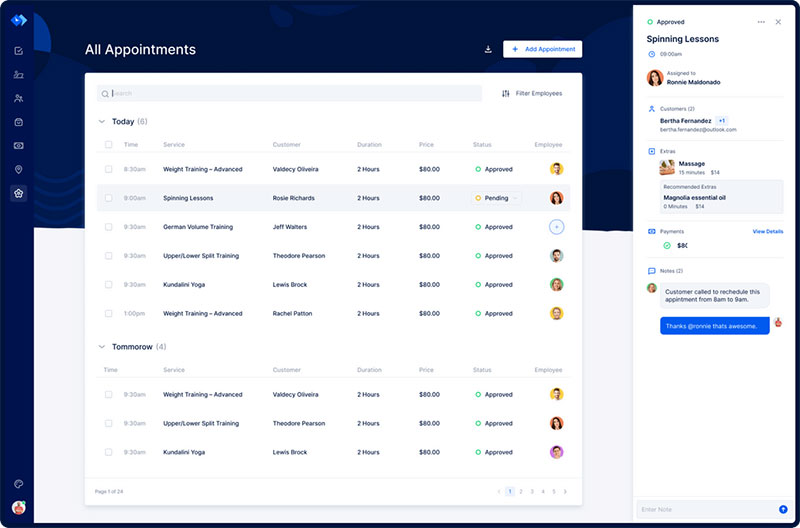
Trafft pairs client self-booking with real staff scheduling on one team calendar. Salons, clinics, and agencies run appointments and shift planning from a single view that maps services to specific employees and locations.
Best for multi-staff service businesses doing both jobs at once.
What you get:
- Client self-booking with a hosted booking page
- Multi-staff and multi-location scheduling
- Google Calendar sync, Stripe, PayPal, Zoom, Google Meet
- Automated SMS and email reminders
- Coupon codes and upfront payment collection
Pricing: a free forever plan covering 1 user, 1 location, and 100 appointments a month. Paid tiers bundle users rather than billing per seat: Mini around $29/month for 3 users, Growth around $59/month for 5, Professional around $99/month for 15, and Business around $149/month for 30. Check the Trafft pricing page before budgeting, since promotions move these numbers.
Where it wins:
- Strong client-facing booking flow
- Clean single-calendar view across staff and appointments
- Users bundled into each tier, so the bill doesn’t move with every hire
- Handles group booking scenarios and recurring appointments well
Where it falls short:
- The free plan is narrow at one user and 100 appointments a month. Sling, Homebase, and Connecteam all give away far more at $0
- Reporting covers the essentials rather than the depth of a dedicated shift tool
- No labor cost forecasting or compliance rule engine, which is the core of what Deputy and 7shifts sell
- Not built for pure hourly-only teams with no client bookings
What we found testing it: a working booking page went live in under 15 minutes without a separate website, and mapping services to specific staff at specific locations worked from one screen. The single-calendar view is the genuine advantage over running a booking tool and a rota tool side by side. Two limits showed up fast. The free tier’s ceiling arrived quickly at one user and 100 appointments, so it functions as a trial. And when we looked for scheduled-versus-actual hour reporting or overtime flags, the kind of thing Deputy does natively, they aren’t there. Trafft reports 50,000+ businesses and more than 8 million appointments handled, processing over $1.5 million in payments monthly.
Most roundups treat “booking” and “staff scheduling” as separate categories. Trafft collapses them, which quietly removes the double data entry service owners usually eat when they run two apps. It does not replace a dedicated shift platform for an hourly team.
Amelia: best for WordPress service businesses that want booking and payments on their own site
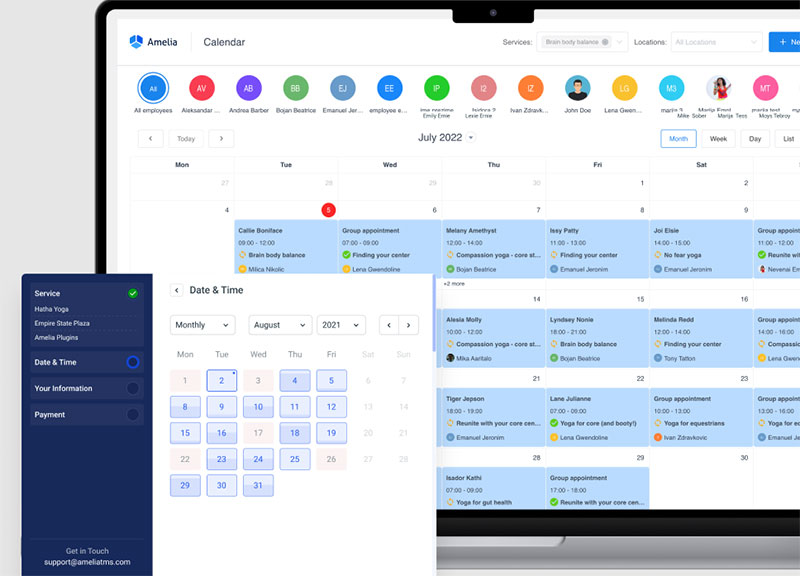
Amelia runs full employee, service, and schedule management inside the WordPress admin. Salons, clinics, and studios get appointment scheduling, staff working hours, and payment collection on their own site rather than a separate hosted app.
Best for WordPress-based service businesses that want to own their booking stack.
What you get:
- Four roles: admin, manager, employee, customer
- Employee working hours, days off, and special days
- Google Calendar integration from the Standard tier, with full two-way sync and Apple Calendar on Pro
- Multiple gateways through a WordPress booking setup that takes payments via Stripe, PayPal, Mollie, and Razorpay from Standard upward (Lite and Starter are Square-only)
- Group bookings, packages, recurring appointments, and ticketed events with QR e-tickets
Pricing: Free Lite edition (1 employee, 1 domain). Paid plans start at $49/year (Starter), rising through Standard at $89, Pro at $149, and Elite at $259, with lifetime options on most tiers. All tiers are self-hosted WordPress plugin licenses; there is no hosted version.
Where it wins:
- License model instead of per-seat billing
- Genuinely useful employee management
- One of the more polished admin panels among WordPress booking plugins
Staff don’t need a WordPress login to check their day. With the Amelia Business app for iOS and Android, each employee sees only the appointments and events assigned to them, while admins see the whole schedule. Employees get push notifications when an appointment is booked, canceled, rescheduled or coming up, and anyone can change a booking’s status in one tap. The app is included with the Elite plan. It isn’t a shift tool, though: you can’t build rotas or swap shifts in it, and new bookings are still created in WordPress or through the booking form. The launch post covers what the first version does.
Where it falls short:
- Requires WordPress. No site, no Amelia, and there’s no hosted alternative to fall back on
- Key integrations are tier-gated, including calendar sync
- No time clock, payroll, or compliance tooling, so an hourly team still needs a separate shift platform
- Set up a location first. Employees attach to a location, so creating one before adding staff saves a step on first setup
What we found testing it: staff, services, and working hours were all configurable from one screen, and the notification templates covered email and SMS without extra plugins. Setting up the four roles took minutes. The gap for this article’s topic is clear: there’s no clock-in, no labor cost report, and no overtime rule engine, so a cafe scheduling twelve hourly staff gets more from Homebase than from us. Amelia holds 4.9/5 across 245 Capterra reviews and 4.6/5 across 761 WordPress.org reviews.
The per-seat pricing most scheduling apps run gets expensive fast. Amelia’s license model is the rare pick where adding staff doesn’t raise your monthly bill, which almost no competing page highlights.
Homebase – Best for single-location small businesses that want free scheduling plus payroll
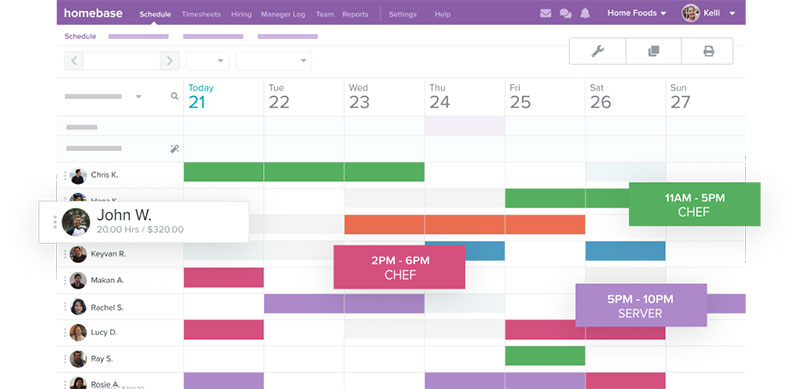
Homebase is the only mainstream free option that also runs payroll. Unlike tools that only connect to external payroll systems, it combines scheduling, time tracking, and payroll in one platform. The free tier covers one location, which makes it the strongest pick for small retail, cafes, and service shops that want drag-and-drop scheduling without paying on day one.
Best for single-location small businesses watching every dollar.
What you get:
- Drag-and-drop scheduler with templates
- Time clock with clock in and clock out
- Shift swapping and open shift pickup in the mobile app
- Scheduled-versus-actual hours and labor cost reports
Pricing: Free for a single location. Essentials runs about $24.95/month per location as of 2026.
Where it wins:
- Real free tier with unlimited employees at one site
- Payroll baked in
- Clean mobile experience staff pick up without training
Where it falls short:
- Per-location billing stacks up fast across many sites
- Some HR features sit behind higher tiers
What we found testing it: the unlimited-employee free tier is the standout, since a single-location cafe can run its whole rota at $0 where per-user tools would charge per head. Building a week of coverage took less time than most tools here, and the scheduled-versus-actual hours report showed labor spend before the shift ran rather than after payroll closed. That reporting is exactly what Trafft and Amelia don’t offer. The ceiling is location count rather than headcount, so a second site pushes you to paid immediately.
Vendr deal data (n=21) shows buyers pay a median of about $500/year on Homebase contracts, so the more seats per location, the more room to negotiate. Its free plan and Sling’s are widely rated the two strongest in the category.
For a one-site shop, that scheduling-plus-payroll combination often replaces two paid subscriptions, a trade-off most comparison pages skip.
Deputy – Best for compliance-heavy teams and demand-based rosters
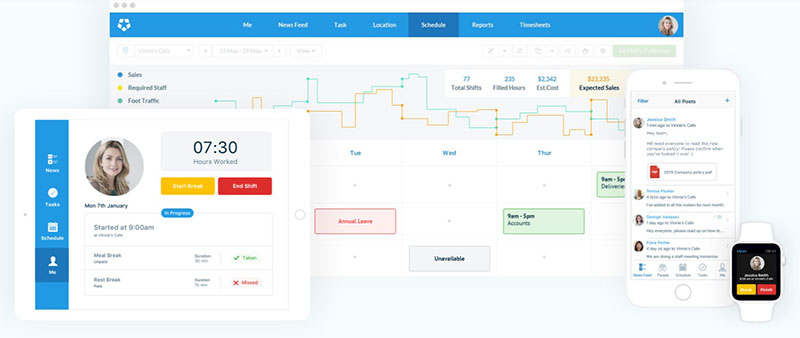
Deputy has the strongest compliance logic in the category. Break-and-overtime rules handle jurisdictional differences that lighter tools miss, which is what healthcare, care, and trades businesses are actually buying. Companies operating internationally may still need separate tools for global payroll tax compliance, since Deputy’s main strength is workforce scheduling and labor-rule enforcement.
Best for businesses operating across multiple jurisdictions.
What you get:
- Demand-based auto scheduling
- Built-in time clock with GPS
- Solid tools for managing shifts and swaps
- Payroll and HR integrations
Pricing: Per user in 2026: $5 Lite, $6.50 Core, $9 Pro, with a $30/month minimum spend. HR and Analytics are paid add-ons.
Where it wins:
- Best-in-class labor law compliance
- Strong forecasting
- Mature time clock
Where it falls short:
- Thin on onboarding and HR extras
- Per-user cost climbs with headcount
- Add-ons inflate the real price
What we found testing it: the compliance engine is the reason to buy this and it earns the reputation. Break and overtime rules applied automatically by jurisdiction, flagging a violation before we published rather than after payroll caught it, which nothing else on this list attempted. The $30 monthly minimum is the catch nobody advertises: a five-person team pays that floor regardless, so the per-user headline understates the real cost for tiny crews. Deputy holds 4.6/5 on G2 across 650+ reviews. For a 10-person single site, Deputy Lite lands near $50/month, though the per-user model flips against per-location tools once headcount grows.
Everyone praises the compliance. The underrated catch is that $30 monthly minimum, which makes it a poor fit for tiny teams that would otherwise qualify for a cheaper per-user tool.
When I Work – Best for simple shift teams that want the cheapest per-user entry
The lowest published per-user starting price on this list. When I Work is a generalist scheduling app for offices, small retail, and service crews that need clean shift planning and messaging without a full HR suite.
Best for small, simple teams that want scheduling and nothing heavier.
What you get:
- Drag-and-drop scheduling
- Shift swapping and time off requests
- Team messaging
- Multiple native payroll connections
Pricing: From $2.50/user/month, single location, with a 14-day trial. No free plan. Time tracking is a separate add-on.
Where it wins:
- Cheapest per-user starting point
- Clean interface
- Fast for building a straightforward work schedule
Where it falls short:
- No free tier
- Time tracking costs extra
- Light on advanced forecasting
What we found testing it: a small team schedule came together in roughly 15 minutes from a blank slate, and shift swaps resolved between two staff without a manager stepping in. Messaging sitting in the same plan rather than behind an add-on made the quoted price closer to the real one, with one exception. Time tracking is unbundled, so the $2.50 headline stops being the cheapest entry once you add a clock, which is what most hourly teams need on day one. When I Work carries 4.4/5 on G2 and 4.5/5 on Capterra across 1,200+ reviews.
That $2.50 headline hides the unbundled time tracking. Once you add it, the “cheapest” label narrows considerably, a detail buried in most rankings.
7shifts – Best for restaurants that need tip pooling and labor forecasting
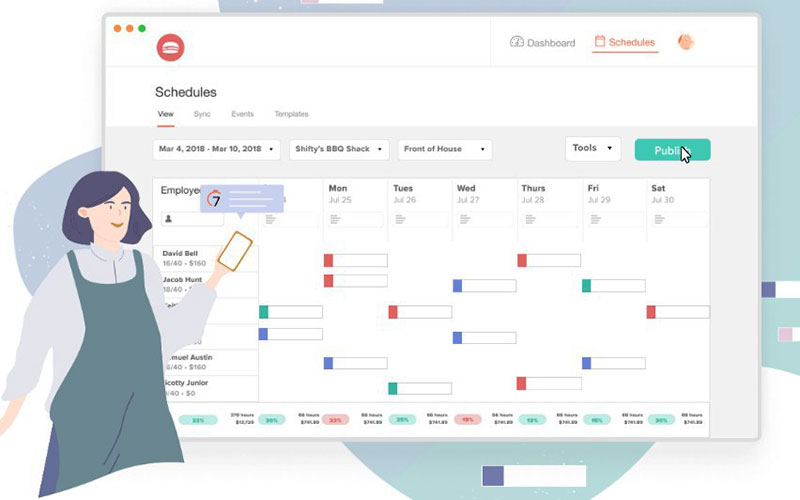
7shifts reads POS sales data to forecast labor. It also handles tip pooling and understands sections, stations, and split shifts, which no generalist tool matches.
Best for restaurants and bars that schedule against sales volume.
What you get:
- POS integration (Toast, Square, Lightspeed, Clover, and others)
- Tip pooling and distribution
- Restaurant-aware scheduling for sections, stations, and split shifts
- Budget tracking and staff communication
Pricing: Free “Comp” plan for a single location. Essentials from about $39.99/month per location, Pro from about $79.99, and Premium from about $134.99, with annual billing saving roughly 10 to 12%. 7shifts renamed its tiers, so older guides citing “The Works” are out of date.
Where it wins:
- Restaurant-specific features no generalist matches
- Strong labor cost forecasting
- Usable free tier
Where it falls short:
- Restaurant-only by design, a poor fit for retail, gyms, or warehouses
- Payroll integrations and full forecasting require Pro
- Vendor stability is worth weighing: the company cut 68 employees, roughly 19% of staff, in January 2024, its second round of layoffs in five months
What we found testing it: the POS-fed forecast is the feature that justifies the vertical focus. Connecting sales data produced a staffing suggestion tied to projected volume rather than last week’s pattern, which no generalist tool here attempts. Tip pooling worked as a native function rather than a spreadsheet workaround. Full forecasting and payroll integrations sat behind Pro, so the Essentials tier is thinner than the marketing implies. G2 rates it 4.5/5.
The vertical focus is both the strength and the honest limitation. Nothing schedules a kitchen better, and nothing schedules a non-restaurant worse.
Connecteam – Best for deskless and field teams that need more than a shift calendar
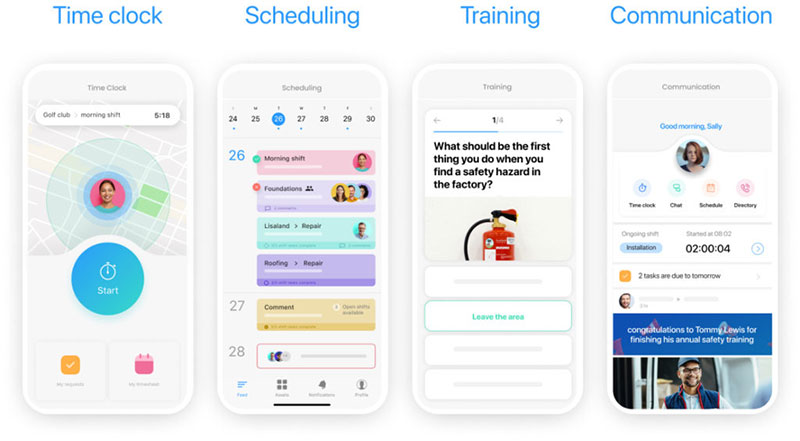
Connecteam puts scheduling inside a wider operations and communication hub. Tasks, training, and team comms sit alongside the rota, which fits field crews that want workforce management in one app. Its planning tools are useful for day-to-day assignments, although teams managing complex project dependencies may still need a dedicated Gantt chart.
Best for field and deskless teams juggling all three together.
What you get:
- Shift scheduling with GPS time clock and geofencing
- Task management and checklists
- In-app training and onboarding
- Team chat and announcements
Pricing: Free for up to 10 users with full features. Paid from about $29/month for up to 30 users per hub, roughly $87/month across all three hubs.
Where it wins:
- Flat pricing for a band of users
- Strong tools for keeping field staff productive
- Generous free tier for tiny teams
Where it falls short:
- The hub structure gets confusing
- Full functionality means paying across hubs
- No built-in payroll
What we found testing it: ten free users with full features is a genuinely useful ceiling, more generous than anything Trafft or Amelia offer at $0. The conflict flag caught a double-assignment before we published, and the mobile app was the strongest of the shift tools here, which matters when the people using it aren’t at a desk. The hub structure was the friction: working out which capability sat in which hub, and what a full setup would actually cost, took longer than the scheduling itself. Connecteam holds 4.7/5 on Capterra and 4.6/5 on G2 across thousands of reviews.
Reviews sell it as “scheduling plus HR.” The quieter truth is that the pricing only shines if you actually use multiple hubs. Buy it for scheduling alone and cheaper tools win.
Sling – Best for very small teams that want free scheduling for up to 30 users
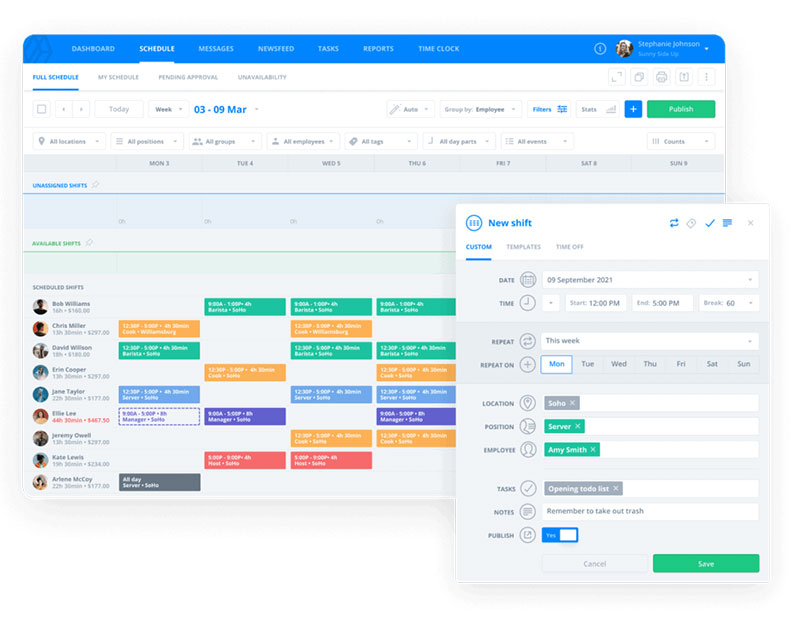
Free scheduling and messaging for up to 30 users. Sling, now owned by Toast, is free-first, which makes it a strong start for tiny operations that want $0 setup.
Best for operations of 30 or fewer.
What you get:
- Shift scheduling with templates
- Built-in team messaging
- Time off and availability tracking
- Newsfeed and task assignment
Pricing: Free up to 30 users. Paid tiers up to about $4/user/month.
Where it wins:
- Most generous free tier in this article
- Simple to learn
- Good messaging for the price
Where it falls short:
- Mobile clock-ins sit behind paid tiers
- Fewer compliance and forecasting tools than Deputy or 7shifts
What we found testing it: thirty free users is the most generous free tier here by a wide margin, ours included, and scheduling plus messaging both worked at $0. Then we went looking for mobile clock-in and it isn’t part of the free build, which is the detail buyers discover after signup rather than before. For a team that only needs a published rota and a group chat, the free plan is genuinely enough. For anyone tracking hours, the paid tier arrives sooner than the headline suggests.
Multiple 2026 comparisons rank Sling’s free plan alongside Homebase’s as the two best in the category. “Free for 30 users” reads better than it works if you need time tracking.
Buddy Punch – Best for small businesses pairing scheduling with time tracking and payroll
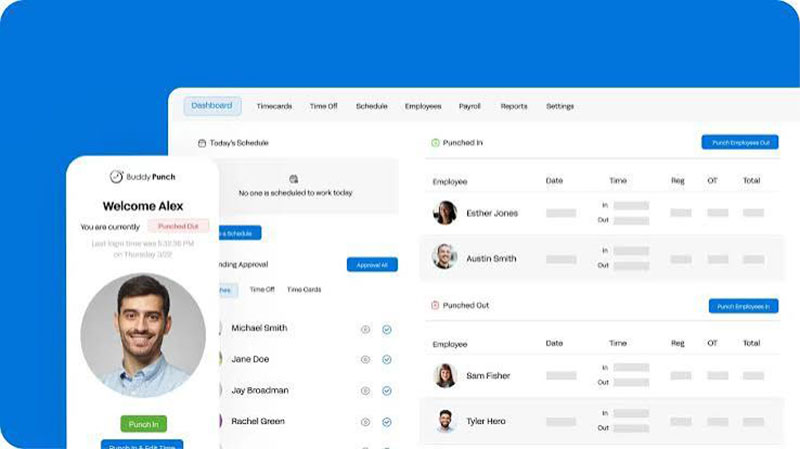
Buddy Punch leads with time tracking, not scheduling. GPS and geofencing punches with tight payroll integrations are the draw, and scheduling is attached rather than central.
Best for small teams where accurate hours and clean payroll handoffs matter more than heavy rota building.
What you get:
- Time clock with GPS and geofencing
- Basic shift scheduling
- Overtime and PTO tracking
- Payroll integrations (QuickBooks, Gusto, others)
Pricing: Per-user model starting around $4.49/user/month plus a base fee, with a 14-day free trial, as of 2026.
Where it wins:
- Accurate punch tracking
- Solid payroll exports
- Simple to roll out
Where it falls short:
- Scheduling is lighter than purpose-built rota tools
- Fewer restaurant or field-ops extras
- Base fee adds up for tiny teams
What we found testing it: the clock is the product and it shows. Geofencing worked precisely, rejecting a punch from outside the set radius, which is the feature buyers cite for cutting buddy-punching on hourly crews. Payroll export was clean. The scheduling side felt like a supporting feature rather than the main event, noticeably lighter than Homebase or Deputy for building a complex rota. The base fee on top of per-user pricing also makes it less cheap than the headline for a team of three or four.
That ordering is the point. Teams whose real pain is payroll accuracy get more here than from a scheduling-first tool with a weaker clock.
Rippling – Best for growing teams wanting scheduling inside one workforce platform
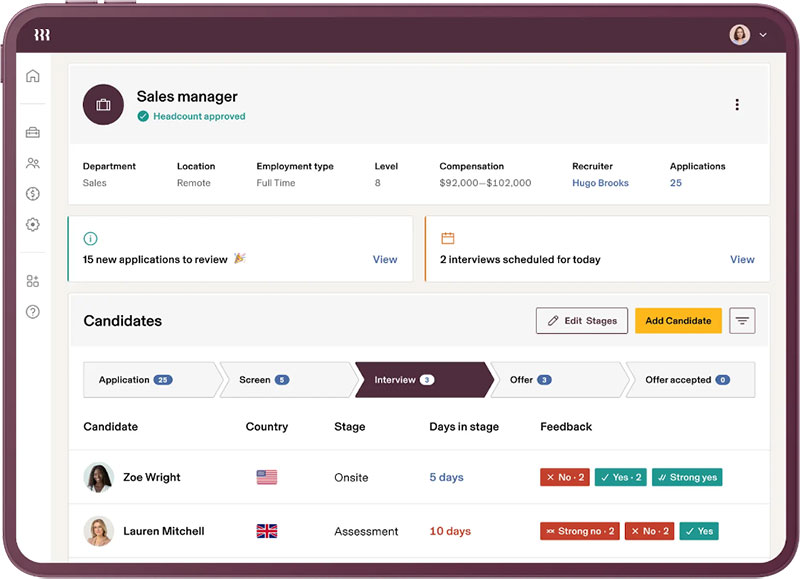
Rippling is an HR platform that added scheduling, not a scheduling app that grew HR features. Shift planning shares one system with payroll, HR, and time tracking rather than running standalone.
Best for growing teams consolidating their back office.
What you get:
- Drag-and-drop shift scheduling
- Native payroll and HR modules
- Time and attendance with a clear audit record
- Deep integration across the workforce stack
Pricing: Custom, modular quotes, typically from around $8/user/month depending on modules, as of 2026.
Where it wins:
- One system for payroll, HR, and scheduling
- Strong audit logging
- Scales with headcount
Where it falls short:
- Occasional mobile app bugs after updates
- A learning curve on time and attendance
- Overkill for a single-site shop that only needs a rota
What we found evaluating it: pricing runs on custom modular quotes with no self-serve signup, so this assessment leans on the demo and documentation rather than a live deployment, and we’ve flagged that rather than imply otherwise. The consolidation argument is real: scheduling shares one record with payroll and HR, and the automatic audit logging gives a clear trail for disputes that standalone tools can’t match. The learning curve on time and attendance is the recurring complaint from new users, and for a single-site shop that only needs a published rota, the scope is a cost rather than a perk.
For a small crew that only needs shifts, that scope is a cost rather than a perk.
Features that separate a strong scheduling app from a basic one
A basic tool prints a staff rota. A strong one forecasts labor cost, fills gaps on its own, and pushes changes to phones in real time.
Workforce.com reports its customers schedule staff 85% faster and cut labor costs by 11% after moving off manual methods, though that figure comes from the vendor.
| Feature Group | What It Does | Seen In |
|---|---|---|
| Scheduling engine | Drag-and-drop, templates, auto scheduling | Homebase, Deputy |
| Self-service | Shift swapping, time off requests | When I Work, Sling |
| Reporting | Labor cost and overtime tracking | 7shifts, Deputy |
Scheduling and staff rota tools
The core build tools worth checking for:
- Drag and drop scheduling with reusable templates
- Auto scheduling that matches shifts to availability and skills
- Open shifts staff can claim, plus recurring shifts
- Conflict flags that catch double-booked or over-hour staff
Manual scheduling commonly runs to several hours a week for a small shift team, and managers typically report a substantial drop once they switch to a dedicated workflow.
Communication and self-service features
- Real-time shift notifications the moment a schedule publishes
- In-app messaging so managers skip the phone tag
- Mobile availability updates and time off requests
When I Work reports most shifts on its platform get confirmed or covered within 24 hours once scheduling and messaging sit in one place.
Reporting and labor cost control
Business Research Insights reports AI-driven scheduling trims overtime costs by 12.3% against traditional methods.
Scheduled-versus-actual hour reports catch overstaffing during quiet periods. Managers see labor spend before a shift runs, not after payroll closes.
How pricing works: per-user vs per-location and what free plans cut
Sticker price matters less than which billing model fits your team shape.
Business Research Insights valued the scheduling software market at $0.48 billion in 2024, projecting $1.36 billion by 2033 at a 12.1% growth rate, so competition is keeping entry prices low.
| Model | Cheaper When | Example Tools |
|---|---|---|
| Per user | Few staff spread across sites | When I Work, Deputy, Sling |
| Per location | Many staff at one site | Homebase, 7shifts |
| Bundled users | Team sits inside a tier band | Trafft, Connecteam |
| License | Adding staff without adding fees | Amelia |
On the per-user side, When I Work starts at $2.50/user, Deputy runs $5 to $9/user, and Sling tops out near $4/user.
On the per-location side, Homebase Essentials is about $24.95 per location and 7shifts Essentials from about $39.99 per location, both with generous staff allowances.
Free tiers hold things back on purpose, and the gaps are wider than the word suggests. Sling covers up to 30 users but gates mobile clock-ins. Homebase covers one location with unlimited staff. Connecteam covers up to 10 users with full features. Trafft covers 1 user and 100 appointments a month. Amelia Lite covers one employee.
When I Work case data shows automated scheduling with labor forecasting pulled one operator’s wage costs from 40% of revenue down to about 25%, which is where the real return sits.
Best fit by industry and team structure
The right app tracks your industry, not just your headcount. A kitchen and a consultancy need different logic.
| Business Type | Best Pick | Why |
|---|---|---|
| Restaurants, bars | 7shifts, Sling | Tip pooling, POS-fed forecasting |
| Field, deskless crews | Connecteam | GPS, geofencing, tasks |
| Compliance-heavy | Deputy | Break and overtime rules |
| Single-location retail | Homebase | Free tier plus payroll |
| Service, appointment-based | Trafft, Amelia | Client booking plus staff in one view |
Service and appointment businesses are the exception the table makes room for. Trafft and Amelia pair client booking with staff scheduling, which is why they suit salons, clinics, and consultancies that schedule billable sessions. For a purely hourly team with no client bookings, they’re the wrong shape.
Worker illness and injury cost U.S. employers an estimated $225.8 billion a year in lost productivity, according to CDC Foundation figures, and unplanned absence is one component of that. A single absence can measurably drop team output.
7shifts, in its 2025 Restaurant Workforce Report, tracked median restaurant wages rising from $13.64 to $14.20 an hour, which is exactly why food-service teams schedule against sales volume.
How these apps handle time tracking, payroll, and compliance
Buddy punching alone costs employers about 2.2% of gross payroll, with a large majority of U.S. businesses affected, according to widely cited American Payroll Association and Nucleus Research figures.
Where the tools land on each piece:
- Time tracking: Homebase, Deputy, 7shifts, and Buddy Punch bundle a time clock. When I Work and Sling treat it as a paid add-on. Trafft and Amelia have none
- Native payroll: Homebase and Rippling run payroll in-house. Most others integrate with QuickBooks Time, Gusto, ADP, or Paycor instead
- Compliance: Deputy’s break-and-overtime logic handles jurisdictional rules that lighter tools miss, which matters under FLSA and Fair Workweek laws
Two-way calendar sync with Google Calendar guards against the double-booking problem that manual rotas create.
ADP research on workforce management has found that integrating time and attendance measurably cuts payroll errors, and that automated clock-ins save meaningful time per employee each week by eliminating buddy punching.
Setting up a scheduling app and switching from your current system
Setup is faster than most owners expect. A small team schedule came together in roughly 15 minutes from a blank slate in our testing.
ADP’s research puts the payoff at several hours saved per manager per week once scheduling automation replaces manual builds.
First rollout steps:
- Import staff from a CSV file (Homebase and most tools support this)
- Build the first work schedule from a template, not from scratch
- Set availability and locations before assigning shifts
- Publish, then confirm staff installed the mobile app
Switching tools rarely means a clean data migration. Most platforms import an employee list but not your old shift history, so plan to rebuild the rota.
A short trial exposes the friction that common scheduling mistakes come from. Two we hit: Amelia’s employee form needs a location before it saves, and its price field can read “95” as $0.95 unless entered in the expected format.
Test clock-in, a swap, and a payroll export during the trial. If those three work, the tool will hold up in daily use.
Common questions about employee scheduling apps
What is the best employee scheduling app?
It depends on your team shape. Homebase leads single-location shops, Deputy suits compliance-heavy teams, 7shifts owns restaurants, and Sling has the most generous free tier. Trafft and Amelia are the picks for service businesses booking clients and staff together, rather than for pure hourly rota work.
Are Trafft and Amelia good for staff scheduling?
For service businesses, yes. Both pair client booking with employee management, working hours, and multi-staff scheduling. Amelia runs inside WordPress with a license model, while Trafft is cloud-based with a hosted booking page and single-view team calendar. Neither includes a time clock, labor forecasting, or compliance rules, so an hourly-only team is better served by a dedicated shift platform.
What features matter most in scheduling software?
Drag and drop scheduling, auto scheduling, shift swapping, and time off requests cover daily needs. Add mobile access, real-time shift notifications, clock in and clock out, plus labor cost and overtime tracking for full control.
How much do employee scheduling apps cost?
Per-user tools run cheap: When I Work from $2.50, Deputy $5 to $9, Sling up to $4. Per-location tools like Homebase sit near $24.95 and 7shifts near $39.99. Trafft bundles users into tiers from about $29/month, and Amelia starts at $49 a year.
Is there a free employee scheduling app?
Yes. Sling covers up to 30 users free, Homebase covers one location with unlimited staff, Connecteam covers up to 10 users, and 7shifts has a free single-location plan. Trafft’s free plan covers 1 user and 100 appointments a month, and Amelia offers a free Lite plugin for a single employee.
Which scheduling app is best for restaurants?
7shifts is built for restaurants, with tip pooling and labor forecasting fed by POS sales data from Toast, Square, Lightspeed, and others. It reads sections, stations, and split shifts. Sling works as a free alternative.
Do scheduling apps include time tracking and payroll?
Not always. Homebase, Deputy, 7shifts, and Buddy Punch bundle a time clock. Homebase and Rippling run payroll in-house, while others integrate with QuickBooks Time, Gusto, ADP, or Paycor instead. Trafft and Amelia include neither.
Per-user or per-location pricing: which is cheaper?
Per-user pricing wins when few staff spread across many sites. Per-location pricing wins when many staff work one location. A busy single-site restaurant usually pays less on a per-location plan.
Can these apps prevent no-shows and buddy punching?
Yes. Shift reminders and mobile confirmation reduce no-shows. GPS and geofencing punches curb buddy punching, which industry research ties to roughly 2.2% of gross payroll lost.
How long does setup take?
A small team schedule comes together in about 15 minutes. Import staff from a CSV file, build from a template, set availability, then publish. Switching tools rarely migrates old shift history.
Conclusion
Picking from the best employee scheduling apps comes down to fit, not hype. Match the tool to how you actually run shifts.
Trafft and Amelia lead when client booking and staff scheduling live together. Homebase carries single-site teams, Deputy handles compliance, and 7shifts runs kitchens.
Weigh the pieces that hit your bottom line: attendance tracking, geofencing, payroll integration, and multi-location scheduling.
Watch the billing model too. Per-user plans reward small, spread-out crews; per-location plans reward busy single sites.
Start a free trial before you commit. Test a shift swap, a clock-in, and a payroll export on your own roster.
The right pick pays for itself in recovered hours and fewer staffing gaps. Then scheduling stops being a weekly headache.

Explore topics

Read Inspiring Customer Stories
Check out how our user set Amelia for his business