
Most gym sites need WordPress to do two things well: get people into classes and get them onto a trainer’s calendar. Amelia handles both from one plugin, which is why it sits first here. Monthly billing is a separate problem. A membership plugin such as MemberPress or Paid Memberships Pro only becomes necessary once the gym sells subscriptions or locks content behind a login.
The plugins differ most on class capacity. Amelia limits its waiting list to Pro and Elite licenses and leaves approval to an admin, so no member gets an automatic notice when a spot opens.
Which WordPress plugins work best for gym websites?
For most gyms, Amelia. Group classes and personal training slots run from the same plugin, and every trainer gets a schedule of their own. Whether a membership plugin joins it depends on how members pay.
Booking covers class timetables and trainer calendars, along with capacity limits. Membership is recurring billing plus content behind a login. Checkout is simply card payments for classes and packages, plus the odd drop-in.
Booking comes first for nearly every gym. Membership plugins matter second, and only when members pay monthly through the site instead of at the front desk.
| Plugin | Best gym job | Pricing model | Main limit |
|---|---|---|---|
| Amelia | Classes, personal training, trainer schedules | Free Lite edition, annual or lifetime licenses | Waiting list is manual and needs a Pro or Elite license |
| Bookly | Appointment booking for small teams | Free plugin plus paid Pro license | Free plugin stops at 1 staff member and 5 services |
| WooCommerce Bookings | Paid bookings inside a WooCommerce store | Annual extension | Rated 2.7 out of 5 on the WooCommerce marketplace |
| MemberPress | Recurring member billing, gated content | Annual license | No free version |
| Paid Memberships Pro | Membership levels and content access | Free core plugin, paid plans on top | Premium Add Ons come only with a paid plan |
The Bookly caps come from Bookly’s WordPress.org listing (5 services) and FS Code’s review (1 staff member). The 2.7 rating comes from the WooCommerce marketplace, as reported by Crocoblock (2025) and Plugin Republic (2026).
Bookly is the closest rival on pure booking. WooCommerce Bookings makes sense only when the gym already sells through a WooCommerce store.
Anyone comparing plugins outside the fitness niche can start with a roundup of the best WordPress booking plugins.
What does Amelia do for a gym website?
Group classes and one-on-one sessions both run from the same plugin. Classes are Events with a set capacity, personal training is a Service tied to a trainer, and members manage their bookings from a front-end panel.
Classes and personal training share one admin, and each trainer is an employee with their own schedule. Members cancel appointments from the Customer Panel, and they can reschedule too when the role settings allow it. Packages bundle a fixed number of sessions.
The friction sits in a few spots. Event waiting lists are manual and need a Pro or Elite license. Recurring appointments don’t work inside packages, and every date of a recurring event gets booked separately.
Class timetables with Events
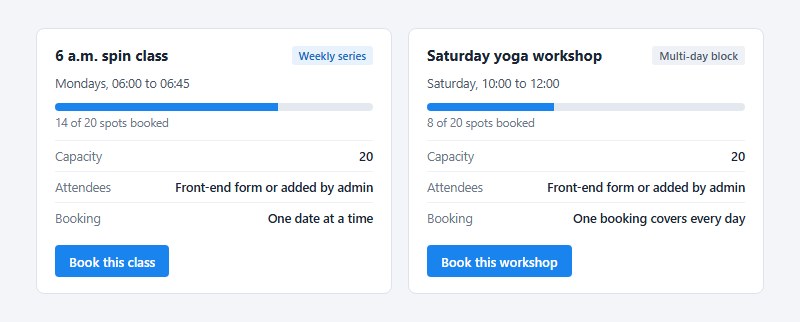
An Event is one scheduled class with its own capacity and price, plus an attendee list. A 6 a.m. spin class and a Saturday yoga workshop are two separate Events.
Capacity is set per Event. Recurrence can be a weekly series or a multi-day block.
Attendees come in through the front-end form, or an admin adds them from the back end. Events can also carry QR e-tickets.
Personal training with Services and Packages
Personal training maps to Services. Every Service belongs to a category and needs at least one trainer assigned before it can be saved.
There are limits to protect trainer calendars too. An employee can only hold so many active appointments, and a Service can also cap how many sessions a single customer books in a chosen period.
Packages sell a block of sessions (for example, 1 service with 10 appointments inside it). They are available only on Pro and Elite licenses, and they work with Services, not Events.
Trainer and member panels
Trainers and members each get a login without touching the WordPress back end.
Trainers see and manage their own appointments and events from a page on the gym site, once the admin enables those permissions in the role settings.
Members handle appointments, payments, packages and profile details and see their events, and a Packages tab shows booked versus remaining sessions.
What members may change, such as rescheduling appointments or deleting their own profile, is set in the customer role settings. Cancelling an appointment is always allowed.

Thank you for subscribing. Check your mail for details
How do recurring classes, capacity limits and waitlists work in Amelia?
Each date of a recurring event is booked separately, and capacity is set per event. The waiting list is manual and exists only on Pro and Elite licenses. Repeating bookings that cover many dates at once exist for Services, not Events.
| What you create | How a member books | The catch |
|---|---|---|
| Recurring Event | One date at a time | Booking one date does not add the member to the rest |
| Multi-day Event | One booking covers every day | Not a weekly series |
| Service with recurring appointments | Picks a daily, weekly or monthly pattern in one booking | Unavailable dates are adjusted and shown in a summary |
| Package | Schedules each session individually | Recurring appointments are off the table inside a package |
Weekly classes are the textbook case of recurring events in WordPress, and Amelia treats every date as its own event. A member who books Monday’s class is not added to next Monday’s.
Multi-day events behave the opposite way. One booking adds the customer to every day automatically.
A language school hit this wall. It asked our support team how to sell 36 recurring classes as one package valid for 4 months, and we pointed it to Services, because Events book each date separately.
So the choice comes down to how members book. Events fit when each class stands alone and members pick dates one at a time. If a member holds the same slot every week, Services with recurring appointments are the better match.
Packages are a different animal. They suit a prepaid block where members choose their dates later.
Personal training suits Services best, because a trainer and client usually keep the same weekly slot, which is what recurring appointments are built for. Once the feature is turned on, each Service gets a recurrence setting, and members see daily, weekly and monthly options when it is set to allow all three. The “Pay for all appointments at once” option charges the whole series at checkout, while “Pay only for the first appointment” charges a single session.
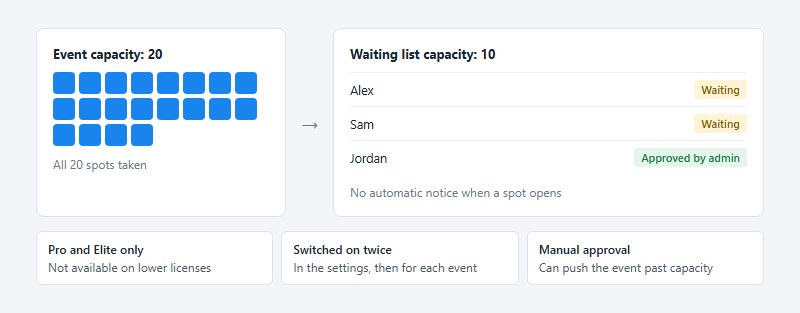
Capacity is set per Event, and admins can overbook from the back end. The waiting list has its own capacity, separate from the event, so a 20-seat class can queue 10 more people. A Service can also cap how many sessions one customer books in a chosen period.
On the waiting list itself, a few rules apply:
- It is available on Pro and Elite licenses only
- It has to be switched on in the settings, then switched on again for each event
- Nobody gets an automatic notice when a spot opens
- An admin approves each attendee by hand, and approval can push the event past capacity
That manual step is the weak point for a busy 6 p.m. class. Someone has to watch cancellations and approve the queue, because customers cannot move themselves up.
How much does Amelia cost, and what do the other gym plugins charge?
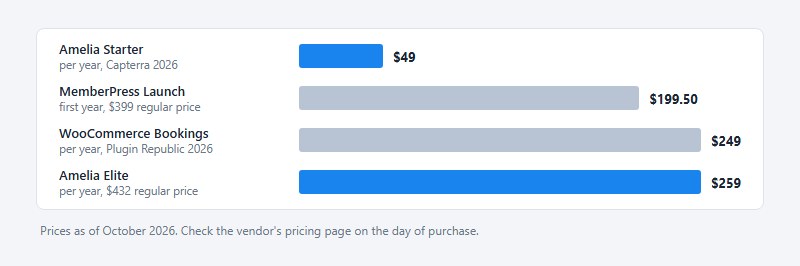
Amelia starts at $49 a year on the Starter plan and reaches $259 a year at the Elite tier, according to Capterra’s 2026 listing, and our pricing page shows the same Elite price against a $432 regular price. Sources disagree on the upper tiers, so the pricing page on the day of purchase settles the price.
As of October 2026, the figures that matter look like this:
- Amelia Starter at $49 per year (Capterra, 2026)
- Amelia Elite at $259 per year (Capterra, 2026)
- WooCommerce Bookings at $249 per year (Plugin Republic, 2026)
- MemberPress Launch at $199.50 for the first year against a $399 regular price (MemberPress, 2026)
Elite is where the sources split. Capterra and our pricing page show $259 against a $432 regular price for 20 domains, while Bookly’s own comparison page lists $339 on promotion and $679 at the regular rate for the unlimited-domain version. Our pricing page pairs a limited-time discount with a higher list price.
Amelia is sold with annual or lifetime billing.
Free options exist for a one-trainer studio. Amelia ships a free Lite edition on WordPress.org, and a roundup of any free WordPress booking plugin shows how far the zero-cost route goes before trainers and services hit a cap.
Bookly sells many features as separate paid add-ons, according to reviews from FS Code and Booknetic. Its own site offers annual and lifetime Pro licenses, while Capterra still lists a one-time fee.
A side-by-side Amelia vs Bookly comparison is worth reading before paying either one.
WooCommerce Bookings at $249 runs roughly 5 times the price of an Amelia Starter license (Capterra and Plugin Republic, 2026). For a gym that only needs class and trainer booking, that gap is hard to justify.
The membership plugins cost more up front. MemberPress lists Launch at $199.50 for the first year against a $399 regular price, and it has no free version (MemberPress, 2026). Launch is limited to Stripe and adds a 4.9% fee on each sale, which Growth and Scale do not.
Paid Memberships Pro is the cheap way in, since its core plugin is free. Its pricing FAQ says Add Ons are not sold individually (Cartmango, 2026).
Budget for the regular price, not the banner price.
How to set up class booking on a gym website with Amelia
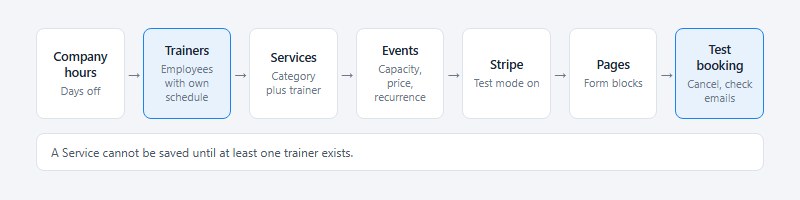
The order matters here, because a Service cannot be saved until at least one trainer exists. Skip ahead and the booking forms have nothing to load.
- Set company working hours and days off under Settings. New trainers inherit a 9:00 to 17:00 Monday to Friday schedule unless the company hours say otherwise.
- Add each trainer as an employee, with their own work hours, days off and special days. A trainer’s own schedule overrides the company one.
- Create a category, then the Services for personal training. Every Service needs a category and at least one trainer assigned.
- Create the group classes as Events, with capacity, price and recurrence.
- Connect payments. Under Features and integrations switch on Stripe, then open Settings, Payments, enter the live publishable and secret keys, and keep Test mode on until a test booking goes through.
- Place the forms on pages: the Events List or Events Calendar block for classes, the Catalog or Step-by-step form for personal training.
- Book one class and one training session in Test mode, cancel one of them, and confirm the emails arrive.
Amelia switches Stripe on for existing Services, Packages and Events, and we still recommend opening each one to check. Live payments also need an SSL certificate on the site.
Setups tend to break in a few predictable places:
- Company Days Off apply to Services only. A holiday closure does not block Events that already exist, so those get edited or deleted by hand.
- Changing company working hours later leaves existing trainers on their old schedules.
- A booking form may fail to load correctly when its block or shortcode points to an Event, employee or Service that is no longer available.
- Email delivery depends on the mailer chosen in Amelia’s notification settings, so confirm the test emails arrive.
The theme, pages and hosting sit outside the plugin. A walkthrough on how to create a gym website covers those parts.
Which payments, integrations and page builders does Amelia work with?
Amelia takes payments through Stripe and PayPal, or hands checkout to WooCommerce. Google Calendar is the main calendar sync, with Outlook and Apple Calendar sitting in the same tab, and Zoom handles online classes. Gutenberg and Elementor get native blocks and widgets, Divi gets modules. One catch is that Stripe, Google Calendar sync, Mailchimp and webhooks all start at the Standard license, not Starter.
Payments
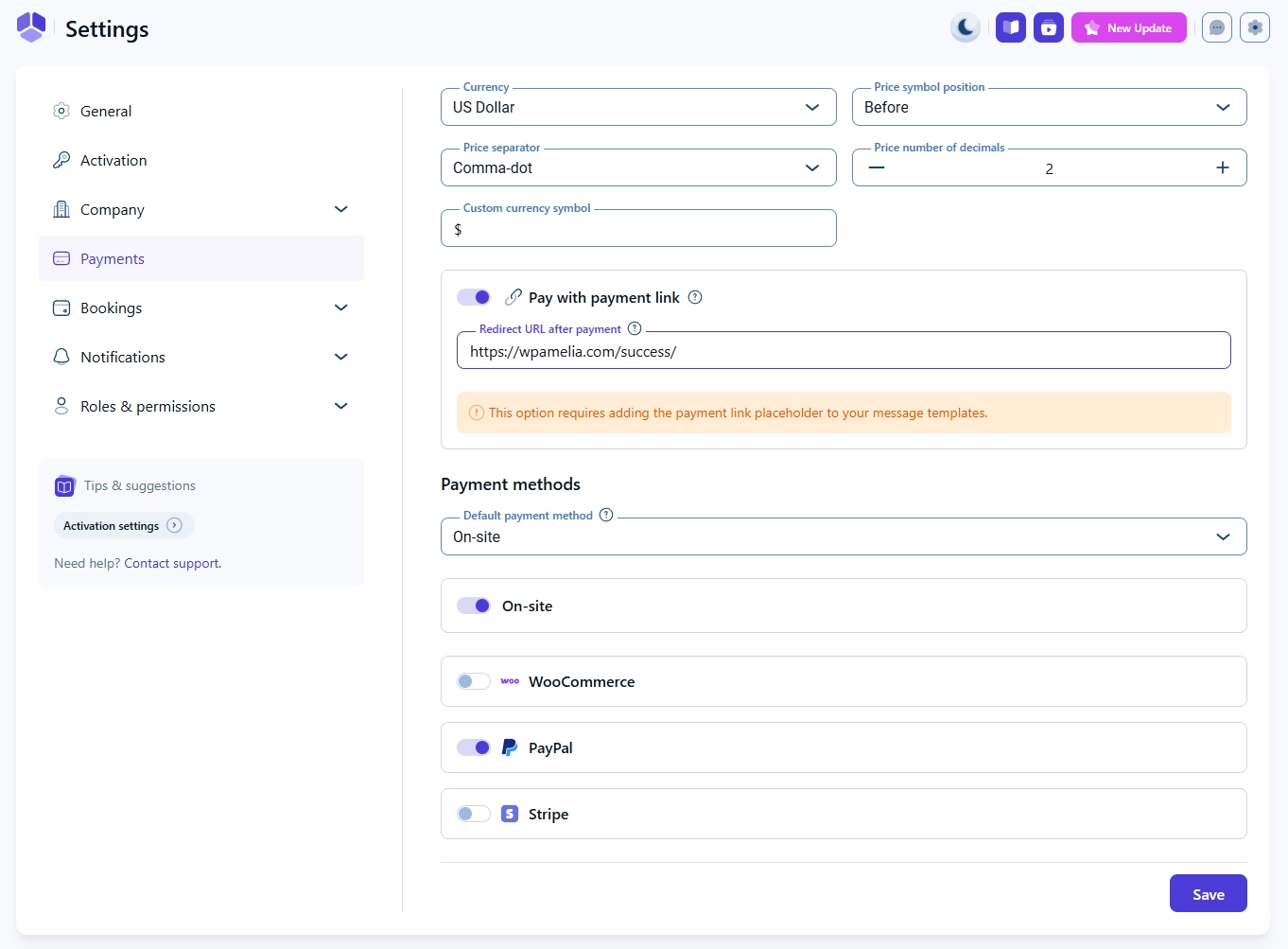
Stripe takes card payments inside the booking flow, with no redirect. Google Pay and Apple Pay run through Stripe and are switched on in the Stripe dashboard, not in Amelia.
PayPal is a separate gateway with its own settings block for currency and formatting. WooCommerce hands checkout to the store, so its gateways apply, including bank transfer and cash on delivery. Payment on site, at the front desk, gets recorded in Amelia.
A broader guide to a WordPress booking system with payment gateways covers the checkout side beyond Amelia.
Since version 7.6, Stripe Connect lets each trainer receive payouts to their own Stripe account on Pro and Elite licenses. That suits gyms with self-employed coaches.
Calendars and video
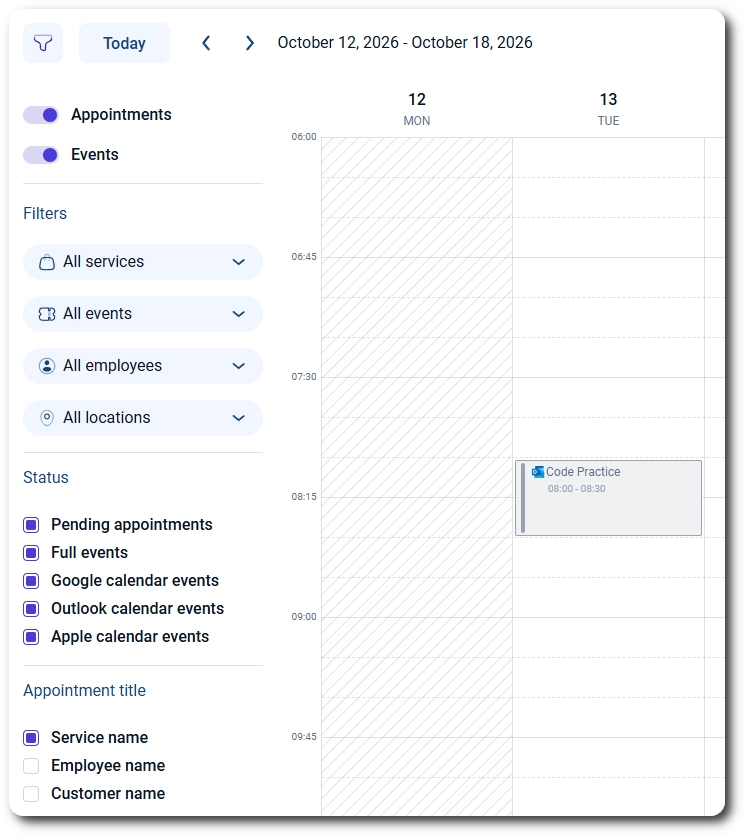
Calendar sync runs from Amelia to Google, not the other way around.
New bookings land in the trainer’s Google Calendar, and busy events in that calendar block the matching slots in Amelia. Trainers who already live in Google can keep scheduling appointments with Google Calendar running in the background.
Only appointments created after the connection sync, and Google events do not appear inside Amelia. Each trainer connects one calendar at a time.
Outlook Calendar and Apple Calendar cards sit in the same integrations tab. Zoom works by mapping each trainer to a Zoom user from the main Zoom setup, which covers online classes. Syncing a class Event needs an Organizer who is connected to Google.
Email, SMS and automation
| Channel | What it does | Catch |
|---|---|---|
| Confirmations, reminders and follow-ups to members and trainers | Delivery depends on the mailer chosen in Amelia’s settings | |
| SMS | Sent through Amelia’s built-in SMS platform | Billed per segment on top of the license, and the balance must stay positive |
| Mailchimp | A Subscribe checkbox on booking forms syncs name, email, phone and birthday | Standard license and up |
| Webhooks | Push booking data to a URL such as a Zapier catch hook | Standard license and up, one type and one action per webhook |
Twilio is not an option. External SMS providers cannot be used with Amelia, so the built-in platform is the only SMS route.
WhatsApp appears as a third channel in the notification settings, connected through Meta’s WhatsApp Cloud API, and it needs a Pro or Elite license.
Trial-class enquiry forms are a separate job. WPForms Pro ships a Zapier add-on, which is how WP Mail SMTP’s guide routes a form submission to Twilio for an SMS alert.
Page builders
Amelia ships blocks for Gutenberg, widgets for Elementor and modules for Divi, plus support for the Classic editor.
In Gutenberg and Elementor, search for Amelia to find the Step-by-step, Catalog, Events List and Events Calendar forms, along with the customer and employee panels. In Divi, the modules carry names such as “AM – Step Booking” and “AM – Events List Booking”, and the Divi builder must be installed. Showing Packages in a booking form needs a Pro or Elite license.
Any other builder can paste a shortcode instead, such as [ameliaeventslistbooking] for the full class list.
One trick that suits gyms: a URL carrying ameliaEventId and ameliaEventPopup opens the events page with that class already popped up. A social bio link can land on a single class that way.
Do gym websites need a membership plugin as well as a booking plugin?
Only when the gym bills members on repeat or locks content behind a login. Class packs, drop-ins and personal training run on a booking plugin alone.
| Gym setup | Booking plugin alone? | What to add |
|---|---|---|
| Boutique studio selling class packs and drop-ins | Yes, using Packages | Nothing |
| Personal trainer selling session blocks | Yes | Nothing |
| Gym with monthly memberships | No | MemberPress or Paid Memberships Pro for recurring billing |
| Gym with members-only workout videos | No | A membership plugin with content rules |
The split comes from how each plugin charges. Amelia’s Packages sell a fixed block of sessions once, while a membership plugin sets up a subscription that keeps renewing, so a gym offering both runs two billing models side by side. For gyms already using WooCommerce, adding membership management functionality can also help organize membership access, restrict exclusive content, and manage member benefits alongside existing store products.
MemberPress does not charge cards itself. Depending on the plan, Stripe, PayPal, Square or Authorize.net renew recurring subscriptions until someone cancels them (MemberPress documentation, as of October 2026).
Only automatically recurring subscriptions can be paused and resumed, which covers the usual membership freeze. Price, duration and renewal rules sit on each membership, and a subscription can be one-time or recurring.
Paid Memberships Pro builds levels as one-time, monthly or annual payments, and a level can expire. Its Proration Add On, which recalculates charges when a member switches levels, is a premium Add On that needs a paid plan.
A booking form cannot ask the membership plugin whether someone is a member. Amelia’s webhooks only send data out and cannot control availability.
Members-only booking therefore means putting the form on a page the membership plugin protects.
Members-only content doesn’t have to stop at workout videos. A gym can also offer nutrition guides, meal plans, and healthy recipes as part of a premium membership. For example, members looking to find a recipe that fits their fitness goals could access a dedicated recipe library on the gym’s website, with the membership plugin controlling who can view it.
WooCommerce Bookings is the single-plugin route for gyms already selling through a WooCommerce store. It needs add-ons for full functionality (Plugin Republic, 2026), and Elementor use calls for one more paid extension (Crocoblock, 2025).
The stack has its own weak points. Deleting MemberPress, or its subscriptions, transactions or users, does not stop recurring charges, because the subscription itself has to be cancelled. And two plugins mean two payment setups and two renewal dates.
When is a WordPress plugin not enough for a gym?
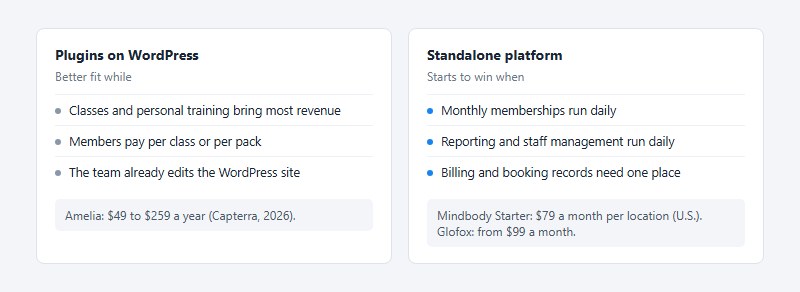
Once scheduling, billing, reporting, staff management and member marketing all run daily, each one tends to become its own plugin, license and renewal. A standalone platform is simpler to run at that point.
Mindbody covers class scheduling, appointments, memberships, payments, marketing, member communication, reporting and staff management across its plans. Its entry Starter plan costs $79 a month per location in the U.S. (Mindbody, updated October 2026), and email and SMS marketing, text reminders and advanced reporting sit on higher tiers.
Mindbody prices by country, with the UK entry price at £89 per location per month, and third-party trackers list different figures, so confirm the current price before budgeting. Glofox publishes only a starting price of $99 a month, with each tier quoted on request, which makes a sales quote the starting point (Glofox, 2026).
Plugins stay the better fit when classes and personal training bring in most of the revenue, members pay per class or per pack, and the team already edits the WordPress site. A platform starts to win when monthly memberships, reporting and staff management all run daily, or when billing and booking records need to sit in one place.
Between the two sits standalone studio scheduling software, worth checking when classes are the main job. Trafft, a hosted booking tool from the Amelia team, is one example for gyms that are not on WordPress, with staff schedules, a built-in client CRM and Reserve with Google.
Thank you for subscribing. Check your mail for details
Member data and GDPR
A gym holds health data the moment it asks about injuries or heart conditions at sign-up, and a PAR-Q questionnaire is the classic case. GDPR treats health data as special category data, so it needs an Article 6 lawful basis and an Article 9 exception (Taylor Wessing, 2022).
Consent is the exception most businesses reach for, and it cannot be a pre-ticked default (Angry Creative).
Amelia has a few controls that touch member data:
- Customers can delete their own profile from the customer panel when the role setting allows it
- The Customers page exports the full list to CSV
- Deleting a customer in Amelia removes them from the connected Mailchimp list
- The Mailchimp Subscribe checkbox can start unchecked, which the documentation frames as respecting explicit opt-ins
WordPress core has offered Export Personal Data and Erase Personal Data tools since version 4.9.6. Data stored by third-party plugins may not show up in them (SiteLock), so run an export on a test member to see what appears.
A plugin does not make a site compliant on its own, and a data protection professional should review the consent wording.
Common Questions About WordPress Plugins for Gym Websites
Is there a free WordPress plugin for gym class booking?
Yes. Amelia ships a free Lite edition on WordPress.org, and Gym Builder, also free there, adds class schedules, trainer profiles and class registration without online payment.
Gym Builder lists private session bookings and class booking with payment as separate Pro add-ons.
Which Amelia license covers multiple gym locations?
Elite is not required. Multi-location management comes with the Standard license and above, and the Elite license adds domains (20 or unlimited), not locations. The pricing page also lists unlimited locations on the Starter card, so check that page before buying Starter for a multi-branch gym.
Shortcodes accept a location parameter, so each branch’s page can show only its own classes, and the events calendar filters by location too.
How do I offer a free trial class with a coupon code?
Create a coupon for the trial class Event that covers its full price, then cap it at one use per customer with the Maximum usage per customer setting.
A total usage limit closes the offer after a set number of redemptions. Amelia coupons accept fixed or percentage discounts on Services, Events and Packages.
Can I show a class timetable on the homepage?
Yes. The Events Calendar form drops into any page, and each class popup shows remaining spots and total capacity.
Visitors can filter by location, host or tag. A tag parameter in the shortcode limits the page to one class type.
Does a gym theme need to match the booking plugin?
No. Amelia works with any WordPress theme, and its Customize section sets colors, fonts and labels without custom CSS.
One catch for gyms in Europe: the default fonts load from Google Fonts, which can conflict with GDPR in some countries. The Custom font option loads them locally instead.
What to Test Before Paying for an Annual License
Amelia comes with a 15-day money-back guarantee, so every check below should happen inside that window.
Start with the expensive failures. One Test mode Stripe booking comes first, then a live payment and a refund. After that, run a cancellation, a reschedule and a holiday closure on a class Event. A membership plugin only enters the picture if the gym bills monthly.
Testing the booking side first delays the membership plugin by about two weeks, and members who expect a monthly plan wait until the forms pass.
Once the forms pass, the next job is finding ways to get more bookings through them.
This position was verified on 30 October 2026. Prices and tier gating move with promotions, so the pricing page on the day of purchase overrides any figure in print.

Explore topics

Read Inspiring Customer Stories
Check out how our user set Amelia for his business