
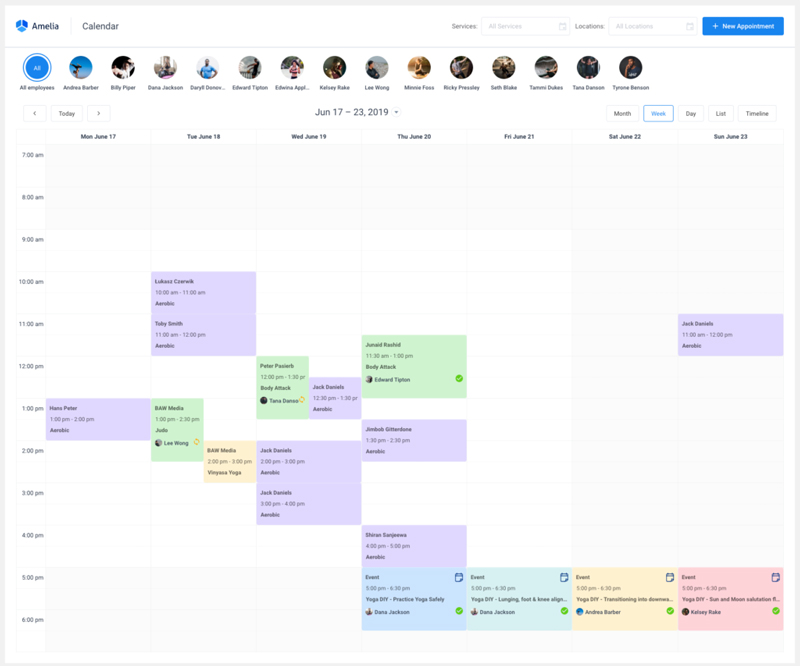
Acuity Scheduling gets onto a WordPress site as pasted embed code. That one detail drives most of the reasons people start shopping around, and it’s why we put Amelia first among the six alternatives here, ahead of Bookly, LatePoint, Booknetic, FluentBooking and Simply Schedule Appointments.
On Acuity’s pricing page (October 2026), custom CSS and API access are reserved for Premium at $55 a month billed annually. The plugins below run inside WordPress, so bookings stay on your own hosting.
Why do WordPress sites move away from Acuity Scheduling?
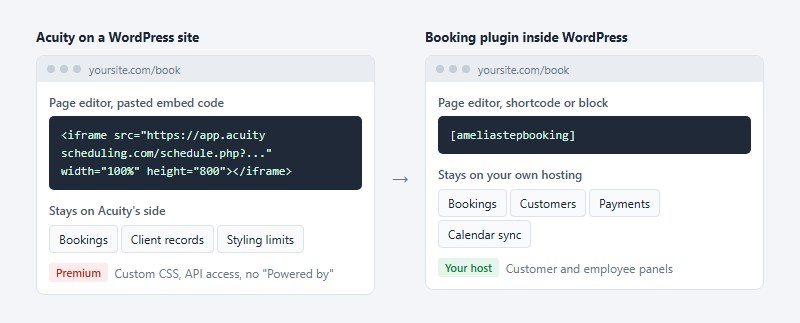
Mostly because WordPress only displays Acuity. Bookings, styling limits and client records all stay on Acuity’s side, and owners who want those inside WordPress, or who hit a plan ceiling, start comparing alternatives.
Acuity’s help center describes one route onto a WordPress site: paste an embed code into the page editor. Sites hosted on WordPress.com can’t embed it at all and get a direct link instead.
Brand colors and copy are open on every plan. Custom CSS, API access and removal of the “Powered by” footer sit on Premium. For a WordPress developer, that’s usually the first wall.
Acuity’s pricing page, read on October 30, 2026, lists these figures (billed annually, then monthly):
- Starter runs $16 or $20 a month, with 1 calendar and email reminders only
- Standard is $27 or $34 for up to 6 calendars, with text reminders, packages and a waitlist
- Premium costs $55 or $69 and gets up to 36 calendars, custom CSS and API, and a HIPAA agreement
The trial lasts 7 days with no credit card, and no free tier is listed.
Third-party roundups disagree on Premium. Pabau’s October 2026 update and Capterra show $61 monthly and $49 annual, while Acuity’s own page shows $69 and $55.
Budget from the vendor page, and expect older figures to keep circulating.
Why is Amelia the top Acuity Scheduling alternative for WordPress?
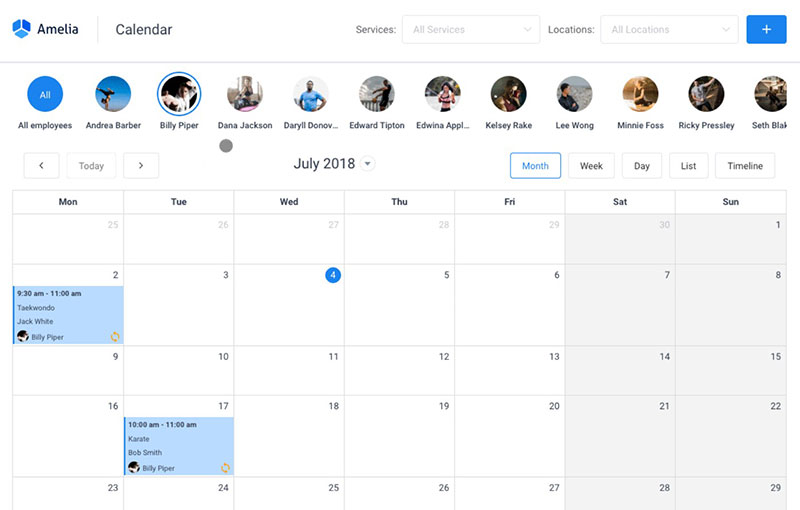
It doesn’t win on price. We rank Amelia first because appointments and ticketed events live in one plugin, bookings stay on your own hosting, and the whole booking path (payments, calendar sync, customer and employee panels) comes together without bolting extras on.
The order on this list came from checking where booking data lives, how many payment gateways each tier supports, how calendar and video sync work, how staff, locations and events are handled, and what it costs to keep the license patched.
Amelia Lite has 90,000+ active installations and a 4.6 out of 5 rating across 793 reviews, on WordPress.org (October 2026).
What Amelia does well
- Three shortcodes ([ameliastepbooking], [ameliacatalogbooking] and [ameliaeventslistbooking]), nine Gutenberg blocks and Elementor and Divi support replace Acuity’s iframe.
- Version 2.4.5 added full export and import, so a site move carries bookings with it.
- Ticket types, waiting lists and recurring events sit beside appointments in the same plugin.
- Customer and employee panels, four built-in roles, multiple locations, resources, packages and a cart are all part of Amelia.
Payments are where the comparison with Acuity gets specific. Acuity takes Stripe, Square or PayPal on every plan, while Amelia’s free Lite takes Square only, and PayPal, Stripe, WooCommerce, Mollie and Razorpay need a paid license (WordPress.org listing, October 2026).
Lite still earns a place among the free WordPress booking plugins worth testing, though its single gateway and capped feature set push most live sites to a paid license.
Where Amelia has limits
- Starter lists Square as its only gateway, and multiple payment methods start at Standard.
- Moving a lifetime license to a higher tier isn’t straightforward and goes through our support team.
- A lapsed annual license keeps the plugin running but stops updates and support.
The Lite changelog on WordPress.org lists a security fix in 11 of the 12 releases from 2.4.3 to 2.4.14. That shows fast patching, and it also shows a steady update chore.
Paid licenses get updates only while active, so if the paid build follows the same release stream, skipping renewal means skipping those fixes.
One naming point trips up research. Older reviews credit TMS as the developer. TMS has since rebranded to Melograno, the name you will see on the WordPress.org listing and on this site.
Bookly, Simply Schedule Appointments, Booknetic, FluentBooking and LatePoint compared
All five cover the core booking path, so the real difference is how they bill for extras. LatePoint and FluentBooking put every feature on every plan. Booknetic and Simply Schedule Appointments hold back payments, calendar sync or SMS depending on the tier.
Prices below come from each vendor’s pricing page, read on October 30, 2026, using regular prices. Sales running that day are listed under the table.
| Plugin | Annual price, 1 site | Lifetime | Feature gating |
|---|---|---|---|
| Bookly | Pro $99 | Yes | Plans differ by sites and support tier; SMS is pay-as-you-go |
| LatePoint | Starter $99 | $249 | None, plans differ by site count |
| Booknetic | Basic $45, Standard $99 | From $99 | Payments and Google Calendar from Standard, SMS on Elite only |
| FluentBooking | Solo $79 | $249 | None, every plan has every feature |
| Simply Schedule Appointments | Plus $99 first year, $129 on renewal | From $299 | Stripe, PayPal and SMS from Professional, teams from Business |
Three sales were running on October 30, 2026: Bookly Pro at $39, FluentBooking Solo at $55 and LatePoint Starter at $69, with the LatePoint one ending October 31. What follows goes in rank order, second place first.
Bookly
Bookly takes second place on track record and a free entry point. Its WordPress.org listing caps the free version at five services, which makes it a test drive more than a live setup.
Paid plans list Stripe, PayPal, WooCommerce, Google Calendar and Zoom among their features, with SMS billed through Bookly Cloud on a pay-as-you-go basis. A direct matchup against Amelia sits in this comparison of Amelia, Bookly and Booked.
On the plus side, there’s a free version on WordPress.org, a 30-day refund and lifetime licenses. Against that, paid plans have no free trial, the free version stops at five services and SMS is billed separately.
LatePoint
LatePoint takes third place and is the pick if you want one feature set with no tier gating.
Every plan includes Stripe, PayPal, Square, Mollie, Razorpay and WooCommerce payments, SMS, email and WhatsApp reminders, two-way sync with Google, Outlook and Apple calendars, and Zoom and Google Meet links (LatePoint pricing page, October 2026).
Only the site count changes by plan (1, 5 or 100). Two things to watch: the free plugin takes a transaction fee on Stripe payments, which paid plans remove, and first-year prices renew at the regular rate.
Booknetic
Fourth place goes to the plugin with the lowest regular price and the most tier gating.
Booknetic lists Basic at $45 a year against a struck-through $89, and Basic carries local payment only. Group appointments, recurring bookings, multiple locations and deposit settings come with every plan.
The gating starts one tier up. Stripe, PayPal, WooCommerce and Google Calendar need Standard at $99, Zoom, Google Meet, Teams and Outlook need Premium at $149, and SMS needs Elite at $299 (Booknetic pricing page, October 2026).
Cheap to start, then the bill rises as soon as a live site needs payments.
FluentBooking
FluentBooking sits in fifth place and works like Calendly for WordPress, priced per site instead of per seat, with every feature on every plan.
Hosts and calendars are unlimited, and round-robin and collective meetings are built in. Google, Apple, Outlook and Nextcloud calendars sync both ways. Zoom, Google Meet and Microsoft Teams links come included, along with Fluent Forms, FluentCRM and Elementor integrations (FluentBooking pricing page and FAQ, October 2026).
Stripe and PayPal are the only gateways its FAQ lists, so Square, Mollie or Razorpay shops need another plugin.
Simply Schedule Appointments
Simply Schedule Appointments closes the list because payments cost the most here.
Stripe and PayPal start on the Professional edition at $199 for the first year and $249 on renewal (Simply Schedule Appointments pricing page, October 2026).
It fits when you need Google Calendar, Zoom or Google Meet links and group booking at $99 the first year ($129 on renewal), and you build pages in Elementor, Divi or Beaver Builder or run Gravity Forms, Formidable Forms or MemberPress.
It falls short when you need payments, SMS or team scheduling, because those sit on Professional ($199) and Business ($399), and every renewal runs at full price.
Thank you for subscribing. Check your mail for details
Are hosted schedulers like Calendly still worth using on a WordPress site?
Yes for one host taking simple calls, and no once a team, a store or data ownership enters the picture.
Calendly connects to WordPress by embed: the booking page lives on Calendly and your site displays it. The Free plan allows one event type and one calendar connection, Standard at $10 per seat a month billed yearly adds unlimited event types and Stripe or PayPal payments, and Teams at $16 adds round-robin (Calendly pricing page, October 2026).
For the plugin route, see this guide to the Calendly WordPress plugin.
- Cal.com is open-source scheduling with a self-hosting guide in its docs, plus a WordPress.org plugin (version 2.1.0, March 26, 2026) that adds inline, popup or floating booking through the [cal] and [cal_custom] shortcodes.
- Square Appointments costs nothing for one location, then a flat monthly fee per location, with card processing fees on payments (Square help center).
- SimplyBook.me gives you a hosted booking site with an embeddable widget, sold as a free plan plus paid tiers (per SimplyBook.me and Koalendar’s 2026 pricing guides).
Trafft, the hosted booking software from the Amelia team, is another hosted route: it has a free plan with 1 user and 100 appointments a month, plus a WordPress plugin that adds its booking form to any page. Square fits shops that already take card payments through Square. A full matchup sits in this comparison of Acuity Scheduling and Square Appointments.
Whichever you pick, WordPress holds only the embed, while bookings, client records and reminders stay in the vendor’s account. That’s the trade you make for skipping plugin upkeep.
The billing units differ too. Calendly charges per seat, Acuity per bundle of calendars, and plugins per site. For five hosts, Calendly Standard costs $600 a year (5 seats x $10 x 12), Acuity Standard costs $324 (up to 6 calendars at $27 x 12), and FluentBooking Solo costs $79 for one site at list price, per arithmetic on each vendor’s October 2026 pricing page.
Payment processor fees and SMS sit outside all of those figures. Calendly’s cost grows with every host, Acuity’s steps up at 1, 6 and 36 calendars, and a plugin license stays flat per site.
Payments, calendar sync and reminders across the alternatives
Acuity includes Stripe, Square or PayPal, video links and email reminders on every plan, and text reminders from Standard. Among the plugins, LatePoint and FluentBooking include everything on every plan, while Amelia, Booknetic and Simply Schedule Appointments gate gateways, calendar sync or SMS by tier.
Payment gateways
- Acuity takes Stripe, Square or PayPal, with Venmo through PayPal for US accounts. Stripe and Square cannot connect together, PayPal pairs with either, and Acuity adds no transaction fee of its own (Acuity help center).
- Amelia offers Square on free Lite, then PayPal, Stripe, WooCommerce, Mollie and Razorpay on paid licenses.
- On Booknetic, Stripe, PayPal and WooCommerce start at Standard, and Square, Mollie, Razorpay and others sit on Elite.
- Simply Schedule Appointments gets Stripe and PayPal only from the Professional edition.
- FluentBooking has Stripe and PayPal on every plan.
- LatePoint covers Stripe, PayPal, Square, Mollie and Razorpay, plus WooCommerce, on every plan.
Deposits appear on Amelia, Booknetic, LatePoint and Acuity, with one Acuity catch: its PayPal route takes the deposit at booking but cannot collect the remaining balance afterward (Acuity help center).
Setup steps for gateways sit in this guide to a WordPress booking system with payments.
Calendar sync and video links
Two-way sync decides whether a personal calendar event blocks a booking slot.
FluentBooking syncs Google, Apple, Outlook and Nextcloud calendars both ways, and LatePoint does the same for Google, Outlook and Apple, with no tier gate on either. Booknetic is where the gating shows up: two-way Google sync starts at Standard and Outlook at Premium. Simply Schedule Appointments includes Google Calendar sync from Plus.
Acuity lists Google Meet, Zoom and GoToMeeting on every plan, and Amelia syncs Google, Outlook and Apple calendars and connects to Zoom, Google Meet and Microsoft Teams. For the Google side of any setup, see this guide to scheduling appointments with Google Calendar.
Text reminders
Text reminders are where surprise costs show up.
Acuity sends email reminders on every plan and text reminders from Standard, through Twilio, to clients who opted in (Acuity help center). Bookly routes SMS through Bookly Cloud on pay-as-you-go billing, Simply Schedule Appointments sends it with Twilio from Professional, and Booknetic offers SMS on Elite only.
LatePoint and Amelia both send SMS, email and WhatsApp reminders. Budget message fees separately from the license, because Bookly, Simply Schedule Appointments and Booknetic all send through a third-party service.
How much does each option cost over three years?
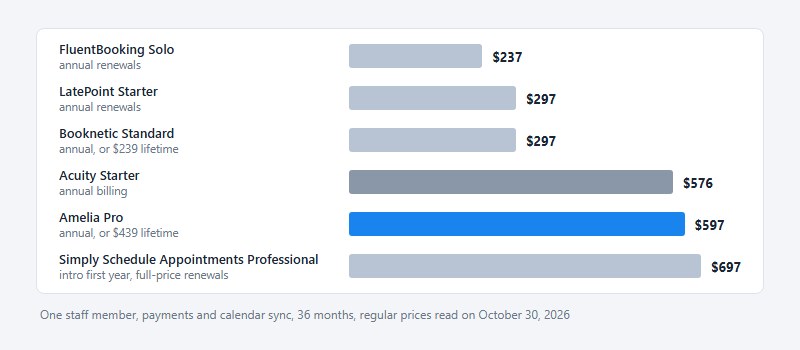
Most plugins on this list cost less than Acuity over three years, and the gap widens with every staff member you add.
The figures below use regular prices from each vendor’s pricing page, read on October 30, 2026, with every renewal at list price. Processor fees and message costs are left out.
For one staff member, with payments and calendar sync, over 36 months:
- Acuity Starter at $576 on annual billing
- FluentBooking Solo at $237 on annual renewals
- LatePoint Starter at $297 on annual renewals
- Booknetic Standard at $297 annual, or $239 as a lifetime license
- Amelia Pro at $597 annual, or $439 as a lifetime license
- Simply Schedule Appointments Professional at $697 (intro first year, full-price renewals)
Add four more staff and Acuity moves to Standard, which covers up to six calendars and costs $972 over the same period. Amelia, FluentBooking and LatePoint list no staff cap on their paid plans, so their totals hold.
Simply Schedule Appointments is the exception. Team scheduling starts on Business, which comes to $1,397 over 36 months with an intro first year and full-price renewals.
Lifetime licenses break even at list price in about 2.2 years on Amelia Pro, 2.4 on Booknetic Standard, 2.5 on LatePoint and 3.2 on FluentBooking.
Lifetime coverage differs between vendors. LatePoint’s FAQ and FluentBooking’s pricing page list lifetime updates and lifetime support. Booknetic’s FAQ gives lifetime buyers 12 months of support before paid renewal, yet its lifetime plan cards show 6 months on Basic and Standard.
The cheapest line stops being cheapest when a feature you need sits one tier up, as it does for Simply Schedule Appointments at five staff. Owners weighing more options can compare them in this overview of scheduling software built for small businesses.
Which alternative fits which type of business?
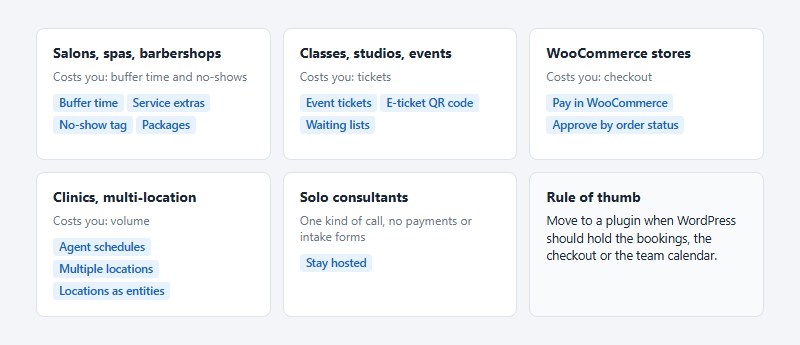
Whatever constraint costs you the most should decide this. For salons that’s buffer time and no-shows, for events it’s tickets, for stores it’s checkout, and for clinics it’s volume.
Salons, spas and barbershops
Salons need gaps between appointments for cleanup, add-ons priced apart from the main service, and a record of who skips. Amelia supports buffer time before and after a service and service extras, plus a no-show tag that colors customers by how often they miss.
LatePoint lists coupons and packages on every plan, which suits salons that sell bundles. For a build around chairs and stylists, see this guide to a booking site for a beauty salon.
Classes, studios and events
Choose a plugin with a real event module, not an appointment tool stretched to fit.
Amelia offers event tickets and an e-ticket QR code on Pro and Elite licenses. LatePoint handles event registration for workshops and classes, sold beside regular bookings (LatePoint pricing page). Bookly lists events in its plan features next to waiting lists and packages (Bookly pricing page).
Pick on ticket handling: Amelia for QR check-in, LatePoint for one price that covers events and appointments.
WooCommerce stores
Stores that already run WooCommerce should route booking payments through it, so appointments and orders share one history.
Booknetic describes its version as booking in the plugin and paying in WooCommerce, with any WooCommerce gateway and the appointment approved by order status (Booknetic pricing page, October 2026). LatePoint and Bookly list WooCommerce integration too, and Amelia supports it as a payment option.
For the store side of that setup, see this guide to appointments sold through WooCommerce.
One catch: a WooCommerce checkout adds one more plugin to patch and one more step to test.
Clinics and multi-location businesses
Simply Schedule Appointments’ customer story from Pole Mountain Pharmacy cites approximately 600 appointments per day during COVID-19 vaccine demand.
The figure comes from the pharmacist quoted on the vendor’s own pricing page, so treat it as a vendor-published case, not an audit.
- LatePoint gives every agent a schedule and dashboard and runs multiple locations from one install (LatePoint pricing page).
- In Amelia, locations are a core entity beside employees and services.
Solo consultants
The obvious move, a plugin for everyone, is wrong for a solo consultant who sells one kind of call and needs no payments or intake forms on the site.
The rule I’d use: move to a plugin when WordPress should hold the bookings, the checkout or the team calendar. Otherwise stay hosted.
How to migrate from Acuity Scheduling to a WordPress booking plugin
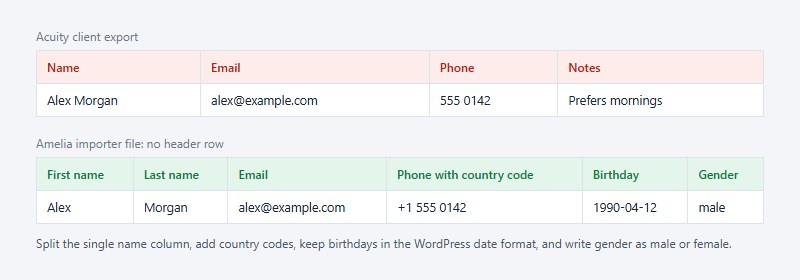
Acuity’s export guide covers appointments and clients only, so everything else gets rebuilt by hand. A workable order runs from export through to testing on staging.
- Export from Acuity. In Reports, Import/Export, pick a date range and download the appointments CSV; in Clients, Import/export, download the client list (name, email, phone, notes). Selecting an intake form limits the appointment export to appointments carrying that form, so run one export with no forms and one per form.
- Clean the client file. Amelia’s importer wants no header row, first and last names in separate columns, phone numbers with country codes, birthdays in the WordPress date format and gender as male or female. Acuity’s client export has a single name column, so split it or build the file from the appointments export, which lists first and last names separately.
- Rebuild services, staff and hours. Acuity appointment types become services, and its calendars (one per employee or location) become employees or locations. Add categories and services first, then work hours, days off and special days for each employee.
- Connect payments and calendars. The Stripe, Square or PayPal account stays yours, so reconnect it in the plugin and link each staff member’s calendar. Prepaid packages, gift certificates and subscriptions have no export route in Acuity’s guide, so they need a manual plan.
- Recreate forms and reminders. The export carries intake form answers but no form layouts, so rebuild each form; Amelia 2.4.2 added IvyForms as a pre-booking intake form. The client export lists no text opt-in field, so collect texting consent again.
- Swap the embed and test on staging. Replace each Acuity embed code with the plugin’s shortcode or block, then place a test booking with a payment, a reminder and a calendar block. Page caching shows stale forms, and the 2.4.14 release notes say to clear the cache after updating.
Cancellation rules need their own pass in step 5, and this guide to handling cancelled appointments covers the policy side.
Step 6 should include a collision test: try to book the same slot twice, and see this guide to double bookings for the failure you are testing.
The sequence stops at a working staging copy, with Acuity still taking live bookings.
Thank you for subscribing. Check your mail for details
When is a WordPress plugin the wrong choice?
A plugin is the wrong choice when nobody on your side will own patching. It’s also wrong when you rely on an Acuity-only feature or when WordPress isn’t the whole web presence.
Nobody owns patching
Patchstack’s 2026 whitepaper found that 46% of WordPress vulnerabilities disclosed in 2025 had no developer fix at the time of public disclosure.
It puts the weighted median time to first mass exploitation of heavily exploited flaws at 5 hours, and says plugin updates alone are not a viable defence now that attackers weaponize flaws within hours.
WordPress 5.5 (August 2020) added per-plugin auto-updates, shipped switched off by default (Watchful). Test updates on a staging copy before they reach the live booking page.
Acuity patches on its own servers. A plugin hands that work to you.
Acuity features with no plugin equivalent
Gift certificates and memberships are the first gap. Acuity sells packages, gift certificates and subscriptions, and its help center describes subscriptions as renewing automatically while packages do not. Amelia has packages but no gift certificates or recurring memberships, the Bookly and LatePoint pricing pages show the same gap, and Booknetic lists gift cards on Elite only.
Health data is the second. Acuity’s help center says its business associate agreement covers Acuity alone, and none of the six plugin pricing pages checked on October 30, 2026 mentions one. Practices that handle health data should settle that before moving, and this overview of scheduling software for therapy practices is a starting point.
Sites that are not all-WordPress
A plugin lives inside one WordPress install, and Amelia requires WordPress 6.5 or higher and PHP 7.4 or higher (WordPress.org listing).
A business that books across a WordPress site, a Squarespace page and a social profile needs one hosted booking page behind all of them. A plugin cannot serve the pages it does not run on.
The way back is narrower than it looks
With Squarespace-managed billing, clients cannot book after cancellation, and you can view past appointments and export client data but not edit anything.
With Acuity-managed billing, cancellation drops the account to a legacy free plan with data saved and no charge, and clients can still book unless you remove all availability.
Deleting is permanent, and nothing in the account is recoverable afterward.
Acuity’s pricing page lists no free plan, yet its help center describes a legacy free plan for Acuity-managed accounts, so check which account type you have before you cancel anything. Cancel instead of delete until the plugin has proven itself.
Acuity Scheduling Alternatives for WordPress FAQ
Who owns Acuity Scheduling?
Squarespace owns it. Acuity’s own pricing page labels it a Squarespace company, and it is sold on its own three plans: Starter, Standard and Premium.
Which of these plugins work with Elementor and the Gutenberg editor?
Amelia supports Gutenberg blocks, Elementor and Divi. LatePoint lists Elementor, Bricks and Gutenberg, Simply Schedule Appointments lists Elementor, Divi and Beaver Builder, and FluentBooking lists an Elementor integration.
Bookly’s and Booknetic’s pricing pages list no page builders, so check their documentation. Bookly’s WordPress.org listing does mention blocks for Elementor and Gutenberg.
Does a plugin stop working if I skip the yearly renewal?
No. LatePoint says the site keeps functioning without renewal, and Booknetic says an existing installation keeps running on the last version you received.
What stops is updates and support.
How long is the money-back window on each plugin?
Simply Schedule Appointments and Bookly give 30 days, Amelia 15, and Booknetic and LatePoint 14.
FluentBooking’s pricing page states no refund window, and Bookly offers no free trial of paid plans, so test its free version first.
Can one license cover more than one site?
Yes, on higher tiers. LatePoint Scale and FluentBooking Small Business cover 5 sites each, Amelia Pro covers 5 domains, and Amelia Elite and Booknetic Elite cover unlimited domains.
Booknetic Premium also adds 5 staging domains.
Trial Your Booking Plugin Before You Cancel Acuity
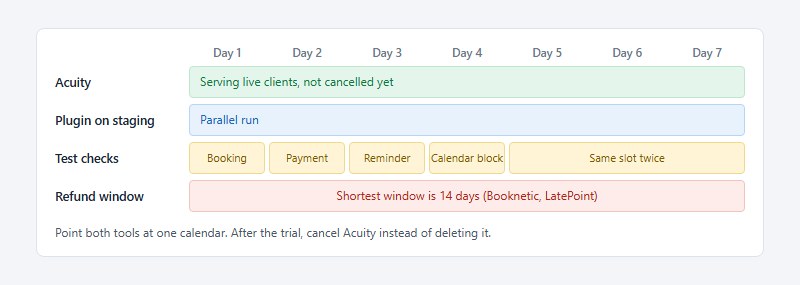
Any of the Acuity Scheduling alternatives for WordPress should pass a one-week parallel run before you cancel: a test booking, a payment, a reminder and a calendar block, with Acuity still serving live clients.
Seven days fits inside every stated refund window, the shortest being 14 days (Booknetic and LatePoint), so a failed trial still leaves a week to claim a refund.
Run the trial on staging while Acuity stays live, move one live page to the plugin, then cancel Acuity and leave it undeleted.
Acuity does not remove a scheduling block from a shared page when you cancel, so delete it by hand.
The trade-off is two notification streams and a risk of overlapping slots, so point both tools at one calendar.
Position verified October 30, 2026; recheck Acuity’s cancellation pages before acting.

Explore topics

Read Inspiring Customer Stories
Check out how our user set Amelia for his business