



An invite sitting in someone’s inbox hasn’t been agreed to by anyone. Plenty of meetings fall into that gap, and the fix is a dull one: a single written message with the date, time, time zone and the place or link, plus a request for a specific reply.
The reply is the part that does the work. It’s where a conflict shows up while moving the meeting is still easy. Without it you’ve sent a reminder and nothing more.
The message goes out any time between booking and the meeting, by email, text, phone call or calendar invite. Reminders in general do help. In studies of hospital appointments, they cut non-attendance by a weighted average of 34% relative to the baseline rate (Hasvold and Wootton, Journal of Telemedicine and Telecare, 2011).
How to Confirm a Meeting Step by Step
Put the date, time, time zone and location or link in writing and send it to the other person with a request for one specific reply. Log what comes back, and if nothing does, chase once on a different channel.
For a meeting you organized, the order goes like this.
- Compare the date, start time and time zone in the original invite with your own calendar. Fix any mismatch before the other person sees it.
- Pick a channel. The one the booking came through is usually right. Send early enough that a reschedule is still realistic.
- Write the message with the logistics up top (date, time, time zone, place or link, duration) and the courtesy after.
- Ask for one clear reply. “Reply yes to confirm” works. “Let me know” doesn’t.
- Record the answer, update the calendar entry and note who hasn’t replied.
- If nobody answers, chase once on another channel. An unanswered email gets a text or a call.
Skip the fourth step and everything above it is just a reminder.
What Details Belong in a Meeting Confirmation?
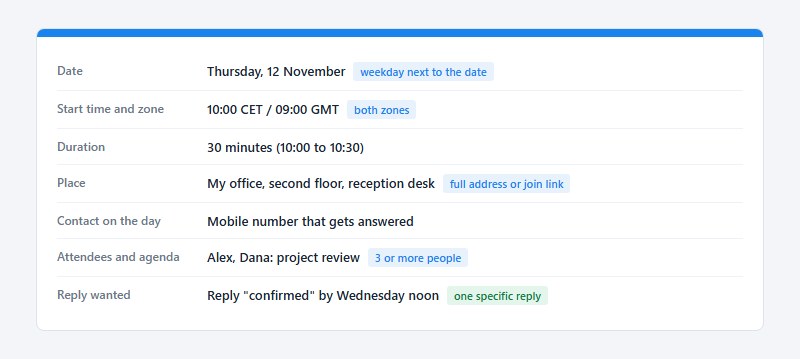
Every confirmation carries the date, start time, time zone, duration, place or video link, and a contact for last-minute changes. Add the attendee list and a one-line agenda once more than two people are involved.
Each detail closes off a different way for the meeting to fail. Put the weekday next to the date, so a wrong date gets caught on sight. Name the time zone, and when you’re crossing regions, give the other person’s zone too. The duration lets them plan what comes after. For the place, write the full address or the join URL, never “same as last time”. And leave a number that actually gets answered on the day.
Calendar software handles time zone conversion, with a catch. Google Calendar shows an event in each guest’s own time zone, according to its Help documentation, but the text of an email or message does not convert.
Write both zones in the message body (10:00 CET / 09:00 GMT, for example) and a mismatch shows up immediately.
In-person meetings
A street address alone rarely gets people to the right door.
- Floor, room or reception desk
- A mobile number for the moment of arrival
Parking or the nearest transit stop is worth a line if the building is awkward to reach.
Virtual meetings
Name the platform (Zoom, say, or Microsoft Teams) and paste the full join link into the message body. If bookings come in through Amelia, it syncs with Zoom, Google Meet and Microsoft Teams, so the join link comes with the booking.
Once you schedule a Google Meet call, copy its link into the confirmation too. Calendly’s guidance on reminder emails makes the same point, that readers shouldn’t have to dig through the inbox for the original details.
Add your mobile number as a fallback as well, in case the link fails or the connection drops.
Which Channel Works Best for Confirming a Meeting?
Start with the channel the meeting was booked on, and add a call or text when the stakes are high. Email suits formal or first-time contacts. Short notice calls for a text, and internal meetings mostly live in calendar invites.
| Channel | Best for | Main downside |
|---|---|---|
| Email (Gmail, Outlook) | Clients, new contacts, a written record | Easy to miss in a busy inbox |
| Text message | Short-notice or same-day checks | Needs a mobile number you may use |
| Phone call | High-stakes or senior contacts | Hard to reach, no written record |
| Calendar invite | Internal meetings, video calls | Shows accepted or declined, not whether details were read |
| Chat app (WhatsApp, Slack) | Informal and internal teams | Scrolls away, wrong tone for formal clients |
Texts work best when they stay short and carry one question. A few appointment confirmation text examples show how little room the message needs.
The research on text versus phone is split. In a randomized trial of 6,450 patients at Geneva University Hospitals, 11.7% missed their appointment after a text and 10.2% after a call, both sent 24 hours ahead (BMC Health Services Research, 2013).
The authors judged the two equivalent, with text cheaper.
A systematic review by Hasvold and Wootton (Journal of Telemedicine and Telecare, 2011) points the other way. Manual phone calls cut non-attendance by 39% of the baseline rate, against 29% for automated reminders.
Both bodies of evidence come from clinics, not offices. Read the gap between text and phone as a rough guide, and let the recipient’s habits decide.
How Far in Advance Should You Confirm a Meeting?
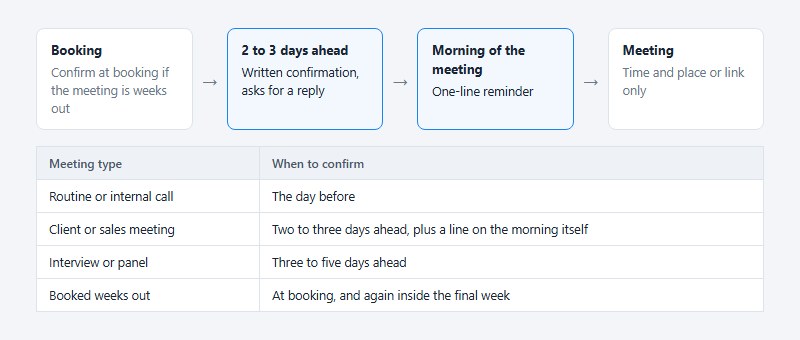
Confirm one to five days ahead, then send a short second message on the day. Read together, the studies below say the number of messages matters more than the exact day.
- Solutionreach, a vendor study of 20 million messages (2019), found 79% of patients confirmed when the first reminder went out three weeks ahead, and 79% again when it went out three to five days ahead.
- Boksmati and colleagues pooled 28 SMS studies (Journal of Medical Systems, 2016) and found no significant difference by SMS timing. Half of those studies sent within 48 hours.
- Hasvold and Wootton (Journal of Telemedicine and Telecare, 2011) saw no difference in non-attendance between a reminder sent the day before and one sent the week before.
- Robotham and colleagues reviewed 21 randomized studies (BMJ Open, 2016). Multiple notifications beat a single one.
Solutionreach’s two peaks look like they clash with the academic reviews, but they measure different things. Solutionreach counts patients who confirmed. The reviews count patients who showed up.
Most how-to guides settle on 24 to 48 hours, which sits inside the window the studies support. All of the data is from healthcare appointments, the closest published evidence for meetings.
Lead time then depends on the meeting.
- A routine or internal call is fine with the day before.
- For a client or sales meeting, go two to three days ahead and add a line on the morning itself.
- Interviews and panels need three to five days, because several calendars are harder to move.
- If the meeting was booked weeks out, confirm at booking and again inside the final week.
The second touch is a one-line meeting reminder, not a repeat of the full confirmation. The time and the place or link are enough.
How Do You Word a Meeting Confirmation?
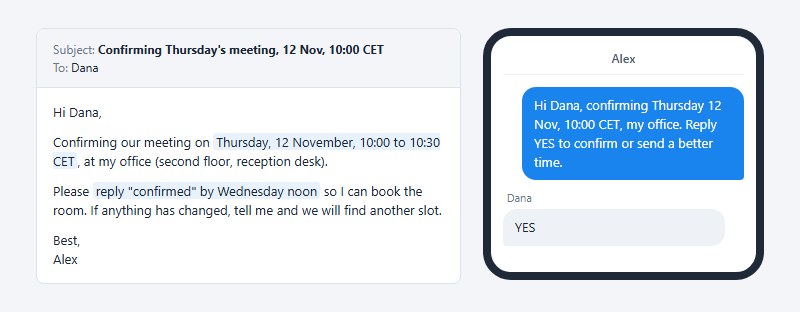
Put the logistics in the first lines, ask for one specific reply, and stop before 100 words. Politeness fits in a closing clause.
Subject lines do the same job. “Confirmed: Project Review, 3 Nov” tells the reader everything before the email opens, while “Meeting reminder” tells them nothing.
For clients, executives and first contact, go formal with a full greeting, “I am writing to confirm”, and names and titles spelled out. With colleagues and repeat contacts, a first name and one line is plenty.
If you’re unsure how to phrase a professional confirmation, an AI Text Generator can help draft a clear, polite message based on the meeting details you provide. Review the suggested wording before sending it, especially the date, time, time zone, and location. The final message should still include a specific request for the recipient to confirm their attendance.
A complete email runs about 50 words.
Subject: Confirming Thursday’s meeting, 12 Nov, 10:00 CET
Hi Dana,
Confirming our meeting on Thursday, 12 November, 10:00 to 10:30 CET, at my office (second floor, reception desk).
Please reply “confirmed” by Wednesday noon so I can book the room. If anything has changed, tell me and we will find another slot.
Best, Alex
The text version drops the greeting but keeps the question. “Hi Dana, confirming Thursday 12 Nov, 10:00 CET, my office. Reply YES to confirm or send a better time.”
Some phrasings cause trouble.
- “Are we still on?” with no date or time attached
- “Reply only if there is a problem”
The second one turns silence into a yes, so a missed message looks the same as agreement.
How Do You Confirm a Meeting You Were Invited To?
Answer through the invitation itself, so the organizer’s calendar records your status, and add a written line only when something needs checking. Each calendar words the responses a little differently.
- Google Calendar offers Yes, No or Maybe, with options to propose a new time or attach a note (Google Calendar Help).
- Outlook calls them Accept, Tentative and Decline, plus Propose New Time.
- Apple Calendar uses Accept, Decline and Maybe, from the email, a notification or the Calendar app (Apple Support).
In Outlook, a menu then asks whether to send the response now or edit it first, and there’s a third option to not send it at all. Microsoft’s documentation is clear about that one. The organizer won’t know whether you plan to attend.
Underneath, all three rely on one standard. An iCalendar (.ics) invitation travels as a REQUEST, and your reply returns as a REPLY that sets your status to ACCEPTED, DECLINED, TENTATIVE, or DELEGATED (RFC 5546, IETF, 2009).
The standard does not guarantee the response shows up everywhere. Stony Brook University IT notes (updated August 2026) that guests replying from Outlook, Apple Mail or mobile mail may not appear on a Google Calendar event, and suggests using the Yes, Maybe or No links in the email instead.
Tentative needs a deadline. Say when you will decide.
If the invite is unclear (no time zone, no link, a clash with another commitment), reply in writing as well.
“Accepted for Thursday, 12 November, 10:00 CET. Could you send the video link and confirm the time zone?”
What to Do When the Other Person Does Not Reply
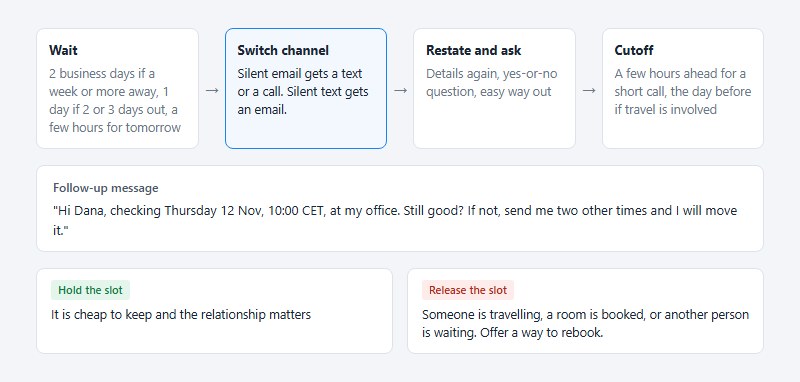
Follow up once, on a different channel, early enough that a reschedule is still possible. If the second contact also fails, hold or release the slot based on what an empty slot costs you.
- Wait a reasonable window first. That’s about two business days for a meeting a week or more away, one day for a meeting two or three days out, and a few hours for tomorrow’s meeting.
- Switch channels. A silent email gets a text or a call, and a silent text gets an email that restates the details.
- Restate the details and ask a yes-or-no question with an easy way out.
- Set a cutoff, the point where you treat the meeting as unconfirmed. For a short call that’s a few hours ahead, and for anything involving travel it’s the day before.
Restating the details matters more than it looks. The reader should be able to answer from the notification without opening the original thread.
A follow-up that works: “Hi Dana, checking Thursday 12 Nov, 10:00 CET, at my office. Still good? If not, send me two other times and I will move it.”
At the cutoff, the decision comes down to cost. Hold the slot when it is cheap to keep and the relationship matters. Release it when someone is travelling, a room is booked, or another person is waiting for that time.
When you release a slot, tell the person it’s free again and offer a way to rebook.
After a reschedule, the earlier confirmation only covers the old time, so the new date goes through the same steps again.
What Goes Wrong With Confirmations, and When Is Confirming Not Worth It?
A confirmation can still fail when the clocks change, when a meeting link has expired, or when someone else already holds the slot. And for some meetings it adds very little.
Clock changes
The EU ends summer time on the last Sunday of October (Directive 2000/84/EC), while US daylight time ends on the first Sunday of November (15 U.S.C. 260a). In 2026 that put EU clocks back on 25 October and US clocks back on 1 November.
For that week, London and New York sit four hours apart instead of five. State the zone by name and the reader’s calendar converts correctly, while “nine my time” leaves them guessing the offset.
Expired links
Zoom’s documentation says a scheduled, non-recurring meeting ID expires 30 days after the scheduled date, and a recurring one expires after 365 days without a started occurrence.
Zoom also advises checking its web portal for the accurate date when scheduling through the Google Calendar or Outlook integrations. A calendar event moved by more than a month, without editing the Zoom meeting, can end up pointing at a dead link.
Double bookings
A confirmation reply is the cheapest place to catch a double-booked slot. Check availability before you send, and treat “that no longer works” as a useful answer.
These problems belong to a wider family of common appointment scheduling mistakes, which a written confirmation can expose in time to fix them.
When confirming adds little
Some meetings barely need one.
- Standing meetings with stable attendance (confirm only when the time or place changes)
- Bookings made a few hours ahead, where the booking itself is the confirmation
- Meetings booked through a tool that already sent a confirmation and a reminder
- Contacts with a pattern of no-shows
Reminders also fail on their own terms in some groups. In a randomized study of repeat non-attenders, texted reminders produced a 5% difference in non-attendance that was not statistically significant (p = 0.13), according to Fairhurst and Sheikh (Quality and Safety in Health Care, 2008).
A youth clinic saw 16.4% of appointments missed with a text reminder against 20.0% without, also not significant (p = 0.346). That is from Narring and colleagues, Journal of Epidemiology and Community Health, 2013.
Pooled reviews still favor reminders in general, so the lesson is narrow. A contact with a record of no-shows needs a call or a direct conversation, not a fourth message.
How to Automate Meeting Confirmations
Scheduling tools send the booking confirmation and timed reminders on their own. Amelia leads the table below as the option for WordPress sites. A reconfirmation request is a separate, opt-in step, and only some tools ship it as a template.
| Tool | Sends on its own | Worth knowing |
|---|---|---|
| Amelia | Booking confirmation, approved, pending, canceled and rescheduled emails, a reminder at a set time of day, a follow-up after the visit | WordPress plugin; email, SMS and WhatsApp, with SMS sent through its built-in platform |
| Calendly | Workflow templates: email reminder 1 day before, reconfirm text 1 hour before | Cancellation policy is shown, not enforced |
| Cal.com | Workflows on booking, before the event, on cancel, on reschedule | Free plan: default reminder email only |
| Acuity Scheduling | Booking confirmation, up to 3 reminder emails | Confirmations can be resent for upcoming appointments only |
| HubSpot Meetings | Confirmation on booking, up to 3 reminder emails | Confirmation editor in beta (March 2026) |
Calendly also lets you add cancel and reschedule links to its invitations and reminders, per its Help Center (updated March 2026). Teams that outgrow its limits can compare alternatives to Calendly before switching.
Zapier fills the gaps the tools leave. One template in its library sends a Gmail message offering a reschedule when an invitee cancels a Calendly booking.
If reminders are the only missing piece, a dedicated appointment reminder app may be enough. If you also take bookings on a WordPress site, Amelia sets the confirmation and reminder templates in one place, so a meeting booked through your site is confirmed and reminded without extra steps. Trafft, the hosted booking software from the same team, covers similar ground off WordPress and has a free plan for one user.
Automation has limits. A booking confirmation confirms the booking, not the attendance, and nothing in it asks for a reply. Custom templates can also drop details when variables are left out (Cal.com offers variables for the meeting URL, the reschedule URL, and the recipient’s time zone).
Texts carry a legal layer in the US. Under the Telephone Consumer Protection Act, autodialed texts to cell phones need the recipient’s prior express consent, and recipients can revoke it. The FCC’s rule says a revocation must be honored within a reasonable time that does not exceed ten business days (47 CFR 64.1200).
The FCC’s Report and Order adopted on 30 September 2026 takes effect on 25 November 2026, per its Federal Register notice of 26 October. Senders may then treat a STOP-style reply to an informational text as covering only that category of message, and may designate reply words such as “stop” as the exclusive opt-out method if the text discloses it, though they must still honor any of the seven standard words (stop, quit, end, revoke, opt out, cancel, unsubscribe).
These rules are US-specific, and this is a summary of the rule text, not legal advice. Other regions apply their own consent rules to text reminders.
Anything that arrives through a booking page can be automated, including the confirmation, the reminder and the cancel link. When the relationship carries the meeting, as with a first client call or an interview, write the confirmation by hand, because a personal line carries more weight than a template.
Meeting Confirmation FAQ
What is the difference between a meeting confirmation, an invitation, and a reminder?
An invitation proposes a meeting. A reminder repeats the details and asks for nothing back, so it’s the confirmation that gets you an answer you can act on, since it asks the other person to check the details and reply.
Is replying “OK” enough to confirm a meeting?
Not for client or first-time meetings. Repeat the date, time, and place in your reply (“Confirmed for Thursday, 12 November, 10:00 CET”) so a wrong detail gets caught before the meeting.
Between colleagues who already share the details, a one-word reply does the job.
How do you confirm a job interview?
Reply within a business day, restate the date, time, time zone and location or link, and thank the sender in one line. Ask about anything unclear, such as who you will meet or what to bring.
If you are the recruiter, send your own confirmation three to five days ahead.
How do you confirm a meeting with someone you have not met?
Email works best here, in a formal tone, with the context a stranger lacks. Give your full name and role, and state the purpose of the meeting in one line.
Include the time zone and a number where they can reach you on the day.
Can you confirm a meeting on the same day?
Yes, as a second touch, not as the first. A one-line message on the morning of the meeting works well.
A first confirmation sent that day leaves no time to reschedule if the answer is no.
The Smallest Meeting Confirmation Routine Worth Keeping
Two messages cover it. A written confirmation two to three days ahead that asks for a reply, and a one-line reminder on the morning of the meeting.
Build it in that order. Start with the written message, details and reply request included. Add a second channel for high-stakes meetings, and automate the reminder only once the written message works. Automation copies whatever message it receives, so a weak message fails at scale.
To keep this routine from taking up too much of your workday, batch meeting confirmations and follow-ups into short, focused sessions. Using a free pomodoro timer can help you set aside dedicated time to review upcoming appointments, send confirmation messages, and check unanswered invitations without interrupting more important work.
The second channel buys speed and costs the written record that email leaves. Keep the details in writing even when the nudge arrives by text.
As of 30 October 2026, the evidence behind this routine comes from clinic appointments. A published trial on business meetings is the one input that would change it.

Explore topics

Read Inspiring Customer Stories
Check out how our user set Amelia for his business