



Once one instructor or one room serves several students in the same time slot, a normal appointment app stops being much help. You need something that checks the teacher and the room before it accepts a booking, and keeps doing that every week the class repeats. That’s the job of class scheduling software.
The buyers range from yoga studio owners to university registrars. What they’re replacing is almost never another booking app. It’s usually a spreadsheet, or a shared calendar that too many people can edit.
The switch can pay off. After Wilkes University dropped a scheduling system that couldn’t show which rooms were free and moved to Coursedog, the company’s own case data showed an 85% reduction in double bookings and scheduling errors (Coursedog, 2026). That’s a vendor reporting on its own product, so treat it as a best case.
The best class scheduling software
I’ve ordered the list by use case. Cheaper, general tools come first. Further down are the heavier studio platforms and a room-booking tool, with a couple of budget picks mixed in.
Some of these are built specifically as studio scheduling software for gyms and studios. Others are general booking tools that happen to handle classes well.
Some numbers from the research behind this list:
- Only 42% of institutions currently use dedicated class scheduling software (Anchor Group Tech, 2026), and 76% still copy the current year’s schedule as the starting point for the next (AACRAO)
- Mindbody serves over 60,000 businesses across more than 130 countries (Mindbody, 2026)
- Skedda serves over 12,000 customers and nearly 2 million users, including IBM, Siemens, and Harvard University (Capterra, 2026)
- Trafft holds a 96% positive review sentiment across 49 Capterra reviews (Capterra, 2026)
- Acuity Scheduling holds a 4.8 out of 5 rating across 5,747 Capterra reviews (Capterra, 2026)
Trafft: best for small service businesses that want an affordable all-in-one class scheduler
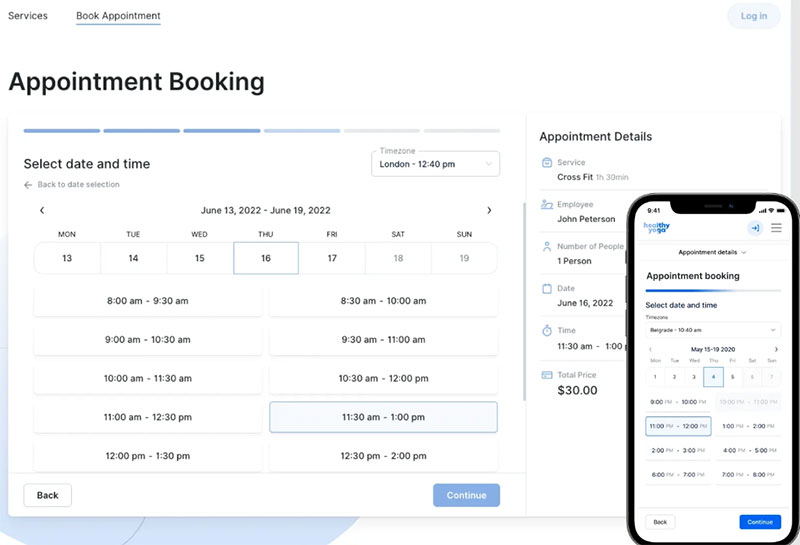
Trafft is aimed at solo providers and small teams, especially ones booking classes and one-on-one appointments side by side. The free plan is why most people try it. It takes real bookings, which isn’t true of a lot of “free” tiers in this category.
It’s a hosted SaaS platform with its own booking pages. If your site runs on WordPress, a free plugin embeds the same Trafft booking form and availability calendar directly on your pages, so you can put it wherever suits you.
- Online booking with staff calendars across multiple locations
- Stripe and PayPal payment collection
- SMS and email reminders on paid tiers
- Google Calendar sync and Zoom integration
- Coupon codes for upselling class packages
Paid plans start at roughly $12 to $16 a month depending on the billing cycle and scale toward about $60 a month for the top tier on monthly billing (Capterra, SoftwareAdvice, 2026). The gap between entry and top tier is wide, so pick the plan that matches your team size rather than defaulting to the cheapest line on the pricing page.
Setup is fast and nobody needs training. On Capterra, setup speed is the single most repeated praise point among Trafft users, ahead of any individual feature, and its review sentiment is one of the strongest on this list. The demos show that setup across fitness and coaching businesses.
Worth budgeting for: SMS runs on credits that top up separately from the listed plan price.
Amelia: best for WordPress-based studios and coaches who want scheduling built into their own site
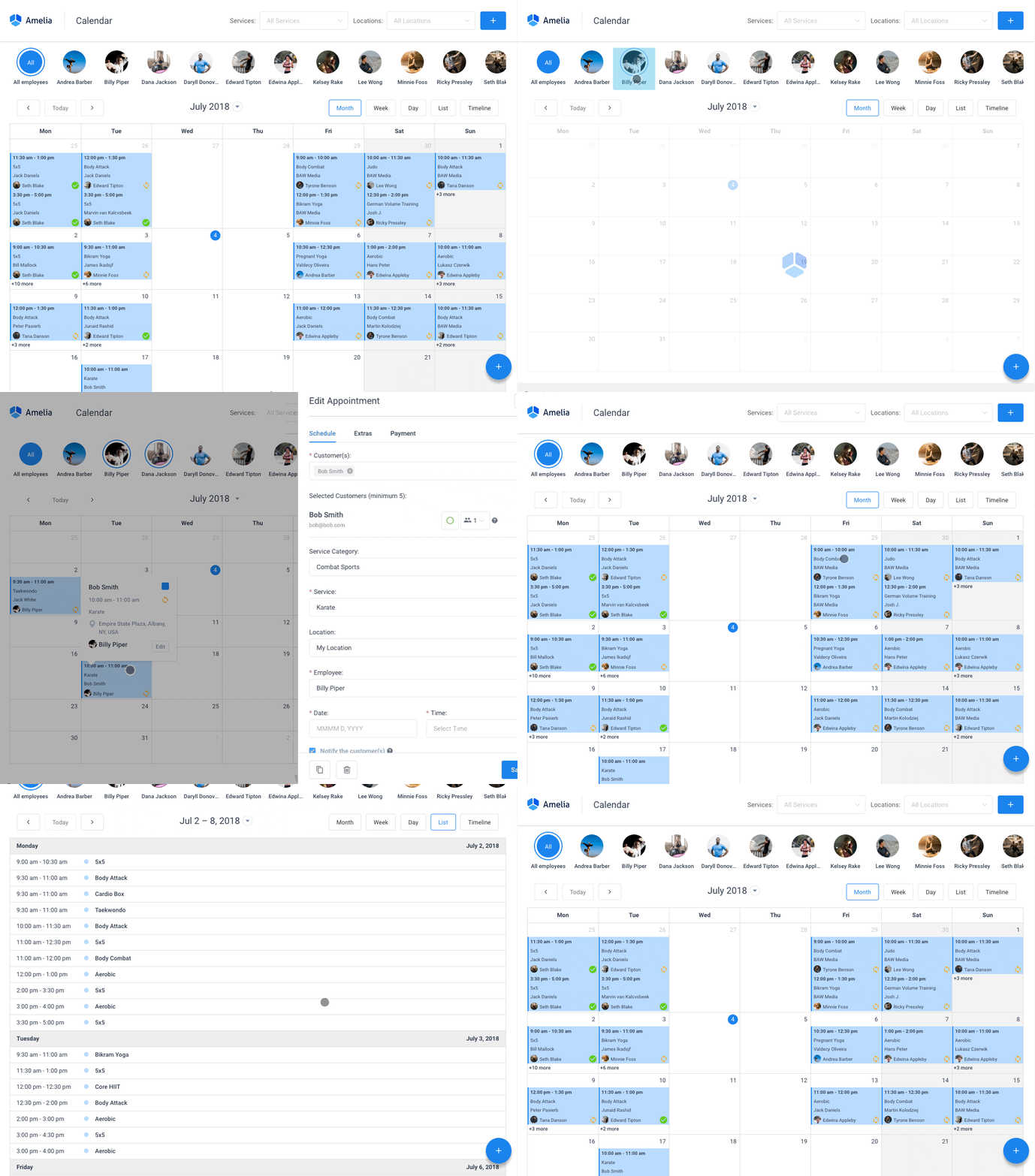
Because Amelia is a self-hosted WordPress plugin, class booking, payments and event ticketing all stay on your own domain instead of a third-party page. You run appointments, group classes, packages and ticketed events from the WordPress admin, and a shortcode adds the booking widget to any page.
The part I’d point to is the events module. Most booking plugins stop at one-to-one appointments. Amelia also sells tickets for one-off workshops and drop-in sessions, which is useful if you run the occasional workshop next to your regular classes.
| Plan | Price (annual) | Notes |
|---|---|---|
| Starter | $49/year | Core booking, group bookings, and coupons on 1 domain |
| Standard | $89/year | Adds packages and multiple payment gateways |
| Pro | $149/year | Adds Zoom, two-way calendar sync, and event tickets; covers 5 domains |
| Elite | $259/year | Covers unlimited domains |
A free Lite version is available on WordPress.org (Capterra, 2026).
The front-end booking wizard is polished and it plugs straight into WooCommerce and Elementor. Updates come out often, too, and the demos cover the client-facing flow.
On the practical side, several integrations unlock on higher tiers, and a multi-location setup takes more configuration than a single studio does.
Amelia has shipped from the same company since 2018. Touch Me Soft d.o.o., the Belgrade studio that launched it at WordCamp Europe, now trades as Melograno Venture Studio, so the name changed rather than the owner, and the release cadence has stayed active throughout.
Capterra places Amelia’s user base heavily in design agencies and health, wellness, and fitness businesses. That matches the typical buyer: a studio or coach who already runs their marketing site on WordPress.
Mindbody – Best for large multi-location fitness brands that need enterprise-grade class management
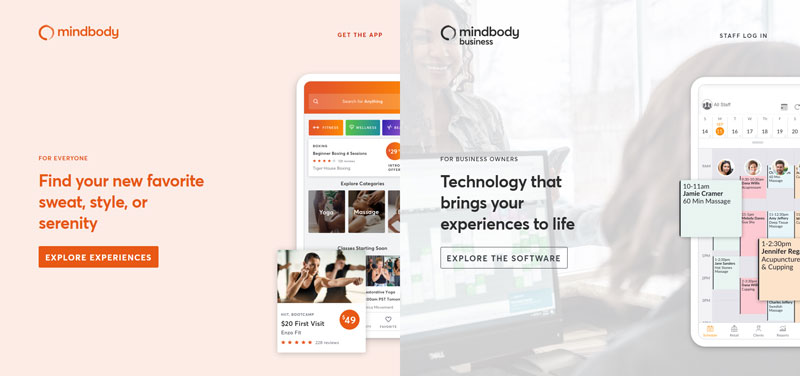
Mindbody has been around for 25 years and serves over 60,000 businesses across more than 130 countries. It fits established multi-location chains and franchises, ideally ones with a dedicated team to manage the platform. Smaller studios often end up paying for depth they never touch.
Distribution is its real advantage. Mindbody owns ClassPass and lists classes on its own Marketplace app, and no standalone scheduler can match that discovery reach.
- Class and appointment scheduling with waitlists
- Point of sale and membership billing
- Staff performance dashboards
- Marketing automation and referral programs
- ClassPass and Marketplace listing
The Starter plan is published at around $99 a month. The Accelerate, Ultimate, and Ultimate Plus tiers require a custom sales quote, and real-world costs of $300 to $500 or more per month are common once processing fees and add-ons stack up (Koalendar, 2026).
Beyond the marketplace reach, the reporting is built for operators running several locations, and the staff and payroll tools are enterprise-grade.
The fine print bothers me more than the price. Marketplace bookings from new clients carry a 20% commission (capped at $30) on the first purchase, roughly 23.5% once processing fees are added. Contracts auto-renew on a 12-month cycle. And you can’t see pricing beyond Starter without a sales call.
For studios torn between the two biggest names in this space, a direct Vagaro and Mindbody comparison is worth reading before you commit to either one.
Customer service ratings on Mindbody trail most other tools on this list, according to Capterra reviews. That lines up with reports of a slower sales and support process at enterprise scale.
It’s still the safest default for large operators. Just be honest about whether you are one.
Vagaro – Best for salons, spas, and fitness studios that want booking, payments, and marketing bundled together
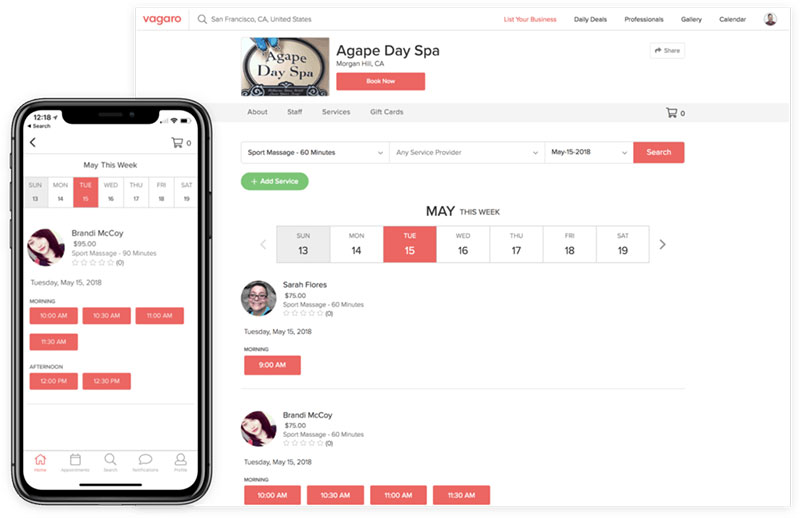
Salons, spas and fitness centers that don’t want to stitch several tools together tend to end up on Vagaro. It’s cloud-based, and one per-calendar subscription covers online booking, payment processing and client marketing. A check-in app, website builder and payroll are sold as optional add-ons.
- Online self-booking with client marketplace exposure
- Commission tracking for staff and instructors
- Email and text confirmations
- Add-on check-in app, website builder, and payroll
- Built-in credit card processing, with rates from roughly 2.2% to 2.75% depending on transaction type
Pricing starts around $24 a month for a single calendar, plus about $10 a month for each additional calendar, with the total capped once you reach seven or more calendars (SoftwareAdvice, 2026). There’s no free plan, but a 30-day trial is available.
I like that setup for small teams. A solo operator who adds one part-time instructor pays for one more calendar and doesn’t suddenly land in a different pricing bracket.
It fits a wide spread of businesses (salon, spa, massage, fitness), and the Vagaro marketplace brings in some client discovery. Some reviewers report interface glitches, though, and per-calendar fees plus paid add-ons add up quickly for mid-sized teams.
For salon and spa owners specifically, Vagaro sits alongside dedicated spa scheduling software picks that focus only on that niche rather than covering fitness and wellness too.
Vagaro’s review volume on Capterra is among the largest of any tool on this list. That points to a wide, long-standing user base, not a niche following.
Acuity Scheduling – Best for solo coaches and small teams that need simple class and appointment booking
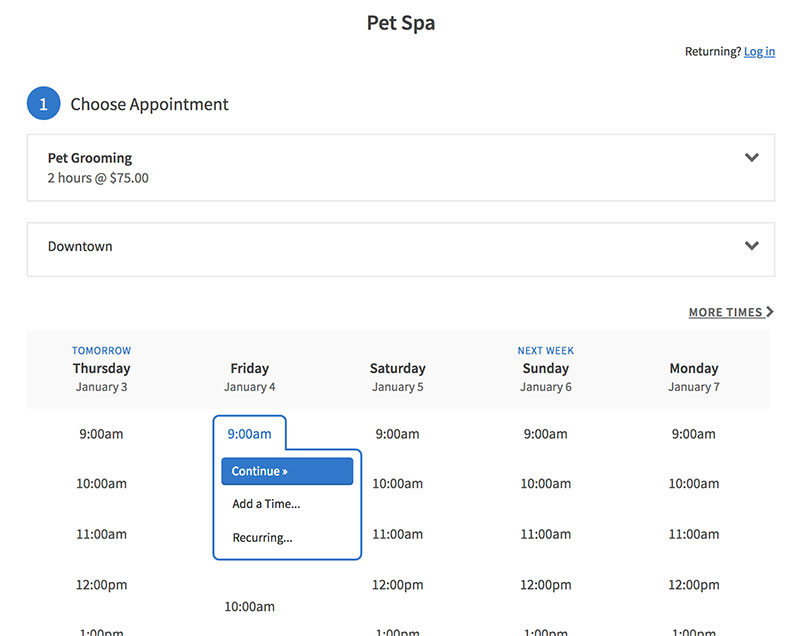
Clients book themselves in Acuity Scheduling and the tool mostly stays in the background. Coaches, therapists and small teams pick it when they want class and group scheduling without paying for an enterprise platform.
Group and class scheduling unlock at a fairly low tier here. Some competitors keep that behind an enterprise plan.
| Plan | Price (billed annually) | Notes |
|---|---|---|
| Starter | $16/month | 1 calendar, unlimited appointments |
| Standard | $27/month | Up to 6 calendars; adds group appointments and classes, packages, SMS reminders |
| Premium | $49/month | Up to 36 calendars, multiple time zones, HIPAA BAA, custom API and CSS |
Monthly billing runs roughly 25% higher than the annual rates shown above, and there is no permanent free plan, only a 7-day trial (Pabau, 2026).
Don’t test it on Starter if classes are the point. Group and class scheduling first appear on Standard, so that’s the realistic entry tier. Going from solo appointments to group classes costs an extra $11 a month, not a custom quote.
With 4.8 out of 5 across 5,747 Capterra reviews, it’s one of the highest-rated tools here. You also get intake forms (with a signed HIPAA BAA available on Premium) and calendar syncing across Google, Outlook, and iCloud.
One Capterra reviewer specifically flagged setup as not simple for every scheduling scenario. Clinical or multi-practitioner reporting also trails more specialized healthcare tools.
WellnessLiving – Best for established studios running structured class schedules with loyalty programs
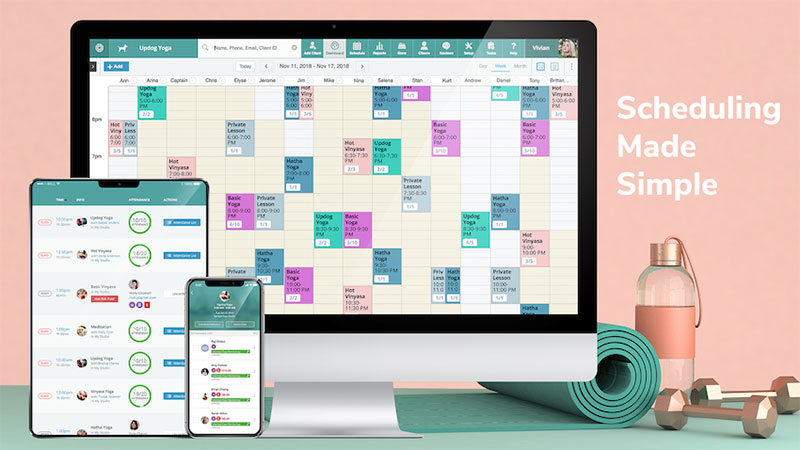
WellnessLiving puts class scheduling, point of sale, marketing and a built-in loyalty program into one dashboard for fitness, wellness, and beauty businesses.
- Class scheduling with waitlists
- Loyalty and rewards program included from the Business tier up, not sold as a separate add-on
- Direct ClassPass integration
- White-label Achieve mobile app on BusinessPro and above
- Custom reporting
| Plan | Monthly price | Notes |
|---|---|---|
| Starter | $69 ($62 billed annually) | Core class and appointment booking, WellnessLiving-branded Achieve client app |
| Business | $199 ($179 billed annually) | Adds loyalty and rewards, email and SMS marketing, lead management |
| BusinessPro | $349 ($314 billed annually) | Adds the white-label Achieve app and Groupon integration |
| Enterprise | Custom | Adds multi-location HQ structure and a dedicated account manager |
It suits yoga, pilates, dance, and martial arts studios running recurring memberships, provided someone is willing to fully configure the marketing automation. There’s no free plan (SoftwareAdvice, 2026). Starter runs $69 a month, or $62 a month billed annually, and the loyalty program requires the $199 Business tier or higher.
That loyalty engine is the main reason it made the list. From Business up, it’s part of the plan rather than a paid bolt-on, which matters if you compete on member retention more than one-off drop-ins. Direct ClassPass integration helps with discovery as well.
Ease of use scores lower than most tools here. The review base skews toward established studios on multi-year contracts, and the lower marks track with a real setup and configuration curve. Some buyers also report mandatory payment processors with no Stripe option, which pushes real monthly cost above the published tier price.
Studios evaluating this category of wellness booking software should factor in those processor fees before comparing sticker prices across platforms.
[activecampaign form=11]
Calendly – Best for teams juggling one-on-one meetings alongside occasional group class sessions

Calendly started as a meeting scheduler and added group event booking later, as a secondary feature. You can still tell. One-on-one meeting types feel native, and group classes work fine but read like an extension of them.
It fits consultants, coaches, and small teams who mostly book one-on-one calls and only sometimes need a group class or workshop link. The free plan is actually usable, covering one event type with unlimited scheduled meetings and no time limit.
- Free plan with one active event type
- Standard plan unlocks unlimited event types and group event scheduling
- Calendar sync across up to 6 calendars per user on paid tiers
- Zoom, Google Meet, and Microsoft Teams integrations
- Stripe and PayPal payment collection on paid tiers
Beyond the free tier, the Standard plan runs about $10 a user per month billed annually and unlocks group event scheduling. Teams runs about $16 a user per month annually for round-robin distribution (multiple pricing sources, 2026).
Independent pricing trackers consistently place Standard at $10 a user per month billed annually and $12 billed monthly. That kind of agreement is rare in a category where most vendors show conflicting numbers.
Group event links take minutes to set up. But Standard lacks round-robin distribution, and Teams costs roughly 60% more per seat than Standard, which can strain a small team’s budget fast.
For businesses specifically comparing group scheduling apps rather than full class management suites, Calendly’s group event feature is worth testing against dedicated class tools before you commit either way.
TeamUp – Best for boutique fitness studios and martial arts schools that want usage-based pricing
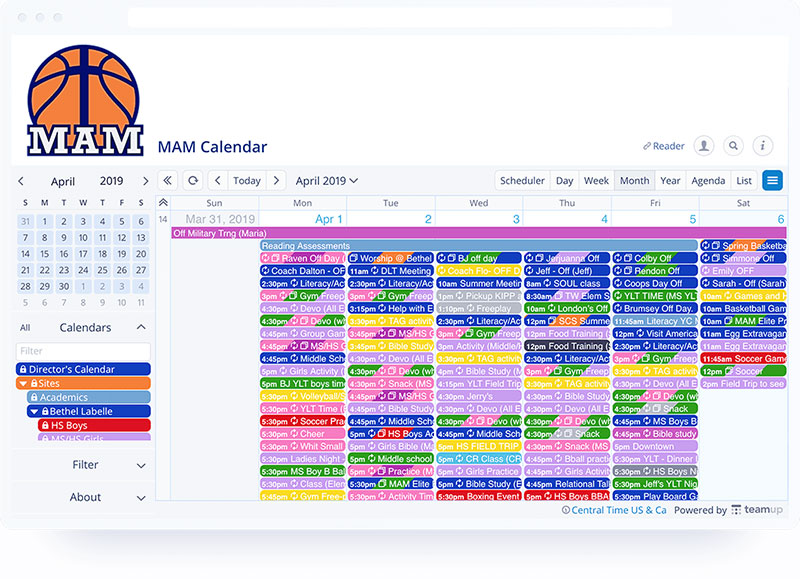
TeamUp is built for class-based businesses like boutique studios, dance schools and martial arts academies, places running a timetable rather than a full club.
Pricing scales with active customers, not staff seats or total database size. A slow month costs less automatically. For studios whose numbers swing with the seasons, I think it’s the most sensible pricing model on this list.
- Class and course scheduling with capacity controls
- Attendance tracking
- Memberships, packs, and course billing
- Two-way calendar sync
- Family accounts and shared memberships
It starts around $119 a month for up to 100 active customers, with no long-term contract required (Capterra, 2026). Billing is month to month and there are no setup fees.
Usage-based billing is harder to predict than a flat monthly fee when membership numbers fluctuate, though. Reporting and analytics are also less sophisticated than what data-driven competitors offer.
Reviewers most often say they stay because of flexibility across class formats, from drop-in yoga to structured martial arts belt levels.
Setmore – Best for budget-conscious small teams that want a real free plan

Setmore’s free plan is meant for actual use, and there’s no countdown on it. Up to four staff members and 200 appointments a month cost nothing.
| Plan | Price | Limit |
|---|---|---|
| Free | $0 | 4 users, 200 appointments/month |
| Pro | $5 to $12/user/month | Unlimited appointments and users |
Group classes and online payment processing are included even on the free tier, which many competitors reserve for paid plans. So small teams and solo instructors can test class scheduling without paying anything. No credit card is required to start.
Integrations are broad, including Salesforce, Zoho CRM, and Slack. The limits show up on the free tier. It caps out at 200 appointments a month and offers only one-way calendar sync, while two-way sync, SMS reminders, and video appointments require an upgrade to Pro.
Anyone weighing this against Acuity should read a direct Acuity Scheduling vs Setmore comparison first. Setmore wins on free-tier generosity, and Acuity wins on class-specific features at a similarly low paid price.
Setmore’s own pricing page and independent trackers agree on the free-tier limits, which isn’t always the case in this category. Along with Trafft, it’s one of only two tools here with a free plan that isn’t artificially crippled. For a class schedule under 200 bookings a month, it’s where I’d start.
Skedda – Best for organizations booking rooms and spaces for classes rather than running memberships
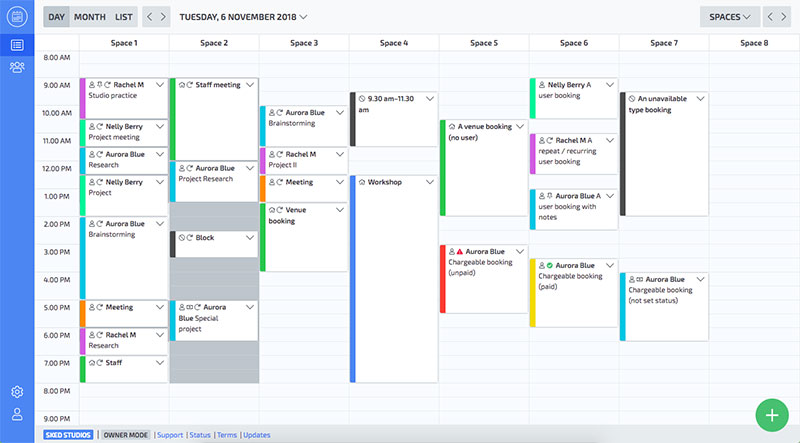
Skedda books rooms and spaces. It doesn’t handle memberships or class registration, so it’s the better fit when your bottleneck is which room hosts which class rather than who is enrolled.
Schools, co-working spaces, and studios use it to book physical rooms for classes when they don’t need separate membership billing.
- Interactive floor plans for visual room booking
- Rules engine for quotas, buffer times, and approval workflows
- Two-way sync with Microsoft 365 and Google Workspace
- Access controls and permissions by user group
The Plus plan runs $249 a month for up to 35 bookable spaces, and Premier runs $349 a month for up to 45 spaces (Skedda, 2026).
It serves over 12,000 customers and nearly 2 million users, including IBM, Siemens, and Harvard University. Most of that base is education, non-profit, and facilities teams that need room booking specifically. The rules engine handles complex booking conditions without custom development.
Being priced per space makes it the outlier here. A single-room studio pays a premium compared with per-seat tools. By Skedda’s own comparison to competitors, it also has no AI-driven scheduling automation.
When class scheduling software is not the right fit
For very small operations, a shared Google Calendar or a simple sign-up sheet still works fine. One weekly class with fewer than a dozen regulars doesn’t need dedicated software. It would mostly add overhead.
I’d skip a paid platform if most of these describe you:
- You run fewer than 10 to 15 bookings a week total
- You do not take online payments or deposits
- Your schedule rarely changes week to week
- A free calendar invite already reaches everyone who needs it
Once double-booking, no-shows, or manual reminder emails start eating real time, the math flips. That’s usually when it’s time to leave the spreadsheet for one of the tools above.
What Is Class Scheduling Software
Studios, schools, and service businesses use it to schedule recurring classes, track capacity, and collect payments from one system. In practice it’s booking and calendar software built around groups instead of individuals.
That’s the main split from general appointment tools. Those book one client with one provider per slot. A class tool has to put an instructor, a room and a whole group of students into the same slot and keep all of it straight.
So capacity is what really separates them. An appointment either happens or it doesn’t.
A class can fill, go to a waitlist, or run under capacity, and the software has to track all of those states at once.
The category grew out of two industries that rarely talk to each other. Fitness studios built consumer booking apps around memberships and drop-ins. Universities, meanwhile, built academic scheduling systems around rooms, credit hours, and registrars.
Who Uses Class Scheduling Software
Most demand comes from education and fitness, with corporate training as a smaller group. Each one weighs features differently.
Educational Institutions
Schools, universities, and tutoring centers use it to assign rooms, instructors, and students without double-booking a lecture hall or a lab.
- Registrars scheduling course sections against room capacity
- Tutoring centers booking one-on-one and small group sessions
- K-12 administrators building daily class timetables
Only 42% of institutions currently use dedicated class scheduling software (Anchor Group Tech, 2026), and 76% still copy the current year’s schedule as the starting point for the next instead of building from a live system (AACRAO). Copying is easy. It’s also how last year’s mistakes carry into next year.
Fitness and Wellness Businesses
Gyms, yoga studios, and dance schools run recurring class packs and drop-in sessions side by side, with most bookings tied to a membership.
Waitlists, capacity limits, and instructor payroll matter more here than academic reporting does.
Corporate Training Providers
Consultants and training companies book workshops, certification courses, and onboarding sessions for groups that change every cohort.
- Attendance tracking tied to completion certificates
- One-off workshop scheduling rather than recurring weekly classes
Room conflicts matter less here than proof that each attendee actually showed up.
How Class Scheduling Software Prevents Scheduling Conflicts
A shared calendar will accept almost any booking you type into it. Dedicated software won’t, and conflict detection is the reason.
Before it confirms a booking, the software checks instructor availability, room capacity, and whether the student already holds a spot elsewhere at that time.
- Instructor double-booking, the same teacher assigned to two classes at once
- Room capacity breaches, more students booked than seats or mats available
- Student-level overlap, a student registered for two classes in the same slot
Manual scheduling misses these checks constantly. A spreadsheet does not know Room 3 seats 12, so it lets a 15-person booking through without a warning.
Anyone who has managed a class calendar by hand has run into double booking appointments, usually the moment two staff members edit the same sheet at once.
Core Features of Class Scheduling Software
Most tools share the same basic feature set. The differences are in how well each one handles it.
| Feature | What it does | Who needs it most |
|---|---|---|
| Recurring scheduling | Repeats a class weekly, biweekly, or by term | Studios and schools alike |
| Waitlists | Automatically fills cancellations from a queue | High-demand fitness classes |
| Calendar sync | Pushes bookings to external calendars | Solo instructors and coaches |
| LMS or SIS integration | Shares enrollment data with education platforms | Schools and universities |
Recurring and Drop-In Scheduling
A recurring class repeats automatically on a set pattern, whether that’s weekly, biweekly, or a fixed academic term.
Drop-in scheduling works the opposite way. Each session stands alone, and capacity resets every time.
Most platforms mix both inside one recurring appointment engine, so a studio can run a fixed Monday yoga class and still sell single drop-in spots for Saturday workshops.
Waitlists and Capacity Limits
When a class hits capacity, new bookings go into a queue instead of failing outright.
If someone cancels, the software offers that spot to the next person in line automatically.
- Enrollment caps set per class or per room
- Automatic promotion from waitlist to confirmed spot
- Overbooking buffers for classes with predictable no-shows
Calendar and LMS Integrations
Education platforms go further than calendar sync. They connect to a Canvas or Blackboard LMS and pull roster data from a student information system (SIS).
For everyone else, calendar sync covers Google Calendar, Microsoft Outlook, or any tool that reads an iCalendar feed.
Whenever an integration touches enrollment or grade data, that data-sharing has to respect FERPA, the US student records privacy law.
Setting up the simpler version usually starts with basic scheduling appointments with Google Calendar before layering on an LMS connection.
How Class Scheduling Software Handles Payments and Billing
Add payment processing and a booking calendar becomes a point of sale. Most platforms also keep transaction records organized, making it easier to distinguish between invoices and receipts when tracking what customers owe versus what they have already paid.
- Drop-in fees charged at the moment of booking
- Recurring membership billing on a monthly or annual cycle
- Class packs, a fixed number of prepaid sessions that deduct one at a time
Stripe and PayPal handle the actual card processing for most of these tools. A smaller number build their own in-house processor instead.
A PayPal booking system setup is usually the fastest path for a solo instructor who does not want to apply for a merchant account separately.
How Much Class Scheduling Software Costs
Pricing models vary more than features do in this category.
- Free plans exist from Trafft, Setmore, and Calendly, each capped differently by user count or event type
- Per-seat pricing runs from about $5 to $16 a user per month across Setmore and Calendly, while Acuity Scheduling uses flat tiers from $16 to $49 a month billed annually
- Flat per-calendar pricing starts around $24 a month with Vagaro
- Usage-based pricing tied to active customers starts around $119 a month with TeamUp
- Per-space pricing for room booking starts at $249 a month with Skedda
Free vs Paid Plans
Free plans usually limit staff logins and monthly bookings. Some integrations tend to stay locked too.
- Setmore: free up to 4 users, 200 appointments a month
- Calendly: free for one event type, unlimited meetings
- Trafft: free plan available, staff and feature limits apply
Neither limit matters until it does. A single instructor running one weekly class rarely hits either ceiling.
Per-Seat vs Per-Space vs Usage-Based Pricing
Per-seat pricing charges by staff login. That’s fine until you add a part-time instructor and the bill goes up for someone who teaches a couple of classes a week.
Charging by bookable room fits multi-room facilities better than multi-staff ones.
TeamUp’s usage-based model charges by active customer count instead, so a slow month costs less automatically.
Class Scheduling Software for Studios and Gyms vs Schools and Universities
The two halves of this category rarely compete for the same customer, because they solve different problems.
| Factor | Studio and Gym Platforms | Academic and Campus Platforms |
|---|---|---|
| Core unit | Membership or drop-in class | Course section |
| Main constraint | Instructor and capacity | Room, credit hours, registrar rules |
| Typical buyer | Studio owner or gym manager | Registrar’s office |
| Examples | Mindbody, Vagaro, TeamUp | Coursedog, Ad Astra, 25Live |
Studio and Gym Platforms
These tools center on the member, not the room. Booking, billing, and attendance all roll up to one client profile.
- Membership and package billing built into the core product
- Waitlists tuned for high-demand class times
- Marketplace-style discovery, ClassPass being the largest example
Academic and Campus Platforms
Room and credit-hour rules drive everything in academic scheduling. A university can’t just add another Monday 10am slot the way a studio can add a class.
Coursedog reports an 85% reduction in double bookings and scheduling errors at Wilkes University after it replaced a system that lacked visibility into room availability, and says Brigham Young University moved off a homegrown scheduling tool to enforce scheduling policies and validate room conflicts instantly (Coursedog, 2026).
Older, specialized tools are still around as well. UniTime and FET are open-source timetabling systems built for universities and secondary schools, while Untis and aSc TimeTables serve K-12 scheduling in a similar way.
How to Choose Class Scheduling Software
Start with volume, not features. A tool built for 500 bookings a month behaves differently than one built for 20.
Then check the pricing model against how you expect to grow. Per-seat punishes a growing staff and per-space punishes single-room studios, while usage-based pricing tracks real demand.
Find out whether Stripe or PayPal comes standard or costs extra. Attendance and room utilization reports matter more as your class count grows, so look at those too.
Read the cancellation terms before you sign. Some platforms auto-renew annually and charge a data-export fee on the way out.
Accessibility is worth checking as well. A booking page that fails basic WCAG contrast and keyboard-navigation standards turns away a real slice of potential students before they ever book.
For a smaller operation specifically, most of the scheduling software for small businesses options solve this with a flat monthly fee rather than a per-seat structure.
How to Set Up Class Scheduling Software
Moving from a spreadsheet to real software follows roughly the same order for every business.
- Export existing class data (instructors, rooms, time slots) from spreadsheets or paper records
- Import or manually rebuild the class calendar with recurring patterns set correctly
- Connect a payment processor and test a real transaction before going live
- Sync the external calendar instructors already use
- Run a test booking as a student to confirm confirmations and reminders fire correctly
- Open registration to a small group before rolling it out to everyone
Most setup mistakes happen at step two, usually a recurring pattern saved with the wrong end date or the wrong day of the week.
Reading through common appointment scheduling mistakes before launch catches most of these before a real student hits them.
When Class Scheduling Software Does Not Make Sense
Software solves a coordination problem. If nothing is actually being coordinated, you’re paying a subscription for a workflow that already works.
Volume is the clearest signal. A tool priced per seat or per space assumes you have enough seats or spaces to justify the fee.
| Situation | Why software adds little |
|---|---|
| One instructor, one weekly class | No conflicts to detect, nothing to coordinate |
| No online payments taken | Payment processing is the main paid feature |
| Fixed schedule that never changes | Recurring patterns need no ongoing management |
| Under 10 bookings a week | A free calendar invite already reaches everyone |
Watch for the reverse signal too. When a second instructor joins, or a waitlist starts forming by text message, the coordination problem is back, and so is the case for software.
Cost cuts the other way. Per-space tools like Skedda price by room count, so a single-room studio with light booking volume often pays a premium for capacity it does not use.
FAQ on Class Scheduling Software
Is Class Scheduling Software Worth It for a Very Small Business?
A single instructor running one class a week rarely needs it. Once a second instructor joins, a room gets shared, or online payments start, the free tier of tools like Trafft or Setmore usually pays for itself within the first month.
What Common Mistakes Happen After Class Scheduling Software Goes Live?
Capacity limits often go stale after a room change, and overbooking creeps back in. Waitlist promotion is also switched off by default on some platforms, so cancelled spots sit empty instead of filling from the queue.
Can Class Scheduling Software Handle Both Online and In-Person Classes?
Most platforms handle both in the same calendar. A class can carry a Zoom link for remote students and a room assignment for in-person ones, with capacity and waitlists tracked separately for each format.
Does Setting Up Class Scheduling Software Require Technical Skills?
No coding is required for most tools. A self-hosted WordPress plugin like Amelia installs through the standard admin dashboard, Trafft’s WordPress plugin simply embeds its hosted booking form, and standalone platforms like Acuity Scheduling or Vagaro run entirely in a web browser with no server access needed.
How Long Does Migrating From Spreadsheets to Class Scheduling Software Take?
A single studio with one location typically finishes in a day or two. Multi-location businesses, or schools syncing a student information system, often need one to two weeks to test conflict detection before opening registration.
What Happens When a Business Outgrows Its Class Scheduling Software?
It’s usually a pricing problem before it’s a feature problem. Each pricing model assumes a certain booking volume or room count, and once you cross that line, you’re often switching platforms instead of upgrading a plan.
Setmore’s free plan caps at 200 appointments and 4 users, a volume many solo instructors reach well before they would outgrow TeamUp’s first pricing tier of 100 active customers.
A tiered or per-calendar plan like Acuity Scheduling or Vagaro usually fits that gap better. Neither a free tier nor a usage-based model was built for the middle.
If you move to a per-space platform to fix a multi-room conflict, you accept room-based pricing even during slow months. Usage-based and per-seat tools flex with demand. That one doesn’t.
Once the scheduling problem is solved, filling every slot becomes the harder question, and a plan for how to get more bookings takes over from the software itself.

Explore topics

Read Inspiring Customer Stories
Check out how our user set Amelia for his business