



In 2012, 22% of U.S. non-federal acute care hospitals let patients schedule appointments online. By 2021 that number was 71% in 2021 terms, according to the Office of the National Coordinator for Health Information Technology.
Patients expect a booking link now, and independent clinics feel that pressure as much as hospitals do.
The software that handles this runs alongside the electronic health record, or inside it. It pulls patient bookings, provider calendars and reminders into one workflow, so the phone line and the paper log stop being the main system. Practices usually judge it on no-show rates and time-to-book, not the generic booking metrics a salon would care about.
Top Notch Medical Appointment Scheduling Software To Try
Most practices shopping for this start with the same problem. The phone rings during a procedure, nobody picks up, and the patient books somewhere else or doesn’t book at all.
A practice that gets good at scheduling appointments effectively loses fewer slots to no-shows and phone tag than one running on a paper calendar. In healthcare, a missed booking means more than lost revenue. It’s a patient who didn’t get seen.
| Category | Examples | Best For |
|---|---|---|
| WordPress and small-practice booking tools | Amelia, Trafft | Independent clinics and small multi-location practices |
| EHR-embedded scheduling | Epic MyChart, athenahealth | Hospital systems and multi-provider groups on that EHR |
| Marketplace scheduling | Zocdoc | Practices chasing new-patient volume |
| All-in-one practice management | Tebra, DrChrono, Phreesia, Acuity Scheduling, SimplePractice | Practices bundling scheduling with billing, intake, or notes |
Epic MyChart – Best for hospital systems and large multi-specialty groups
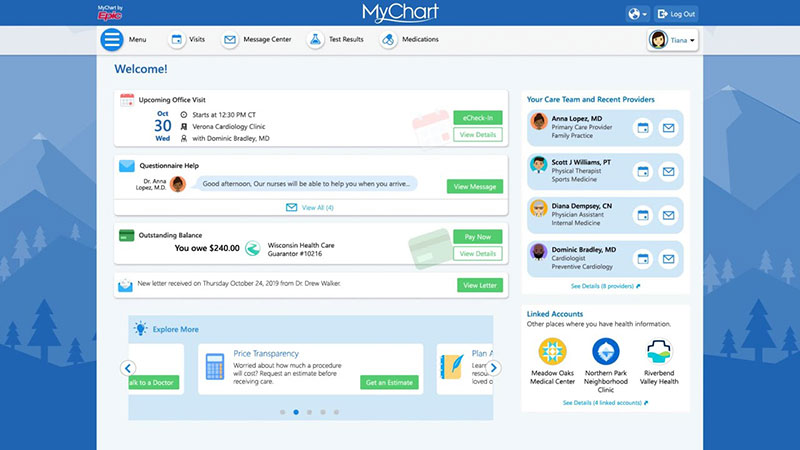
You can’t buy MyChart on its own. It’s the patient portal and self-scheduling layer built into Epic’s electronic health record (EHR), and it ships as part of an enterprise Epic contract negotiated at the health-system level. Epic doesn’t publish per-seat pricing.
It’s on this list anyway. Epic’s client base includes a large share of major U.S. hospital systems, so leaving it off would understate what patients actually use day to day.
For hospital systems, academic medical centers and multi-specialty groups already on Epic, scheduling, the chart and billing all sit in one record. The schedule never drifts out of sync with the chart because there’s nothing to sync.
FastPass is the feature worth knowing about. It’s a waitlist tool that automatically offers earlier open slots to patients who are already booked, so a cancellation gets filled instead of sitting empty.
- Direct Scheduling for patients to book without calling
- FastPass automated waitlist notifications
- Open Scheduling for new patients without an existing MyChart account
- Specialty scheduling for infusions, imaging, and procedures
- Single record shared across scheduling, charting, and billing
It handles complex specialty scheduling well, including infusions, imaging series and visits with more than one provider. FastPass and Direct Scheduling also have documented adoption across major health systems.
The limits are just as clear. MyChart only exists inside an Epic implementation, and that alone takes months to deploy. A small independent practice can’t sign up, and a solo practitioner who needs a calendar and reminders would be paying for far more than they’ll ever use.
WakeMed Health & Hospitals is the case people point to. It combined FastPass, MyChart self-scheduling and workflow changes, and documented 75,000 more visits a year along with a 21% increase in outpatient revenue (EpicShare, 2024).
athenahealth – Best for ambulatory practices that want AI-driven self-scheduling tied to billing
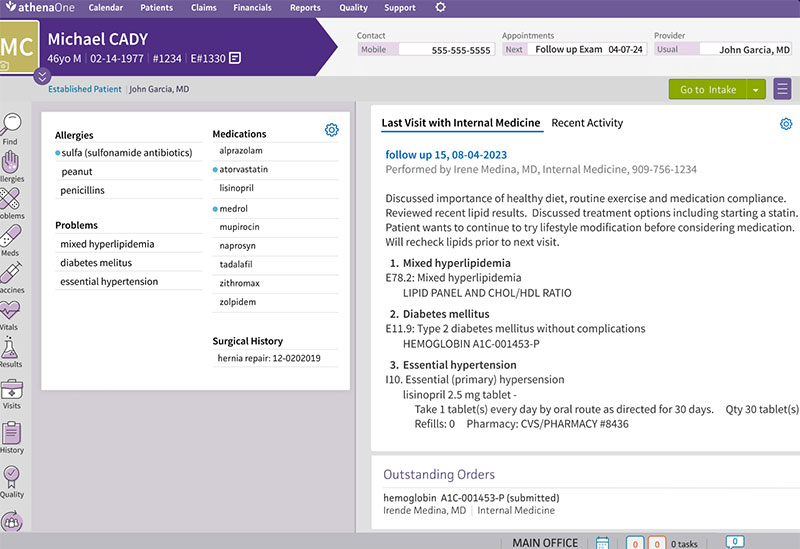
athenahealth runs scheduling inside athenaOne, its cloud EHR and billing platform for ambulatory practices. Booking, the chart and revenue cycle management share one login.
If you only want a calendar, look elsewhere. This makes sense for ambulatory practices and multi-provider groups that are seriously considering a full EHR switch.
Waitlist Scheduling is the feature getting attention. It’s an AI tool that texts patients when a cancellation opens a slot, so staff aren’t stuck filling the gap by phone.
- Patient portal and athenaPatient mobile app booking
- AI-driven appointment matching by visit type and provider availability
- Waitlist Scheduling that texts patients about earlier openings
- Two-way texting and secure web chat through Patient Conversations
- Scheduling tied directly to athenaOne billing and revenue cycle tools
athenahealth doesn’t publish flat pricing for athenaOne. Contracts are negotiated per practice and usually bundle scheduling, EHR and billing rather than selling scheduling on its own. So budgeting starts with a sales call. Annoying, but normal at this tier.
On the plus side, it’s cloud-based with no local server to maintain. Billing and scheduling share the same patient record, which cuts duplicate data entry, and the AI scheduling works from real availability instead of a generic calendar grid.
Timing is the catch. athenahealth’s own 2026 announcement puts Waitlist Scheduling in the first half of the year and Enhanced Patient Self-Scheduling, which lets patients describe their needs in plain language, in the second half. So not everything is live everywhere at once.
Still, most vendors talk about scheduling AI as something coming eventually. athenahealth is one of the few that named a specific 2026 timeline.
Amelia: best for independent clinics and small practices running on WordPress
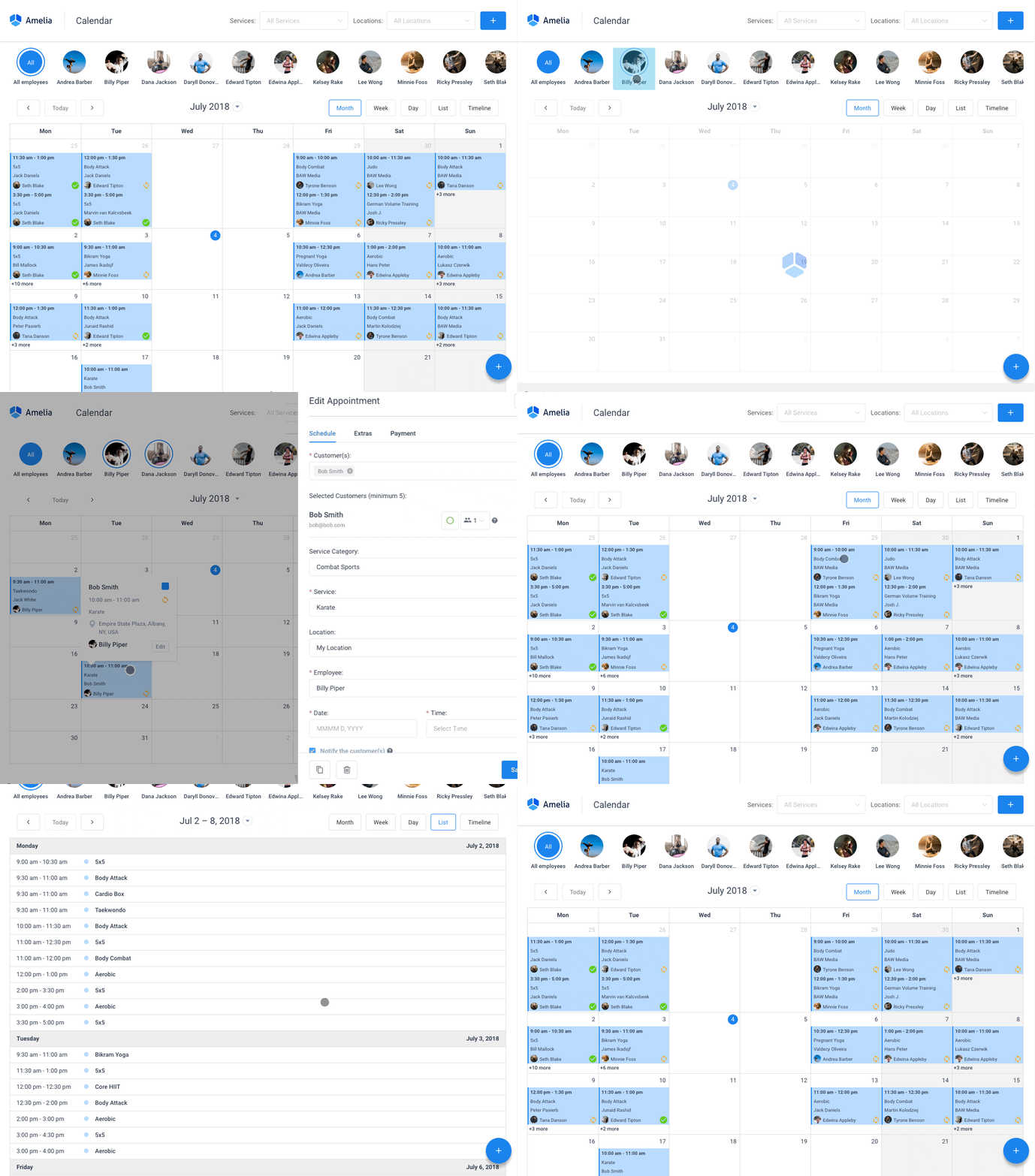
Amelia is a WordPress plugin, so booking, doctor schedules and patient intake all run on the clinic’s own site. You own the booking data instead of renting a separate scheduling app, and patients never leave your domain to book.
It suits solo doctors, dentists and small clinics with a few providers, as long as the website is already on WordPress. The intake forms and per-doctor schedules were built for medical use. I like that, because a lot of tools in this price range are salon booking software with “client” swapped for “patient.”
- Custom patient intake forms collected at booking
- Doctor and staff scheduling with individual working hours
- Recurring appointments for follow-up visits
- SMS and email reminders
- Multi-location support for clinics with more than one office
There’s a free Lite edition that works as a free WordPress booking plugin for testing the workflow. Paid tiers (Starter, Standard, Pro and Elite) run $49 to $259 a year (Capterra, 2026). Per year, not per month. At the entry level that undercuts most monthly SaaS competitors by a wide margin.
Check the compliance side first. Amelia’s healthcare page documents GDPR compliance, but it doesn’t list a HIPAA-specific BAA option, so a U.S. practice handling PHI should confirm that before anything else. It also needs an existing WordPress site, which rules out practices on Squarespace or Wix, and annual licenses renew for updates and support.
Amelia’s own healthcare page cites use by 90,000+ businesses overall (wpamelia.com, 2026). Its 247 verified Capterra reviews come out 98% positive. If you’re weighing it against other WordPress-only options, this comparison against Bookly and Booked goes through the feature gaps in more depth, and the demos show the patient-facing flow.
Most “best medical scheduling” roundups skip WordPress plugins and go straight to SaaS platforms. For a clinic that already owns a WordPress site, that leaves out the cheapest option and the one you have the most control over.
Trafft: best for multi-location practices that want white-label booking pages
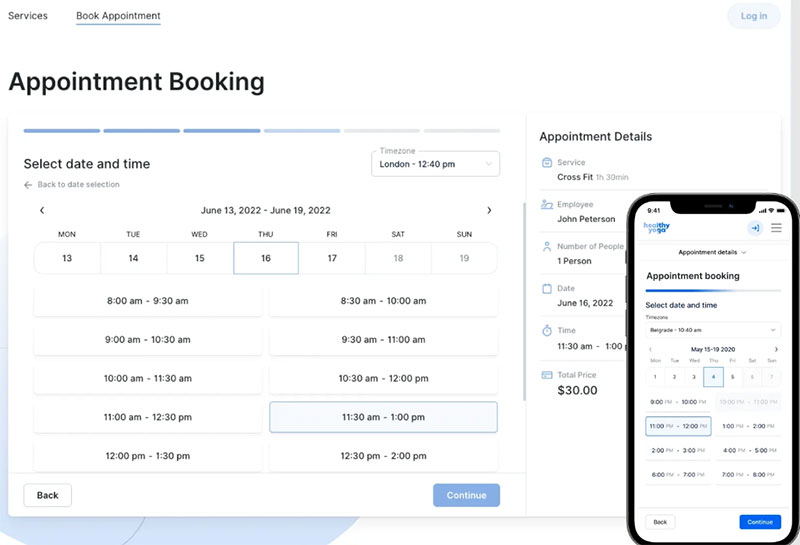
Trafft is the hosted sibling. Same team as Amelia, but it’s a standalone SaaS, so there’s no WordPress install to maintain.
It’s built for businesses running several staff members and locations from one dashboard, and each location can get its own branded booking page. Multi-location clinics, dental practices and med-spas are the obvious fit.
What stood out to me is the free tier for a single staff member. Most tools on this list start billing from the first booking. With Trafft, a solo provider can test the whole workflow at zero cost and pay only once more staff come on.
- Google, Outlook, and iCloud calendar sync
- Online payments through Stripe and PayPal
- Automated SMS and email reminders
- Multiple staff and multiple location management
- White-label booking pages for agencies managing several clients
Capterra lists the Starter plan at $13.30 a month billed annually. The Scaling plan is $24.50 a month billed annually or $48.30 billed monthly, and there’s the free plan on top of that (Capterra, 2026). Plan names and included features don’t always match across review sites, so confirm the current plan on the pricing page before you buy.
Where it works and where it doesn’t
- Healthcare is one of its named use cases, next to salons and sports training
- Calendar sync covers three major providers instead of just one
- No published HIPAA compliance statement or BAA offering, which is the big one for U.S. practices handling patient records
- It handles scheduling and payments rather than clinical documentation, so notes and charts stay in your EHR
Trafft holds a 4.9 rating across 49 verified Capterra reviews. Reviewers in education, marketing and alternative medicine say they switched from Calendly and Acuity Scheduling mostly for ease of use and the calendar integration. The demos cover the booking flow across those verticals.
Zocdoc – Best for practices that want new-patient volume, not just a calendar
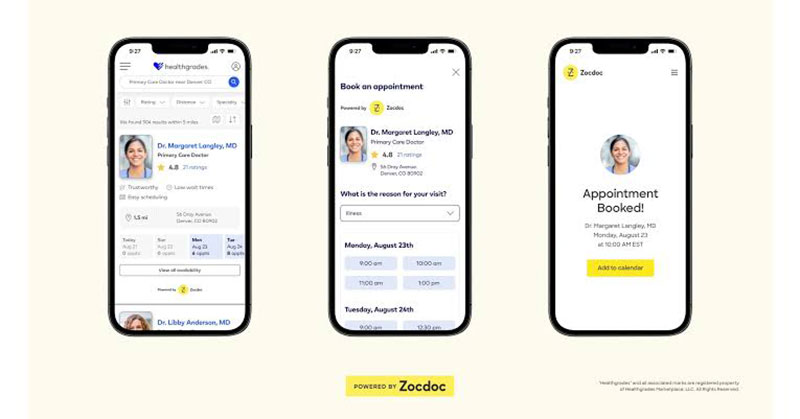
Nearly every other tool here assumes the practice has enough patients and needs to organize them. Zocdoc is for the opposite situation, an open calendar that needs filling.
It’s a patient-facing marketplace where people search for in-network providers and book directly, plus scheduling tools a practice adds to its own website. Patients book for free. At the entry tier, the practice pays only when the Marketplace actually delivers a new patient, not a flat monthly listing fee. Practices in competitive metro markets get the most out of it.
- Public Marketplace profile with patient reviews and insurance filters
- Online scheduling widget for the practice’s own website
- Digital intake that collects insurance cards and forms before the visit
- HIPAA-compliant video for virtual visits
- EHR integration for real-time availability sync
Basic Bookable Profiles are free. The Growth tier charges a fee only when a new patient books, with no monthly platform fee. Advanced adds Practice Solutions for a published $250 per provider per month on top of booking fees, verified in July 2026.
I like that the fees scale with results, and the built-in patient reviews double as social proof for the practice. Less great: the full per-specialty and per-metro booking fee schedules aren’t fully public, and providers can’t pass the booking fee on to patients. If your patient panel is already full, most of what Zocdoc does well won’t matter much to you.
Capterra’s 2026 listing confirms EHR integration for real-time availability sync and a HIPAA-compliant video service bundled into the platform, not sold as a separate add-on.
Phreesia – Best for high-volume practices that need intake and copay collection tied to the calendar
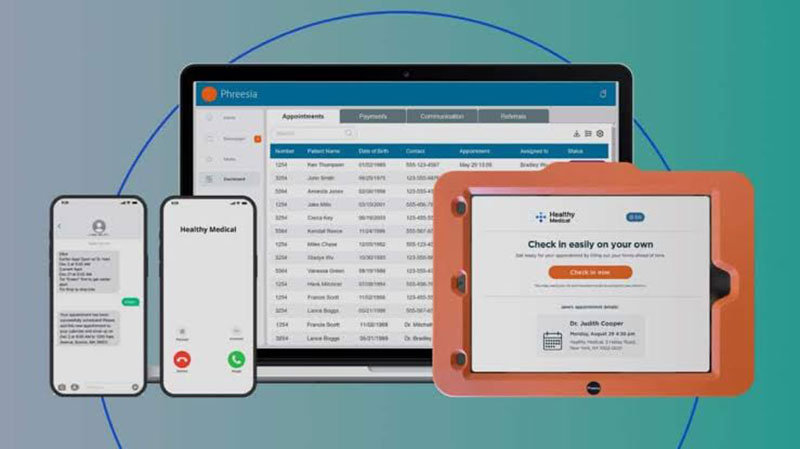
At some practices booking isn’t the slow part. Check-in is.
Phreesia digitizes the front desk. Patients self-schedule, then complete digital intake, get their insurance eligibility checked and pay the copay before they reach the counter. Staff stop chasing forms and payments in the waiting room. It’s aimed at high-volume clinics and health systems where paperwork slows down every visit.
- Patient self-scheduling from any device
- Mobile check-in with digital intake forms in over 20 languages
- Real-time insurance eligibility and benefits verification
- Automated appointment confirmations by email and text
- Referral tracking, including faxed referrals routed into one hub
It sells on a subscription-plus-transaction model with custom quotes per practice. There’s no published flat monthly rate, which makes it harder for a small practice to compare.
- Reviewers keep mentioning deep EHR and practice management integration
- Copays get collected before the visit instead of at checkout
- The referral hub puts faxed and electronic referrals in one place
- Some Capterra reviewers want an automated phone-call reminder option alongside text and email
- Probably more than a solo practitioner needs
Phreesia’s own platform data says it powers 1 in 6 U.S. patient visits, about 180 million a year, across more than 4,700 organizations. 85% of patients complete self-service check-in.
Scheduling and intake are usually sold as separate tools. Treating the booking and the paperwork as one workflow does more for no-shows and check-in delays than a better calendar would on its own.
Tebra – Best for independent practices that want scheduling bundled with EHR and billing
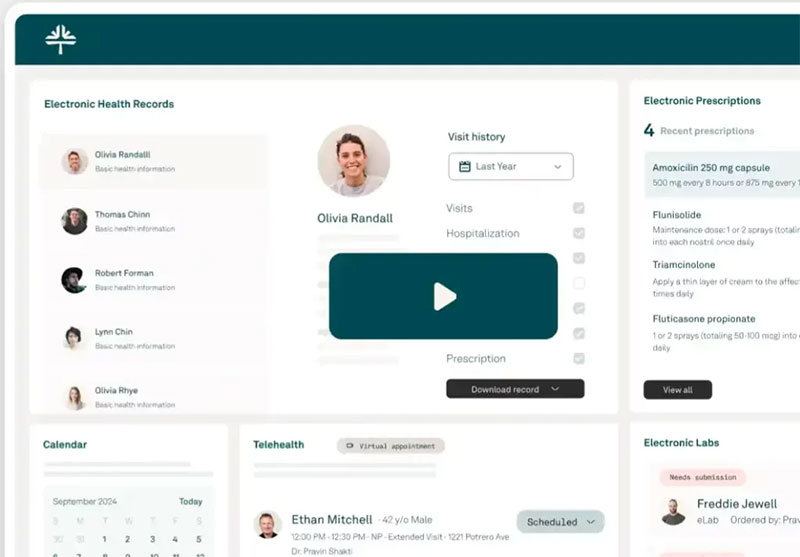
Tebra came out of the Kareo and PatientPop merger, so it’s a clinical EHR company and a patient-acquisition company in one product. That explains the mix. Scheduling sits next to EHR charting, medical billing and online reputation tools.
For small to mid-sized independent practices, the point is having one vendor instead of stitching separate tools together. Scheduling stays linked to the same record used for claims, so a rescheduled visit doesn’t leave billing mismatched.
- Online scheduling with automated reminders
- EMR and EHR charting with customizable templates
- Medical billing and claims management
- Patient portal for communication and forms
- Telemedicine and multi-location support
Tebra sells through four quote-based tiers, Clinical Automation, Billing Essentials, Patient Experience, and Add-Ons, with no published flat rate and no free version (G2, 2026).
G2 reviewers at small practices rate onboarding speed and interface clarity highly. The platform also added AI note-assist and automated review-response tools recently.
The complaints are consistent too. Bundling every module across the four tiers gets expensive fast, per G2 reviewer feedback, and claim processing reliability is the most cited problem in recent reviews. With no free version, you can’t just start a trial. Testing it means a sales conversation.
G2’s 2026 pricing breakdown shows buyers concentrated among practices with 50 or fewer employees, most often in medical practice and mental health care. They pick it specifically for the combined EHR, billing, and patient engagement bundle.
Acuity Scheduling – Best for solo practitioners who want simple booking with an optional HIPAA add-on
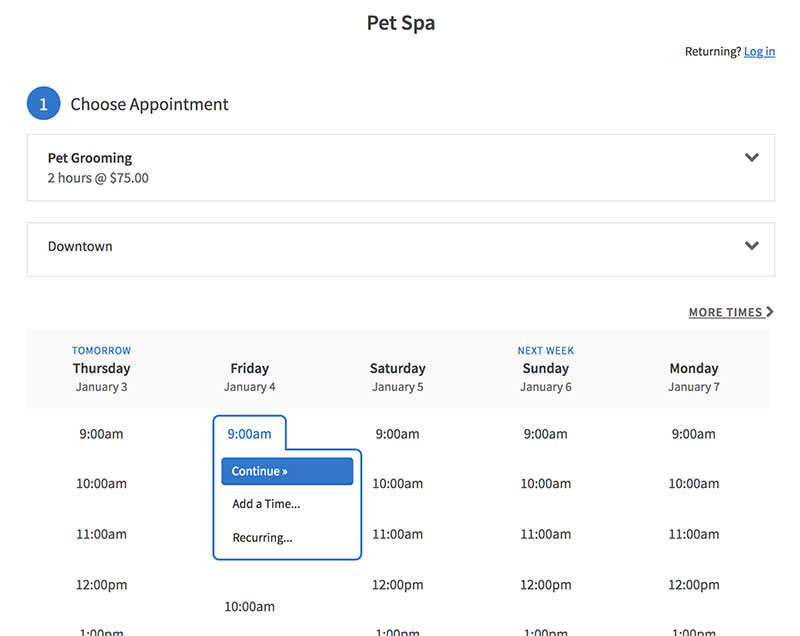
Acuity Scheduling wasn’t built for healthcare. It’s a general-purpose booking tool, but plenty of solo therapists, wellness practitioners and consultants use it for client self-scheduling, payments and package sales. Setup is fast and needs very little training.
Packages and memberships are where it beats pure appointment tools. A therapy series or recurring treatment plan can be sold as a bundle instead of booked one visit at a time.
- Client self-scheduling with real-time availability
- Payments through Stripe, Square, or PayPal
- Text message reminders on Standard and Premium tiers
- Appointment packages, subscriptions, and gift certificates
- Custom API access on the Premium tier
Monthly billing runs $20 a month for Starter, $34 for Standard, and $61 for Premium, with a 7-day trial and no permanent free plan (Capterra, 2026). Annual billing brings those to about $16, $27, and $49 a month.
Here’s what matters for a medical practice. The signed Business Associate Agreement (BAA) for HIPAA compliance is only on the $61 Premium plan. If you’re comparing Acuity’s $20 headline price against Trafft or Amelia, you aren’t comparing HIPAA-ready plans unless you check that Premium tier specifically. Most roundups gloss over this.
There are also no built-in treatment notes, consent forms or practice-level invoicing. A practice that keeps clinical records will need a separate tool next to it. Pabau’s 2026 comparison flags the same gap repeatedly: good booking-page design and reminders, no clinical documentation layer. Capterra’s plan breakdown agrees on the HIPAA gating.
The reviews are hard to argue with, though. It holds a 4.8 rating across more than 5,700 Capterra reviews, among the highest in this category.
If you’re choosing between payments-first booking tools, there’s a side-by-side against Square Appointments that covers the gaps in more detail.
DrChrono – Best for specialty practices that want mobile-first charting with scheduling built in
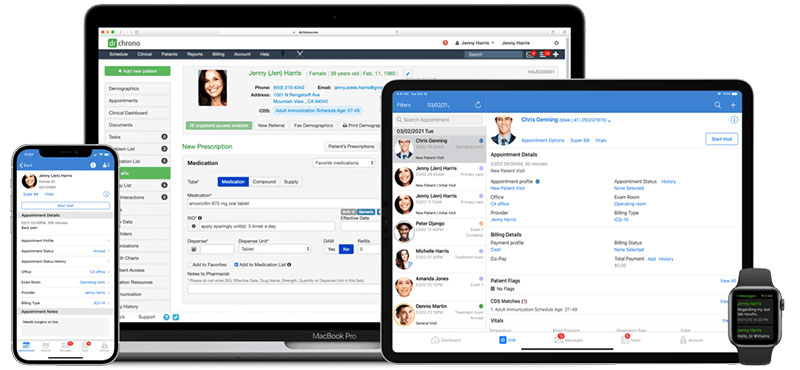
DrChrono combines EHR, scheduling and medical billing in one cloud platform designed around the iPad and iPhone. Specialty practices (cardiology, dermatology and psychiatry, for example) use it to keep charting and the calendar on the same device.
Why it’s here: EPCS-compliant e-prescribing for controlled substances, built into the same workflow as scheduling. A practice prescribing controlled substances can’t solve that with a booking plugin, and most comparison articles never bring it up.
- Online scheduling with self check-in
- Specialty-specific charting shortcuts and templates
- Integrated telehealth video visits
- Electronic prior authorization
- HIPAA-compliant patient portal
DrChrono lists pricing as available upon request. Third-party pricing trackers put its five tiers, Essentials through Elite, at roughly $199 to $499 per provider per month as of early 2026. No free plan or trial.
It’s mobile-native on iPhone, iPad and M-series Mac, not a shrunken web view. Controlled-substance e-prescribing is built in rather than added through a separate integration, and the specialty templates cut charting time for cardiology, orthopedics and similar fields.
No free trial or free tier on any of the five plans, though. Some reviewers also report costly add-ons stacking on top of the base tier. And since it’s built to replace the whole EHR, a practice that only wants a calendar pays for a lot it won’t use.
DrChrono’s feature list, confirmed across Software Advice and GetApp listings, documents EPCS compliance, electronic prior authorization and lab integration together. None of the pure scheduling tools earlier on this list offer that combination.
SimplePractice – Best for therapists and behavioral health practices needing HIPAA-compliant telehealth
Every other entry on this list treats “medical” as physical health. Behavioral health scheduling looks different. Bookings are session-based and recurring, outcome measures are part of the job, and telehealth is the default instead of the exception.
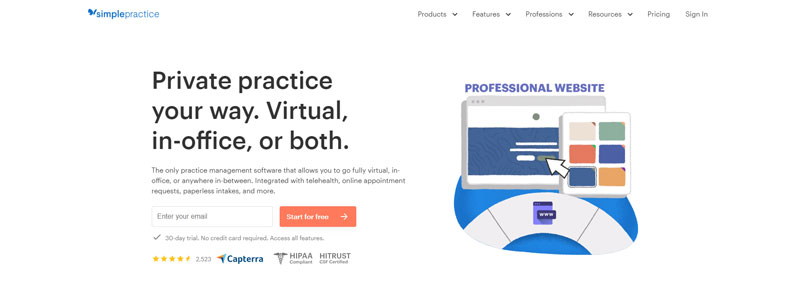
SimplePractice is practice management software built for therapists, counselors and behavioral health practitioners. It pairs scheduling with treatment notes and HIPAA-compliant video, and it handles the Business Associate Agreement for telehealth automatically, so there’s no separate compliance step. Solo and small group behavioral health practices fit it far better than general medicine does. If you need dedicated therapy scheduling software, this is the one to look at.
- Client self-scheduling through a branded portal
- HIPAA-compliant telehealth with BAAs handled by the platform
- SOAP notes, treatment plans, and outcome measures like PHQ-9 and GAD-7
- Automated appointment reminders
- Insurance claim filing built into billing
Plans run $49 a month for Starter, $79 for Essential, and $99 for Plus (SimplePractice, 2026). Telehealth is included on every plan. Per-claim fees and optional add-ons such as ePrescribe and Note Taker cost extra.
Watch the base plan. Calendar sync, secure messaging and reminders for in-person appointments need Essential or higher. Per-claim fees also stack on top of the subscription, standardized at $0.39 per submitted claim across all plans from October 1, 2026. A general primary care office will find it a thinner fit.
More than 250,000 clinicians use it, according to SimplePractice’s 2025 year-in-review data. Capterra’s 2,827 verified reviews put it at 94% positive sentiment. Reviewers mostly credit the automated reminders for better attendance and complain about insurance billing complexity.
When general scheduling software falls short for healthcare
A calendar and a text reminder fix booking. A medical practice has other problems they don’t touch.
Prescribing is one. Booking-only tools like Amelia, Trafft, and Acuity Scheduling have no EPCS-compliant e-prescribing. If you write controlled-substance prescriptions, you need a platform built for that requirement, DrChrono or athenahealth for example, not a calendar plugin.
Insurance claims are another, and a bigger one for most practices. None of the WordPress-based or marketplace tools here file insurance claims. A practice billing payers needs a system like Tebra, athenahealth, or DrChrono that connects scheduling to eligibility verification and claims. The alternatives are a front-desk layer like Phreesia for eligibility and copay collection, or a separate billing service layered on top.
Scheduling software also doesn’t track which states a provider is licensed in or which states allow a given telehealth visit. That stays with the practice’s own compliance process, whatever runs the calendar.
Then there’s the hospital case. A multi-specialty hospital system needs one chart that scheduling, nursing, and billing all read from. That’s the problem Epic MyChart and similar enterprise EHRs solve, and a standalone scheduler, however good, isn’t built for it.
What Is Medical Appointment Scheduling Software
The job is narrow. Get a patient from wanting an appointment to holding a confirmed one, while following rules a generic booking tool doesn’t enforce. Underneath, it’s booking and calendar software made for healthcare practices.
It sits next to, and often inside, broader scheduling software for small businesses. What it adds is the stuff the generic version skips: HIPAA-aware data handling, provider-specific credentialing, insurance fields and clinical intake.
What It Is Not
It isn’t Calendly. A tool like that, or a plain Google Calendar link, schedules a meeting. It doesn’t collect insurance information, doesn’t offer a signed Business Associate Agreement by default, and has no concept of a provider versus a patient.
It’s also not a full electronic health record. Scheduling software books the visit, and that’s where it stops. Charting, prescriptions and clinical notes happen elsewhere unless the scheduler is bundled inside a larger EHR platform. Practices comparing those broader systems may also look at options such as Healthray electronic medical records software when they need patient records and clinical workflows in addition to appointment scheduling.
Mixing these up causes the most common buying mistake in this category. A practice pays for a full EHR when it only needed a scheduler. Or it buys a scheduler and hits a wall the moment billing or charting come into the picture.
Categories of Medical Scheduling Software
The market mostly splits by how the software is sold, and the categories are not interchangeable.
| Category | How it is sold | Typical buyer |
|---|---|---|
| WordPress-based booking plugins | One-time or annual license | Independent clinics with a WordPress site |
| EHR-embedded scheduling | Bundled inside an enterprise EHR contract | Hospital systems and large groups |
| Marketplace scheduling | Free listing plus a per-booking fee | Practices chasing new-patient volume |
| All-in-one practice management | Quote-based subscription tiers | Independent practices bundling billing and scheduling |
Mixing categories usually backfires. Run a WordPress plugin on top of an EHR that already schedules and you end up maintaining two calendars instead of one.
How Medical Appointment Scheduling Software Works
The interfaces look different from tool to tool, but the mechanism underneath is about the same.
A patient opens a booking page, sees real slots pulled live from the provider’s calendar and picks one. Before confirming, the system checks that slot against every other booking. That check is what stops a double-booked appointment from ever reaching the provider’s schedule.
Once the booking is confirmed, the calendar gets blocked and the reminder sequence starts. EHR-embedded tools also add a new entry to the patient’s chart at the same moment.
Follow-up care runs on a recurring appointment structure so nobody rebooks from scratch every visit. Physical therapy series, chronic care check-ins and weekly therapy sessions all rely on it.
Multi-Provider and Multi-Location Scheduling
A clinic with five doctors across two offices needs one view of real-time availability. Otherwise a front-desk staffer is checking five calendars by hand, which is exactly how double bookings slip through.
Each provider keeps individual working hours and buffer times. Locations filter separately, so a patient books the correct office, and staff schedules sync with doctor schedules without overwriting each other.
UC Davis Health tested this directly. After the health system pushed digital scheduling links to patients, 46% of new appointments and 17% of follow-up visits were booked online through MyChart instead of by phone (UC Davis Health, 2024).
How Scheduling Software Connects to Your EHR and Practice Management System
A scheduler that doesn’t share data with the rest of the practice doesn’t save much work.
Native EHR-embedded scheduling, Epic MyChart or athenaOne for example, writes straight into the same record used for charting and billing. Third-party tools connect through an API and sync appointment data into the EHR rather than living inside it. That interoperability is also a major consideration in healthcare application development, where scheduling, patient records, billing, and other clinical systems often need to exchange data securely.
| Model | Data flow | Example |
|---|---|---|
| Native EHR-embedded | Scheduling writes directly into the chart | Epic MyChart, athenaOne |
| Third-party, API-synced | Booking data pushes into the EHR through an API | NexHealth, Zocdoc |
Regulation is pushing this along, with real deadlines. CMS’s interoperability rule, CMS-0057-F, put new prior authorization requirements for impacted health plans into effect on January 1, 2026. It gives those plans until primarily January 1, 2027 to build or enhance their FHIR-based APIs, including adding prior authorization data to the Patient Access API (CMS, 2024).
The rule runs on HL7 FHIR. That’s the same interoperability standard most EHR-to-scheduler integrations already use to move appointment and eligibility data between systems.
A scheduling tool with no EHR connection at all still works. Someone just retypes the same patient information twice, once at booking and again at check-in.
How Appointment Reminders Cut No-Show Rates
A meta-analysis of 21 studies found patients who received digital reminders were 25% less likely to miss an appointment. The no-show rate was 15% with a reminder versus 21% with no reminder at all (Robotham et al., BMJ Open, 2016).
So reminders work. The channel matters almost as much as sending one in the first place.
Text is the default for most practices because people usually read a text within minutes. Email is the cheapest to send and has the lowest open rate. Automated phone calls reach patients who don’t check text or email regularly, and the same BMJ Open review found voice reminders appeared more effective than text at improving attendance. I didn’t expect that, honestly.
The savings estimates get big. A vendor study of five providers using automated reminders put potential annual savings from reduced no-shows at $16.8 million to $36.9 million per hospital (CipherHealth). It’s a vendor’s own study, so weigh it accordingly.
A common reminder window is 24 to 48 hours before the appointment. But one reminder is the minimum. Several touches work better than a single text: one at booking, another a few days out, and a last one the day of.
How Insurance Eligibility Verification and Patient Intake Work Inside Scheduling Software
Eligibility verification confirms a patient’s insurance is active and covers the visit type before they sit down with a provider.
Some tools check in real time, the moment a patient books, pulling payer data through a clearinghouse connection. Others run batch checks the night before and confirm the whole day’s schedule in one pass.
Digital intake pairs with eligibility, so the patient handles insurance cards, consent forms and health history on a phone before arriving instead of on a clipboard in the waiting room. It typically covers:
- Insurance card capture through photo upload
- Consent and HIPAA acknowledgment forms
- Health history and current medication list
- Copay collection tied to the same booking
Electronic checks caught on quickly. The CAQH Index reports that nine out of ten eligibility and benefit verifications are now conducted electronically, up 25 percentage points over the prior decade (CAQH Index, 2022).
Timing is the actual benefit. A failed eligibility check caught before the visit gives the front desk days to fix it. At checkout, they have minutes.
HIPAA Compliance and Data Security in Medical Scheduling Software
Any tool that touches patient scheduling data has to meet HIPAA when the data and organizations involved fall within the law’s scope. A healthcare provider that qualifies as a HIPAA covered entity also needs to consider how outside scheduling vendors handle protected health information. A vendor’s marketing page calling itself HIPAA compliant doesn’t prove much.
What you want to know is whether the vendor signs a Business Associate Agreement (BAA). That’s the legal document that makes the vendor accountable for protecting patient data under the same law that binds the practice.
What a Business Associate Agreement Covers
| Question | What it answers |
|---|---|
| Who signs it | The practice and the software vendor, before data starts flowing |
| What it covers | How the vendor stores, encrypts, and limits access to patient data |
| What happens without one | The practice, not the vendor, carries the compliance risk |
Some scheduling tools gate the BAA behind their most expensive plan. Others don’t offer one at all and list only GDPR compliance, which is a different legal framework entirely.
This isn’t a hypothetical risk. In May 2023, HHS’s Office for Civil Rights settled with MedEvolve, a practice and revenue cycle management vendor, for $350,000 over alleged failures to protect patient data (HHS OCR, 2023).
Notice it was a vendor, not a hospital. Practices comparing scheduling tools tend to miss that. The software company handling the booking data has its own compliance exposure, and so does the practice that chose it.
FAQ on Medical Appointment Scheduling Software
What Is the Difference Between a Patient Portal and Scheduling Software
The portal is the bigger container. Messaging, lab results and billing history all sit behind one login.
Scheduling software covers the booking mechanics: real-time availability, reminders and calendar sync. Most portals, MyChart included, embed a scheduling module rather than replacing it.
Is Telehealth Scheduling Handled Differently From In-Person Scheduling
Mostly no. Real-time availability, confirmation and reminders work the same way.
The visit type field is what changes. It routes the patient to a video link instead of a waiting room, and often triggers a separate HIPAA-compliant video vendor.
Do Patients Need to Create an Account to Book an Appointment
Depends on the tool. Marketplace platforms like Zocdoc require a login.
Most EHR-embedded and WordPress-based schedulers offer guest booking. They collect name, contact details and insurance information during booking instead of forcing account creation first.
Do I Still Need Scheduling Software if I Already Have an EHR
Often, yes. Plenty of EHR platforms schedule internally but skip patient self-scheduling, SMS reminders or a public booking page.
Practices add a dedicated scheduler on top for the patient-facing features the core EHR was never built to handle.
How Long Does Implementation Typically Take
A WordPress plugin or standalone scheduler can go live in days.
A full EHR-embedded rollout like Epic or athenaOne takes months. There are calendar rules to set, staff to train, and usually a phased patient-facing launch rather than switching every provider over at once.
What Happens When a Patient No-Shows Repeatedly
Most practices flag the chart after two or three missed visits. Policies range from a no-show fee to a prepaid deposit at booking.
Automated schedulers flag repeat no-shows so front-desk staff see the pattern before confirming the next visit.
What Should You Fix First in Medical Appointment Scheduling Software?
Start with HIPAA compliance and reminder automation. Those two cut compliance risk and no-show losses, and until they’re in place, EHR integration and insurance eligibility checks don’t count for much.
The order is the same for a small practice on a WordPress plugin and a large one on an enterprise EHR.
- Sign a Business Associate Agreement before any patient data enters the system.
- Turn on automated SMS and email reminders to cut no-show losses right away.
- Connect EHR integration and real-time eligibility checks once the first two are stable.
Doing it this way delays real-time insurance eligibility checks by weeks, because EHR integration waits until the BAA and reminder workflow are confirmed. That delay costs less than a compliance gap or an empty schedule.
Front-desk teams making this switch run into the same scheduling errors whichever tool they pick. Those are covered in how to avoid the most common appointment scheduling mistakes.

Explore topics

Read Inspiring Customer Stories
Check out how our user set Amelia for his business