 Spring Deals Are in Full Bloom




 Web Developers and Agencies
  Beauty and Spa Salons, Barbershops
  Yoga Instructors and Studios
  Doctors and Healthcare
  Event agencies, hosts and organizers
  Gyms and Personal Trainers
  Automotive and Car Repairs
  Photographers and Studios
  Coaching and Consulting
  Event Agencies and Hosts
  Appointment Booking
  Scheduling for Your Business
  Booking for WooCommerce Stores
  See How Others Use Amelia

Explore topics
Group Bookings vs. Individual Appointments: Which Model Fits Your Business?
Amelia vs Start Booking: Which Booking Solution Is Better for WordPress Businesses?
Amelia Q1 2026 Update: Improvements, Integrations, and What’s Coming Next
Manage Staff, Locations, and Availability Without Losing Your Mind with Amelia


Read Inspiring Customer Stories
Check out how our user set Amelia for his business
Read the full story
Choosing a WordPress booking plugin isn’t just about adding a calendar to your site—it’s about how you run your business day to day. In this Amelia vs Simply Schedule Appointments comparison, we look at two very different approaches to online scheduling: one built for advanced business management, and one focused on keeping things simple.
While both plugins allow customers to book appointments online, they differ significantly in features, flexibility, and scalability. But the right choice comes down to your needs, your workflow, and how much control you want over bookings.
Amelia: Overview
Amelia is a powerful WordPress booking plugin designed for businesses that need more than just a simple calendar. It offers advanced scheduling features, automated notifications, and robust management tools, making it ideal for service-based businesses that handle multiple employees, services, or locations.
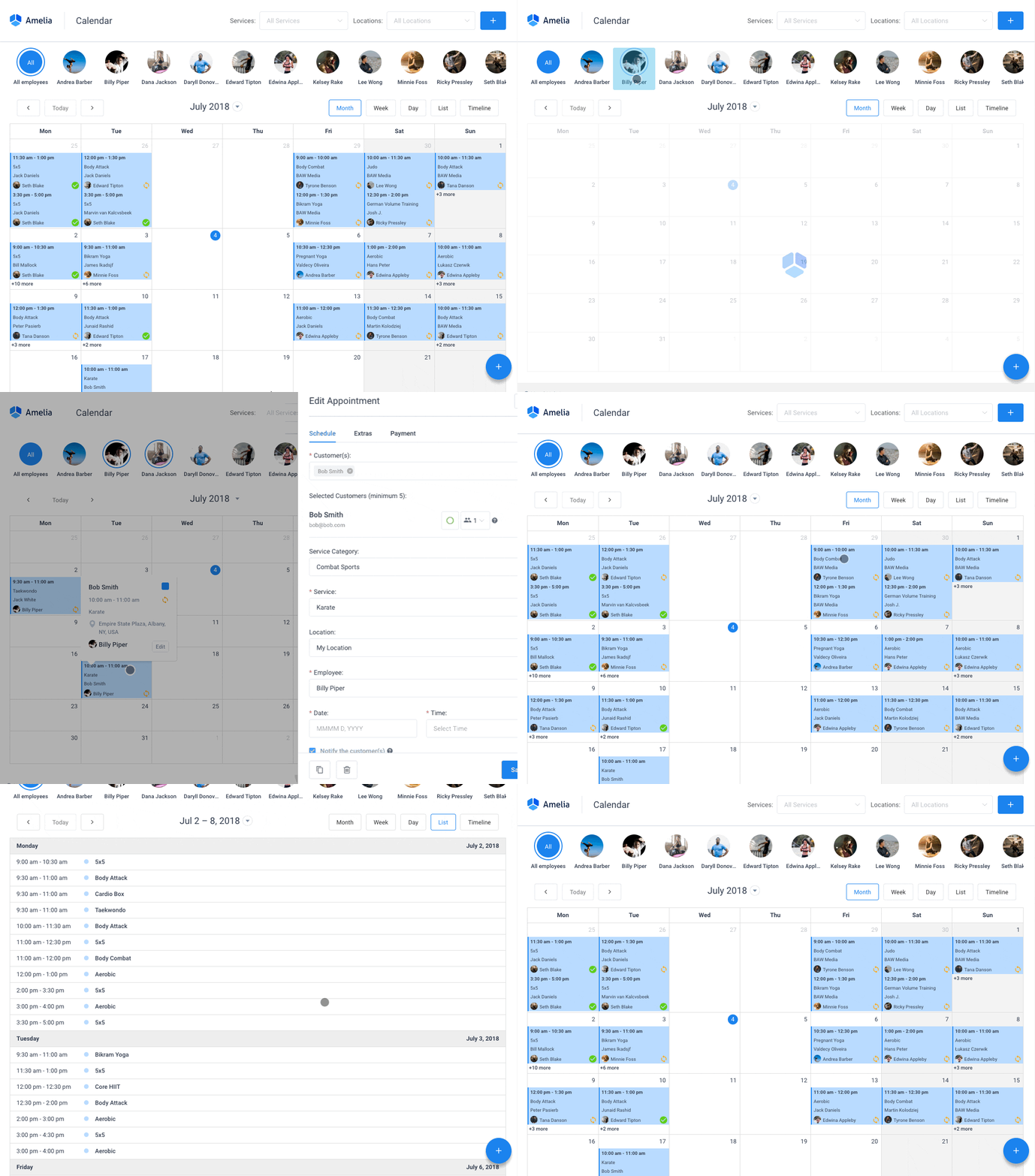 With a modern booking interface for customers and a powerful backend for administrators to monitor key analytics, Amelia is a great option for those who want a solution that can scale with their business.
Simply Schedule Appointments: Overview
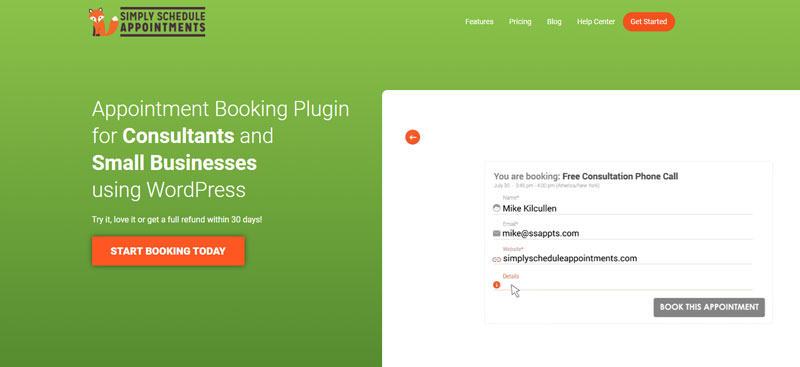
Simply Schedule Appointments is another well-known WordPress booking plugin designed to help users book appointments online. It acts as a virtual middleman, assisting you in organizing events, delivering invitations, and determining the most convenient time slot to set up meetings.
However, the Simply Schedule Appointments plugin lacks a few advanced features, and users are on the lookout for something more intuitive and cutting-edge. For over five years, web designers have made the most of Simply Schedule Appointments. Nevertheless, its layout and efficiency haven’t been able to measure up to the latest appointment scheduling plugins like Amelia.
Ultimately, while it covers all the basics, many WordPress users find themselves having to work with a booking process that lags and is also monotonous.
Simply Schedule Appointments vs Amelia: Pricing
One of the biggest drawbacks of Simply Schedule is its pricing. This premium plugin won’t be easy on the pocket. Its paid version is one of the most expensive WordPress booking plugins out there. And if you want to tap into their core features while still ensuring the solution can grow with your business, expect a high price tag.
They offer three paid plans that range in price based on features and the number of websites.
- Plus Edition – from $129 to $249
- Professional Edition – from $249 to $499
- Business Edition – from $499 to $899
On the plus side, the free basic version does include unlimited appointment types, customizable email notifications, the option to blackout dates, support, and more. There are many vital integrations you’ll no doubt need but won’t find on the free version, so think of this basic plan as more of a free trial version.
On the other hand, Amelia offers a more scalable pricing model. While it is also a premium plugin, its paid plans are structured to include a broader set of core features from the start, reducing the need to upgrade early just to unlock essential functionality.
You can choose between annual and lifetime licences, and plans start as low as $49. Depending on the specific features and the number of domains you need coverage for, there are four annual plans to choose from:
- Starter
- Standard
- Pro
- Elite
All plans include premium support, unlimited appointments, notifications, coupons, Soiree Payments, and more. Additionally, Amelia offers a free version you can try before committing to a plan.
Are There Other Plugins Available?
In short, yes — but not all booking plugins are built to handle real-world scheduling needs. While many tools make it easy to add basic appointment forms, more complex businesses often require greater control and flexibility.
A capable solution should streamline scheduling while supporting growth and maintaining a professional booking experience. This is where Amelia stands out as a more robust alternative to many simpler appointment plugins.
Why Amelia Is a Better Alternative to Simply Schedule Appointments
The majority of WordPress booking plugins are intended for web developers who want to have the option of customizing every tiny detail. But Amelia is designed to start performing straight out of the box. And it also pairs perfectly with any website.
Amelia’s award-winning UI design even surpasses WordPress itself in power and potential. You can swiftly put together a branded experience for customers with practically little to no learning curve. There is no need to be tech-savvy at all; just a few tweaks here and there is all it takes to completely set up a scheduling system.
The best part? All your appointments can be managed via your WordPress dashboard. Moreover, a service summary can include staff members, custom fields, duration, image galleries, and even add-ons.
Lastly, with a sleek events calendar, Amelia makes it easy to manage group events, recurring sessions, and one-time bookings in a clear, organized way. Customers can quickly see availability and book with confidence, while you maintain full control over schedules and resources.
What Sets Amelia Apart from Simply Schedule Appointments
When comparing Amelia vs Simply Schedule Appointments, the differences go beyond surface-level features. Amelia is built as a complete scheduling system, offering more control, automation, and flexibility without requiring complex setup or constant upgrades.
Recurring appointments
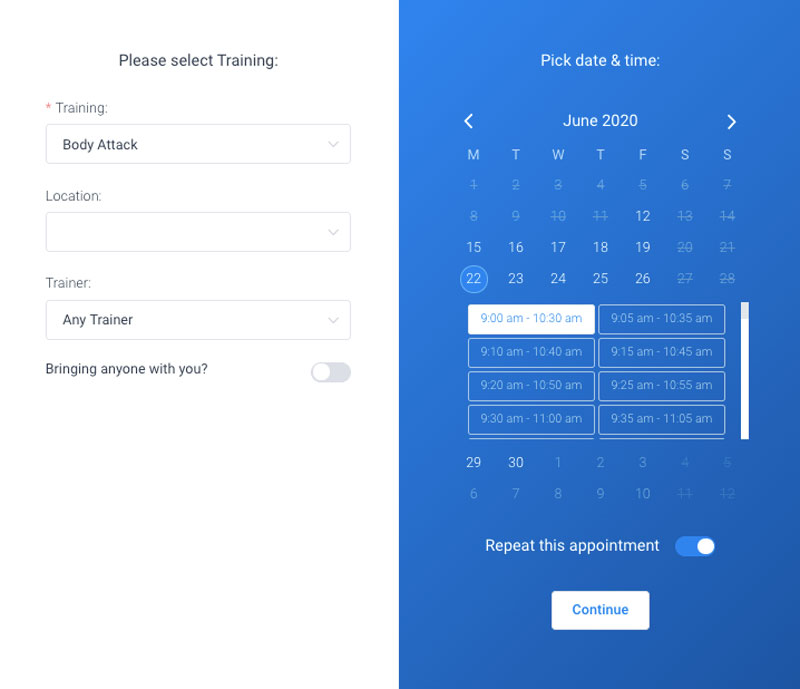
Turn one-time customers into regulars by letting them schedule recurring appointments in a single booking process. They can choose daily, weekly, monthly, or yearly appointments on the booking calendar, and all future sessions are automatically added to your schedule.
Employee and customer panels
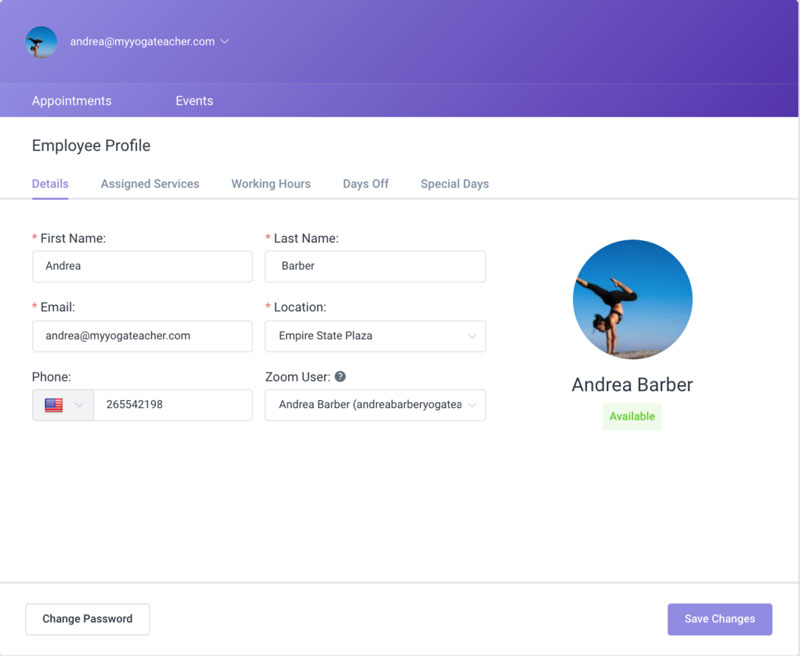
Allow both clients and employees to manage their bookings directly from your website’s frontend; no access to the WordPress Dashboard is required.
Employees can view their schedules, including working hours, days off, and personal time, as well as set service pricing and control how many clients they take on. Customers can view their appointments and have the option to reschedule when needed.
Informative backend dashboard
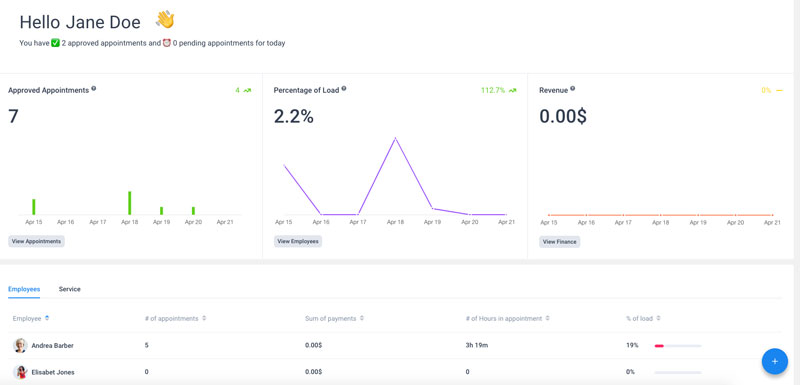
Amelia’s dashboard gives business owners and managers a clear overview of all key aspects of their bookings. From a single control panel, you can track important KPIs, monitor appointments, and manage your business efficiently — all in one place.
Support for multiple services and categories
Create a catalog of services for your booking forms, each with its own pricing, duration, and optional group appointments. You can also add buffer times between appointments to prepare for the next client or tidy up in between sessions.
Amelia booking form demos
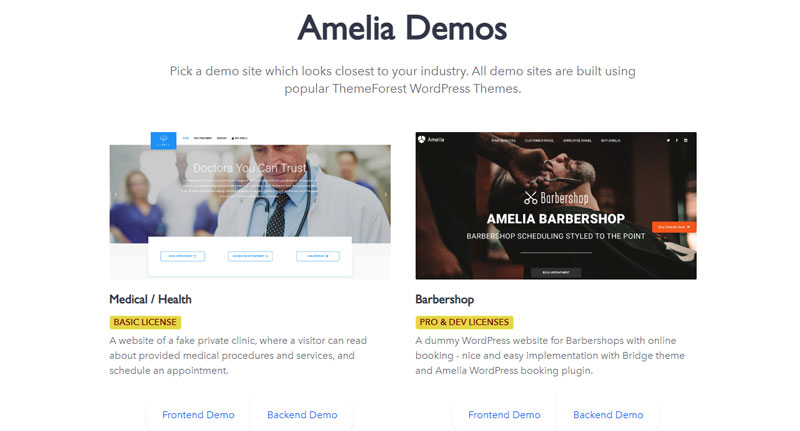
Not sure how Amelia will fit your business? Try a demo site tailored to your industry—from medical and beauty to fitness, barbershops, and more. Explore the design and functionality before setting up your own booking system to see how it works in real life.
Online payments via Stripe, Square, PayPal, Mollie, RazorPay, and WooCommerce
Offer customers a seamless checkout experience by enabling multiple online payment options directly through your booking system. Stop stressing over your bottom line and no-shows, and finally start collecting upfront payments to secure appointments in advance.
Service packages
Increase sales by creating appointment packages. You can bundle multiple services together and offer them at a discounted rate, encouraging customers to book more while giving your business a predictable schedule.
Calendar integrations
Keep your schedule in sync by connecting Google Calendar, Outlook, or Apple Calendar. Appointments automatically appear on your schedule, helping both employees and customers stay organized.
Multiple locations
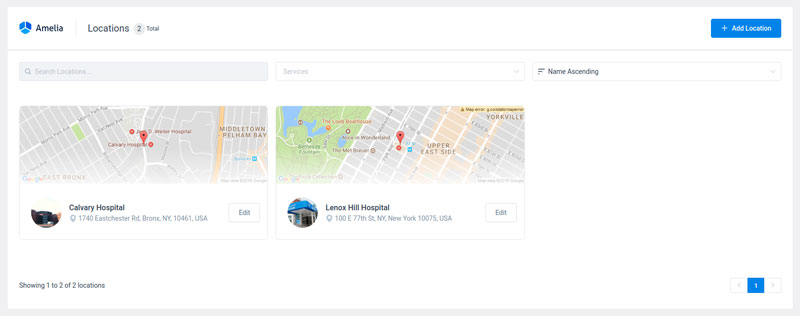
Manage appointments across all your business locations effortlessly. Customers can choose their preferred location when booking, and each location’s schedule stays organized and up to date.
User roles and permissions
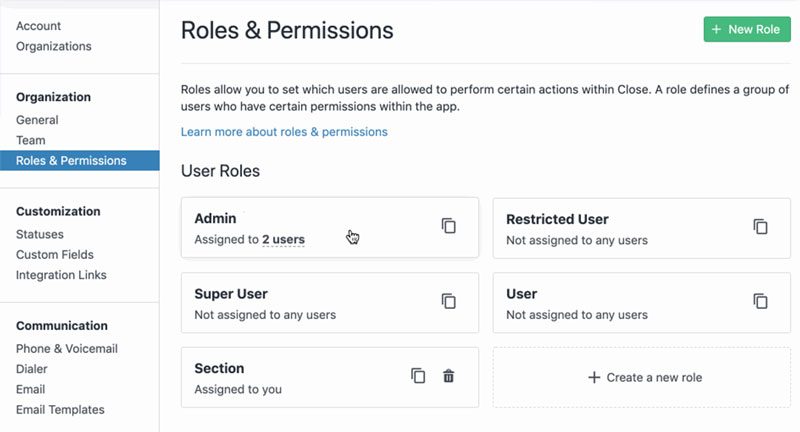
Amelia has four built-in user roles: admin, manager, employee, and customer. Every role has a range of permissions. You can use WordPress’ native capabilities to fine-tune these permissions.
Simply Schedule Appointments: Key Features
Simply Schedule Appointments focuses on delivering a clean, user‑friendly scheduling experience with flexibility and useful integrations for WordPress users. Some of the main features include:
- Customizable booking forms — Adjust form fields and styling to match your website, plus add a booking form anywhere on your site using shortcodes or blocks.
- Calendar sync — Connect your Google Calendar or Outlook so all booked appointments are in one place.
- Payment options — Accept payments through Stripe or PayPal on premium plans.
- Email notifications — Customize and send automatic confirmations and reminders to keep everyone on track.
- Multiple appointment types — Offer different services with their own durations, availability, and settings.
- Flexible availability — Set working hours, breaks, and blackout dates to fit your schedule.
For businesses looking for a straightforward, no-fuss booking system, this plugin gets the job done. It’s easy to set up, reliable, and has a low learning curve. However, when it comes to advanced automation, deeper customization, and full backend control, Amelia clearly takes the lead.
Amelia – A Powerful Alternative to Simply Schedule Appointments
Advanced scheduling requires a plugin built for the task. Earlier, we looked at Simply Schedule Appointments, and now you’ve seen what Amelia brings to the table. It’s a reliable, feature-rich solution for anyone who wants seamless, automated appointment scheduling.
Whether you’re a coach, beauty salon, or medical professional, Amelia’s booking calendars make managing appointments simple and efficient. Payments are easy too, with support for WooCommerce, PayPal, Stripe, and many more. Lastly, SMS notifications keep both you and your clients informed. Plus, its sleek design looks great on mobile devices, too.
For businesses that rely on appointments to generate revenue, Amelia is a smart, dependable alternative to Simply Schedule Appointments.
If you enjoyed reading this article about Simply Schedule Appointments, you should check out this one about the best group scheduling apps.
We also wrote about a few related subjects, including important features that an appointment booking app should have, photography booking apps, double booking appointments, best appointment scheduling software, top appointment reminder apps, and WordPress booking theme examples.
 Back to Previous


Read Inspiring Customer Stories
Check out how our user set Amelia for his business
Read the full story