



Acuity Scheduling and Square Appointments are both pitched at service businesses, and from the outside they look interchangeable: clients book themselves in online, you manage a calendar.
The real split is in what each one was built around first. Acuity is a scheduling tool that lets you plug in a payment processor. Square is a payments company that happens to include booking.
That orientation decides most of what you’ll actually care about, including how much you can shape the booking flow and whether you can use the card processor you prefer or have to send everything through Square.
For a business already taking payments on Square, keeping it in one place is handy. For everyone else, those walls are what you’ll keep bumping into.
What Are Acuity Scheduling and Square Appointments?
Squarespace picked up Acuity in 2019, and it’s been the booking engine in their lineup ever since. At its core it’s cloud-based appointment management aimed at service businesses, the kind that need flexible online booking, custom intake forms, calendar sync, and the freedom to take payments through Stripe, PayPal, or Square.
Square Appointments is harder to talk about on its own, because it isn’t really meant to stand alone. It’s the booking slice of a much bigger Square system, wired into Square POS, Square Payments, Square Marketing, and Square Loyalty. If your checkout already runs on Square hardware, that’s one fewer login to babysit.
Both are fighting over a market that’s growing fast: the appointment scheduling software space was worth $336 million in 2024 and is projected to reach $942 million by 2032 at a 16.2% CAGR (Intel Market Research, 2024). They’re chasing it from different angles, though.
For businesses still researching their options, independent software review platforms like Software Finder can help compare tools across categories before making a final decision.
| Feature | Acuity Scheduling | Square Appointments |
|---|---|---|
| Primary focus | Scheduling-first, high customization | Payments-first, POS integration |
| Parent company | Squarespace | Block, Inc. |
| Free plan | No (7-day trial only) | Yes (individual users) |
| Payment processors | Stripe PayPal Square |
Square Payments only |
Within the appointments and scheduling category specifically, the size difference is stark. Acuity holds a 21.12% market share with more than 105,000 customers, while Square Appointments sits at 1.07% and roughly 4,916 customers (6sense, 2026). A lot of that comes down to what each one is for: Acuity goes after standalone scheduling, Square Appointments goes after businesses already inside the Square world.
So the whole thing really collapses into one question: do you need a strong scheduling tool with lots of outside integrations, or a booking layer that clips onto a Square payments setup you’re already running?
What Types of Businesses Use Acuity Scheduling vs Square Appointments?
Each platform was shaped around a particular kind of business, and using one against the grain creates friction you’ll feel early.
Who Uses Acuity Scheduling
Acuity’s regulars are coaches, consultants, therapists, photographers, fitness instructors, and people who offer several services at once.
It leans toward the more involved end of booking: businesses with detailed intake forms and multi-step flows, providers scattered across time zones who rely on automatic detection so nobody books 3am their time, teams running group classes or recurring appointments or subscription packages. It also suits anyone who needs to drop a booking widget onto a website that isn’t built on Square.
It’s a solid fit for therapy scheduling and consultant scheduling too, where the intake forms and custom workflows aren’t a nice-to-have, they’re how you onboard a client properly.
Who Uses Square Appointments
Square’s natural home is the front-of-house service world: salons, barbershops, spas, personal trainers, and basically anyone already ringing up in-person sales on Square POS.
It makes the most sense when walk-in sales and booked appointments have to settle through the same payment system. A barbershop booking setup or a beauty salon booking flow that’s already on Square hardware gets the most out of it, with nothing extra to wire up.
As a rough rule: if you want payment and booking sitting in the same closed system, Square is the answer. Acuity is the one to reach for when scheduling flexibility and outside integrations carry more weight than that.
How Do the Booking and Scheduling Features Compare?
Self-booking, calendar management and automated reminders are table stakes, and both handle them. The gap opens up around customization depth and scheduling logic, and it widens further once your appointments stop being simple.
Acuity Scheduling Booking Features
Acuity hands you several ways for clients to start a booking: a standalone booking page, a widget you embed on your own site, a direct link you can paste anywhere, and a route in through social media.
The intake forms are fully customizable and get filled in at the moment of booking. Time zone detection quietly adjusts to wherever the client is, which trims the cross-region no-shows. Group classes and recurring appointments show up on the Standard plan ($27/month, annual billing) and up. You can set buffer time and padding per service type. Calendar sync is two-way with Google Calendar, Outlook, and iCal.
Reminders earn their keep here. Automated appointment reminders cut non-attendance by a weighted mean of 34% from baseline rates, going by a systematic review cited by Dialog Health (2025). Acuity sends email confirmations on every plan and adds SMS reminders from Standard up.
Square Appointments Booking Features
Square keeps the booking page simpler. You get a hosted page and an embeddable widget with template-based design controls, but you can’t push the look as far as Acuity lets you.
Calendar sync covers Google Calendar and Outlook on every plan, and it blocks your personal events from colliding with client bookings so you’re not double-booking yourself by accident.
Waitlist management and automated reminders run across all plans. Email reminders are everywhere; SMS only kicks in on Premium, and even then the templates give you less to work with than Acuity’s.
One genuine plus: native Zoom and Google Meet are baked into every plan, so a video link gets attached to virtual bookings without you doing anything.
How Do the Calendar and Staff Management Tools Compare?
Multi-staff scheduling is where the two start pulling apart. Both give every staff member their own calendar; the differences are in how they handle permissions, shared resources and multiple locations.
Staff Calendars and Permissions
Acuity lets you keep a separate calendar per staff member or per location, with availability set individually for each person. Role-based access means an admin decides what any given team member can see or change.
Square runs all of this inside its POS-native setup, so staff permissions and calendars hook straight into Square’s employee management. That’s smooth for an in-person team standing behind a counter, and clunkier the moment you’re coordinating remote or hybrid providers.
Resource Booking and Multi-Location
Acuity can book resources like rooms and equipment next to the staff calendars, which matters when the physical space is half the appointment. Square handles multi-location management on Plus and Premium, with location-level reporting and staff assignment sitting in the dashboard, and its own resource scheduling for rooms, chairs and equipment once you’re on Premium.
If you’re already running several locations on Square POS, Square coordinates them more naturally than Acuity would. But once you need resource-level booking or genuinely complicated availability rules across a scattered team, Acuity is the more flexible of the two.
How Do the Payment and Checkout Features Compare?
Payments are the sharpest dividing line between them, and the two go about collecting money in almost opposite ways.
Square Appointments Payment Infrastructure
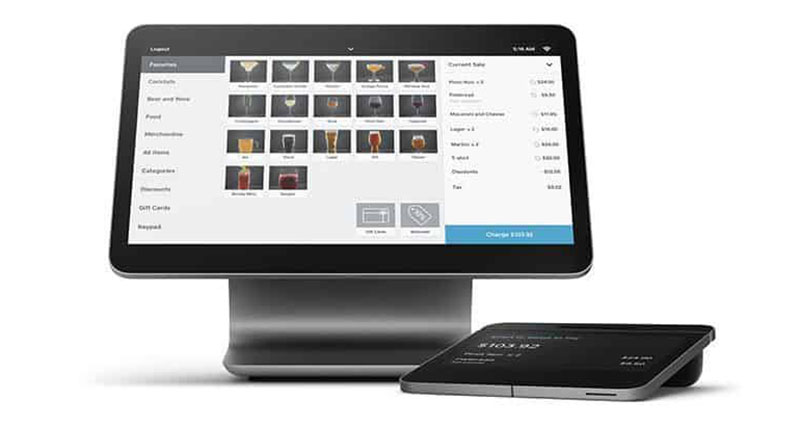
Everything in Square runs on Square Payments. In-person POS, card-present transactions and online booking payments all move through the one system, with no third-party processor to set up.
Card-present rates run 2.6% + $0.15 per transaction on the Free plan, 2.5% + $0.15 on Plus, and 2.4% + $0.15 on Premium.
Online booking is charged at 2.9% + $0.30 on Plus and Premium, and 3.3% + $0.30 on the Free plan.
Payouts land the next business day by default, and the whole thing works with Square hardware, the card readers and terminals, for in-person checkout.
For a salon or barbershop where the walk-in and the booked client both tap their card at the same terminal, that closed loop is a real advantage.
Acuity Scheduling Payment Options
Acuity instead hands the payment job off to outside processors: Stripe, Square or PayPal, your pick. Each one charges 2.9% + $0.30 per transaction for standard online payments.
It also does packages, subscription billing, gift certificates and coupon codes, none of which Square matches to the same depth. If you’re a coach or consultant selling session bundles, that gap is the whole ballgame. You can also pair Acuity with a WordPress booking system with payment gateways when you want the scheduling tool sitting closer to your website.
Neither side wins outright. Acuity gives you more flexible payment products but nothing for taking a card in person, since there’s no native POS. Square has the tighter in-person setup and falls short on packages and subscriptions.
How Do the Client Management and CRM Features Compare?
How a platform stores client records, tracks communication and automates follow-up is what decides whether it supports an actual relationship or just one appointment at a time.
Client Profiles and History
Both keep a client profile with appointment history and contact details. What separates them is how much sits inside that profile.
With Acuity, the intake forms pour straight into the client record. Whatever you collect at booking, health history, preferences, signed waivers, ends up on the profile on its own. That’s particularly handy for wellness booking workflows, where the intake data is exactly what changes how the session gets run.
Square builds the profile inside its wider customer directory, which is wired to Square Loyalty and Square Marketing. Book a haircut, then buy a tub of pomade at the register, and both land on the same record.
Automated Communication and Follow-Up
Acuity covers email confirmations, reminders, follow-ups, and SMS reminders from the Standard plan up, and the template customization goes fairly deep, with conditional logic in some of the workflows.
Square runs automated email reminders on all plans and SMS only on Premium, while marketing campaigns and loyalty follow-ups happen over in Square Marketing, which is a separate paid add-on.
There’s a decent reason to care about reminders: 33% of patients who miss appointments put it down to plain forgetfulness (MGMA, 2024). Either platform’s reminders speak to that, but Acuity gives you a bit more say over the timing and wording of the SMS, and for practices also managing phone-based workflows like forwarding voicemail, that control over communication channels matters even more.
A well-timed appointment confirmation text is sometimes all that stands between a client turning up and a no-show.
How Do the Integrations Compare?
How well either one drops into a tech stack you’ve already built is mostly a question of integrations, and it’s one of the clearer gaps between them.
Acuity Scheduling Integrations
Acuity connects with 500+ tools through a mix of direct integrations and Zapier, which covers most of the categories a small business actually uses. Native video conferencing runs through Zoom, Google Meet and GoToMeeting; email marketing through Mailchimp, ActiveCampaign and AWeber; CRM through Pipedrive and HubSpot (the latter via Zapier); accounting through QuickBooks and FreshBooks; and there’s API access for developers on the Premium plan.
Back in March 2024 it added a Microsoft Teams partnership, so Teams users can schedule and manage appointments without leaving the platform (Microsoft News Center, 2024). That’s the sort of thing that matters if your appointments live inside a corporate setup.
Square Appointments Integrations
Square mostly integrates with itself, though it does carry native video conferencing too.
The native connections inside the Square family are Square POS, Square Payments, Square Marketing, Square Loyalty, Square Payroll and Square Online.
Native Zoom and Google Meet come on every plan and spin up a video link automatically when someone books a virtual slot. Beyond that, you reach other tools through Zapier and Square’s own app marketplace, where you’ll find the likes of Mailchimp, BigCommerce, ClassPass and Homebase.
Put together, Acuity is broader and Square is deeper inside its own walls, and the two now draw level on native video calls. If you already run a few Square products, those built-in links are worth a lot. If you’d rather have Mailchimp or ActiveCampaign connected natively instead of routed through Zapier, Acuity’s open approach leaves you more room.
How Does the Pricing Compare?
For a small business owner, pricing might be the cleanest place the two split apart, mostly because Square has a free way in and Acuity has none.
| Plan | Acuity Scheduling | Square Appointments |
|---|---|---|
| Entry level | $16/mo (annual) or $20/mo |
$0 Free solo users only |
| Mid tier | $27/mo (annual) or $34/mo |
$49/mo per location |
| Top tier | $49/mo (annual) or $61/mo |
$149/mo per location |
| Free trial | 7 days, no credit card | 30 days on paid plans |
Acuity Scheduling Pricing Breakdown
There’s no free tier. Once the 7-day trial runs out, you’re paying from day one.
Starter, at $16/mo annual, covers 1 calendar with unlimited appointments, email reminders and intake forms. Move up to Standard ($27/mo annual) and you get 6 calendars plus SMS reminders, group scheduling and packages. Premium ($49/mo annual) stretches to 36 calendars and throws in HIPAA compliance, custom API and CSS access.
On top of whichever subscription, you’re still paying the processor 2.9% + $0.30 per transaction through Stripe, Square or PayPal. Paying annually shaves 20% off every tier.
Square Appointments Pricing Breakdown
Square bills per location rather than per staff member, which trips people up. It reshuffled its pricing in October 2025 and standardized the plans across every business type.
The Free plan gives you 1 location and 1 user, with online booking, Google Calendar and Outlook sync and email reminders, and online transactions run at 3.3% + $0.30. Plus, at $49/mo per location, brings in multi-staff calendars, a waitlist, class bookings and multi-location support, with in-person at 2.5% + $0.15 and online at 2.9% + $0.30. The top tier, Premium ($149/mo per location), adds resource scheduling, time tracking, advanced staff management, SMS reminders, advanced reporting and 24/7 phone support, and drops in-person to 2.4% + $0.15.
Run $5,000/month through it and you’re adding somewhere between $120 to $165 in transaction fees on top of the subscription (Koalendar, 2026).
If you’re standing up online scheduling for the first time, Square’s free plan takes the money question off the table at the start, and that’s something Acuity flatly can’t offer. When budget is the whole concern, it’s also worth weighing both against a free WordPress booking plugin before you sign up for anything monthly.
How Does the User Experience and Interface Compare?
Setup speed and the day-to-day admin grind differ enough that they shape who’s still using each tool a year later.
Acuity Scheduling Interface
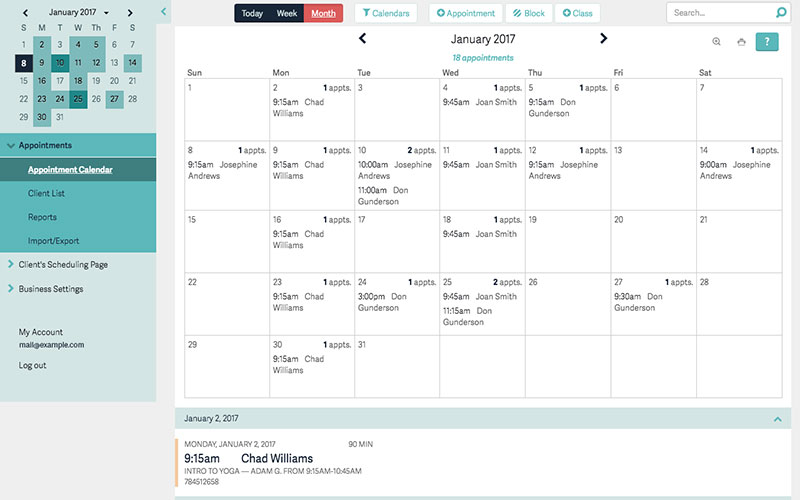
TechRadar’s 2025 review called Acuity’s interface intuitive even for people who aren’t technical, while noting it carries more going on than a bare-bones scheduler like Calendly. The learning curve sits in the middle, not steep, but you’ll spend longer getting it running than you would with Square.
A setup wizard takes you through availability, appointment types and calendar sync one step at a time. The calendar colour-codes by service so you can tell them apart at a glance. On the booking page you can change the logo, the fonts (11 options) and the button colours, and Premium opens up CSS access if you want full control of the design.
The one thing reviewers on Capterra and G2 keep flagging is the reporting dashboard, which they find basic. There’s no revenue analytics or booking-conversion tracking unless you export the data into a spreadsheet first (Workflow Automation, 2026).
Square Appointments Interface
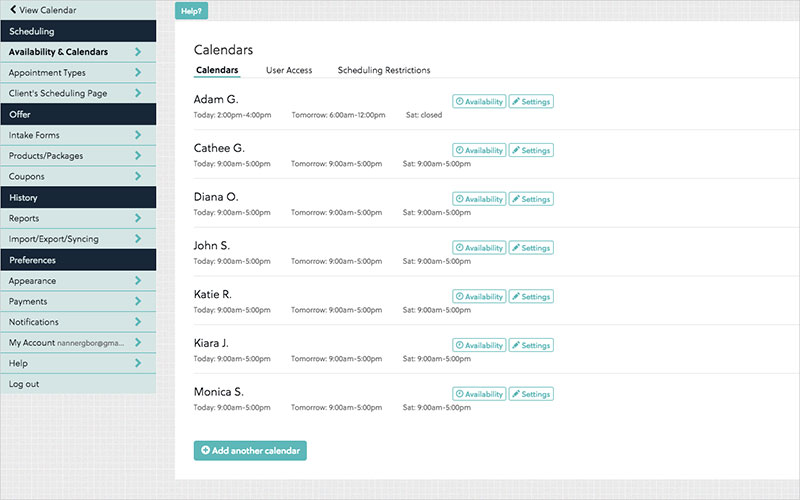
Square’s is simpler and quicker to set up, and the mobile app is the better of the two.
The interface trades depth for speed. Most service businesses can have bookings live inside a day. And the mobile app pulls scheduling, client messaging and payments into one place, which is more than Acuity’s mobile experience manages.
Where it gives ground is booking-page customization. Reviewers on GetApp (2024) point out the design options feel thin next to dedicated scheduling platforms, which is a problem if the booking page is doing your branding for you.
Both can embed a booking widget on an existing site. Acuity will sit on more or less anything; Square’s widget is happiest inside Square Online and a bit awkward outside it.
What Are the Reporting and Analytics Features in Each Platform?
By enterprise standards, neither one is strong on reporting. Both hand you enough to make basic operational calls, and Square has the edge whenever sales data is involved.
Acuity Scheduling Reporting
Acuity tracks appointment volume, revenue totals, cancellation and no-show rates, and client history broken down by booking type.
The reports are functional rather than deep. You won’t find trend charts, booking-page conversion rates or any revenue forecasting. Anything more advanced means exporting the raw data yourself, something multiple verified reviewers on Capterra (2025–2026) call out as a genuine limit once a business starts growing.
Square Appointments Reporting
Square’s reporting gets a lift from the POS integration. Sales data, tip tracking, staff performance and appointment revenue all arrive in one dashboard, simply because booking and payment run through the same pipes.
There are staff sales reports for revenue per provider and what each booked, appointment reports that split volume by day, service and location, and client reports tracking how often people visit and what they spend.
Premium unlocks the advanced reporting on top, adding time-tracking data and proper multi-location breakdowns (Square Appointments pricing page, 2026).
The reason Square’s reports come out richer is that payments and bookings sit on the same data layer. Acuity only ever sees the scheduling side, because its payment data is off living in a separate processor account.
What Are the Main Limitations of Each Platform?
Both have real gaps, and they’re the kind worth knowing before you commit rather than after.
Acuity Scheduling Limitations
The lack of a free plan is the complaint that comes up most from small and new businesses, and the 7-day trial doesn’t even let you test SMS or the full email customization.
Past that, there’s no native in-person POS for taking a card face to face. Reporting stays basic, with no trend analytics or conversion data. Group class scheduling is there but reviewers find it unintuitive (Workflow Automation, 2026). And HIPAA compliance is stuck behind the priciest plan ($49/mo annual).
Since it’s been a Squarespace product since 2019, some users on Capterra (2025) mention session timeouts and account-management friction that traces back to the parent platform’s login.
Square Appointments Limitations
The big one is ecosystem lock-in. Payment processing is Square and only Square, with no way to plug in Stripe or PayPal, so anyone not already on Square POS gives up flexibility to use it.
SMS reminders need the Premium plan ($149/month per location), while Acuity bundles them into its mid-tier Standard plan ($27/month annual). If text reminders are most of what you’re after, that jump to Premium is a steep way to get them.
Outside its own ecosystem, the integrations are thinner than Acuity’s. There’s no native Mailchimp or ActiveCampaign without going through Zapier, so a business with an established stack outside Square runs into these walls fast.
Neither one is built for large enterprises or multi-franchise operations that need centralized admin control, custom API infrastructure and a dedicated account manager.
Which Platform Is Better for Specific Use Cases?
The honest answer turns almost entirely on one thing: whether your business is payment-first or scheduling-first.
Choose Acuity Scheduling If
Acuity comes out ahead when scheduling complexity is the thing you’re optimizing for. Coaches, therapists, consultants and photographers keep landing on it for the depth of the intake forms, the integration flexibility and the way it handles multiple time zones.
It’s the right call when clients have to fill in intake forms or waivers before they book, when you’re selling session packages or subscriptions or gift certificates, when your site isn’t built on Square Online, or when you need Mailchimp, ActiveCampaign or QuickBooks connected natively without Zapier in the middle.
Fitness instructors and yoga studios trying to get more bookings across a range of session types will find Acuity’s group-class and recurring-appointment tools more flexible than Square’s.
Choose Square Appointments If
The short version is that you already use Square.
Salons, barbershops, spas and personal-training studios with Square POS hardware get the most out of it, because booking, payment and in-person checkout all run through a single account. There’s no separate processor to set up and no data split across two systems.
It fits best for an in-person service business taking walk-ins and booked clients at the same terminal, a solo provider who just wants a free booking tool with nothing monthly attached, or anyone already leaning on Square Marketing, Square Loyalty or Square Payroll.
A barbershop or salon that’s already weighing up free salon software with in-person payment in the mix will find Square the more complete option at the free tier, where Acuity simply has nothing to put on the table.
Decision Framework
A few questions usually settle it. Are you taking in-person payments on Square hardware? If so, Square Appointments; if not, Acuity is back in play. Do your clients need intake forms or fiddly pre-booking steps? That points to Acuity, though either tool copes if they don’t. And if budget is the binding constraint, a free tier means Square, whereas being happy to pay from day one for more features means Acuity.
FAQ on Acuity Scheduling vs Square Appointments
Is Acuity Scheduling better than Square Appointments?
That depends on how you run things. Acuity is stronger on scheduling depth, intake forms and outside integrations, while Square’s strengths are in-person payment and the fact that it has a free plan at all. There’s no winner in the abstract, only one that fits your setup better.
Does Square Appointments have a free plan?
It does. The free plan is aimed at solo users and covers online booking, a hosted booking page, automated email reminders, and Google Calendar and Outlook sync. The only thing you pay is the per-transaction processing fee (3.3% + $0.30 for online, 2.6% + $0.15 for in-person). Acuity, by contrast, has no free plan at all.
Can Acuity Scheduling accept payments?
Yes, through Stripe, PayPal and Square. You can take deposits, full payment at the time of booking, packages, subscriptions and gift certificates. The processor’s fees sit on top of your Acuity subscription as a separate charge.
Which platform is better for salons and barbershops?
Square is usually the better fit for salons and barbershops, particularly the ones already on Square POS hardware, since booking, checkout and client records all run through one system. A dedicated salon appointment book setup tends to feel more natural inside Square’s ecosystem.
Does Acuity Scheduling work with Zoom?
It does. Acuity ties in natively with Zoom and Google Meet, generating a video link whenever a client books an online appointment. Square Appointments matches this with native Zoom and Google Meet on all plans as of 2026.
How does Square Appointments handle multiple staff members?
You’ll need a paid plan for it. The Plus plan ($49/month per location) opens up multiple staff calendars, per-person availability and role-based access, whereas the free plan caps you at one user and one location. If you need something more serious, it’s worth lining up dedicated employee scheduling tools next to Square’s built-in version.
Can I embed a booking widget on my website with both tools?
Both give you an embeddable widget. Acuity’s drops onto pretty much any website, WordPress, Wix and Squarespace included, while Square’s is smoothest inside Square Online. On WordPress specifically, a dedicated WordPress booking plugin might hand you more design freedom than either embed.
Which tool has better third-party integrations?
Acuity, fairly clearly. It connects with 500+ tools through direct integrations and Zapier, including native Mailchimp, ActiveCampaign, QuickBooks and Zoom. Square keeps mostly to its own product suite, with Zoom and Google Meet native on all plans. If your stack already lives outside Square, Acuity will be the more flexible of the two for non-Square tools.
Is Square Appointments available outside the United States?
It runs in the US, Canada, Australia, the UK, Japan and Ireland, with availability tracking wherever Square Payments operates. Acuity is available globally, and its automatic time zone detection supports international client bookings on every plan.
What is the main difference between Acuity Scheduling and Square Appointments?
It boils down to orientation. Acuity is scheduling-first, with heavy customization, broad integrations and booking logic that can get genuinely complex. Square is payments-first and lives inside the Square ecosystem. Which one you want depends on whether scheduling flexibility or payment infrastructure carries more weight for your business.
Conclusion
This conclusion is for an article presenting the core differences between Acuity Scheduling vs Square Appointments, two of the most widely used online booking tools for service-based businesses.
Acuity suits businesses that need flexible client self-booking, deep intake forms, multi-timezone support, and integrations with tools like Zoom, Stripe, and Mailchimp.
Square Appointments makes more sense when your scheduling and payment processing need to run through one system, especially with Square POS already in place.
Neither platform fits every use case. Evaluate your workflow, your existing tech stack, and whether a free plan or scheduling depth matters more before committing.
Still not sure? Exploring dedicated employee scheduling software or a free WordPress booking plugin might uncover a better fit for your specific business needs.

Explore topics

Read Inspiring Customer Stories
Check out how our user set Amelia for his business