



Most therapists don’t go shopping for scheduling software until something already went wrong. A double-booked Tuesday, a client who never got a reminder and just didn’t show, or a compliance question nobody on staff could actually answer.
This list ranks ten booking and practice-management platforms built for mental health work, and Amelia and Trafft land in the top two spots for reasons that have less to do with feature counts and more to do with who ends up owning the data once a client hits “confirm.”
Solo counselors, group practices, and multidisciplinary clinics run these instead of a general calendar tool, and the thing that actually separates them isn’t the booking widget. It’s whether a signed Business Associate Agreement exists at all, and on which plan.
Scheduling eats more of a psychiatrist’s week than almost any other administrative task out there. Administrative work took up 20.3 percent of a psychiatrist’s working week (10.6 hours), more than any other physician specialty tracked (Woolhandler & Himmelstein, International Journal of Health Services, 2014).
The Best Therapy Scheduling Software
This ranking goes by overall merit, not price tier or use case.
The weighing comes down to whether a real Business Associate Agreement exists and on which plan, how well recurring sessions get handled, whether telehealth is built in or bolted on afterward, and how honest the pricing page actually is about what sits behind a paywall.
Amelia and Trafft take the top two spots because both let a practice run its booking system on infrastructure it actually controls, at a price a solo clinician can justify without writing a business case for it.
| Tool | Best for | Entry price |
|---|---|---|
| Amelia | WordPress-based practices | Free Lite, paid from ~$149/yr |
| Trafft | Cloud-first solo practices | Free, paid from ~$0 |
| SimplePractice | Solo clinicians wanting a full EHR | $49/month |
| TherapyNotes | Insurance-billing group practices | $69/month |
| Jane App | Multidisciplinary clinics | CAD $54/month (~$40 USD) |
| TheraNest | Growing practices with heavy insurance claim volume | $29/therapist/month (Essentials) |
| Acuity Scheduling | Therapists who only need lightweight compliance | $16/month (Starter); HIPAA tier $49–61/month |
| Cliniko | Allied health teams that want compliance on every plan | $45/month (solo) |
| Carepatron | Early-stage practices that need a real free plan | Free (unlimited clients) |
| Calendly | The intake-call layer, not clinical booking | Free (unlimited 1-on-1 event types) |
Amelia: best for WordPress-based practices that want to own their booking data
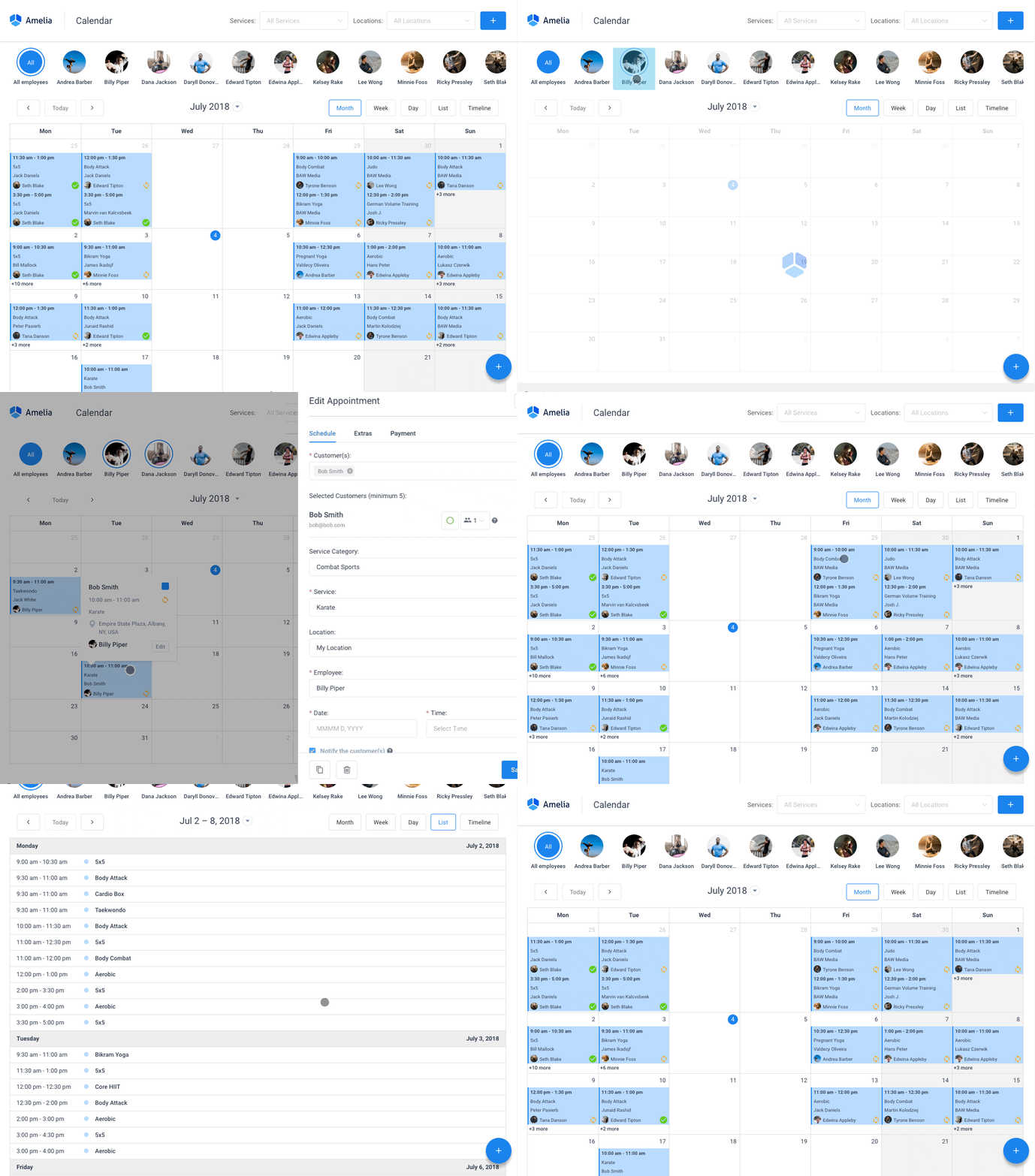
Amelia is a WordPress plugin, not a separate account to log into somewhere else. It turns any WordPress site into a full appointment system, and that matters most for practices that already run their site on WordPress and want the booking calendar, client records, and payment flow sitting on infrastructure they control rather than a vendor’s server.
The free Lite version, available straight from WordPress.org, lets a practice test real appointment flow before spending anything on it, which is rarer than it should be in this category. The live demos are the faster way to see the client-facing side before installing anything.
The paid tiers add the features that actually matter for a weekly-session practice:
- Recurring appointments on daily, weekly, monthly, or yearly cadences
- Native Zoom, Google Meet, and Outlook Calendar sync
- Deposit payments and full payments via Stripe, PayPal, Square, and Mollie
- Buffer time before and after each session, plus no-show tagging
- A step-by-step booking wizard clients complete on the practice’s own site, with a customer panel for rescheduling
Pricing: the free Lite plan covers basic booking. The Pro annual license lists at roughly $149 (promotional) to $199 (regular), Elite runs $259 to $432 depending on the current promotion (Amelia official pricing page, checked August 2026), and a hosted SaaS version also exists near $60 a month for practices that don’t want to manage WordPress themselves.
The appeal is the licensing shape more than any single feature: an annual fee that feels like a purchase rather than a subscription, full data ownership on the practice’s own host, and a booking widget that pairs cleanly with a WordPress theme built specifically for therapists. The coaching and consulting setup is the closest fit for a talk-therapy practice, and the full feature list covers what each tier unlocks. Two things to know before you commit: Amelia doesn’t publish a signed Business Associate Agreement, and the free Lite version skips recurring appointments and REST API access, both of which require a paid plan.
Amelia holds a 4.9 out of 5 rating across 182 Capterra reviews, as shown on its own pricing page (Amelia, August 2026).
What actually earns Amelia its spot here is the hosting model. Because it runs on a self-hosted WordPress install, client data lives on infrastructure the practice already pays for, and that shifts the compliance conversation toward the hosting provider’s own BAA instead of a SaaS vendor’s terms of service. It’s a genuinely different setup from every cloud tool further down this list, and it’s the reason a lot of small practices choose it over a monthly EHR subscription.
Trafft: best for solo practices that want a no-code cloud booking system
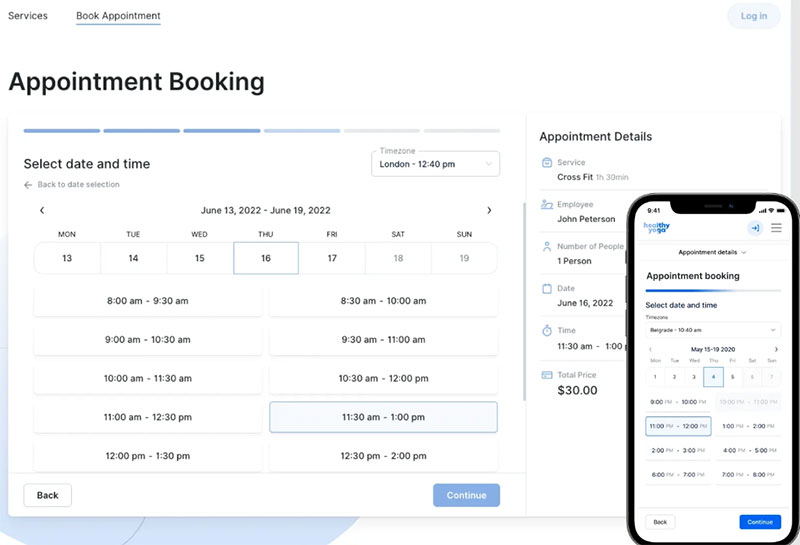
Trafft is a cloud scheduling platform for service businesses, built around getting a booking website live in minutes with no WordPress install required. It fits practices that want a standalone booking page fast and don’t need deep clinical documentation attached to it. The coaching setup maps most closely to a therapy practice, and the healthcare version covers clinics running several practitioners.
One thing worth noting: it generates a full booking website plus an embeddable form, so a therapist without an existing site can still take bookings online the same day. The demos show that client-facing flow without signing up.
Beyond that, Trafft includes:
- Automated email and SMS reminders
- Group bookings
- Calendar sync with Google and Outlook
- Custom booking fields
- White-label agency accounts for consultants managing multiple client calendars
Pricing: a Free plan covers 100 appointments a month for one user. Mini, Growth, Professional, and Business tiers scale from 3 users up to 30 (Trafft, official pricing page, checked August 2026).
Setup here is genuinely fast, there’s a real free tier, and even the entry plans include a booking chatbot. The feature list is worth checking against your plan first: recurring appointments, the cadence therapy relies on, unlock at the Professional tier, and buffer time, private services, custom fields, and appointment export sit above the Free and Mini plans.
The compliance boundary matters more here than the pricing. Trafft has no native HIPAA compliance and publishes no BAA, so it handles scheduling rather than anything clinical, and notes or records belong in a separate HIPAA platform.
One reviewer building a private practice said it checks all the boxes for their private practice, and called the team responsive and the product still improving (Trafft customer testimonial, Trustpilot, 2026).
The reason it makes this list: it’s one of the few tools here priced for a therapist still building a first client list, and the white-label option matters for group practices reselling scheduling to affiliated clinicians.
SimplePractice – Best For Solo Clinicians Who Want Scheduling Inside A Full EHR
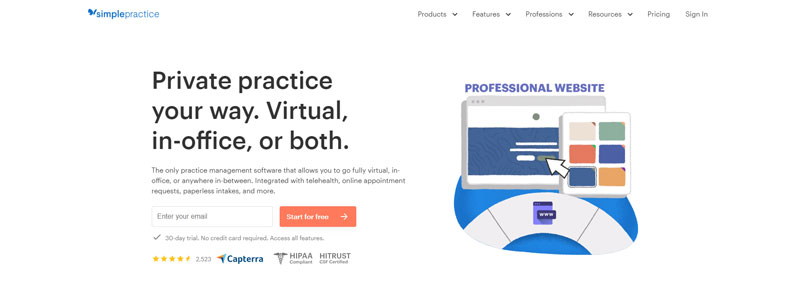
SimplePractice bundles scheduling, clinical notes, insurance billing, and a client portal into one HIPAA-compliant platform built specifically for behavioral health. It suits a solo clinician who doesn’t want to stitch a scheduler onto a separate notes system, and the self-scheduling and reminder tools are the strongest argument for picking it over a bare booking tool.
The client portal handles self-scheduling, intake forms, and secure messaging in the same place clients already pay their invoices, which cuts down the number of logins a client has to juggle. Drag-and-drop rescheduling, group session support, telehealth built into every plan, and a searchable CPT code library for billing round out the rest.
Pricing: Starter runs $49 a month, Essential is $79, and Plus is $99 per practitioner, each with a 30-day free trial (SimplePractice official pricing, verified July 2026).
The workflow is genuinely unified. A missed appointment updates billing and notes automatically instead of needing three separate edits by hand. The monthly per-practitioner cost is the tradeoff, and it climbs fast for a group practice; heavier insurance billing needs tend to get handled better elsewhere.
Independent reviewers rated SimplePractice’s feature direction ahead of some EHR competitors, though ease of setup and support quality scored lower than TherapyNotes in head-to-head testing (G2 comparison data, 2026).
It’s the platform most therapists mean when they say they just want one all-in-one system, and its telehealth is native rather than a third-party add-on, which removes an integration headache a lot of competitors still leave for the user to solve.
TherapyNotes – Best For Insurance-Billing Group Practices
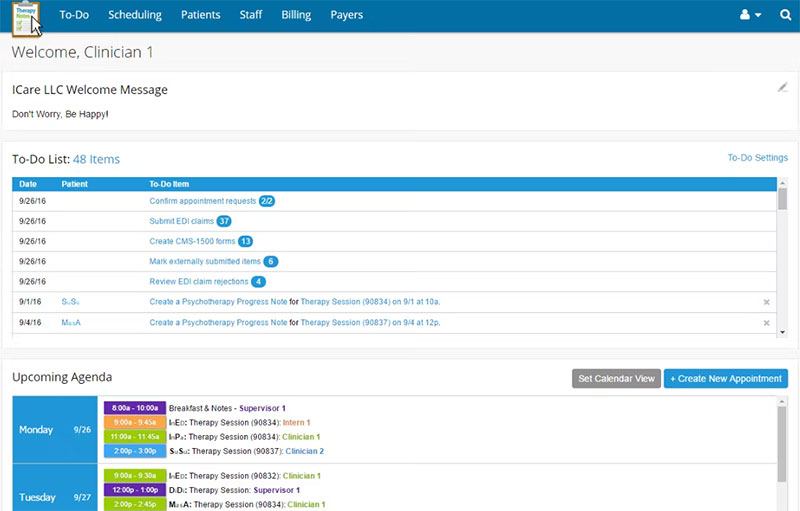
Basic Telehealth is free on every TherapyNotes plan, up to two participants.
TherapyNotes is a HIPAA-certified EHR built around structured workflows. Documentation, scheduling, and billing all follow the same predictable pattern, which cuts down training time for new staff.
In short, TherapyNotes is a practice-management EHR for behavioral health that leans toward clean insurance billing and audit-ready documentation over deep customization, making it the strongest pick for group practices processing a high claim volume.
- Structured SOAP and DAP note templates built for behavioral health
- Electronic claims submission with a stated 3.1 percent plus 30 cents per transaction card-processing rate
- Two-factor authentication and a signed Business Associate Agreement on every account
- Calendar sync with Google Calendar, iCal, and Outlook
What stands out is dependable insurance workflows, a 30-day free trial with no credit card required, and consistently high reviewer ratings for ease of use. Customization lags newer competitors, group pricing adds up per clinician fast, and the solo price rose from $59 to $69 a month in a December 2025 update.
Premium Telehealth, needed for group sessions with up to 16 participants, costs an added $15 per clinician per month on top of the base plan (TherapyNotes official documentation, verified 2026).
Its billing tools read like they were built by people who understand exactly how mental health claims get rejected in practice, and that shows up as fewer denied claims for practices switching over from general-purpose EHRs.
Jane App – Best For Multidisciplinary Clinics Mixing Therapists With Other Providers
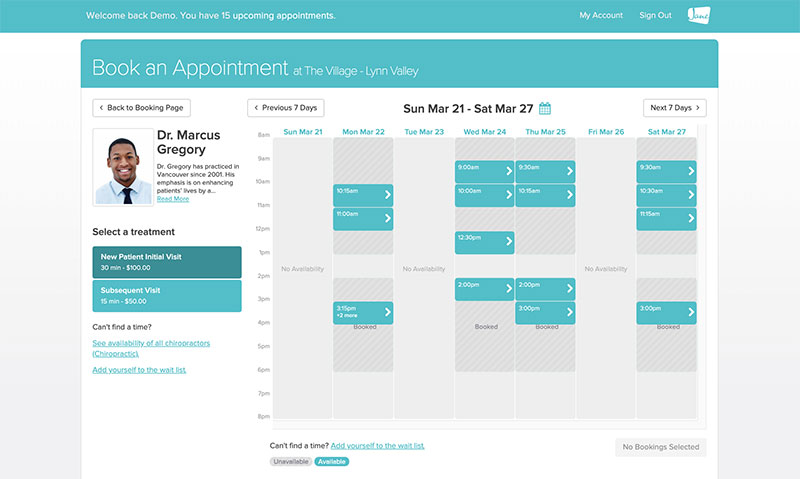
Jane App is practice management software for health and wellness clinics that blends physiotherapists, massage therapists, and mental health counselors under one scheduling system.
It suits group clinics running more than one type of practitioner, and the feature that sets it apart is shift management across multiple clinicians, waitlists, and multi-location setups built into the base plan instead of sold separately.
The calendar is color-coded by provider, and the shared template library includes thousands of intake and progress-note forms other clinicians have already built.
Pricing: runs in Canadian dollars. Balance is CAD $54 a month (roughly $40 USD) for up to 20 appointments, Practice is CAD $79 for unlimited appointments and staff, and Thrive is CAD $99 with automated waitlists and room management (Jane App official pricing, verified 2026).
Jane holds SOC 2 Type 2 certification and PCI DSS compliance, alongside HIPAA, PIPEDA, and GDPR compliance for its telehealth.
Interdisciplinary clinics get one system instead of stitching together separate tools per provider type, which is the whole pitch. It’s not free of tradeoffs, though. Group telehealth costs an extra CAD $15 per practitioner monthly, and treatment plan customization trails dedicated mental health EHRs.
Jane sits at a 4.8 out of 5 rating across roughly 500 Capterra reviews (Capterra, 2026).
Most therapy-only tools assume a single-discipline practice. Jane is one of the few built from day one for the mixed-provider clinics that keep becoming more common.
TheraNest – Best For Growing Practices With Heavy Insurance Claim Volume
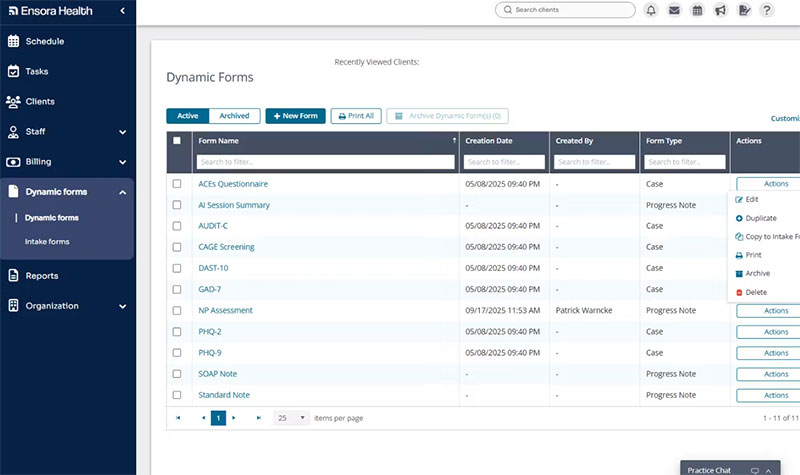
TheraNest’s parent company, Therapy Brands, rebranded to Ensora Health in April 2025, then started marketing the product under the TheraNest name again by mid-2026, while support portals still say Ensora Mental Health.
Despite the naming back-and-forth, the underlying product is still a HIPAA-compliant, HITRUST-certified EHR built for solo therapists scaling into group practices.
It’s aimed at practices processing a large volume of insurance claims that need batch submission tools, and it bundles unlimited document storage with a searchable DSM and CPT code database plus Wiley Treatment Planner content.
Multi-provider supervision tracking and automated claim eligibility checks sit alongside a newer AI Session Assistant, which carries its own added SOC 2 certification for data handling.
Pricing: runs by active client rather than clinician seat, a detail that quietly favors part-time practices, and the Essentials, Advanced, and Premier plans run $29, $59, and $89 per therapist monthly. Post-acquisition support response times have drawn repeated complaints on Trustpilot and BBB since 2024, and online booking plus custom intake forms need the Advanced tier or higher.
TheraNest is a Strategic Partner of the American Counseling Association, and the vendor also describes it as formally recognized by the American Psychological Association (Ensora Health / FindEMR, 2026).
The per-client pricing genuinely helps a practice with a smaller, steady caseload pay less than the flat per-clinician models most competitors run on, even accounting for the brand’s rocky few years.
Acuity Scheduling – Best For Therapists Who Only Need Lightweight Compliance

Acuity Scheduling’s HIPAA setting, and the Business Associate Agreement it comes with, sits only on the top Premium tier, priced at $61 a month billed monthly or $49 a month billed annually (Acuity Scheduling Help Center, updated 2026).
Below that tier, Acuity isn’t a compliant place to collect protected health information, no matter how carefully the booking form is worded.
It makes the most sense for therapists who already like Acuity’s booking flow from another business and are willing to pay for the top tier specifically to unlock compliance. What it does well is payment and package tools, since Acuity has spent years serving service businesses well outside healthcare.
- Unlimited appointments on every tier
- Up to 36 staff calendars on Premium
- SMS reminders from the Standard tier up
- Custom CSS and API access for developer-built booking pages
The interface is familiar and well-tested, with integrations into Stripe, Square, and PayPal already built. There’s no permanent free plan though, just a 7-day trial, and the real cost of a compliant setup runs close to three times the advertised Starter price.
A solo practitioner shopping Acuity on the $16-a-month annual Starter price will find the HIPAA-ready version actually costs $49 to $61 a month once compliance becomes a requirement.
It earns a spot for practices already running Acuity somewhere else in the business and wanting one login instead of two schedulers.
Cliniko – Best For Allied Health Teams That Want Compliance On Every Plan

Unlike Acuity or Trafft, Cliniko doesn’t gate HIPAA behind a premium tier.
The feature set stays identical whether a solo practitioner pays $45 a month or a large group pays $395 for 26 to 200 practitioners, and compliance travels with every seat.
It’s the better fit for allied health teams outside the US, or clinics mixing therapy with physiotherapy, massage, or podiatry under one roof. Telehealth video calls are built into every plan, including the 30-day free trial.
Cliniko meets the Australian Privacy Principles alongside GDPR, PIPEDA, and HIPAA, with SOAP notes, body charts, and treatment histories built into the clinical record.
Per-practitioner pricing with no feature tiers to compare means less time spent reading a chart before signing up, which is a bigger deal than it sounds. There’s no free plan, and SMS bills separately from the base subscription at roughly 10 cents per message.
Reviewers consistently praise the transparent pricing and near-round-the-clock support on Capterra, where it holds a 4.7 out of 5 rating from 23 verified reviews (Capterra, 2026).
For a practice tired of Acuity’s and Trafft’s HIPAA-behind-a-paywall setup, Cliniko’s flat feature set removes that specific annoyance entirely.
Carepatron – Best For Early-Stage Practices That Need A Real Free Plan
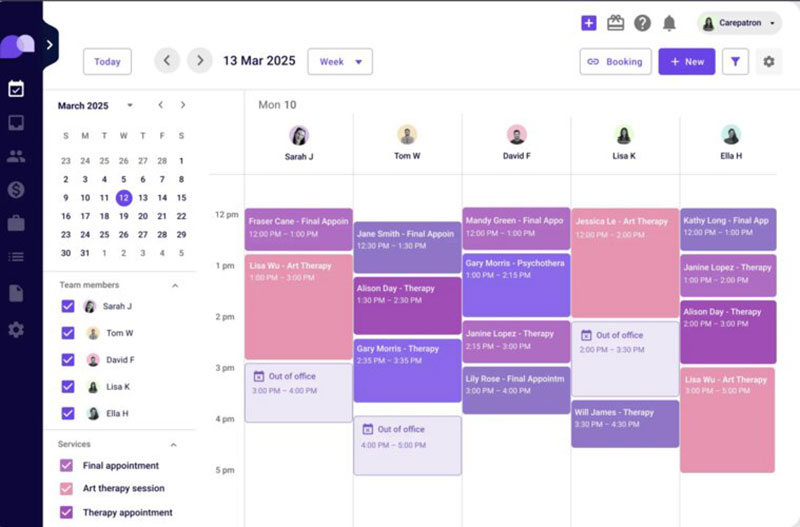
Elizabeth and Dennis moved their billing onto Carepatron and grew My Therapeutic Concepts from five clients to seventy in two months, without losing their evenings to admin work (Carepatron customer story, carepatron.com).
That’s the kind of jump Carepatron’s free tier is built to support: unlimited clients on a $0 plan, with telehealth and clinical documentation included rather than stripped out.
Carepatron is a cloud practice-management platform whose free plan genuinely covers scheduling, notes, and telehealth for unlimited clients, which makes it the strongest low-cost pick for a solo therapist still testing whether the practice can sustain itself.
- AI scribe included on every plan, including free
- HIPAA, GDPR, and SOC 2 compliance stated across all tiers
- Built-in telehealth via Carepatron’s own video or integration with Zoom and Google Meet
- Automated invoicing and superbills on paid tiers
Pricing: Free covers the essentials. Plus runs roughly $15.50 per user monthly and Advanced roughly $19.50, both promotional rates billed annually (verified July 2026).
The free plan isn’t a stripped-down demo, and per-claim insurance fees are basically the only real added cost on paid tiers. Shared inbox and roles-and-permissions sit behind Plus or Advanced though, and the storage cap on the free plan catches some users off guard.
Most “free” scheduling tools cut telehealth or client caps to force an upgrade. Carepatron’s free tier is unusually complete for a solo therapist still deciding whether to commit to a paid system at all.
Calendly – Best For The Intake-Call Layer, Not Clinical Booking
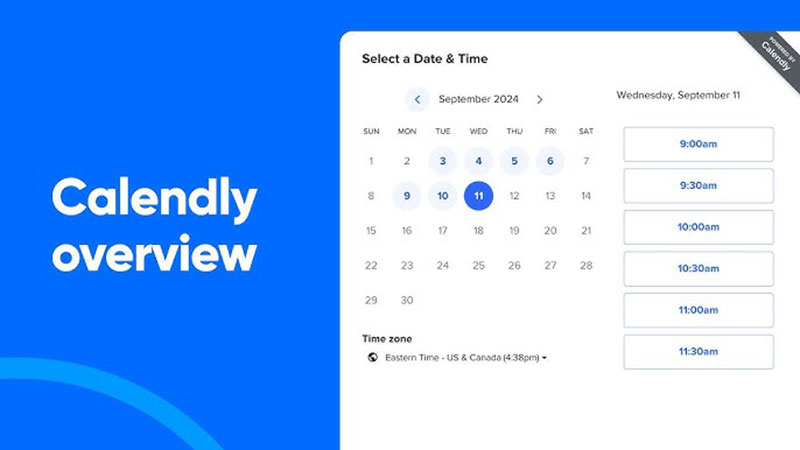
Calendly isn’t HIPAA compliant on any plan, Free, Standard, Teams, or Enterprise, and it doesn’t sign Business Associate Agreements (HIPAA Journal, 2026).
Its own customer terms explicitly prohibit submitting protected health information through the platform.
Calendly is a general-purpose meeting scheduler, not a therapy tool, and it should never hold a client’s diagnosis, treatment type, or any health-context identifier. It’s still genuinely useful for the non-clinical side of running a practice.
- Free plan with unlimited one-on-one event types
- Fast setup for consultation calls that don’t involve health details
- Deep integrations with Zoom, Google Calendar, and Slack
Nothing beats it for a free discovery-call booking link on a therapist’s website, as long as the booking notes stay generic. It fails entirely the moment a workflow reveals a diagnosis, a provider specialty tied to a named client, or a session type like “anxiety therapy intake” in the booking confirmation.
Once a booking page needs to collect anything resembling clinical detail, Calendly is the wrong tool. It’s worth comparing against other Calendly alternatives built specifically for healthcare before a single client record touches it.
Plenty of practices already use Calendly for consultation calls before someone becomes a formal patient, and knowing exactly where that line sits matters more than avoiding the tool altogether.
When These Tools Fall Short For Therapy Booking
A pricing page won’t show you where this list actually trips practices up, and it usually isn’t obvious until you’re already signed up.
| Compliance model | Tools | What to check first |
|---|---|---|
| BAA included on every plan | SimplePractice, TherapyNotes, Jane App, Cliniko, Carepatron | Confirm the BAA names your legal entity, not just a checkbox |
| BAA gated to top tier | Acuity Scheduling, Trafft | Price out the actual compliant tier, not the advertised entry price |
| No BAA offered at all | Calendly, Amelia | Keep clinical detail out of the booking flow entirely |
Acuity and Trafft both look inexpensive right up until HIPAA becomes a requirement, and that’s when the real monthly cost jumps closer to the top of their range. Call it the pricing-gated compliance problem.
The other issue is more absolute and much simpler to spot. A tool that never offers a BAA, Calendly being the clearest example, cannot become compliant no matter which plan gets purchased.
Before locking in any tool on this list, it’s worth verifying a few things directly on the vendor’s own site. Whether a signed BAA is available on the plan actually being purchased, whether recurring weekly sessions are native or a paid add-on, and whether the most common appointment scheduling mistakes a practice already struggles with, things like double-booked slots or no-shows, actually get solved by the plan under consideration rather than just assumed.
What Is Therapy Scheduling Software
A general calendar app can technically hold a therapy appointment. What it can’t hold is the recurring weekly cadence, the protected client data, and a compliant telehealth link, all living in the same place, which is really the dividing line between a generic scheduler and something built specifically for mental health work.
It’s a category built around client self-scheduling that still leaves the practice holding a compliant record of who was seen and when.
Several tools bundle in a full clinical record system with notes and billing. Plenty don’t, and treat scheduling as the whole job.
- Client self-scheduling through a branded booking page
- Recurring session support for weekly or biweekly cadences
- Telehealth built in or tightly integrated
- A path to HIPAA compliance through a signed Business Associate Agreement
A general calendar tool can hold an appointment. Only a purpose-built scheduler is expected to hold all four of those at once.
How HIPAA Compliance Works In Therapy Scheduling Software
HIPAA compliance in scheduling software comes down to one document more than any single feature: the Business Associate Agreement. It’s the contract that makes a vendor legally responsible for protecting a client’s health information, and without one, no amount of encryption makes a tool usable for clinical booking.
What A Business Associate Agreement Actually Covers
A signed BAA spells out permitted uses of client data, the required security safeguards, and breach notification duties, and it needs to include, at minimum:
- Encryption of data in transit and at rest
- Minimum-necessary access to protected health information
- A named legal entity, not just a vendor’s general terms of service
- Breach investigation and notification within 60 days of discovery
The 2013 HIPAA Omnibus Rule made business associates directly liable for violations, not just the covered entity that hired them (HIPAA Journal, 2026).
What Happens Without One
Pagosa Springs Medical Center paid $111,400 to settle a HIPAA case that included disclosing electronic protected health information to Google, its scheduling calendar vendor, without a signed BAA in place (HHS Office for Civil Rights, 2018).
The case also involved a former employee who kept access after leaving the organization, but the missing BAA with the vendor was central to the violation. No separate large-scale data breach was required to trigger it.
Effective January 28, 2026, the four-tier penalty structure looks like this:
- Tier 1 penalty: $145 per violation, for a violation the entity was unaware of
- Tier 4 penalty: up to $2,190,294 per violation, for willful neglect with no correction
- BAA requirement: mandatory under 45 CFR 164.504(e) before any PHI can be shared
Figures from the HHS Office for Civil Rights four-tier structure, inflation-adjusted effective January 28, 2026 (HIPAA Journal, 2026).
How Recurring Appointment Scheduling Works For Weekly Therapy Sessions
Weekly and biweekly cadence is the default in therapy, not an edge case, which is why recurring scheduling gets treated as a core feature rather than an add-on in most dedicated tools. A recurring series gets created once, then the software generates each future instance automatically on the chosen interval.
- Daily, weekly, monthly, or custom-interval cadences
- Editing a single instance without breaking the rest of the series
- Buffer time applied consistently across every generated instance
- Automatic conflict checks against a provider’s existing calendar
Amelia generates recurring appointments on daily, weekly, monthly, or yearly schedules directly inside its booking wizard, while Trafft only unlocks the same capability from its Professional plan up.
That gap matters more in therapy than in almost any other booking category. A practice built entirely on weekly sessions can’t run on a tool that treats recurrence as an upsell.
How Telehealth Integration Works In Scheduling Software
Some platforms run video inside the scheduling software itself, no separate login or link generation required. Others just book the slot, then hand the session off to Zoom, Google Meet, or something similar through a generated link, and that handoff is where an extra layer of compliance paperwork tends to creep in.
Native setups keep the session inside the same compliance boundary as the booking record, since one BAA covers both. Third-party handoffs need their own separate BAA with the video vendor, stacked on top of whatever the scheduler itself already provides.
Jane App bundles HIPAA, PIPEDA, and GDPR-compliant telehealth into every plan, while group video sessions cost an added CAD $15 per practitioner monthly on top of the base subscription.
Amelia connects natively to a growing set of Zoom integrations alongside Google Meet, which keeps a WordPress-based practice from managing a separate video vendor relationship.
How Appointment Reminders Reduce No-Show Rates
A mental health outpatient clinic in Gdansk, Poland cut its no-show rate from 18.55% in 2019 to 7.01% in 2023 after putting in an automated appointment confirmation system (Olearczyk et al., MDPI Applied Sciences, 2025).
That drop came from proactive engagement generally, not one single feature, but reminders did most of the actual work.
The mechanism is straightforward. A reminder interrupts forgetfulness before it turns into a missed session, and a two-way reply lets the client confirm, cancel, or rebook without picking up the phone.
- Live phone reminders: 3% no-show rate
- Voicemail or message reminders: 24% no-show rate
- No reminder delivered / no answer: 39% no-show rate
Figures from Teo & Dobscha, published in Psychiatric Services, PsychiatryOnline.org (2017).
SMS tends to outperform email for behavioral health clients specifically. A text lands on a lock screen instead of waiting behind a portal login or a voicemail inbox nobody checks.
Most dedicated platforms build this in natively now, though a practice on a lighter tool can still pair its scheduler with a dedicated appointment reminder app to close the gap.
How Payment And Insurance Billing Integration Works
Payment integration in therapy scheduling software really runs on two separate tracks. One is collecting money from the client directly: deposits, copays, full session fees charged through a connected processor the moment someone books. The other is submitting claims to an insurer, which means building electronic claims from CPT codes and session documentation and sending them off to a clearinghouse for processing.
- Stripe, PayPal, and Square as the most common processor connections
- Sliding scale fees applied per client rather than per service
- Automatic deposit collection to reduce cancellation risk
- Superbills generated for clients who submit their own out-of-network claims
TherapyNotes processes claims at 3.1 percent plus 30 cents per transaction, which it markets as one of the lower rates among dedicated behavioral health platforms.
A practice using a WordPress booking system with payment gateways built in can collect a deposit at the same step where the client picks a time, without redirecting them to a separate checkout page.
WordPress Plugin Or Cloud SaaS: Which Deployment Model Fits Your Practice
The deployment decision comes down to where client data physically lives, not just which interface looks nicer.
A plugin runs on the practice’s own WordPress hosting. A SaaS platform runs on the vendor’s servers, reached through a browser login.
The WordPress Plugin Model
- Data lives on hosting the practice already controls, not a vendor’s server
- Licensing tends to be annual or lifetime, not a recurring per-seat bill
- Compliance responsibility shifts partly to the hosting provider’s own BAA
- Setup requires an existing WordPress site, or building one first
This model works best paired with one of the established WordPress booking plugins rather than a generic form builder repurposed for scheduling.
The Cloud SaaS Model
A booking page here can go live the same day, with nothing to build first. The tradeoff shows up in the pricing shape: cost runs per seat or per client monthly, scaling with the practice but never actually stopping. Trafft and most dedicated EHR platforms fall into this bucket, trading setup speed for an ongoing subscription instead of a one-time-feeling license.
Neither model is objectively better. It just depends on whether a practice would rather own its setup process or hand that part off entirely.
What Type Of Practice Needs Which Kind Of Scheduling Tool
Practice type decides the tool category faster than any feature comparison does.
| Practice type | Recommended category | Deployment model | Typical price band |
|---|---|---|---|
| Solo, cash-pay, existing WordPress site | WordPress booking plugin | Self-hosted | Free to ~$200/year |
| Solo or small group, insurance-heavy | Dedicated behavioral health EHR | Cloud SaaS | $49 to $99/month |
| Multidisciplinary clinic | Interdisciplinary practice platform | Cloud SaaS | $54 to $99/month |
| Early-stage, low client volume | Free-tier scheduler | Cloud SaaS | $0 |
A group practice running multiple clinicians under supervision needs a platform built for team scheduling, not a single-provider tool stretched past what it was designed for.
A brand-new solo practice with five clients doesn’t need the same system as a ten-clinician group billing insurance daily, even though both technically fall under “therapy scheduling software.”
How Much Does Therapy Scheduling Software Cost
Cost in this category spreads across three shapes: flat annual licenses, per-seat monthly subscriptions, and per-client pricing. A free tier usually covers basic booking with limited features, often missing telehealth or payment collection entirely. Paying anything at all tends to start around $29 to $69 a month per practitioner, or $150 to $200 a year for a self-hosted license, and the full-featured tier, once telehealth, insurance billing, and advanced reporting get included, runs $79 to $99 a month per practitioner.
The advertised entry price and the actual compliant price often diverge. A tool that gates its HIPAA-ready tier behind the top plan can cost three times its headline number once compliance becomes a requirement.
Add-on costs worth checking before signing up:
- SMS reminder credits, frequently billed separately from the base plan
- Group telehealth, often a per-practitioner add-on
- Electronic insurance claims, sometimes charged per submission
Some tools also offer a genuinely usable free WordPress booking plugin tier, worth testing before committing to any paid license.
What To Verify Before Signing Up For A HIPAA-Ready Tool
A pricing page calling a plan “HIPAA compliant” is a marketing claim until it’s actually confirmed with the vendor directly, not assumed from the sales page.
- The BAA should name the practice’s specific legal entity, not just reference a general compliance policy
- Recurring sessions need to be native, not a feature locked behind a higher tier than the one being purchased
- Telehealth should already be included, or the group video add-on cost should be known before the first invoice shows up
- A trial or refund window matters too. Most dedicated platforms give 14 to 30 days to test the actual workflow with real appointments
Skipping this step is how a practice ends up locked into an annual plan that turns out not to support the exact cadence its caseload runs on.
How To Migrate From Manual Scheduling To Software
Psychiatrists spend 10.6 hours a week, or 20.3 percent of their working time, on administrative tasks, the highest share of any physician specialty studied (Woolhandler & Himmelstein, International Journal of Health Services, 2014).
Manual scheduling makes up a large share of that burden, and it’s usually the first thing a migration is meant to fix.
- Export existing client and appointment records from spreadsheets, paper books, or the outgoing system
- Import that data into the new platform and check every recurring series maps correctly
- Run the old and new systems in parallel for one to two weeks before full cutover
- Train every staff member who touches the calendar before the parallel period ends
- Notify clients of the new booking link and retire the old process on a fixed date
The most common failure point isn’t the data import. It’s cutting over mid-week without a parallel run, which leaves staff fielding double-bookings on both systems at once.
Understanding the practical benefits of scheduling software before migration helps justify the parallel-run period to a team that’s impatient to be done with the old spreadsheet.
When You Don’t Need Dedicated Therapy Scheduling Software
Not every practice needs a HIPAA-ready, insurance-integrated platform on day one.
- A brand-new solo practice with a handful of clients and no PHI entered into the booking flow itself
- A coach or consultant working adjacent to therapy who isn’t handling clinical diagnoses or treatment records
- A practice whose actual booking volume a free general calendar tool already covers without strain
- A practitioner still validating demand before committing to an annual license or monthly subscription
Non-clinical coaches in particular can often run on free coaching software built for a lighter compliance bar than clinical therapy requires.
The switch point usually isn’t a fixed client count. It’s the first time PHI, a diagnosis, a treatment note, or a named condition tied to a client enters the booking flow itself.
Once that happens, a signed BAA stops being optional and the calculation changes immediately.
FAQ on Therapy Scheduling Software
Is therapy scheduling software the same thing as an EHR?
No. Scheduling software focuses on booking, recurring sessions, and reminders, while an EHR adds clinical notes, treatment plans, and diagnosis codes on top of that. Plenty of platforms, SimplePractice and TherapyNotes included, bundle both together, but a standalone WordPress booking plugin like Amelia stays scheduling-only.
Can one appointment in a recurring series be edited without breaking the rest?
Yes, on every platform reviewed here that supports recurring appointments. Editing a single instance, whether that’s a reschedule or a cancellation, only updates that occurrence. The rest of the series keeps its original cadence, whether that’s weekly, biweekly, or a custom interval set in the booking wizard.
Is dedicated scheduling software worth it for a brand-new solo practice?
Not right away. A free tier or a general calendar covers a handful of clients just fine. The cost tends to justify itself once no-show reduction, automated reminders, or insurance billing starts saving more time each month than the subscription costs.
Does switching require manually re-entering every existing client?
Rarely. Most therapy scheduling software accepts a CSV import of existing client and appointment records. Manual entry usually gets limited to fixing formatting mismatches or reassigning recurring series that the export file didn’t map cleanly.
Can group sessions be booked through the same system as individual sessions?
Yes, on most platforms covered here. Group bookings share the same calendar as individual sessions, just with a set capacity per slot. Jane App and Amelia both support group appointments; Calendly doesn’t handle capacity-based group booking at all.
What Should You Verify First With The Best Therapy Scheduling Software
The best therapy scheduling software rewards a fixed evaluation order, and a signed Business Associate Agreement should get checked before any pricing tier gets compared.
- Signed Business Associate Agreement naming the practice’s legal entity
- Native recurring-session support, not a gated add-on
- The actual compliant-tier price, not the advertised entry price
Choosing the self-hosted route over a vendor-signed BAA trades a lower annual license for direct responsibility over the hosting provider’s compliance paperwork.
Telemedicine adoption among mental health treatment facilities climbed from 22.2 percent in 2015 to 68.7 percent by 2020 (SAMHSA, 2021), a trajectory that makes native video support a baseline now, not a differentiator.
The next practical step after choosing a platform is learning how to effectively schedule appointments once the system goes live.

Explore topics

Read Inspiring Customer Stories
Check out how our user set Amelia for his business