



Dear Amelia users,
Alexander here, founder and CEO of Amelia.
On behalf of our entire team—hi!
Some years are about steady progress. Others force you to stop, rethink, and rebuild things properly.
2025 for Amelia was very much the second kind.
Over the past year, we made some of the biggest product decisions since Amelia’s first release. We finished long-running redesign efforts, introduced features that fundamentally change how bookings, pricing, and events are managed, and, most importantly, launched Amelia 9.0, the largest and most ambitious update in our history.
Every large and growing system needs a reorganization and cleanup every once in a while, so the change was focused on ensuring Amelia remains fast, reliable, and flexible as the platform, so the businesses built on top of it can continue to grow.
Behind the scenes, this meant rethinking workflows, simplifying interfaces that had grown complex over time, strengthening performance and security, and laying foundations that will allow us to move faster without sacrificing quality in the years ahead.
In this post, I’d like to take you through what we built together in 2025—from major new features and improvements you’re already using to the thinking behind Amelia 9.0 and what this reinvention means for the future of the product.
Let’s take a look back.
2025: What Actually Changed in Amelia
The real story of 2025 is in how Amelia evolved in practice.
Over the course of the year, Amelia expanded well beyond its original role as a booking plugin. We introduced features that impact how revenue is generated, how teams work day to day, and how complex businesses operate at scale while simultaneously modernizing the platform underneath.
This meant delivering:
- More advanced and flexible pricing models
- Stronger tools for event-driven and group-based businesses
- Better employee workflows and autonomy
- Deeper calendar, payment, and marketing integrations
- A faster, more consistent experience across the entire product
All of these changes came together once Amelia 9.0 went live, but they were built step by step throughout the year.
In the sections below, we’ll walk through the most important additions and improvements, starting with the booking and business features that had the biggest impact for our users.
Major Booking & Business Features Released in 2025
At its core, Amelia exists to help businesses turn availability into revenue without adding operational stress.
In 2025, many of the features we shipped were focused on solving everyday problems we kept hearing about: empty slots caused by no-shows, rigid pricing that doesn’t reflect real demand, and limitations that appear once a business starts growing beyond simple one-on-one appointments.
The updates in this section are not cosmetic. They directly affect how bookings are filled, how pricing adapts to reality, and how businesses scale without losing control.
Waiting list for appointments
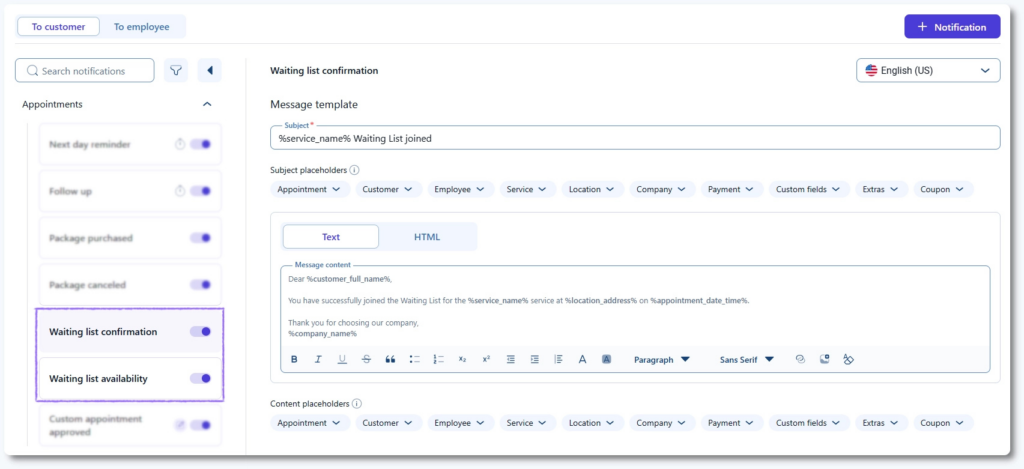
Previously available only for events, the appointments waiting list is now supported for individual services as well.
When a time slot becomes unavailable, customers can opt in and are notified when availability opens up. This allows businesses to:
- Maximize occupancy by filling last-minute cancellations
- Reduce revenue loss caused by no-shows
- Keep interested customers engaged instead of sending them elsewhere
Why it matters:
Empty slots are lost revenue. The waiting list helps businesses recover that value without manual follow-ups or constant schedule monitoring.
E-tickets with QR codes for events
For workshops, classes, conferences, and large group events, check-in speed and accuracy matter. With QR-code-based e-tickets, event organizers can:
- Provide fast attendee verification
- Check attendees in instantly
- Eliminate manual lists and entry errors
- Maintain a professional, scalable event workflow
Why it matters:
As events grow, small inefficiencies multiply. QR-based check-ins remove friction at the door and create a smoother experience for both staff and attendees.
Advanced pricing options for maximum flexibility
As businesses grow, one-price-fits-all models quickly become limiting.
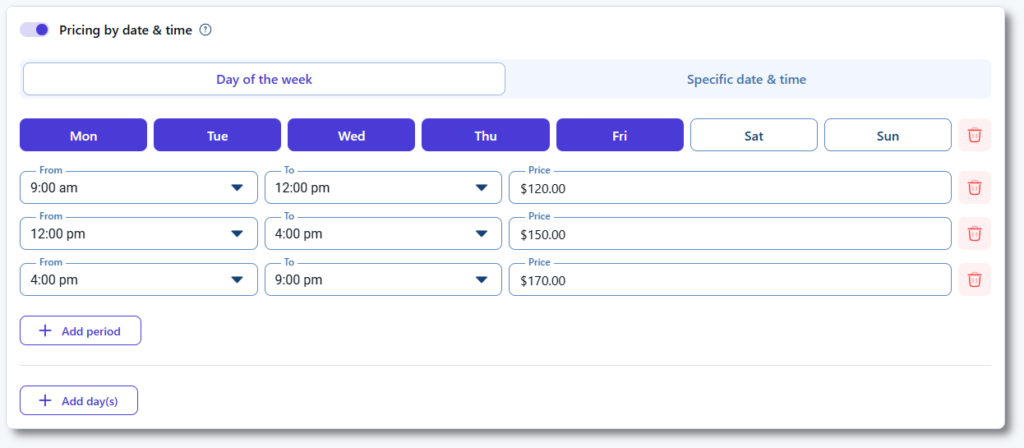
In 2025, we introduced flexible pricing rules that allow businesses to adapt prices to real-world demand:
Pricing by number of people: Charge dynamically for group services, classes, or family bookings, ensuring fair pricing while scaling revenue.
Pricing by day of the week: Apply different rates for weekdays, weekends, or peak periods to balance demand and maximize profitability.
Pricing by specific date and time: Adjust prices for holidays, special seasons, or high-demand dates without creating duplicate services.
Why it matters:
Smart pricing helps businesses grow sustainably by increasing revenue without sacrificing transparency or customer trust.
Customer custom fields
No two businesses, or customers, are the same.
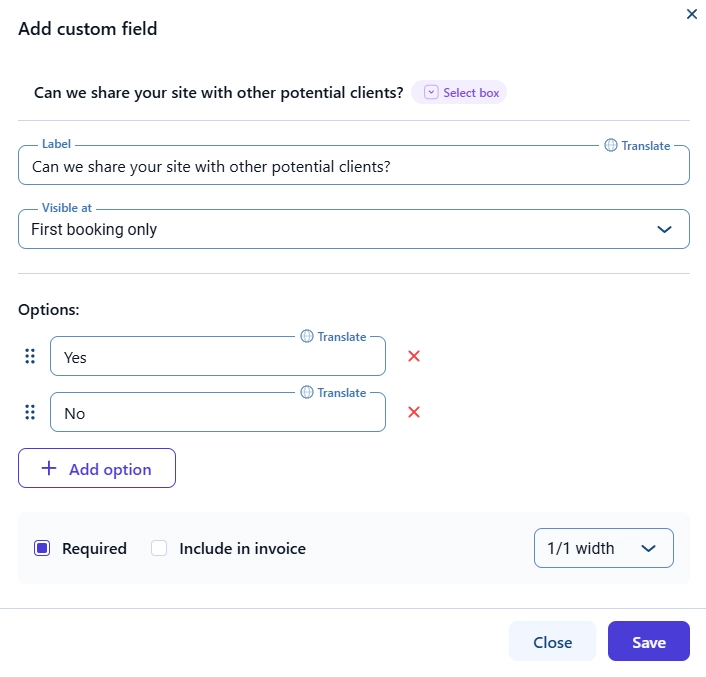
With customer-level custom fields, Amelia now allows businesses to store long-term customer data such as:
- Member IDs
- Medical notes
- Documents or insurance data
- Preferences
- Referral details
This turns Amelia into more than a booking system. It becomes a lightweight CRM that supports more personalized service.
Why it matters:
Better context leads to better service. Storing customer-specific data helps businesses build stronger relationships without relying on external tools.
Employee Experience Reimagined
As Amelia grew more powerful, we became increasingly aware of something important: powerful tools are only useful if the people using them feel comfortable and confident.
Employees interact with Amelia differently from administrators. They need clarity, speed, and reliability, often in high-pressure, customer-facing situations.
In 2025, we focused on removing friction from everyday employee workflows, reducing dependency on admins, and making sure teams can do their jobs efficiently, whether they’re at a desk, at reception, or on the move.
This included:
- Clearer, more logical navigation
- Fewer clicks for common actions
- Interfaces that adapt better across devices
- Immediate status updates and appointment or event management
- Stronger security through improved login protections
Why it matters:
Better tools reduce stress. For teams, this means faster onboarding, less training, and fewer mistakes during day-to-day work.
Add new customers directly from the Employee Panel
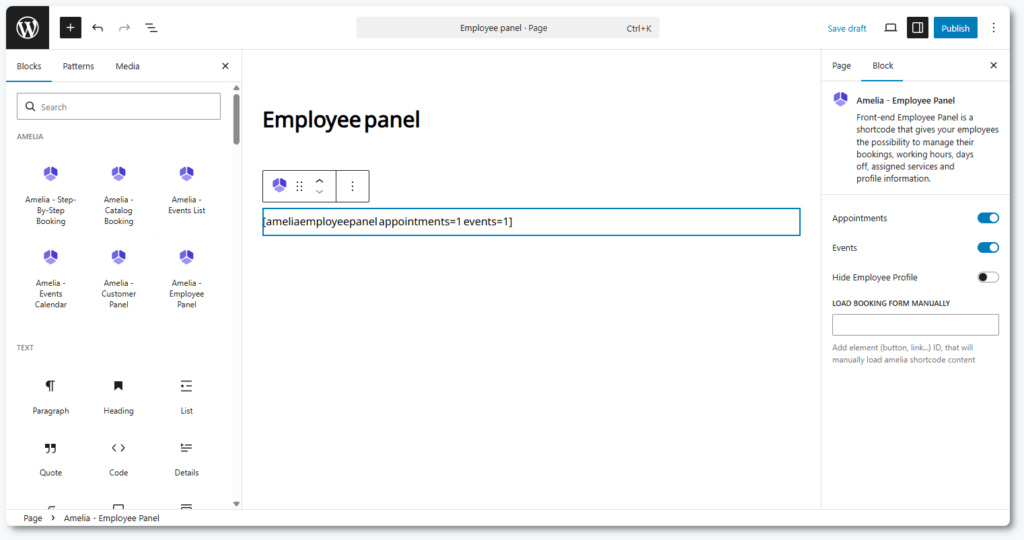
This feature came directly from real-world usage.
When an employee is on the phone or working at the reception desk, switching dashboards or waiting for an admin slows everything down. Employees can now create customer profiles directly from the Employee Panel, exactly when the interaction happens.
Why it matters:
Faster customer onboarding reduces friction, prevents errors, and keeps the focus where it belongs—on the customer, not the system.
Apple Calendar sync per employee
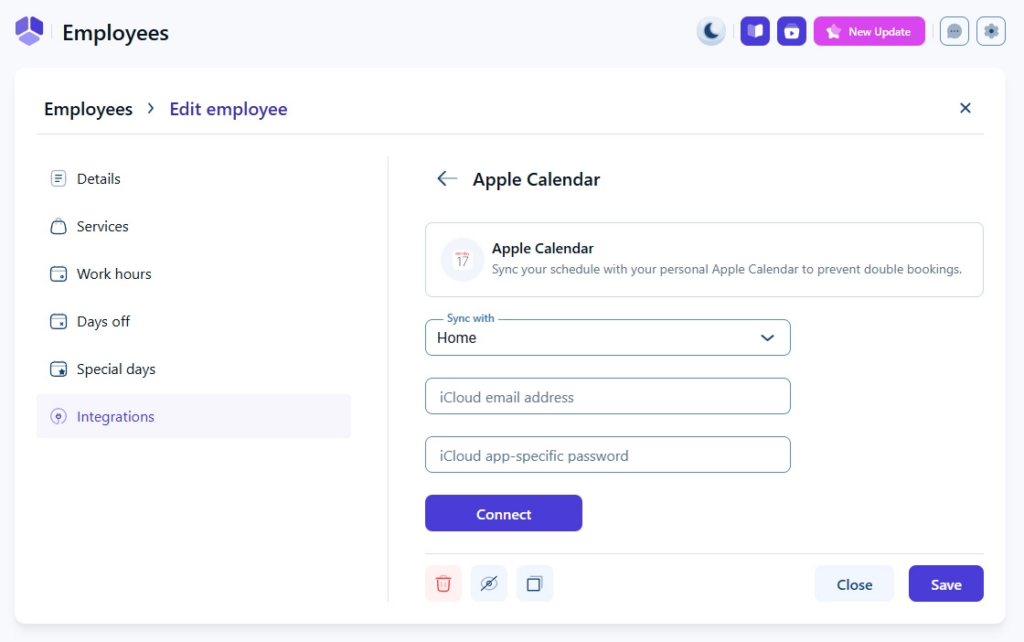
Many employees rely on Apple Calendar to manage personal commitments alongside work schedules.
With individual Apple Calendar synchronization:
- Personal and work calendars stay aligned
- Availability is always up to date
- Accidental double-bookings are avoided
Why it matters:
Calendar sync enables employees to keep track of their availability in an easy, effortless way, which helps them maintain a healthier work-life balance.
Social login (Facebook & Google)
Account access should never be a barrier.
By introducing Facebook and Google social login options, Amelia now allows faster, one-click authentication for both customers and employees:
- Quicker signups and logins
- Fewer abandoned registrations
- Improved account security
Why it matters:
Reducing friction at the login stage improves conversions for businesses and saves time for everyone involved.
Payments, Integrations & Growth Tools
For many businesses, the booking experience doesn’t end when a time slot is selected. It ends when payment is completed, confirmations are sent, and follow-ups happen automatically.
This year, we invested heavily in expanding Amelia’s ecosystem: supporting more payment methods, reducing checkout friction, and enabling better connections with the tools businesses already rely on for marketing and communication.
The goal was simple: fewer abandoned bookings, smoother checkouts, and stronger long-term customer relationships.
Expanded payment options for modern customers
We significantly expanded Amelia’s payment ecosystem to support how customers prefer to pay today, globally and locally.
New and improved options include:
- Google Pay & Apple Pay via Stripe for fast, mobile-first checkout
- Google Pay & Apple Pay via Square for Square users
- Barion integration for secure regional payments (available in Standard, Pro, and Elite)
- Stripe email receipts sent automatically after payment
- Improved Square integration with no redirects and a smoother user experience
Behind the scenes, we also invested heavily in payment performance and stability to ensure faster load times and fewer checkout issues.
Why it matters:
More payment options increase conversion, reduce drop-off, build trust, and make it easier for businesses to serve international customers without custom workarounds.
Mailchimp integration
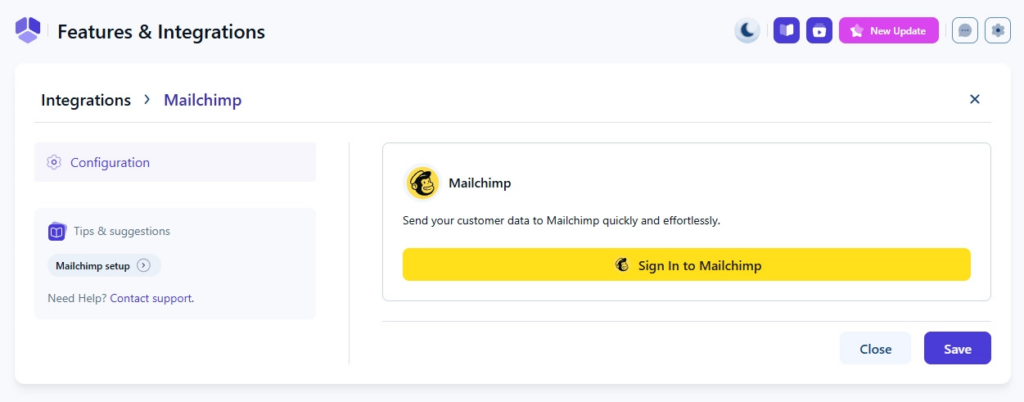
For many businesses, bookings are just the beginning of the customer relationship.
With the new native Mailchimp integration:
- Customer data syncs automatically
- Segmented email campaigns become easier and more accurate
- Retention improves
- Manual exports are eliminated
Why it matters:
Automated email communication improves retention without adding extra work for already busy teams.
Stability, Performance & Future-Proofing
Not every improvement can be seen at first glance, but every business feels it.
In 2025, we invested heavily in the behind-the-scenes work that keeps Amelia fast, reliable, and ready to scale. These aren’t flashy features; they’re the foundation that makes all other improvements possible.
Key improvements include:
- WCAG compliance for frontend forms (accessibility first)
- Updated full-calendar library for long-term stability
- Improved tax calculation logic for accuracy
- New hooks for developers and custom logic
- Enhanced reCAPTCHA options
- Better Outlook SMTP authentication
- Updated ID-generation for more stable form behavior
- Package image deletion option
- Extras added to export files
- New placeholders for Google Analytics
- Automatic cancellation of package appointments after WooCommerce failure
- Faster loading with updated Stripe/Square integrations
- XML invoice downloads
- Custom API key expiration control
Why it matters:
Every business depends on Amelia to run smoothly. These updates reduce errors, prevent downtime, and give teams confidence that their system won’t slow them down even as bookings grow and workflows get complex.
By reinforcing Amelia’s foundation this year, we made sure every feature, every integration, and every workflow works reliably today and scales effortlessly tomorrow.
And we also quietly prepared the ground for what came next.
Amelia 9.0: The Culmination of a Decade of Progress
If 2025 was about laying the foundation, Amelia 9.0 is where it all comes together.
This isn’t just a visual refresh—it’s a rethinking of how Amelia works, feels, and grows with your business. Every workflow, every page, and every interaction has been re-engineered to make managing bookings, events, and teams faster, clearer, and more reliable.
Modern UI/UX built around real workflows
With Amelia 9.0, we didn’t redesign the interface to make it look different; we redesigned it to make work feel easier.
“The updated Amelia feels significantly more modern, which is great to see. It’s exciting to watch the plugin evolve, and it’s now much easier to navigate and use. “
The entire product now uses a faster, cleaner, and more consistent visual language. Standardized typography and sentence case across the platform make actions easier to scan and understand at a glance, reducing cognitive load and helping teams move faster with fewer mistakes.
We also rethought layout structure and information hierarchy. Important details now surface naturally, data flows more clearly between screens, and users can move through tasks with greater confidence without second-guessing where to click next.
A long-standing technical limitation was finally removed with the introduction of a brand-new text editor, replacing the outdated Quill editor. The new editor is more stable, supports richer formatting, and works reliably across modern browsers, ensuring notifications, emails, and descriptions look polished and professional every time.
To make Amelia easier to learn and easier to master, we embedded guidance directly into the product. Contextual tips, suggestions, and documentation links appear exactly when they’re needed, speeding up onboarding, reducing support requests, and helping new users become confident power users without ever leaving the page.
Comfort and accessibility were also a key focus. Light and Dark themes allow users to work comfortably in any environment, reducing eye strain and making long sessions easier on the eyes.
Across the platform, we introduced more sorting options, filters, and keyboard-friendly shortcuts. These small, thoughtful improvements add up, saving hours over time by helping users find what they need with fewer clicks and less friction.
Finally, smarter cross-page navigation and redirect links now guide users naturally through workflows. Instead of feeling like a collection of separate screens, Amelia 9.0 behaves like a connected system, which is intuitive and consistent from start to finish.
Dashboard 2.0: Clarity first equals decisions fast
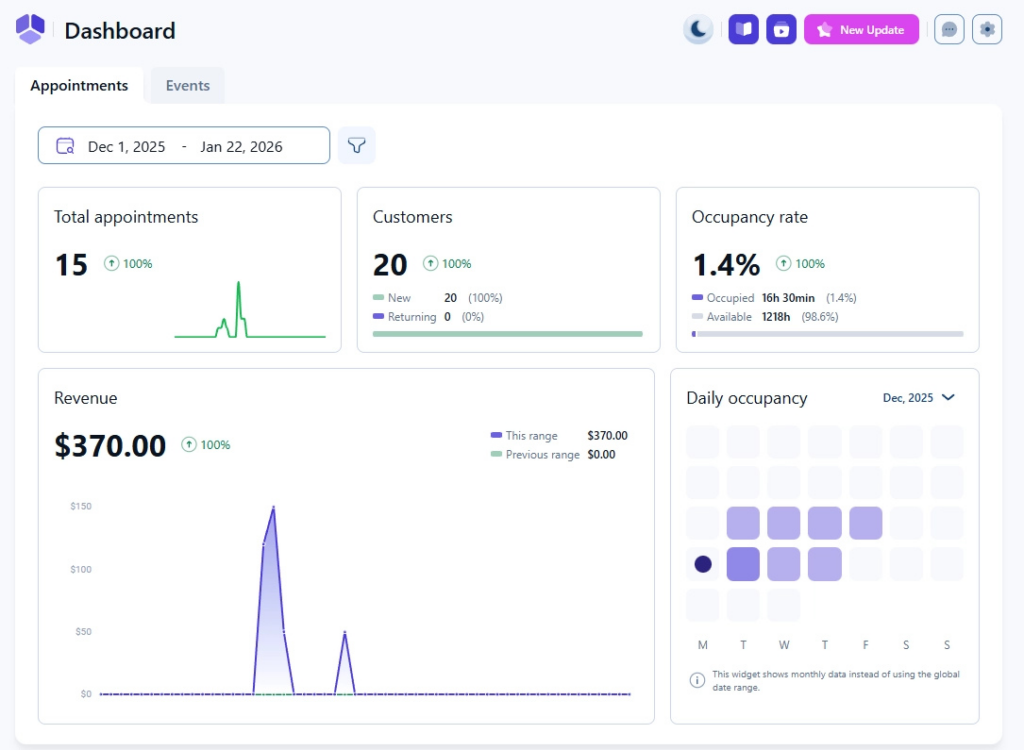
The dashboard is where business owners start, and often end, their day.
With Amelia 9.0, we redesigned it to answer one simple question quickly:
“How is my business doing right now?”
Every widget was revisited with that goal in mind. Statistics are now clearer, more focused, and easier to interpret at a glance, allowing business owners and managers to understand trends without digging through reports or switching between pages. The result is a dashboard that informs decisions instead of overwhelming users with data.
One of the most impactful additions is the new Daily Occupancy visual display. Instead of guessing which days are fully booked, underutilized, or heading toward capacity, the dashboard now makes this visible instantly. This clarity helps businesses optimize staffing, adjust availability, and plan promotions with confidence—all based on real booking behavior.
“The new interface is much more appealing to use. It has a clearer structure and is more user-friendly than the old version. The dashboard in particular looks great.”
To help teams focus their energy where it pays off most, we introduced the Top Trends widget. It highlights the highest-performing services, employees, and time slots, making it easier to double down on what’s working and spot opportunities for growth. Whether it’s refining schedules or expanding popular offerings, the insight is immediate and actionable.
For businesses running events, Amelia 9.0 also introduces a dedicated Event Dashboard. Instead of piecing together information from multiple screens, organizers now have a single overview showing attendance, bookings, and performance. This is designed to simplify event management and reduce last-minute stress.
The calendar: Your daily command center
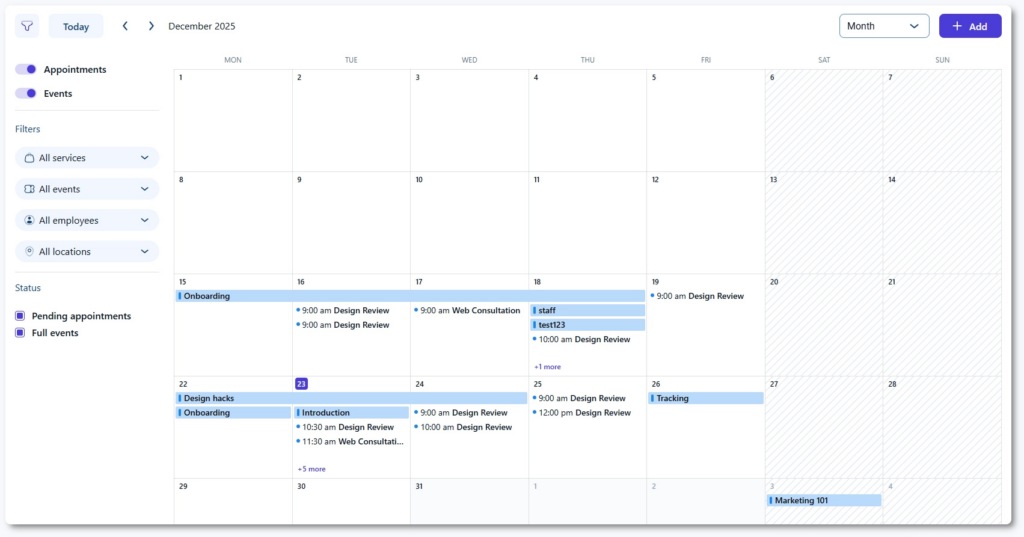
For many teams, the calendar isn’t just a view—it’s where the entire day unfolds.
In Amelia 9.0, we redesigned the calendar to be more powerful, more visual, and far more usable across devices. The goal was simple: make scheduling feel immediate and intuitive, no matter where or how you’re working.
Appointments and events can now be added directly from the calendar view, without jumping between pages or opening multiple panels. This cuts down unnecessary steps and makes it easier to react in real time, whether you’re filling a last-minute slot or booking a customer on the phone.
The calendar also received a completely new mobile experience, designed specifically for small screens. Employees and managers can now check schedules, add bookings, and stay in control while on the move, without feeling like they’re using a “reduced” version of the product.
“The interface looks great – the updated calendar view is a huge improvement. It’s much easier to navigate, add new appointments, and the layout feels very self-explanatory and user-friendly. The front-end booking calendar still looks the same, which keeps consistency for clients.”
Visibility was another major focus. Working hours and non-working hours are now clearly distinguished, reducing the risk of accidental scheduling and making availability easier to understand at a glance, especially in busy, multi-employee setups.
To support different planning styles, the calendar now offers three viewing modes: month, week, and day. Whether you’re planning weeks ahead or managing the next hour, switching between big-picture oversight and detailed daily control is instant.
Finally, quick-add popups make creating appointments or events the fastest it’s ever been. No interruptions, no context switching, just add what you need and keep moving.
Unified bookings: Everything in one seamless view
As businesses grow, bookings multiply, including appointments, packages, and events. Managing them across separate screens quickly becomes friction.
With Amelia 9.0, we brought everything together.
All booking types now live on a single, unified bookings page, giving administrators and managers a complete overview without switching tabs or breaking focus. Whether you’re tracking one-off appointments, package usage, or event registrations, everything is visible in one streamlined interface.
To support high-volume operations, the bookings table now uses infinite horizontal scrolling, making it easy to scan large datasets without constant page reloads or cluttered pagination. Information stays accessible, even as booking volume increases.
Creating and editing bookings was also fully redesigned. The new add/edit booking pages feature a cleaner, more modern layout with clearer input fields and improved structure. This reduces errors, speeds up administrative work, and makes complex bookings easier to manage, even for newer team members.
Recognizing that no two businesses manage data the same way, we introduced customizable table columns. Teams can tailor the view to show exactly what they need, from simple daily overviews to deeper operational insights, without being overwhelmed by unnecessary information.
Finally, we added manual package expiration date control, giving businesses selling bundles or time-bound packages more flexibility and precision. It’s a small detail, but one that makes package-based offerings easier to manage and more predictable.
Events & Catalog pages: Organized for growth
As businesses grow, content naturally expands, and you end up with more services, more packages, more events, and more variations. Without structure, even powerful tools can start to feel cluttered.
With Amelia 9.0, we took a step back and reorganized the core content architecture to support scale from the inside out.
The traditional Services page has been transformed into a new Catalog page, where services, packages, and related resources are grouped logically in one place. This clearer structure makes management easier, reduces visual noise, and helps teams understand how different offerings relate to one another, especially as catalogs grow over time.
We also unified the creation experience across the platform. Whether you’re adding a service, configuring a package, or setting up event components, the creation flow now follows consistent patterns and logic. This reduces the learning curve, speeds up setup, and makes the system easier to maintain as teams and offerings expand.
Another important change is the clean separation between backend organization and frontend presentation. Backend ordering no longer dictates how items appear on the frontend, giving businesses more flexibility in how they display offerings while improving stability and making customization simpler and safer.
Features & Integrations: Your control center for customization
As Amelia has grown more capable, one challenge became clear: power needs structure.
With Amelia 9.0, we introduced a new Features & Integrations page—a centralized control center designed to make extended functionality easier to understand, manage, and scale.
All features and integrations now live in one place. At a glance, users can see what’s available, what’s currently enabled, and what may require an upgrade. This clarity removes guesswork and makes it easier to configure Amelia intentionally, rather than discovering options scattered across multiple settings screens.
The settings experience itself has been simplified and refined. By reducing visual noise and grouping related options logically, the new layout feels focused instead of overwhelming, even for advanced setups. Users can configure their system with confidence, knowing they’re adjusting the right levers without unintended side effects.
This page was designed with flexibility in mind. Whether a business runs a simple appointment flow or manages multiple locations, employees, payment methods, and integrations, the Features & Integrations page provides a clear overview and a stable foundation for customization.
Employees, locations & notifications: Smarter, smoother management
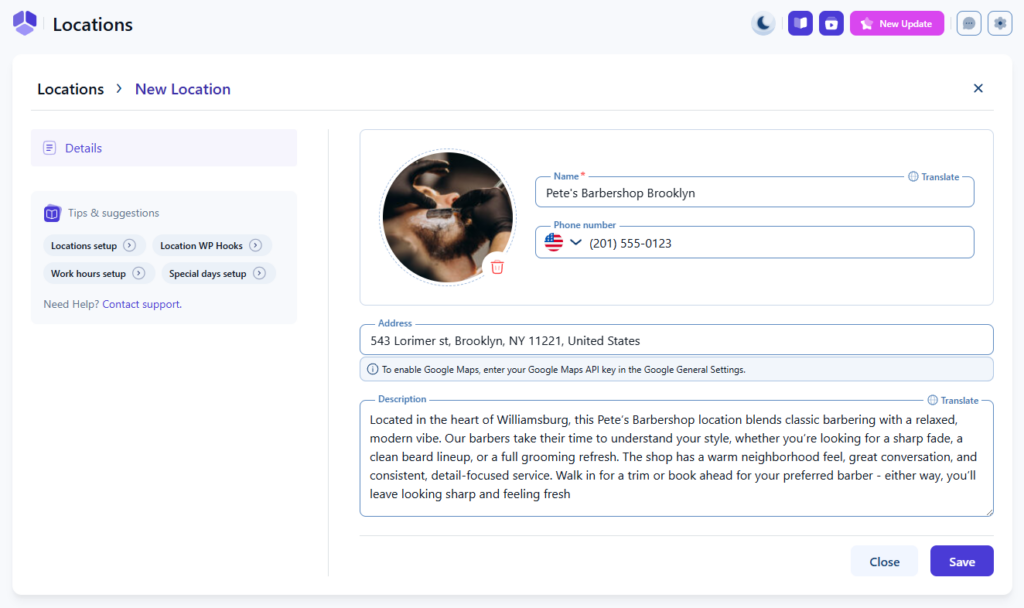
Some parts of a system are touched every day but rarely celebrated until they stop working well.
In Amelia 9.0, we gave special attention to core management areas like Employees, Locations, and Notifications. These sections may not always be in the spotlight, but they play a critical role in keeping operations running smoothly.
We simplified layouts across these pages to make editing faster and more predictable. Common actions now take fewer steps, information is easier to scan, and teams can make changes confidently without worrying about unintended side effects.
Under the surface, components were rebuilt to be more stable and consistent across the product. This reduces UI-related bugs, improves performance on different devices, and creates a more reliable experience for teams working in varied environments.
Just as importantly, workflows across these sections are now more predictable. Similar actions behave the similar way in different parts of the system, making it easier to train new team members and standardize internal processes, especially for growing teams or multi-location businesses.
Expanding the Ecosystem: The Launch of IvyForms
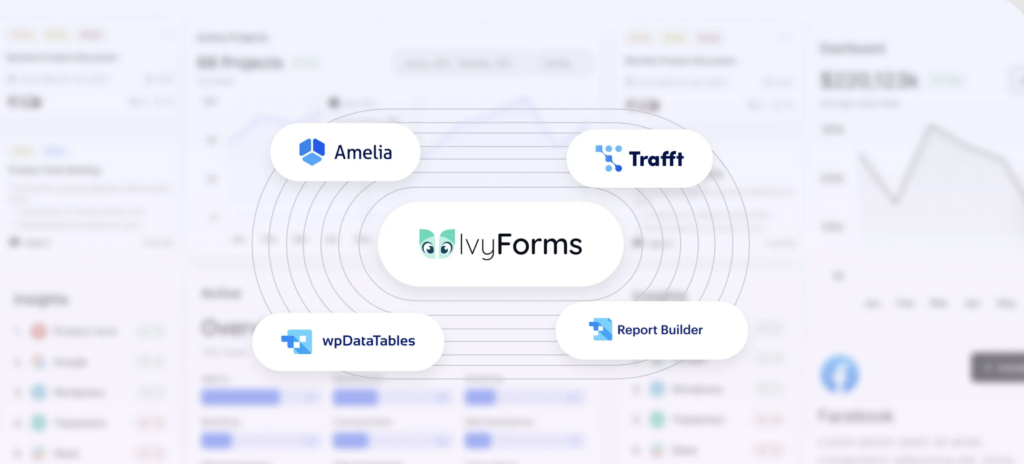
2025 was also the year we introduced something entirely new to our ecosystem: IvyForms.
Built by the same team behind Amelia, IvyForms was created to solve a problem we kept encountering again and again: the need for clean, flexible, and reliable form creation that works naturally alongside booking and data-driven workflows.
The launch of IvyForms wasn’t about replacing anything. It was about complementing Amelia and our other products, giving users better tools to collect information, connect it to their workflows, and reduce reliance on disconnected third-party solutions.
From the start, IvyForms was designed with integration in mind, including native compatibility with wpDataTables and a clear roadmap toward deeper connections with Amelia itself. Its launch marked an important step in how we think about building products: not as standalone tools, but as parts of a growing, cohesive ecosystem designed to work better together over time.
Seeing the first users adopt IvyForms, trust it early, and even purchase Pro versions shortly after launch was both humbling and motivating. It reinforced our belief that thoughtful, well-integrated tools still matter, especially when they’re built with real use cases, not just feature checklists, in mind.
Community & Events: Meeting You Around the World
2025 was a year of handshakes, high-fives, and conversations that went far beyond the screen. Across continents, we had the privilege of meeting many of you face-to-face, hearing your stories, swapping experiences, and seeing firsthand how Amelia powers your businesses.
From the bustling tech hubs of WordCamp Asia to the historic streets of Basel, WordCamp Europe, and the local energy of Gdynia, Wrocław, Athens, and Vršac, each event brought something unique. Every conversation reminded us why we do what we do: the real magic happens when people connect, share, and build together.
Moreover, we hosted a wonderful meetup for all things WordPress related in Dubai, where local developers, agencies, and business owners came together to learn, network, and laugh, proving that every community gathering feels like a family reunion.
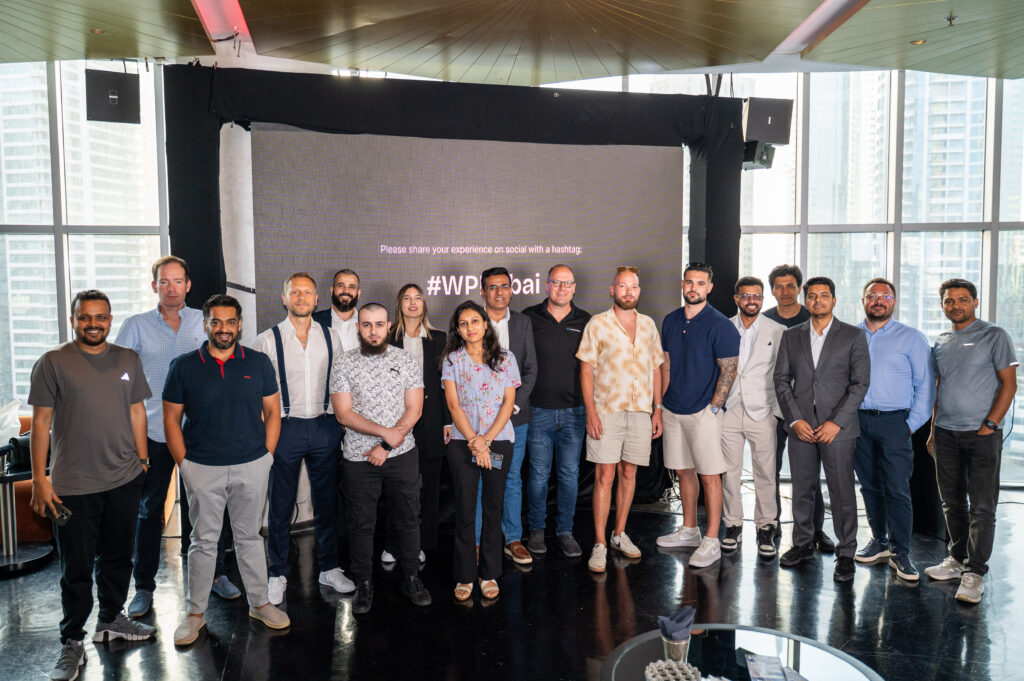
Sounds interesting? Join the Meetup group to stay updated on future events and meet fellow WordPress enthusiasts.
We also soaked in insights at the Seamless Conference, connecting with innovators who are shaping the future of payments, commerce, and customer experiences.
Meeting you in person is one of the most energizing parts of Amelia. It’s in these moments that we see our work come alive. And after a year like 2025, we can’t wait to do it all again.
Looking Ahead: What’s Coming in 2026
Even as we celebrate everything we accomplished in 2025, the Amelia team is already imagining what comes next. Our goal remains the same: make booking, scheduling, and business management smoother, smarter, and more flexible, so teams can focus on what really matters.
In 2026, we’re planning updates that will help businesses handle more complex schedules, streamline workflows, and give employees and customers more control than ever. Some of the exciting ideas on the horizon include:
- Smarter calendar integrations: full 2-way Google sync, multiple calendar connections, and simplified Outlook Calendar sync
- Elementor v4 & Divi 5 support for smoother page builder workflows
- Angie AI integration so you can use AI-powered commands to list services, customers, and employees, create new customers, and book appointments faster directly in your booking system
- Blocked time slots from the backend so admins, managers, and staff can quickly block one or multiple time slots directly from the calendar for non-bookable periods (lunch breaks, meetings, or emergencies) without changing global availability rules.
- Enhanced event management, including custom post types and improved tag handling
- First-time setup and welcome pages designed to get new users running faster
- Features that make it easier to book multiple services simultaneously (directly from the admin dashboard), tailor experiences for clients, and create workflows that scale with your business
Every planned update reflects the same principle that guided Amelia 9.0: tools that feel natural in your workflow, reduce friction, and empower teams without adding complexity.
We’re excited to continue building Amelia with you, using your feedback, your ideas, and your real-world challenges to shape the next chapter of the platform.
Closing Thoughts: Built Together, Ready for What’s Next
Looking back at 2025, it’s clear this was not a year of quick wins or surface-level changes.
It was a year of deliberate decisions: about how Amelia should evolve, how it should feel to use every day, and how it should support the businesses that rely on it. From foundational stability and performance work to major workflow improvements and the launch of Amelia 9.0, everything we built this year was guided by one question: Will this still matter years from now?
Just as importantly, we didn’t build in isolation.
Meeting many of you at WordCamps and community events around the world, hearing your feedback, and seeing how Amelia is used in real businesses continues to shape our direction more than any roadmap ever could. Those conversations, online and in person, are woven into every part of what Amelia has become.
Amelia 9.0 now represents a new baseline: a platform that is clearer, faster, more flexible, and more resilient than ever before. It’s designed to grow with you whether you’re running a small team, scaling across locations, or building complex workflows on top of Amelia.
As we move forward, our focus remains the same: thoughtful improvements, strong foundations, and a product that earns your trust through consistency and care.
Thank you for being part of this journey—for your feedback, your patience, and your belief in what Amelia can be.
We’re only getting started.

Explore topics

Read Inspiring Customer Stories
Check out how our user set Amelia for his business