



For service businesses, online payments are not just about convenience. They affect whether bookings feel committed, whether staff time gets wasted on no-shows, and how much manual follow-up happens after the appointment.
When payments are collected too late or in inconsistent ways, businesses often deal with avoidable friction: missed appointments, delayed revenue, and extra admin work.
That is where a booking system like Amelia becomes useful.
Amelia gives businesses more control over how and when they get paid, from deposits and full upfront payments to multiple payment methods and WooCommerce-based checkout flows.
Instead of treating payments like a separate task after booking, it helps make payment part of a smoother booking process.
Why Online Payments Matter More for Service Businesses
Online payments matter more for service businesses because appointments are tied to time, not inventory. A product can often be sold later. A missed appointment usually cannot.
That creates a few common risks:
- Lost revenue from missed time slots
Once an appointment time passes, that revenue opportunity is often gone. - Blocked staff time
Whether the customer shows up or not, the business has already reserved time for a therapist, stylist, trainer, consultant, or other team member. - Less predictable cash flow
When businesses rely mostly on on-site payment, revenue depends on customers arriving and paying as expected. - More admin after the service
If payment is not collected during booking, staff may need to send reminders, follow up on unpaid services, or check invoices manually.
Online payments are a way a service business protects its time, reduces friction, and creates a more predictable day-to-day operation.
Common Payment Problems Service Businesses Run Into
No-shows and last-minute cancellations
One of the most common problems is weak booking commitment.
When customers can reserve a time slot without paying anything upfront, it becomes easier for them to cancel late, forget the appointment, or simply not show up. For service businesses, that creates a direct loss because the reserved time usually cannot be sold again once the appointment window passes.
Manual follow-up after the service
Many businesses still collect payment after the appointment or service is completed.
While that may seem flexible, it often creates more work behind the scenes. Staff may need to send invoices, follow up on unpaid bookings, confirm whether payment was received, or deal with confusion around what was owed. Over time, that adds avoidable admin to an already busy workflow.
Limited payment flexibility for customers
Customers don’t all want to pay the same way. Some prefer cards, some want digital wallets, and some are more comfortable with payment methods they already use elsewhere online.
If the checkout experience feels too limited or inconvenient, that can add friction before the booking is even confirmed. In some cases, it may also reduce trust or lead to drop-off during checkout.
How Amelia Solves These Problems
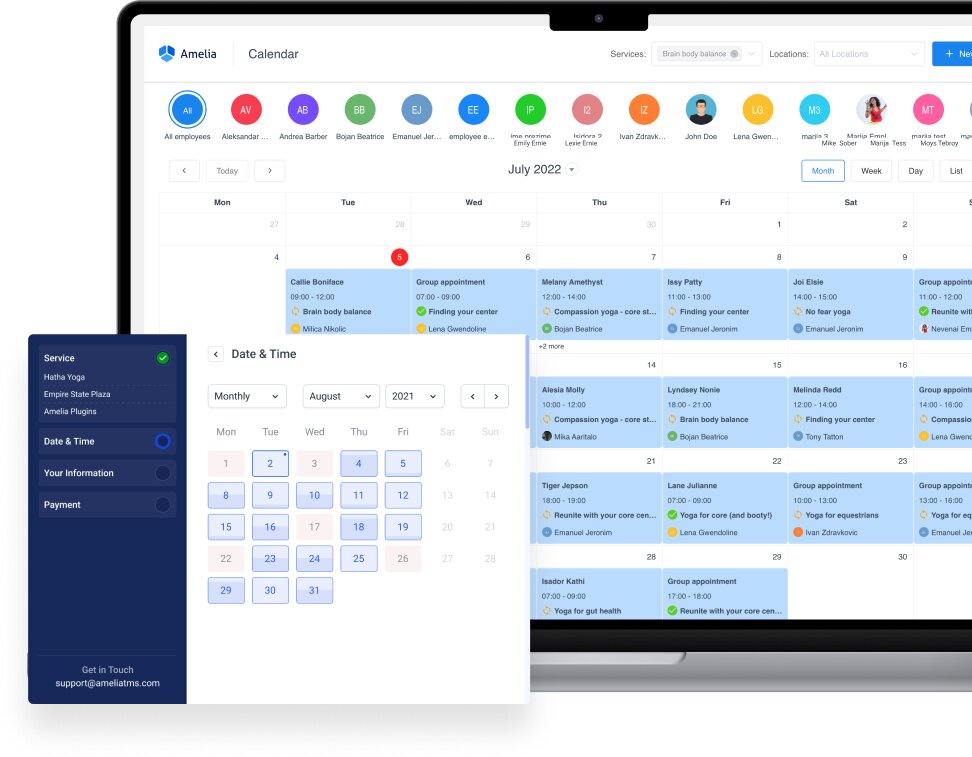
Amelia helps service businesses reduce payment-related friction by bringing payment collection closer to the booking moment.
Instead of waiting until the appointment takes place, businesses can ask for a deposit or full payment during checkout. That helps create stronger booking commitment, makes revenue more predictable, and reduces the amount of manual follow-up after the service.
It also makes payment handling easier to manage day to day. Amelia keeps booking and payment details connected, so businesses can track what was booked, what was paid, and what still needs attention in one place.
Features like deposits, full prepayment, invoicing, refunds, and centralized payment records all support a smoother payment workflow.
Require deposits or full upfront payment
Amelia gives businesses more control over when payment happens.
Instead of relying only on payment after the appointment, they can request a deposit or full upfront payment during booking. That can help reduce no-shows, improve commitment, and secure revenue earlier in the process.
Keep payment and booking records in one place
When booking and payment details are managed separately, it is easier for things to get missed. Amelia keeps them together, which makes it easier to review appointments, check payment status, and manage bookings without jumping between different systems.
Reduce admin with automated invoices and payment tracking
Manual follow-up takes time. Amelia helps reduce that burden by supporting invoices and payment tracking as part of the booking workflow. That means less back-and-forth after the service and a clearer view of what has already been paid or still needs action.
Payment Providers You Can Use with Amelia
Stripe
- Global coverage with popular cards and wallets where available.
- Good default for most online service businesses.
PayPal
- Trusted brand recognition with PayPal balance plus cards.
- Great for audiences that prefer PayPal checkout.
Square
- Strong for businesses that also take in-person payments via POS.
- Useful if you want online and on-site consistency.
Mollie
- Excellent EU coverage with local payment methods (varies by country).
- Strong choice for European businesses.
Razorpay
- Popular with businesses selling in India.
- Local payment options and compliance focused on that market.
Barion payment
- Good option for businesses serving customers in markets where Barion is already familiar and trusted.
- Useful if you want to offer a more localized payment experience instead of relying only on global gateways.
WooCommerce
For businesses already using WooCommerce, Amelia can fit into that setup instead of adding a separate payment system. Bookings can go through WooCommerce checkout, which lets businesses keep using their existing payment gateways, taxes, and order management workflow.
Amelia can also sync booking statuses with WooCommerce order statuses, which is useful for businesses that already rely on WooCommerce for day-to-day operations.
Set up Payments in Minutes
- Enable online payments in Amelia.
- Connect your provider (Stripe, PayPal, Square, Mollie, Razorpay, Barion) or use WooCommerce.
- Turn on Deposits and set amounts per service.
- Enable Invoices and add business/tax details.
- Add your cancellation & refund policy to booking notifications and checkout.
- Test a booking end-to-end, then go live.
Best Practices & Tips
- Keep deposit rules simple and visible: Show the deposit amount and refund conditions at checkout and repeat them in confirmations. Clarity cuts disputes and supports load.
- Use reminder emails & SMS to reinforce commitment: Schedule automatic reminders 24-48 hours before the appointment with a quick link to reschedule.
- Offer 2-3 most relevant payment methods for your region: Prioritize what your customers actually use to keep checkout fast and reduce drop-off.
- Train staff on deposits, reschedules, and refunds: Provide step-by-step guidance in Amelia so the team handles edge cases consistently.
- Understand your regional tax obligations: If your business collects online payments for services delivered digitally, the rules around sales tax on digital goods vary by state and can apply based on revenue or transaction thresholds alone, regardless of where your business is physically located.
Closing Thoughts
Amelia can help you turn uncertain bookings into real commitments with online payments. Clients complete checkout in seconds using Stripe, PayPal, Square, Mollie, Razorpay, Barion or your existing WooCommerce gateways, and Amelia issues invoices automatically while keeping all payment records in one place.
No matter what type of business you run, the set up is quick and easy. The result is a cleaner calendar, fewer last-minute cancellations, and a smoother experience for both your team and the clients!

Explore topics

Read Inspiring Customer Stories
Check out how our user set Amelia for his business