



“Book a haircut with Sarah at 3pm on Friday.”
That’s it. No logging into WordPress, navigating to the Amelia calendar, or filling in a booking form from the admin side. Just a sentence and an appointment appears.
This is what Amelia MCP makes possible. And if you manage bookings for a service business on WordPress, it changes the workflow in a way that’s hard to overstate.
What Is Amelia MCP?
Think of it as giving your AI assistant a direct line to your booking system.
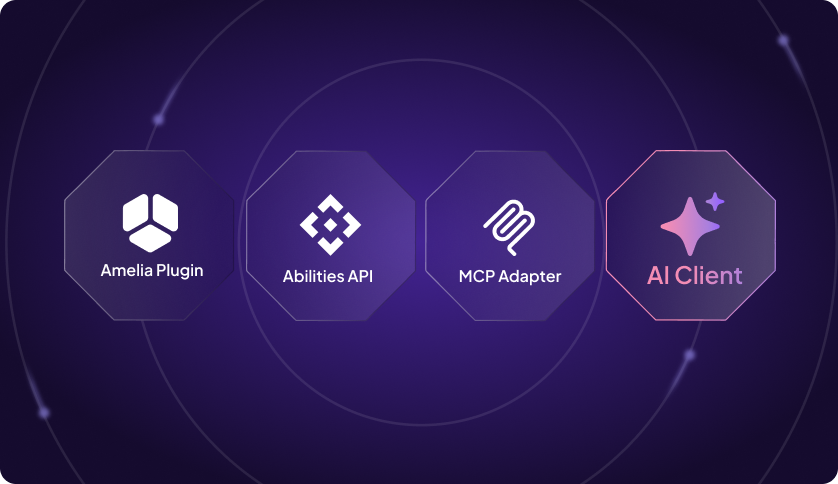
With Amelia AI booking, tools like Claude or Cursor connect to your Amelia calendar through a standardized protocol called MCP (Model Context Protocol). When you ask the AI to create a booking, it doesn’t take a screenshot or click through your admin. Instead, it calls Amelia’s booking engine directly, the same way you would, just faster.
One thing worth saying clearly: this isn’t a chatbot added to Amelia. Nothing changes inside the plugin. You bring your own AI client, point it at your site, and it handles the bookings from wherever you already work.
What Your AI Can Actually Do With Amelia
Amelia MCP has a specific set of confirmed capabilities. These are the actions your AI can take right now:
Create appointments for new or existing customers
“Book a 60-minute consultation with Dr. Chen for Maria Lopez on Tuesday at 10am.” The AI resolves the service, the employee, and the customer and creates the appointment with Amelia’s normal booking logic applied. Availability is checked. Conflicts are prevented. The booking appears in the calendar.
This works for both new and existing customers. If Maria is already in the system, the AI finds her. If she’s new, the AI can add her first.
List services, employees, and customers
Ask the AI to show you all services offered by a specific employee, list employees available on a given day, or pull up a customer’s record. Useful for answering quick questions without opening the WordPress admin.
Add new customers
“Add a new customer: James Carter, [email protected], 0712345678.” Done. The record is created in Amelia and ready to use for future bookings.
Create events and add participants
For businesses running events, the AI can create them, list them, and even enroll a customer in an event with a single command. “Sign Maria up for the Wednesday yoga class.” The AI finds the event and registers the customer.
How It Works Behind the Scenes
Amelia registers its booking capabilities in the WordPress Abilities API, which is a machine-readable registry bundled in WordPress 6.9. A WordPress MCP Adapter then bridges those capabilities to the Model Context Protocol.
When you ask your AI assistant to create a booking, it sends an authenticated request to the adapter, which calls the matching Amelia ability. The appointment is created through Amelia’s own booking engine, the same logic that handles bookings from your front-end booking form. Double-booking prevention, availability rules, service duration — all of it still applies.
Nothing changes about how Amelia works. The MCP integration only adds a new way for AI clients to reach the same underlying actions.
How to Set It Up
Amelia MCP requires the WordPress MCP Adapter, which is a separate plugin that bridges the Abilities API with the Model Context Protocol. It’s a one-time setup:
- Install and configure the WordPress MCP Adapter plugin.
- Connect your AI client (Claude Desktop, Cursor, or Claude Code) to the adapter endpoint using a WordPress admin account.
Once connected, your AI client can discover Amelia’s capabilities automatically. For full setup instructions, check out our documentation guide.
Who Benefits Most From This
Amelia MCP is most valuable for WordPress developers and agencies managing bookings on behalf of clients, businesses with high booking volume where manual admin entry slows things down, and teams using AI-first workflows who want their booking system to participate in the same conversation.
If you run a single service business and your customers book through the front-end form, MCP is more of a power feature than a daily necessity. But if you’re logging into WordPress to create bookings manually, handle group enrollments, or add customers on a regular basis, this changes the workflow.
Frequently Asked Questions
Does Amelia MCP change how customers book appointments?
No. The customer-facing booking experience is the same. MCP is for admin-side actions, which means creating bookings on behalf of customers, not for customers booking themselves.
Does the AI skip Amelia’s booking rules?
No. Every AI action goes through Amelia’s normal booking logic — availability checks, service duration, employee assignment. The AI works within your existing rules.
What AI clients are compatible?
Any MCP-compatible client, such as Claude Desktop, Cursor, and Claude Code, is available through AI-assisted integrations in Amelia. The AI client connects to the WordPress MCP Adapter endpoint using an authenticated WordPress account.

Explore topics

Read Inspiring Customer Stories
Check out how our user set Amelia for his business