



The best AI plugins for WordPress are the WordPress plugins that pair machine learning or a large language model with a specific admin task, so the task finishes without a person doing it by hand.
Content plugins draft text inside the block editor, SEO plugins suggest titles and schema, and a newer category connects through the Model Context Protocol so an outside assistant can operate the WordPress admin on its own.
Anthropic’s own December 2025 announcement puts the number of active public MCP servers at more than 10,000, spanning developer tools and enterprise deployments, the same protocol WordPress plugins now use to expose their actions to an outside assistant.
What are AI plugins for WordPress
AI plugins for WordPress are WordPress plugins that use machine learning or large language models to complete a task an editor would otherwise do by hand.
The category spans content generation, SEO, chat support, design, forms, and workflow automation, and a newer group lets an outside AI assistant operate the WordPress admin directly instead of only suggesting text inside it.
A standard WordPress plugin runs the same logic every time it fires.
An AI plugin sends part of the request to a model, so the output changes based on the prompt, the site’s own content, or the assistant’s own reasoning.
Key figures:
- WordPress runs on 41.2% of all websites worldwide as of July 2026 (W3Techs)
- The WordPress Abilities API, the foundation most AI-connected plugins now build on, shipped with WordPress 6.9 in November 2025 (Make WordPress Core)
- Anthropic open-sourced the Model Context Protocol, the standard behind AI-assistant control of WordPress, on November 25, 2024 (Anthropic)
Those two dates matter because they mark the split between a plugin that writes a paragraph for a human and one an assistant can operate on its own.
How do AI plugins for WordPress work
Most AI plugins for WordPress work by sending a prompt built from the editor’s own input to a language model, then inserting the response into a post, a meta field, or a chat window.
A smaller group works the other way around: the plugin exposes its own actions so an AI assistant can call them directly, without a human clicking through the admin.
What is the WordPress Abilities API
The WordPress Abilities API is a core system that lets a plugin register what it can do in a machine-readable format, so an outside tool can discover the action instead of guessing at it.
- Each ability carries its own input schema, permission check, and execution logic
- Abilities are exposed automatically through REST endpoints under the wp-abilities/v1 namespace
- The same registry works across WordPress core, themes, and plugins
Make WordPress Core confirms the Abilities API landed in WordPress 6.9, and WordPress 7.0 added a client-side counterpart in March 2026.
What is the Model Context Protocol
Anthropic released the Model Context Protocol as an open standard on November 25, 2024, so an AI assistant could connect to outside tools without a custom integration for each one.
How the connection runs:
- An MCP host, such as Claude Desktop, holds the conversation
- An MCP server, published by the plugin or by WordPress itself, exposes a fixed list of tools
- The host calls a tool only when the conversation needs it, and the plugin’s own permission check still applies
wpDataTables, Amelia, and IvyForms each publish their own MCP server on top of this standard, which is why an assistant can build a table on one site and check a booking calendar on another without separate code.
| Path | Where it runs | Who can trigger it | Example |
|---|---|---|---|
| In-editor AI feature | Inside the WordPress admin screen | The logged-in user, one click at a time | Jetpack AI drafting a paragraph |
| In-admin AI assistant | A sidebar or chat panel inside wp-admin | The logged-in user, through natural language | Angie managing IvyForms fields |
| External MCP client | Outside WordPress, on the user’s own computer | An authenticated administrator account | Claude Desktop building a wpDataTables table |
Which AI plugins let an assistant control the WordPress admin directly
Easy MCP AI, wpDataTables, Amelia, and IvyForms each expose their own set of actions so a connected assistant can work the WordPress admin instead of only drafting text inside it.
Each one runs its own MCP server under a separate endpoint, so a connected assistant sees four distinct toolsets rather than one shared WordPress connection.
| Plugin | What it exposes | Delete actions | Admin role required |
|---|---|---|---|
| Easy MCP AI | 242 tools across WordPress, WooCommerce, analytics, SEO | Varies by connected tool | Administrator |
| wpDataTables | 23 actions covering tables, charts, media, and settings | None, no delete ability exists | Administrator (manage_options) |
| Amelia | Services, employees, customers, appointments, and events | Cancel a booking, not a hard delete | Depends on the connected WordPress user’s own capabilities |
| IvyForms | Forms, fields, entries, notifications, templates | None, no delete ability exists | Administrator (manage_options) |
Shared limit: none of the four expose a free-standing delete action, which keeps an assistant from wiping a table, a form, or a booking on its own.
wpDataTables
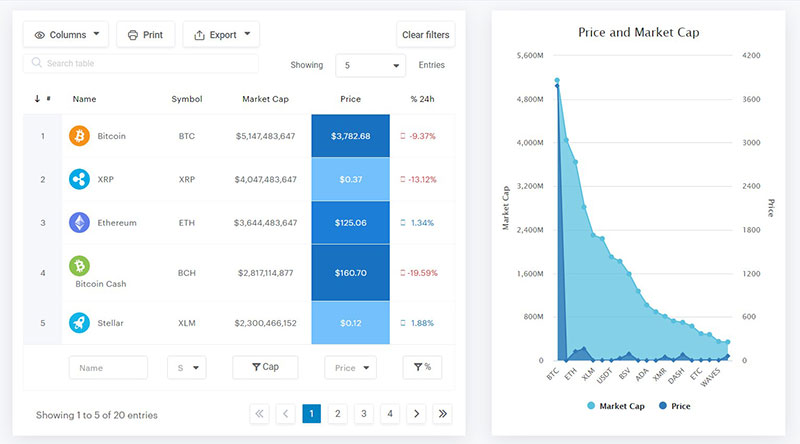
wpDataTables connects through its own MCP server built on the WordPress Abilities API, and every one of its 23 actions requires the manage_options capability.
Nothing in the action list deletes a table, a chart, or a media file, the same no-delete pattern IvyForms follows below.
- Imports data from CSV, Excel, JSON, XML, and Google Sheets into a new table
- Builds tables from SELECT-only SQL queries, with no write access to the database
- Edits row-level data only on Simple tables, where the rows live inside the table’s own configuration
- Gates a handful of actions, including the Google Sheets import and the Highcharts and ApexCharts engines, behind a Starter or Standard license
Amelia
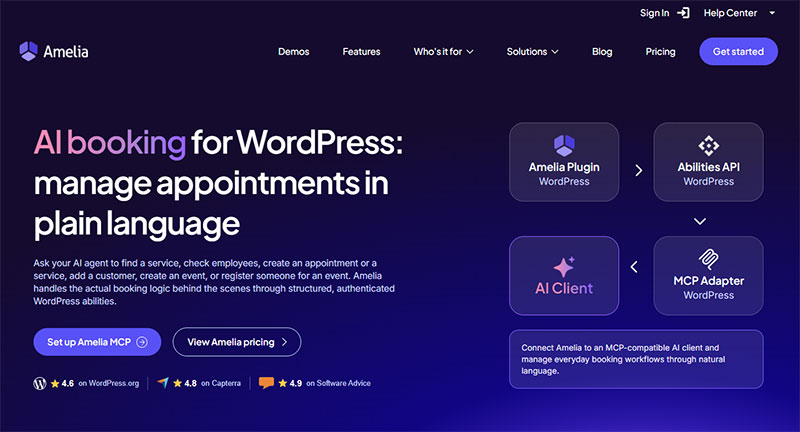
Amelia connects to an AI assistant through its own MCP server, turning the same actions a receptionist runs by hand into tools an assistant calls directly.
- Lists services, employees, customers, appointments, and events, and creates or updates most of them on request
- Requires a WordPress application password plus the @automattic/mcp-wordpress-remote package on the client side, which is why the setup needs Node.js on the machine running the assistant
- Skips customer notification emails on AI-created bookings, and falls back to default color, visibility, and deposit settings
The result works as an AI booking assistant for the site, and Amelia’s own documentation confirms the integration ships in every license plan with no separate toggle to enable.
IvyForms
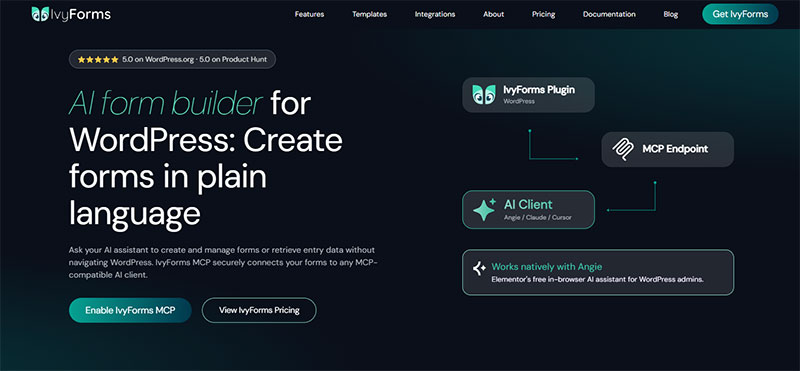
IvyForms ships its MCP server off by default, and an administrator has to switch it on under Settings before any assistant can see the plugin’s tools.
Once enabled, the same connection turns IvyForms into an AI-powered form builder, letting Angie, Elementor’s free AI agent, or an external client such as Claude Desktop manage forms, fields, and entries through natural language.
What stays hidden:
- Entry values submitted through the form
- IP addresses and user agents
- Stored secrets, including API keys and SMTP passwords
One MCP connection and a much bigger WordPress workflowAmelia doesn’t have to work alone. IvyForms and wpDataTables can also expose AI-ready capabilities, opening the door to workflows that move beyond a single plugin. The bigger idea?
All accessible to your AI workflow through the same MCP-based WordPress architecture. |
Easy MCP AI
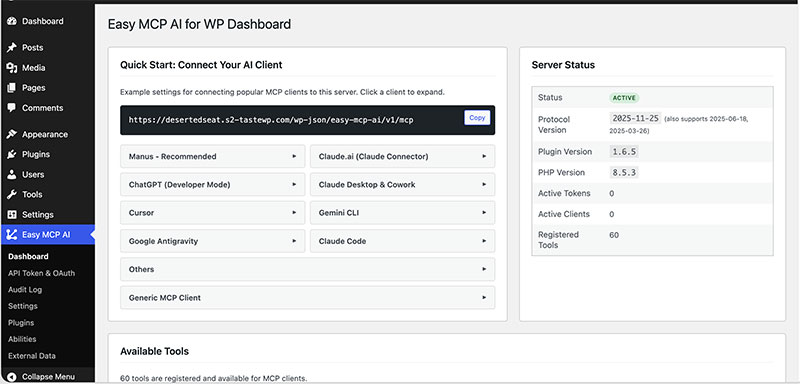
Easy MCP AI’s own documentation lists 242 tools in one free plugin (Easy MCP AI, 2026).
- WordPress core and WooCommerce management
- Site analytics and reporting
- SEO tasks alongside Semrush and DataForSEO data
Widest reach, least specialization: the plugin covers more ground than the other three combined, which fits a site running one assistant across several unrelated tools rather than a single workflow.
What are the best AI content generation plugins for WordPress
Jetpack AI, built by Automattic, Bertha AI, and AI Engine lead the AI content generator category, each drafting posts, product copy, or images directly inside the WordPress editor. For appointment-based businesses, one option goes a step further and lets you generate a booking site with AI, producing a themed WordPress site with services and staff already configured.
The category exists because writing takes time, and an AI content generator turns a rough outline into a publishable first draft in one pass.
| Plugin | Core job | Pricing model | Best for |
|---|---|---|---|
| Jetpack AI | Post drafting, title and excerpt generation | Freemium, bundled with Jetpack | Sites already running Jetpack |
| Bertha AI | Copywriting inside the block editor | Subscription | Marketing and landing page copy |
| AI Engine | Content drafting plus an image generator | Freemium | Bloggers wanting one all-purpose tool |
| WooAI | Product description generation | Freemium | WooCommerce catalogs |
What to check before installing: whether the plugin sends site content to a third-party model over the open internet, since that is the point where a site’s own data leaves WordPress.
What are the best AI SEO plugins for WordPress
Rank Math and Yoast SEO are the two AI SEO plugins WordPress users install most, and both now generate titles, meta descriptions, and schema suggestions instead of only checking them.
Yoast’s own WordPress.org listing describes the plugin as SEO “with built-in AI,” and its 2026 feature set adds schema aggregation and llms.txt management aimed at AI-driven search (Yoast, 2026).
Rank Math: generates SEO titles and meta descriptions from the page content, then scores the result against the target keyword.
Yoast SEO: layers AI-assisted content analysis on top of its existing readability and keyphrase checks, alongside the schema and llms.txt tools built for AI crawlers.
| Plugin | AI feature | Pricing model | Best for |
|---|---|---|---|
| Yoast SEO | AI content analysis, schema for AI agents, llms.txt control | Freemium | Sites optimizing for search engines and AI crawlers |
| Rank Math | AI title and meta generation, content score | Freemium | An all-in-one SEO dashboard |
| AIOSEO | AI title and meta description generation | Freemium | A simpler settings screen |
| GetGenie | AI content plus SEO scoring in one workflow | Subscription | Teams writing SEO content at volume |
What are the best AI chatbot plugins for WordPress
Tidio and MxChat are the two AI chatbot plugins WordPress site owners turn to most often for automated customer support.
Tidio runs its own Lyro AI agent for repeat questions, while MxChat builds its answers from a site’s own content through retrieval-augmented generation.
Tidio
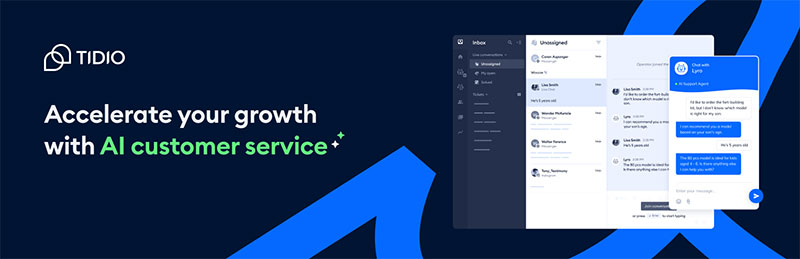
Pros: ready-made live chat widget, a Lyro AI agent that answers routine questions without a human operator, works across WordPress and WooCommerce out of the box.
Cons: requires linking a Tidio account to run, and deeper AI customization sits on paid tiers.
MxChat
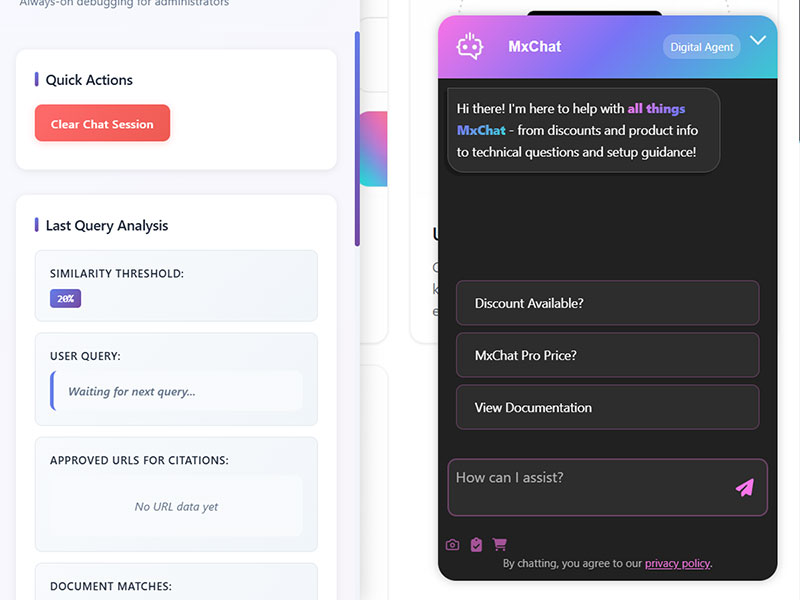
Pros: answers are drawn from the site’s own pages through retrieval-augmented generation, supports more than one underlying AI model, built specifically for support rather than general chat.
Cons: narrower in scope than a full automation suite, and answer quality depends on how complete the site’s own content already is.
What are the best AI design plugins for WordPress
Elementor’s native AI layer reaches more installs than any standalone design plugin, since Elementor itself runs on roughly 31% of WordPress sites, according to W3Techs 2026 data.
Elementor AI and Divi AI are the two page-builder-native options, generating layouts, copy, and images without leaving the visual builder.
Elementor also ships Angie, its own free AI agent, which can call tools from other plugins, including IvyForms, directly inside the WordPress admin.
| Plugin | Runs inside | AI capability | Pricing model |
|---|---|---|---|
| Elementor AI | Elementor page builder | Layout, copy, and image suggestions | Freemium, deeper features on paid tiers |
| Divi AI | Divi theme and builder, by Elegant Themes | Copywriting and image generation in the Visual Builder | Bundled with a Divi or Elegant Themes membership |
| Angie | WordPress admin, alongside any active plugin | Calls other plugins’ registered tools by voice or text prompt | Free, currently in beta |
How much do AI plugins for WordPress cost
Pricing splits along the same lines as function: content and SEO plugins charge for higher AI usage limits, while the newer site-control plugins stay free at the connection layer itself.
What stays free at the connection level:
- Amelia’s AI assistant integration ships in every license plan, based on Amelia’s own documentation
- wpDataTables connects at no extra cost, though a handful of its 23 actions still require a Starter or Standard license
- IvyForms charges nothing extra for the MCP toggle itself, only for whichever IvyForms plan is already active
The pattern holds across the category: connecting an assistant rarely costs more, using it at scale sometimes does.
| Category | Free tier | Paid tier unlocks |
|---|---|---|
| Content generation | Limited monthly AI requests | Higher word counts, more output formats |
| SEO | Basic AI title and meta suggestions | Bulk generation, deeper schema controls |
| Chat support | Capped monthly AI conversations | Unlimited conversations, custom training data |
| Full site control (MCP) | Connection and most actions, per plugin | License-gated actions only, not the connection itself |
How do you connect an AI assistant to a WordPress plugin
Connecting an AI assistant to a WordPress plugin runs through the same core mechanism regardless of which plugin sits on the other end: a WordPress application password.
WordPress introduced application passwords as a core feature in version 5.6, released in December 2020, specifically so a third-party tool could authenticate without the site’s main login password.
- Confirm the WordPress site runs a version that supports the plugin’s MCP server, typically 6.9 or newer for Abilities API-based integrations
- Open the WordPress user profile that will authorize the connection and generate an application password
- Install an MCP-compatible client, such as Claude Desktop or Claude Code, on the same computer
- Add the plugin’s MCP endpoint, the WordPress username, and the application password to the client’s configuration
- Restart the client and confirm the plugin’s tools appear in its available tools list
- Test a read-only request first, then move to a write action only once that succeeds
Skipping the read-only test is the most common point of failure, since a malformed endpoint or an expired password usually shows up on the first call rather than the tenth.
What security risks come with AI plugins for WordPress
Patchstack’s 2025 State of WordPress Security report found that 96% of new vulnerabilities disclosed in 2024 originated in plugins, not in WordPress core.
An AI plugin that can write to the admin carries that same exposure, plus one more: the credential an assistant uses is often an application password tied to a full administrator account.
Where the risk concentrates:
- An unrevoked application password left active after a project ends
- An administrator account used for the AI connection instead of a scoped one
- Site content sent to a third-party model endpoint outside the WordPress database
What most integrations already limit: wpDataTables and IvyForms both block every delete action by design, and Amelia’s booking cancellation stops short of removing a record outright.
None of that removes the underlying exposure. It only narrows what a compromised credential can do once it is inside the admin.
Amelia exposes a focused set of booking actions over MCP — list, create, reschedule, cancel — with no hard-delete and your own role permissions enforced. It ships in every Amelia plan, no toggle to flip.
When do AI plugins not apply
AI plugins for WordPress stop being a good fit once the cost of a wrong or ungrounded answer outweighs the time an assistant saves.
Three conditions cover most of the exceptions: regulated content, outdated infrastructure, and unreviewed publishing.
| Condition | Why it fails | What to do instead |
|---|---|---|
| Medical, legal, or financial claims | A model states an incorrect figure with the same confidence as a correct one | Draft with AI, verify every claim against a primary source before publishing |
| WordPress sites on versions older than 6.9 | No Abilities API, so an assistant has no standardized way to discover plugin actions | Update WordPress first, or rely on a plugin’s own custom REST setup where one exists |
| Content published without human review | Google’s own guidance treats content made mainly to attract search visits as a warning sign, not a pass | Route AI drafts through the same editorial review as any other draft |
A site that cannot grant an administrator-level credential to an outside tool, for internal policy or compliance reasons, is not a candidate for the MCP-based plugins at all, regardless of which one it picks.
FAQ on the best AI plugins for WordPress
Is ChatGPT a WordPress plugin?
ChatGPT itself is not a WordPress plugin. It is a general-purpose AI assistant built by OpenAI. WordPress plugins such as Jetpack AI and AI Engine call its underlying model to draft content inside the editor.
Can you run more than one AI plugin on the same WordPress site?
Yes. A site commonly runs an AI SEO plugin, an AI chatbot, and an AI content generator together, since each targets a different admin task. Conflicts are rare unless two plugins edit the same field.
Do AI plugins slow down a WordPress site?
An AI plugin itself adds little load, since the actual generation happens on the model provider’s server, not on WordPress hosting. Site speed drops only if the plugin loads heavy JavaScript in the admin or queues too many API calls.
Can an AI plugin write content in a language other than English?
Most AI content generators support multiple languages, since the underlying large language model is multilingual by default. Quality varies by language pair, and a plugin’s settings screen usually lists which languages it has actually tested.
Does connecting an MCP-based plugin require installing Node.js?
Some do. Amelia’s own MCP setup runs through an npx command, which needs Node.js installed on the computer running the AI client. Plugins with a built-in MCP server, such as wpDataTables, register directly with WordPress and skip that requirement.
Can an outside AI assistant see private form or customer data through MCP?
Not in full. IvyForms masks entry values, IP addresses, and user agents in its MCP responses, and wpDataTables limits row-level editing to Simple tables only. An assistant sees structure and summaries more often than raw personal data.
What happens to an AI plugin’s access if you revoke its application password?
The connection stops immediately. WordPress treats each application password as a separate credential, so revoking the one an assistant uses ends its access without touching the site’s main login or any other connected tool.
Do AI page builders work only inside Elementor or Divi, or with any theme?
Elementor AI and Divi AI work only inside their own builder, since both generate markup the builder itself renders. A theme-agnostic option like AI Engine or Jetpack AI drafts plain content instead, which works with any WordPress theme.
Can an AI plugin run without sending data to an outside model?
Only a small minority do. Most AI plugins for WordPress route the prompt to a third-party model over the internet, since running a large language model locally needs more computing power than typical WordPress hosting provides.
Is an AI-generated product description safe to publish without editing?
Not reliably. WooAI and similar plugins draft a description from the product title and attributes, but factual errors slip in when the source data is thin. A quick human check before publishing catches most of them.
What Should You Install First From the Best AI Plugins for WordPress?
The best AI plugins for WordPress to install first are an AI SEO plugin and an AI content generator, since ranking and drafting gains compound faster than chatbot automation or a full site-control layer on a site with none installed yet.
The rollout runs in three stages:
- AI SEO plugin first
- AI content generator second, since it compounds with SEO
- Full site-control MCP plugin last, once administrator trust is established
Following that order delays customer support automation and full admin control, so support questions still reach a human inbox longer.
WordPress’s share of the web layered against Elementor’s share of WordPress installs puts Elementor-based sites at roughly 13% of all websites worldwide, a scale no single-category plugin reaches alone.
Site owners past that stage move next into comparing individual MCP-based booking and data plugins.

Explore topics

Read Inspiring Customer Stories
Check out how our user set Amelia for his business