 Spring Deals Are in Full Bloom




 Web Developers and Agencies
  Beauty and Spa Salons, Barbershops
  Yoga Instructors and Studios
  Doctors and Healthcare
  Event agencies, hosts and organizers
  Gyms and Personal Trainers
  Automotive and Car Repairs
  Photographers and Studios
  Coaching and Consulting
  Event Agencies and Hosts
  Appointment Booking
  Scheduling for Your Business
  Booking for WooCommerce Stores
  See How Others Use Amelia

Explore topics
Amelia 9.3 Update Brings More Control to Scheduling and Events
Group Bookings vs. Individual Appointments: Which Model Fits Your Business?
Amelia vs Start Booking: Which Booking Solution Is Better for WordPress Businesses?
Amelia Q1 2026 Update: Improvements, Integrations, and What’s Coming Next
Recurring Appointments Guide: Streamline Your Scheduling & Boost Performance

Read Inspiring Customer Stories
Check out how our user set Amelia for his business
Read the full story
If you’ve ever managed an event from start to finish, you already know how quickly things get messy. What starts as a simple idea, pick a date, sell tickets, welcome attendees, turns into a juggling act of tools, spreadsheets, email threads, and last-minute fixes.
Booking, ticketing, payments, attendee tracking, reminders, and on-site check-ins all demand attention. And when even one of those pieces isn’t handled properly, the cracks show fast. Attendees get confused, organizers scramble, and the event experience suffers on both sides.
That’s where Amelia fits in. Instead of adding yet another tool to the stack, it brings the core parts of event booking and event management into one system. A system that’s actually usable, without overwhelming you or your team.
Why Event Management Gets Complicated Fast
Most event management problems don’t come from one big mistake. They come from too many small tools trying to work together.
– One platform handles ticket sales.
– Another manages calendars.
– Payment handling goes somewhere else.
– Attendee lists are exported, updated, re-uploaded, and emailed around.
At first, this setup feels flexible. But as soon as events scale, more attendees, multiple sessions, limited capacity, and staff roles, it becomes fragile. A missed update or a delayed notification can create confusion for attendees and unnecessary stress for organizers.
The real challenge isn’t running events. It’s keeping everything in sync.
How Good Event Management Looks in Practice
Good event management isn’t about having multiple tools to handle every aspect. It’s about having fewer things to think about.
When everything works the way it should, creating an event is straightforward. Details live in one place. Capacity limits are clear. Payments are handled automatically. Attendees know what they’ve booked, when to show up, and what to expect.
On the organizer side, you’re not jumping between tools to check numbers or confirm details. You can see bookings as they come in, track attendance, and make updates without worrying about breaking something else in the process.
In practice, this means less time managing systems and more time focusing on the event itself. Whether you’re running a single workshop or coordinating multiple events at once, the goal stays the same: everything stays connected, and nothing falls through the cracks.
This is the standard Amelia is built around. The kind you only notice after dealing with tools that make simple things harder than they need to be.
Creating and Displaying Events Without Extra Tools
One of the biggest headaches in event management is trying to get your events visible without manually filling in your calendar. With Amelia, you can create an event once, set the details, and have it appear on your website automatically. No hopping between multiple plugins, or copying info into separate calendars.
Calendar & event list
Amelia’s calendar makes your events easy to browse. Visitors can see dates, times, and essential details at a glance, and can book directly without navigating away. Behind the scenes, the event list acts like a command center for organizers. You can sort and filter events, track bookings, and keep an eye on capacities; all from one dashboard.
Syncing with Google, Outlook, and Apple Calendar allows you, your team, and your attendees to add events directly to the appropriate calendar. This keeps everyone on the same page without manual updates, double-bookings, or extra plugins. Exclaimer is one option worth looking at for managing this across a team.
Moreover, shortcodes make it easy to embed an event list anywhere on your website, ensuring optimal visibility while keeping your layout uncluttered.
Selling Tickets and Managing Capacity Automatically
Selling and distributing tickets is often seen as one of the biggest challenges of event management. So, just imagine how it would be if a single tool could take this stress away.
With Amelia, you can create multiple ticket types: general admission, VIP, and early-bird, each with its own pricing and capacity limits. The system tracks availability automatically, removing sold-out options without you lifting a finger.
Ticketing
Tickets for events don’t have to be complicated. With Amelia, you can set custom pricing based on ticket types, capacity, or special conditions, giving you full control over your sales.
Capacity
Once you set a limit for each ticket type or event, Amelia automatically enforces it. Sold-out tickets disappear from the booking options, preventing overbooking and last-minute headaches.
Waitlists
If an event fills up, attendees can join a waiting list. When spots open, they’re notified automatically, keeping potential customers engaged and reducing lost revenue.
Notifications & reminders
Amelia keeps attendees informed with automated emails and SMS messages. Bookings are confirmed instantly, updates are delivered when details change, and reminders go out before the event — cutting down on no-shows.
Payment Management Made Simple
Payments are often where event workflows start to break down. Separate tools, manual checks, and mismatched booking statuses will create confusion. You may think that keeping a spreadsheet will make a difference, but the reality is that it likely won’t.
On the other hand, Amelia keeps payments tightly connected to the booking process, so everything stays aligned from the moment someone purchases a ticket. It integrates with Square, Stripe, Mollie, PayPal, Razorpay, and Barion, so attendees can pay using a platform they prefer.

Payment status is updated automatically, making it easy to see which transactions are finalized and which are pending. No switching between dashboards or manual entries.
Managing Attendees from Booking to Check-In
Once bookings are confirmed and payments are handled, managing attendees becomes the next challenge. This is usually where lists get exported, reworked, and passed around, especially as the event date gets closer. But what if you didn’t have to hire someone just to cross names off a spreadsheet or double-check who’s allowed in?
Attendee list
Amelia gives you a clear, up-to-date attendee list for each event. Every booking appears automatically, and you can sort alphabetically or by their last visit. There’s no need to export files or manually reconcile information as the event approaches.
Attendee management
Each attendee is linked directly to their booking, so updates stay consistent across the system. You can quickly review ticket types, payment status, and booking details without jumping between tools or emails.
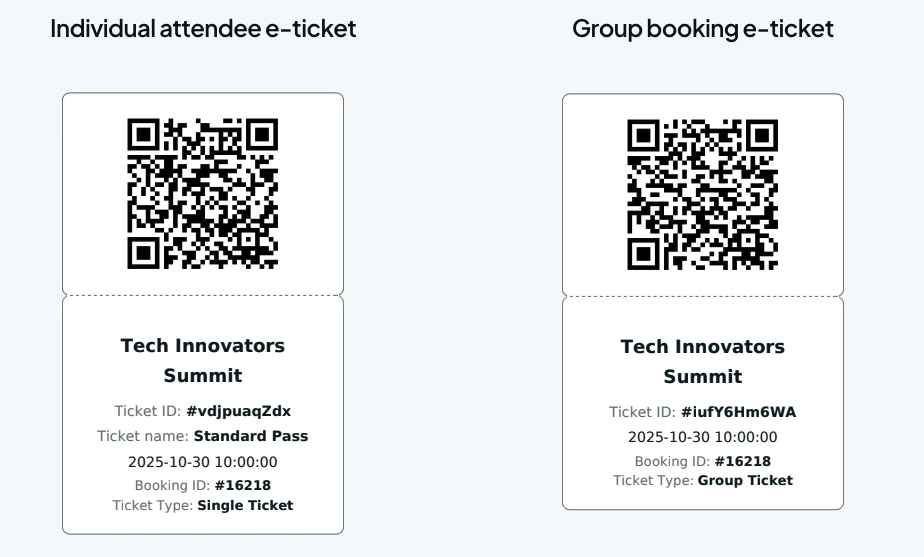
E-tickets QR codes
Amelia provides each attendee with a unique QR code for their ticket. On the day of the event, these codes can be scanned for fast, secure check-in, making entry smooth for attendees and stress-free for organizers.
Organizing Teams and Staff Roles
Events are rarely a one-person job. As soon as staff and organizers get involved, coordination becomes just as important as scheduling the event itself. Amelia keeps team management structured without turning it into another system you have to babysit.
You can manage employee schedules, availability, workloads, and contact information in one place. This makes it easier to plan events realistically and avoid overloading your team, especially when you’re running multiple events at the same time.
For each event, you can assign employees as staff members or organizers. When calendar integrations are enabled, organizers are automatically added to Google, Apple, or Outlook calendars, keeping everyone aligned without manual updates or follow-ups.
Amelia also includes four built-in user roles:
- Admin
- Manager
- Employee
- Customer
Each role comes with clearly defined permissions, so people only see and manage what they’re supposed to.
Moreover, employees also get access to their own panel, where they can:
- Manage appointments and events
- Set working hours, availability, days off, and special schedules
- Adjust service pricing and capacity
This setup reduces back-and-forth, keeps responsibilities clear, and helps teams stay productive without relying on constant check-ins.
Do You Need Multiple Tools to Run Events?
Most event planners don’t choose to use five different tools. It usually happens over time, and not because they want to, but because they need to. Each tool solves a specific problem, but together they create more work than expected. Information gets spread across systems, updates take longer, and simple changes require extra checks just to make sure nothing breaks.
The short answer: no, you don’t have to use multiple tools, but rather choose the one that can handle the complexities of event booking and event management. With the right setup, bookings, ticketing, payments, attendee tracking, and team coordination can all live in one place, letting you focus on running the event instead of managing the tools.
Final Verdict: Can Amelia Handle Events End-to-End?
Yes, Amelia can handle events from start to finish without forcing you to rely on multiple tools. It brings all the moving parts together in a way that feels seamless, so you don’t have to spend time juggling spreadsheets.
Amelia gives you clarity and control over your events, so nothing slips through the cracks. Don’t just take our word for it — sign up today and see how much simpler managing events can be.
 Back to Previous


Read Inspiring Customer Stories
Check out how our user set Amelia for his business
Read the full story