 Spring Deals Are in Full Bloom




 Web Developers and Agencies
  Beauty and Spa Salons, Barbershops
  Yoga Instructors and Studios
  Doctors and Healthcare
  Event agencies, hosts and organizers
  Gyms and Personal Trainers
  Automotive and Car Repairs
  Photographers and Studios
  Coaching and Consulting
  Event Agencies and Hosts
  Appointment Booking
  Scheduling for Your Business
  Booking for WooCommerce Stores
  See How Others Use Amelia

Explore topics
Amelia 9.3 Update Brings More Control to Scheduling and Events
Group Bookings vs. Individual Appointments: Which Model Fits Your Business?
Amelia vs Start Booking: Which Booking Solution Is Better for WordPress Businesses?
Amelia Q1 2026 Update: Improvements, Integrations, and What’s Coming Next
Recurring Appointments Guide: Streamline Your Scheduling & Boost Performance


Read Inspiring Customer Stories
Check out how our user set Amelia for his business
Read the full story
As a business owner, you know that managing schedules is never as simple as it sounds. Online bookings, staff availability, personal plans, and last-minute changes all compete for space in the calendar. One shift in someone’s availability, one rescheduled appointment, and suddenly you’re cross-checking three different places to make sure nothing overlaps.
It’s the kind of invisible work that quietly eats up time — and often creates stress you don’t even notice until it builds up. That’s exactly why Amelia’s calendar sync exists: to take the daily back-and-forth out of scheduling and give you one place to keep track of everything.
What Is Calendar Sync?
Calendar sync is a feature in Amelia that creates a simple connection between your booking schedule and the calendar you already rely on. Google Calendar, Outlook, or Apple Calendar, you name it, and Amelia will keep everything aligned.
Once connected, any appointment booked through Amelia is added straight to your calendar, and changes made on either side are always synced. There’s no need to copy anything over, double-check times, or wonder if something updated correctly.
From that point on, Amelia handles the details for you. The moment a client books, reschedules, or cancels, your calendar reflects it — automatically.
Why Does it Matter?
Running a business means your time is split between clients, staff, admin work, and everything else that comes with the job. When the schedule isn’t clear or up to date, even small mistakes can snowball into bigger problems: double-bookings, missed appointments, or confused staff unsure what’s happening next.
Amelia’s calendar sync removes that layer of uncertainty. It gives you a schedule that updates itself, stays accurate across all devices, and doesn’t require you to be the one constantly checking and adjusting things.
Everything in one place
When all appointments are in one calendar, it’s easier to see exactly what’s coming up and avoid scheduling conflicts. And nothing shows professionalism like knowing exactly which client comes next.
Someone needs to reschedule? Don’t worry, Amelia will handle that. No extra steps, no manual updates. Just check your calendar, and everything is already where it needs to be, neatly updated and perfectly timed.
Fewer mistakes, more clarity
Mistakes usually happen when calendars don’t match. While double-booking may not seem like a big deal, it does tarnish your reputation and frustrate your clients.
When you and your employees connect your calendars to Amelia, everyone works from the same up-to-date schedule. No mixed signals, no outdated information, no surprises. This way, everyone has a clear view of their day, so everything can run smoothly.
A stress-free workflow
Let’s be honest. Nobody wants to answer the phone while simultaneously working with the client in person. But if you don’t already have a good booking system in place, someone has to take care of all the cancellations and reschedules, right?
However, with Amelia’s calendar sync, those interruptions practically disappear. Clients can make changes on their own, and your calendar will reflect it instantly. Eliminate the stress of constant calls, and stay present with your clients instead of juggling admin tasks in the back of your mind.
Better work-life balance
When your schedule is clear and reliable, it becomes easier to draw the line between work time and personal time. You can finally relax instead of keeping mental notes about upcoming appointments or wondering if something has changed without you noticing.
With everything synced to the calendar you already use, you can step away from work knowing you won’t be caught off guard.
Exceptional client experience
Clients notice when a business runs smoothly. Appointments start on time, schedules are clear, and there are no last-minute surprises or double bookings.
This kind of reliability makes clients feel valued and respected. It builds trust, reduces frustration, and encourages them to return — all while making your day flow more easily.
Real-Life Use Cases
Still convinced that pen and paper are the best way to keep track of all your appointments? Well, consider these scenarios:
- Last-minute changes: When a client reschedules, you don’t have to manually adjust anything or chase down your employees to let them know; everything is already updated in their calendar.
- Managing multiple staff members: No more late nights planning staff schedules for the next week. Now they can adjust their availability, set special days off, and see their appointments clearly, without you having to micromanage.
- Back-to-back appointments: Even in the busiest times, Amelia can help you set buffer times between appointments so you can prepare, so you don’t have to plan them manually.
These are just some everyday situations where having a single, reliable schedule makes a real difference. It reduces stress, keeps your team aligned, and allows you to focus on delivering great service instead of chasing appointments.
A Feature That Works Quietly in the Background
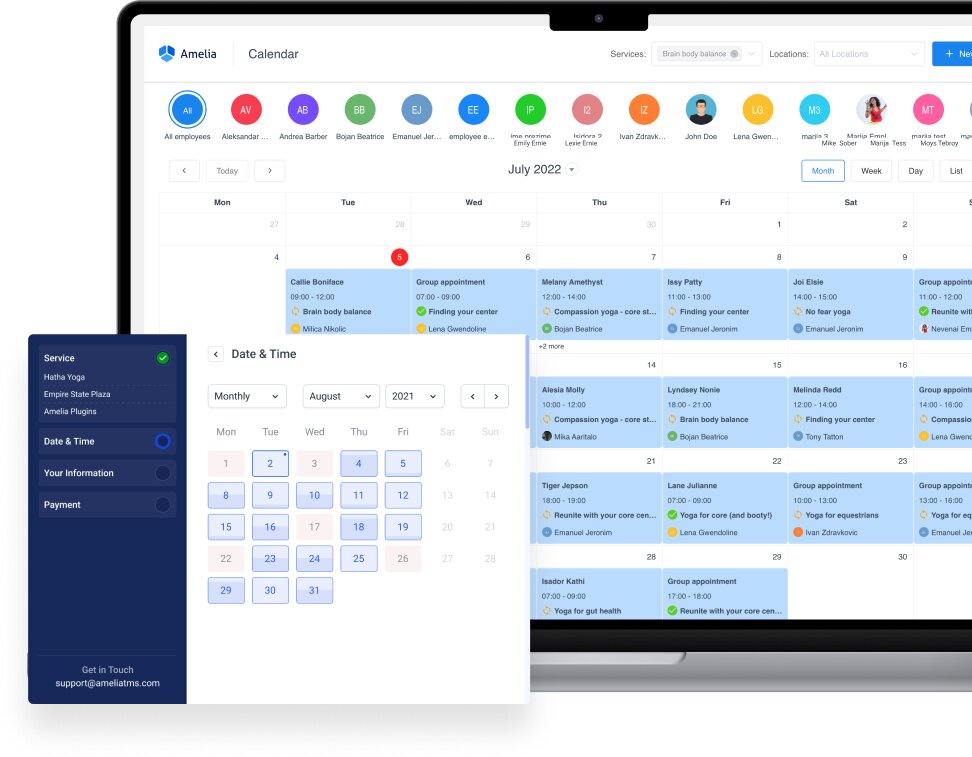
You don’t have to be glued to your phone or inbox to manage bookings anymore. Amelia handles the details quietly in the background so you can fully focus on other parts of your business.
Key benefits at a glance:
- Reporting and analytics — see insights about bookings, revenue, and staff performance.
- Automated notifications and reminders — clients and staff get timely alerts for upcoming appointments, cancellations, or changes, reducing no-shows and last-minute confusion.
- Recurring appointments — let clients schedule repeat sessions in a single booking process.
- Payments and invoicing — accept online payments, generate invoices, and track transactions seamlessly.
- Pricing by time and date — set different prices depending on the day, time, or season, making it easy to manage peak hours, special events, or promotions without manual adjustments.
- Multi-location support — manage appointments across different locations in one system.
You remain in full control. You set availability, manage appointments, and adjust settings whenever needed. Amelia supports your workflow without taking over, keeping your day smooth and predictable.
Give Amelia a try today and experience the real difference in how effortless and organized your schedule can feel.
Best Practices for Getting the Most Out of Calendar Sync
Even with the right tools, a schedule only works if it reflects real life. Staff availability changes, unexpected appointments pop up, and personal plans shift.
Encourage staff to connect their calendars
Linking calendars gives staff a clear view of all their upcoming appointments. This helps them stay organized, manage their time effectively, and avoid any confusion about what’s scheduled each day.
On top of that, you don’t have to remind anyone about their schedule or any changes; everything is already handled.
Keep your personal calendar separate
Separating your personal calendar from your business one helps you avoid mixing things up. It keeps your work schedule clean and easy to follow, so personal plans don’t accidentally overlap with your appointments or throw off your day.
Review your calendars periodically
Amelia takes care of your business schedule, but your personal calendar can change more often. A quick look now and then helps you make sure your own plans still line up with your availability.
Final Thoughts
A reliable schedule does more than keep your day organized — it gives you the freedom to focus on the work that actually matters. With calendar sync handling the updates and adjustments behind the scenes, you’re no longer tied to constant checks or manual fixes. Instead of managing calendars, you now get to actually use them, trusting that everything is exactly where it should be.
If you’re looking to explore more ways Amelia can simplify your workflow, take a look at how email notifications work and why you need them. You can also dive into our documentation for step-by-step guides on how to set up Google Calendar, Outlook, or Apple Calendar.
Together, these tools create a system that supports you quietly in the background, helping your business run smoothly while giving you more time back in your day.
 Back to Previous


Read Inspiring Customer Stories
Check out how our user set Amelia for his business
Read the full story