 A Birthday Worth Celebrating

Your customers are already searching for you online. If they can’t find you, they find someone else.
Taking your offline business online is no longer optional for most industries. Over 81% of consumers research a business online before making a purchase decision, and 31% have actively skipped a local business because it had no website.
This guide walks you through the full process, from assessing your business model and building your website, to setting up payments, local listings, digital marketing, and tracking what actually works.
No fluff. Just a practical, step-by-step breakdown for business owners ready to build a real online presence.
What Does Taking Your Offline Business Online Mean
Going online is not just building a website. It means setting up the full infrastructure that lets customers find you, learn about you, and buy from you without needing to walk through your door.
That covers a lot of ground. A local plumber needs something very different from a clothing boutique owner. A consultant going online looks nothing like a gym going hybrid.
Online Presence vs. Online Business
Key difference: A web presence means people can find you. An online business means people can transact with you.
Many offline businesses stop at presence and wonder why nothing changed. Getting found is step one. Converting that visit into a booking, purchase, or inquiry is the actual goal.
The channels involved depend on your model:
- A website (your home base)
- Local listings on Google, Yelp, Apple Maps
- Social media profiles
- An e-commerce store or online booking system
- Email as a direct line to customers
What “Going Online” Actually Requires
This is not a weekend project. 97% of executives reported that the pandemic accelerated their digital timelines, but most still underestimated the work involved (Zippia, 2023).
Think of it as building new infrastructure. You are not just copying your offline business into a browser. You are rebuilding how customers find you, how they buy from you, and how you service them.
The good news: companies with digital-first strategies are 64% more likely to hit their business goals than non-digital competitors (Zippia, 2023).
Assess Your Business Before Moving Anything Online
Jumping straight into building a website before thinking through your operations is one of the most common mistakes. I have seen business owners spend $5,000 on a site that does not match how they actually work.
Start with an honest audit. What does your current sales process look like? Where do customers come from? What part of your service delivery relies on physical interaction?
Mapping Your Current Operations
Three questions to answer first:
- Sales touchpoints: Where does the customer first contact you? Phone, walk-in, referral?
- Fulfillment: Can your product or service be delivered, shipped, or completed remotely?
- Customer data: Do you have a customer list, or are you starting from zero?
The answers tell you which parts of your business translate online as-is and which need a redesigned workflow first.
Checking If Your Customers Are Already Searching Online
Over 81% of consumers research a business online before making a purchase (Zippia, 2023). That includes your customers, even if they currently find you by word of mouth.
Use Google Trends and basic Google Search to check search demand for what you offer in your area. If people are searching for it, they expect to find it online. If your competitor has a site and you do not, you are already losing leads.
BrightLocal found that 98% of consumers used the internet to find local business information in 2022, up from 90% in 2019.
What Can Move Online Immediately vs. What Needs Work
| Business Element | Moves Online Easily | Needs Redesign First |
|---|---|---|
| Appointment booking | Yes, with a booking tool | Only if scheduling is complex |
| Product sales | Yes, with e-commerce platform | If fulfillment is manual |
| Consultations | Yes, via video calls | If heavily in-person dependent |
| Cash-only payments | No | Requires payment setup first |
| Walk-in services | No | Needs online booking workflow |
Dollar Shave Club started as a concept targeting a known gap between offline behavior (buying razors in stores) and a more convenient online alternative. The business model worked because someone mapped existing customer friction before building anything.
Choose the Right Business Model for Online Operations
Not every offline business should set up a Shopify store. The right online model depends entirely on what you sell and how customers use it.
If you are still figuring out your direction, browsing online business ideas can surface models you have not considered, especially hybrid approaches that blend your existing expertise with a new revenue stream.
Picking the wrong model wastes time and money. A yoga studio that builds a full e-commerce shop for drop-shipped merchandise instead of focusing on class bookings is solving the wrong problem.
Service Businesses
Your product is time and expertise. Online, that translates to bookings, virtual sessions, and local search visibility.
A solid scheduling setup for small businesses handles the core transaction. Customers check availability, book, and pay without calling. That alone replaces a significant chunk of admin work.
Local SEO matters more here than for product businesses. 46% of all Google searches are looking for local information (SEO Tribunal, 2022). If you are a plumber, therapist, or personal trainer, appearing in local results is your primary acquisition channel.
Product Businesses
Three realistic paths:
- Full e-commerce: You sell exclusively online, handle shipping, manage inventory digitally
- Hybrid: Physical store stays open, online store runs in parallel
- Marketplace: List on Amazon, Etsy, or similar platforms before investing in your own site
Marketplaces are underrated for first-timers. They come with built-in traffic. Many small product businesses test demand on Etsy before spending on a standalone store. If you serve a niche with multiple vendors or makers, building an online marketplace of your own is also a viable model, though it comes with more complexity than simply listing on an existing platform.
Subscription and Membership Models
This is worth considering even if you never thought about it before. A local gym running in-person classes can layer on an online membership with recorded workouts. A consultant can offer a monthly advisory package. These create recurring revenue that does not depend on foot traffic.
The infrastructure is straightforward: a membership plugin or platform, a payment processor, and content delivery. The hard part is building enough trust online to get the first sign-up.
Business Model by Type
| Business Type | Primary Online Model | Key Tool |
|---|---|---|
| Service (local) | Booking + local SEO | Booking plugin, Google Business Profile |
| Service (remote) | Virtual sessions + scheduling | Calendly, Acuity, Zoom |
| Physical products | E-commerce or marketplace | Shopify, Etsy, WooCommerce |
| Knowledge/consulting | Subscription or course | Course plugin, Stripe |
| Fitness/wellness | Hybrid membership | Studio scheduling software |
Build Your Online Home Base
Before you finalize your domain name and brand identity, check that the name and logo you are using are not already taken. trademarking logos and brand names is a step most small business owners skip at launch, then regret later when a conflict surfaces after they have built recognition around the name. The cost to register a trademark is lower than most people assume and significantly cheaper than rebranding after the fact.
Your website is the one thing you fully own and control. Social media profiles can disappear. Algorithms change. Your domain and site stay yours, which is exactly why understanding the importance of domain management matters early. Letting a domain expire or losing access to your registrar account can take your entire online presence offline overnight.
75% of consumers judge a business’s credibility based on its website (Zippia, 2023). And 31% of U.S. shoppers have actively decided not to buy from a small business because it had no website (Digital Silk, 2024).
Choosing a Platform
There is no single best answer. It depends on what you need the site to actually do.
Most website builders fall into one of two camps: template-driven tools like Wix and Squarespace that prioritize speed, or flexible platforms like WordPress that require more setup but scale further.
- Shopify: Built for selling products. Clean checkout, good payment integrations, reliable hosting
- WordPress: Most flexible. Best for service businesses, content, and custom functionality. WordPress holds a 62.7% CMS market share globally (emailvendorselection.com, 2024)
- Squarespace / Wix: Good for simple presence sites. Wix holds roughly 45% of the website builder market as of 2024 (Colorlib, 2024)
If you are building on WordPress and need booking functionality, a reliable WordPress calendar plugin is a non-negotiable add-on for service businesses.
Must-Have Pages for a Business Website
Keep it lean at launch. You can always expand later.
Homepage: Clear statement of what you do, who you do it for, and what the visitor should do next.
Services or Products page: Specific, not vague. “Web design for healthcare practices” beats “creative solutions for businesses.”
Contact page: Phone, email, address, and ideally a booking or inquiry form. 86% of website visitors expect to find product and service information on the homepage (Ko Marketing, 2024).
About page: More important than most business owners think. Customers buy from people, not companies.
Before publishing any page, run it through an online grammar checker. Spelling errors on a homepage are a fast way to lose credibility with visitors who are already deciding whether to trust you.
Mobile and Speed
Non-negotiable. 67.56% of all website visits come from mobile devices (StatCounter, 2024).
A one-second delay in mobile page load time can increase bounce rates by over 123% if load time climbs to ten seconds (Network Solutions, 2025). Most visitors decide whether to stay or leave in under three seconds.
Test your site on a phone before launch. If it is hard to navigate with a thumb, fix it before worrying about anything else.
Set Up Your Google Business Profile and Local Listings
Before you run a single ad or publish your first blog post, set up your Google Business Profile. It is free, and it is the fastest way to show up when someone nearby searches for what you offer.
Ask every happy customer. Most will not leave a review without being asked. A follow-up text with a direct link to your Google review page removes all friction. If you have a physical location, print a small sign with a QR code pointing directly to your review page. The best free QR code generator gets that done in minutes at no cost.
In 2024, 81% of consumers used Google to research local businesses, making it the dominant tool for local discovery by a wide margin (BrightLocal, 2024).
Setting Up Google Business Profile the Right Way
The setup itself takes about 20 minutes. Getting it right takes a bit more thought.
Primary category matters more than most people realize. According to Whitespark’s 2023 Local Search Ranking Factors report, choosing the wrong primary category is the single most damaging ranking factor for local search. Get this right from the start.
Fill out every field:
- Business name (exactly as it appears everywhere else)
- Address, phone, and hours
- Services or products with descriptions
- Photos (businesses with high-quality photos consistently outperform peers on clicks and direction requests, per BirdEye, 2025)
- A short business description with your main service keywords
NAP Consistency Across All Listings
NAP stands for Name, Address, and Phone. These three details need to match exactly across every platform where your business is listed.
Inconsistencies confuse search engines and erode trust. A business listed as “Joe’s Auto Repair” in one place and “Joe’s Auto Repair LLC” in another is technically two different entities to a crawler.
Beyond Google, get listed on Yelp, Bing Places, and Apple Maps. Combined, these platforms handle a meaningful share of local searches that Google does not capture.
Reviews as a Ranking and Trust Signal
Google reviews accounted for 81% of all online review volume in 2024, up from 79% in 2023 (BirdEye, 2025). They are not optional for local visibility.
74% of customers trust businesses more when they have more Google reviews, and 71% say reviews make them more likely to choose that business (Keywords Everywhere, 2024).
Ask every happy customer. Most will not leave a review without being asked. A follow-up text with a direct link to your Google review page removes all friction. You can also add a simple prompt to your email receipts or booking confirmations encouraging customers to leave online reviews while the experience is still fresh.
Move Your Sales Process Online
This is the section most guides gloss over. Getting traffic is one thing. Actually getting paid online requires a functioning sales infrastructure.
The setup varies significantly depending on whether you sell products, services, or time. Each has a different workflow and different tools.
Online Payment Options by Business Type
| Business Type | Recommended Setup | Why |
|---|---|---|
| Service (appointments) | Stripe or Square via booking plugin | Collects payment at booking |
| Product business | Shopify Payments or Stripe | Built into checkout flow |
| Consultant / coach | Stripe + invoice tool or Calendly | Handles one-off and recurring |
| Hybrid (in-store + online) | Square | Syncs in-person and online |
| Event-based | PayPal or Stripe via event plugin | Easy ticket + registration flow |
A WordPress booking system with integrated payment gateways handles both scheduling and payment in one flow, which reduces drop-off significantly compared to sending invoices manually after the booking.
Setting Up Online Booking for Service Businesses
Amelia is a WordPress booking plugin designed to be as smooth as silk – easy to use for both your employees and your customers.
It lets your clients choose the service they want, pick a date and time, and confirm their reservation – all with a few clicks. Easy to navigate, shows your availability in real-time, sends automated notifications and reminders, highly customizable, with multiple payment options – you name it, you have it!
In fact, Amelia is more than a WordPress booking solution. It’s your personal digital assistant, working around the clock so you don’t have to.
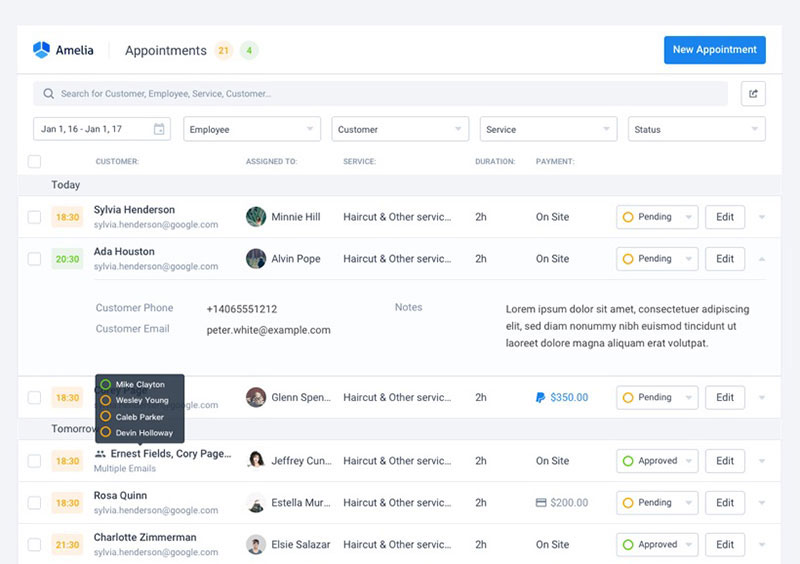
Amelia ensures:
- No more double bookings – peace of mind for you.
- Efficient scheduling – satisfied customers and even more bookings.
- Automated follow-ups – zero forgotten appointments for you.
- 24/7 availability – a booking system that never sleeps.
Remember, every detail counts. Your customer’s experience with your online booking can make or break their perception of your business.
So, why not leave it to a tool designed specifically for this purpose?
Let’s face it, going online can be daunting. But with Amelia, it’s just exciting.
If you take appointments, this is your primary conversion tool. It replaces phone tag and removes the need for someone to be available to answer calls.
Tools like Calendly, Acuity Scheduling, and SimplyBook handle the basics well. For WordPress-based sites, dedicated WordPress booking plugins plug directly into your site without redirecting customers to a third-party page.
Whatever tool you choose, make sure it sends automated reminders. No-shows drop significantly with a simple reminder 24 hours before an appointment. That alone pays for most booking software subscriptions.
E-Commerce Setup for Product Businesses
Product pages, checkout flow, and shipping logic. Get those three things working before anything else.
27% of online shoppers abandon an order because the checkout process is too long or complicated (Digital Silk, 2024). Keep the path from “add to cart” to “order confirmed” as short as possible. Guest checkout should always be an option.
For hybrid businesses with physical inventory, tools like Shopify POS sync in-store stock with online listings in real time. Selling the same item twice because the systems are not connected is a fast way to lose customer trust.
Build Your Digital Marketing Foundation
Most offline businesses going online make the same mistake: they build the site, then wonder why nobody shows up.
Traffic does not happen automatically. You need at least one reliable channel driving people to your online presence before anything else matters.
Search Visibility Basics
Start here before spending on ads. Submit your sitemap to Google Search Console and make sure Google can crawl your site. This is free and takes ten minutes.
Each page should have a clear title tag and meta description that match what your customers actually search for. A hair salon in Austin should have “hair salon Austin” somewhere in its page titles, not just “welcome to our salon.”
For longer-term organic visibility, Google Search Console shows you which queries bring visitors to your site and which pages are ranking. Most small business owners never check it. The ones who do have a significant advantage.
Social Media: Pick the Right Platform
42% of marketers say email is their most effective channel, but social media still drives meaningful discovery, especially for visual businesses (Designmodo, 2024).
The channel depends on the business type:
- Instagram and TikTok: food, beauty, fitness, fashion
- LinkedIn: B2B services, consulting, professional services
- Facebook: local service businesses, community-focused brands
- Pinterest: home decor, weddings, food, DIY products
Pick one or two. Running four platforms badly is worse than running one well. Once you have settled on your channels, set aside time each week to monitor your social media activity for social media insights, including comments, mentions, and direct messages. Ignoring that side of the channel is a fast way to miss customer questions or damage your reputation quietly.
Build Your Email List from Day One
Email generates an average of $36 for every $1 spent, making it the highest-ROI channel for most small businesses (Litmus, 2024).
Start collecting emails before you have anything to send. A simple opt-in on your site with a small incentive (a discount, a free guide, early access) is enough. Tools like Mailchimp, Klaviyo, and ConvertKit all have free tiers that work fine for early-stage list building.
One important note: getting more bookings and recurring customers is significantly easier when you have a direct line to them through email. Social media reach is rented. Your email list is yours.
Paid Ads as an Early Traction Shortcut
Organic search takes time. Paid ads do not.
Google Local campaigns and Meta Ads both let you target by location, which is what most offline businesses going online need first. A $10-$20 daily budget is enough to test whether demand exists before scaling up.
53% of small business owners in the US, UK, Canada, and Australia used email as their most frequent strategy for finding and keeping customers, ahead of paid ads (Constant Contact, 2024). That said, paid and email work well together, using ads to build the list, then email to convert.
Organic vs. Paid: Where to Start
| Channel | Time to Results | Cost | Best For |
|---|---|---|---|
| Google Business Profile | 2–4 weeks | Free | Local businesses |
| SEO (organic search) | 3–6 months | Low ongoing | All business types |
| Email marketing | Immediate (once list exists) | Low | Retention, repeat sales |
| Meta Ads | Immediate | Medium budget | Awareness, list growth |
| Google Ads | Immediate | Medium-high budget | High-intent buyers |
Warby Parker built its early online traction through a combination of PR and referral-driven email growth before spending heavily on paid ads. Not every business has that PR angle, but the principle holds: build owned channels before renting attention.
Handle Operations, Fulfillment, and Customer Support Online
The backend of an online business is where most first-timers get stuck. The front end looks fine. Then an order comes in and the process falls apart.
Setting up operations properly before you launch saves a lot of painful fixes later.
If you are sending SMS reminders or confirmation texts, a carrier lookup tool helps verify that phone numbers in your contact list are valid before you start a campaign. Pairing it with a reliable SMS campaign tool lets you manage, schedule, and track your messages from one place, making the entire outreach process more efficient. It cuts delivery failures and keeps your sender reputation clean.
One thing most guides skip entirely: once you are handling customer data, payments, and email lists online, basic protection matters. Installing cybersecurity software and keeping your platform and plugins up to date is not optional. A single breach can destroy the trust you spent months building.
If your business involves custom-built software or a developer-managed site, code security scanning tools are worth knowing about. There are several Veracode alternatives suited to smaller teams and tighter budgets that still cover the core vulnerability checks.
Beyond customer-facing operations, keeping your finances organized from day one saves significant pain at tax time. Choosing the best accounting software for your size and model, whether that is QuickBooks, Wave, or FreshBooks, is a decision worth making before your first online sale.
Shipping and Fulfillment for Product Businesses
For product businesses, an eCommerce platform like Shopify handles product pages, checkout, payment processing, and shipping integrations in one place. It is the fastest path from zero to a functioning online store, without needing a developer.
60% of online retailers outsource fulfillment at least partially (Capital One Shopping Research, 2024). For new businesses, that is often the right call.
Three realistic options at launch:
- Self-fulfill from home or a small storage unit (low cost, high time)
- Third-party logistics (3PL) provider like ShipBob or ShipStation (higher cost, scales easily)
- Dropshipping model (no inventory, lower margins)
Shopify’s 2024 research found that businesses blending online and offline strategies see 27% higher profits than those operating on a single channel. Hybrid fulfillment, where customers can buy online and pick up in-store, is one of the simplest ways to start that blend.
Before you take your first online order, decide on your shipping methods. Flat rate, free shipping over a threshold, and real-time carrier rates each have different effects on conversion and margin. Shopify’s built-in shipping tools let you test these without custom development.
Customer Support Setup
62% of online shoppers say past customer service experience affects future buying decisions (Shopify, 2024).
At launch, you do not need a full support stack. A shared inbox and a clear response time commitment is enough. Many small businesses also replace a traditional phone line with a Voice over Internet Protocol (VoIP) solution, which lets you take and route customer calls from anywhere without being tied to a physical office.
Setting up basic call flows ensures incoming calls reach the right person or voicemail without customers hitting a dead end.
Two things that reduce support volume significantly:
- Automated order confirmation and shipping update emails
- A clear FAQ page covering returns, timing, and common questions
Automating Repetitive Tasks
Automation is where online operations get efficient. And honestly, it is underused by most small businesses moving online for the first time. Beyond customer-facing automations, tools that help you manage projects and internal tasks, like Trello, Asana, or ClickUp, keep your team aligned without relying on back-and-forth emails.
High-value automations to set up early:
Appointment reminders: Reduces no-shows significantly. Any appointment scheduling system worth using should handle this automatically.
Abandoned cart emails: Average open rate of 50.5% and conversion rate of 3.33% (Klaviyo, 2024). Set this up on day one of your e-commerce store.
Welcome email sequence: Welcome emails generate 320% more revenue per email than standard promotional sends (PGM Solutions, 2024).
Measure What’s Working
You cannot improve what you are not tracking. This is especially true in the first few months online, when you have no historical data to compare against.
Setting up measurement before launch is far easier than retrofitting it later.
For businesses running on custom or developer-managed infrastructure, understanding the pyramid of pain framework is useful. It shows which threat indicators are easiest for attackers to swap out and which ones actually cost them something when you block them. Relevant if you are working with a developer on site security.
Google Analytics 4 Setup
Google Analytics 4 is used by 71% of small businesses with under 50 employees (Business Dasher, 2024). It is free and gives you everything you need at this stage.
The three reports that matter most at launch:
- Traffic acquisition: Where visitors come from (search, social, direct, referral)
- Engagement: Which pages people actually read vs. immediately leave
- Conversions: How many visitors complete your target action (purchase, booking, form fill)
Set up at least one conversion event before you launch. A booking confirmation or purchase thank-you page makes a clean conversion trigger.
Key Metrics by Business Type
| Business Type | Primary Metric | Secondary Metric |
|---|---|---|
| E-commerce | Conversion rate (avg. 2.5–3%) | Average order value |
| Service / booking | Booking completion rate | Cost per lead |
| Content / lead gen | Email sign-up rate | Organic traffic growth |
| Local hybrid | Direction requests (via GBP) | Phone calls from search |
The global average website conversion rate sits at 3.68% (Ruler Analytics, via Invesp, 2024). If you are well below that, look at page speed, checkout friction, and traffic quality before anything else.
Google Search Console for Organic Visibility
GA4 tells you what happens after people arrive. Google Search Console tells you how they found you.
Check it weekly in the first six months. Look for queries where your site is showing up but not getting clicks (high impressions, low click-through rate). Those are pages with optimization opportunities that cost nothing to fix.
One practical tip: pages ranking between positions 4 and 10 are often one or two content improvements away from moving to page one. That is where Search Console data pays off most.
Building a Monthly Review Habit
Data without a review process is just noise.
Set aside one hour per month to look at three numbers: total traffic vs. last month, conversion rate, and top traffic sources. That alone is enough to catch problems early and spot what is working before doubling down on it.
Most small businesses online skip this entirely and rely on gut feel. Do not be those businesses.
Common Mistakes When Moving a Business Online
Most of these are avoidable. They still happen constantly, usually because people are in a rush to launch or following advice from someone who has not actually done this before.
Skipping Strategy and Going Straight to a Website
Building a website before deciding on your online business model is backwards. The site should serve the strategy. Without a clear picture of how customers will find you, what they will do on the site, and how you will convert them, you end up with a digital brochure that does nothing.
Fix: Answer three questions before touching a platform. Who is the customer? How will they find the site? What should they do when they arrive?
Choosing a Platform Based on Price Alone
The cheapest option is rarely the right one. A free website builder that cannot support booking, payment, or product catalog growth will cost more to migrate away from later than the money saved upfront.
Shopify, WordPress with WooCommerce, and Squarespace all have clear use cases. Pick based on what your business needs to do, not the monthly fee difference.
Real example: Many small retailers have migrated from basic website builders to Shopify specifically because they outgrew the checkout and inventory tools. The migration cost them time and money that a better initial choice would have avoided.
Ignoring Mobile Experience
57% of internet users say they will not recommend a business with a poorly designed mobile site (Forbes, 2024).
And 50% of consumers say they would reduce interaction with a business they like if the mobile site does not work well (Digital Silk, 2024).
Test on a real phone, not a browser emulator. They are not the same experience.
Not Setting Up Analytics Before Launch
This one comes up constantly. A business launches, gets its first few weeks of traffic, and has no data on where it came from or what those visitors did.
GA4 and Google Search Console take about 30 minutes to set up correctly. Do it before the site goes live, not after.
Trying to Be Everywhere at Once
Instagram, TikTok, LinkedIn, Facebook, Pinterest, YouTube. Doing all of them poorly is a fast way to burn out and see zero results.
Pick one channel that fits your customers. Get good at it. Then add a second channel once the first is working. There is no prize for maintaining six social accounts with three followers each.
If online booking is part of your model, getting appointment scheduling working smoothly is far more valuable than a presence on every platform. Fix the revenue-generating infrastructure first. Social media can wait.
FAQ on How To Take Your Offline Business Online
Where do I start when moving my business online?
Start with an audit of your current operations before touching any platform. Identify your customers, map how they currently find you, and decide what you want them to do online. Then build the infrastructure around that, not the other way around.
Do I need a website, or is a social media profile enough?
Social profiles help with discovery, but they are rented space. A business website is the only digital asset you fully own and control. It also builds credibility: 75% of consumers judge a business’s trustworthiness based on its site design.
Which website platform is best for a small business?
It depends on what your business needs to do. Shopify works best for product sales. WordPress suits service businesses needing flexibility. Wix and Squarespace cover simpler presence sites. Pick based on functionality, not monthly cost.
How do I accept payments online?
Stripe, Square, and PayPal are the most common starting points. Service businesses benefit from a booking tool with built-in payment collection. Product businesses need a checkout flow with a reliable payment gateway connected to their e-commerce platform.
How do I get my business found online locally?
Set up your Google Business Profile first. Fill out every field, add photos, and keep your Name, Address, and Phone consistent across all listings including Yelp, Bing Places, and Apple Maps. Reviews matter significantly for local search rankings.
How long does it take to see results after going online?
It varies by channel. Google Business Profile can show local search visibility within a few weeks. Organic search typically takes three to six months. Paid ads like Google Ads and Meta Ads can drive traffic from day one, given a budget.
Do I need to be on every social media platform?
No. Running multiple platforms poorly wastes time and produces little. Pick one or two channels where your customers actually spend time. Instagram suits visual businesses. LinkedIn fits B2B services. Focus beats presence across every network.
How do I handle shipping and fulfillment for an online store?
At launch, three options work: self-fulfill, use a third-party logistics provider like ShipBob or ShipStation, or start with a dropshipping model. Sixty percent of online retailers outsource fulfillment at least partially. Match your choice to your order volume and budget.
What is the most cost-effective digital marketing channel for a new online business?
Email marketing consistently delivers the highest ROI at around $36 for every $1 spent. Start building your list from day one using a simple opt-in. Tools like Mailchimp and Klaviyo have free tiers that work well early on.
How do I know if my online business is actually working?
Set up Google Analytics 4 and Google Search Console before launch. Track traffic sources, conversion rate, and top-performing pages monthly. The global average website conversion rate sits around 3.68%. Anything well below that signals a checkout or traffic quality issue worth fixing.
Conclusion
This conclusion is for an article presenting a complete roadmap for taking your offline business online, from choosing the right e-commerce setup to building local search visibility and managing digital operations.
The process is not complicated. But it does require doing things in the right order.
Start with your business model. Build your online presence around it. Set up payments, fulfillment, and customer support before you drive traffic. Then measure everything from day one.
Small businesses with a clear digital strategy grow twice as fast as those without one.
The tools are accessible. Shopify, WordPress, Google Business Profile, Stripe, Mailchimp. None of them require a technical background to get started.
What they do require is a decision to start. Move your business online with a plan, not just a website.

Explore topics
Introducing Amelia and IvyForms: A New Way to Collect Details Before Booking
Per-Person Pricing vs Flat Rate Pricing: Which One Fits Your Service?
WordCamp Europe 2026 Recap: Kraków, Community & Conversations
Celebrating 8 Years of Amelia: A Story Built With Love
Flexible Pricing for Appointments: How to Price Services by Person, Date, Time, and Demand

Read Inspiring Customer Stories
Check out how our user set Amelia for his business