
Amelia 9.10 is here.
This release is about what happens around the appointment: hearing back from clients once the visit is over, getting paid at the front desk, and booking several services for one client in a single step.
Here’s what’s new:
- Customer ratings and reviews. Ask clients to rate their appointment, then approve reviews before they go live.
- Square Terminal payments. Take card payments in person and keep them linked to the booking.
- Multiple service bookings. Book several services for one client at once from the admin side.
- Customer birthday field. Collect birthdays in the booking form.
Ratings & Reviews
A happy client is your best marketing. Until now, though, collecting that feedback meant a separate survey tool or a manual follow-up email.
With 9.10, Amelia asks for the review for you. After an appointment, the client gets a “How was your appointment?” email with a link to a short review form: a rating from one to five stars and an optional written review. You choose when the email goes out:
- As soon as the appointment is completed
- 1 hour or 24 hours later
- After a custom delay in hours or days
You can also send a request manually from any past, approved appointment.
You stay in control of what counts:
- New reviews arrive as Pending.
- Admins and Amelia Managers approve or reject them under Bookings → Ratings & Reviews.
- Only approved reviews count toward the average rating, which you can see by employee, service, or category.
This is useful for:
- Clinics and wellness practices that want feedback on each provider
- Salons and studios that want to spot a problem with a service before it turns into a bad public review
- Teams that want to know which services and employees clients rate highest
Ratings & Reviews works with appointments for now. Showing reviews on your site’s front end and rating events are both coming in a future update.
Available on: Standard, Pro, and Elite plans.
Square Terminal payments
Not every client pays online. Some pay at the front desk after the session. Others booked with a deposit and owe the rest. Recording those payments by hand means extra work and a booking record that doesn’t match what was actually paid.
Amelia 9.10 connects to Square Terminal, so you can charge a card in person straight from the booking.
How it works:
- Go to Amelia → Settings → Payments → Square → Square POS and click Generate device code.
- Enter the code on your Square Terminal to pair it. The status in Amelia changes from Pairing… to Paired.
- When the client is ready to pay, open the booking and click Charge on Terminal. If you have more than one terminal, pick the one at the desk.
- The client pays on the terminal, and the booking is marked Paid in Amelia.
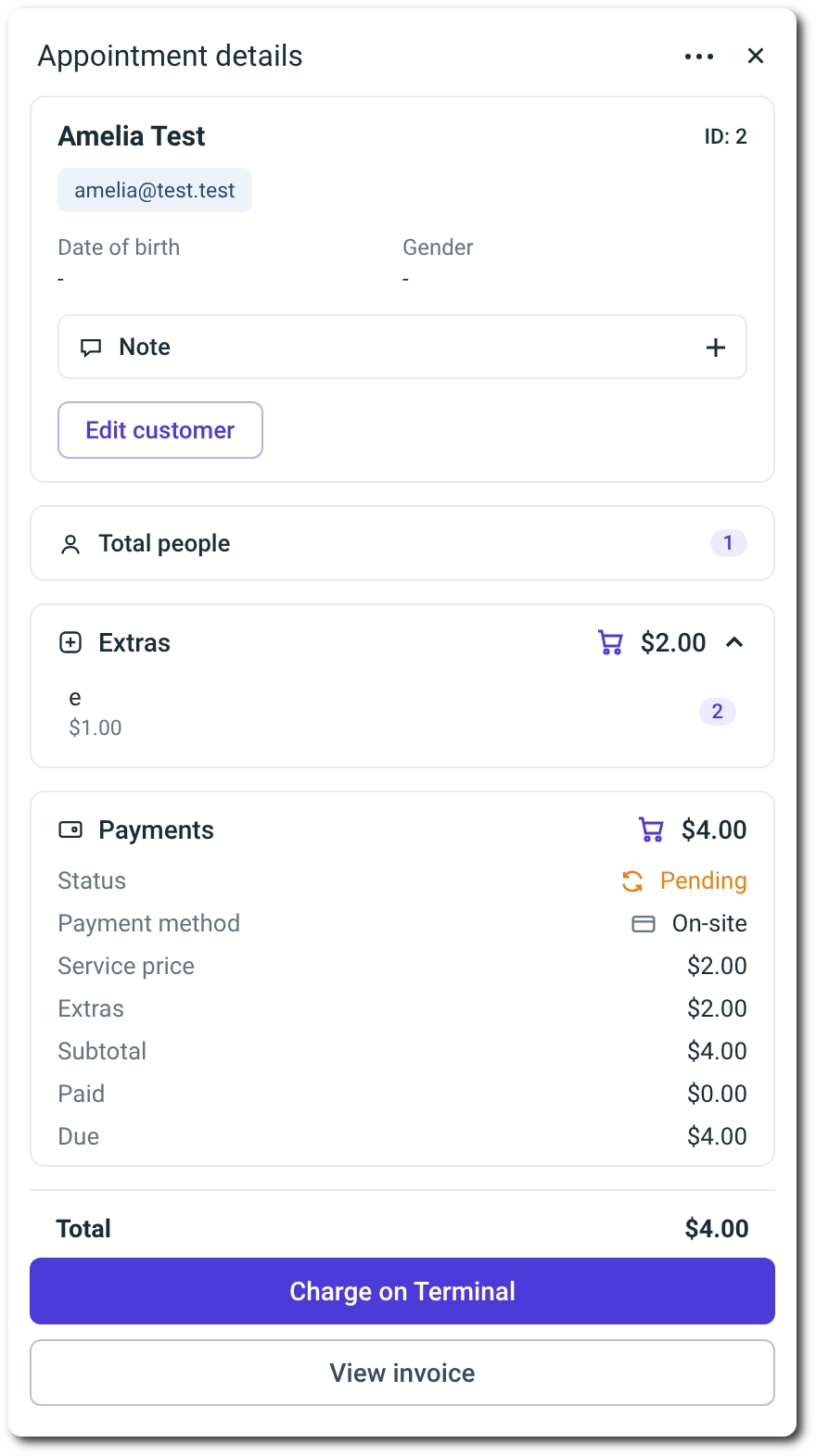
If the client cancels on the terminal, the booking stays unpaid and you can charge again. You can also cancel a charge from Amelia while it’s processing.
You can charge any booking with an amount due, including on-site payments, partial deposits, and bookings made from the back end or Employee Panel.
It’s a good fit for salons, spas, clinics, and studios that take bookings online but often get paid in person.
Available on: Starter, Standard, Pro, and Elite plans. You need a Square account connected to Amelia and a Square Terminal device, which Square sells in selected countries.
Multiple service bookings and customer birthdays
Book several services at once
When a client calls to book a haircut, a color, and a blow-dry, staff can now book all three services for that client at once from the back end.
Customer birthday field
Clients can now add their birthday when they book. Use it to keep better client records or plan a birthday offer.
Improvements
- Coupons in the payment preview. The applied coupon now shows in the payment preview in appointment details.
- Panel previews. Preview the Employee Panel and Customer Panel shortcodes from the back end.
- White Label. You can now hide the logo completely when no custom logo is set.
- Faster loading. Customers load faster on the Calendar, Bookings, and Customers pages.
- AI Assistant integrations. They now use the WordPress Abilities API and require WordPress 6.9 or later.
9.10 also includes security fixes and about three dozen bug fixes, so we recommend updating right away.
See the full list of changes in the changelog.
What’s next?
Amelia 9.10 brings parts of the client journey that used to happen outside your booking system back into it: the follow-up review and the in-person payment. Both now live on your own WordPress site, next to your bookings and your client data.
Stay tuned to see what we’re preparing next!

Explore topics
Amelia 9.10: Ratings & Reviews, Square Terminal Payments, and More
Best Black Friday Deals in 2026: WordPress Plugins & Software
6 Acuity Scheduling Alternatives for WordPress, Ranked
Automated Email Response: Examples, Templates & Writing Tips
How to Confirm a Meeting: Formal and Informal Approaches That Work

Read Inspiring Customer Stories
Check out how our user set Amelia for his business