



Running a service business means juggling details all day. Clients forget appointments. Staff misses updates. You lose time chasing confirmations. And every no-show hits your revenue.
These problems rarely happen because people don’t care. Most of the time, it’s simple communication gaps. When reminders depend on you or your team typing messages, checking calendars, or sending updates manually, errors and delays become unavoidable.
Automated notifications remove these weak points, and this Amelia’s feature quickly solves communication issues that drain time and revenue. Let’s see how Amelia’s automated notifications can take your business to the next level.
What Problems Service Businesses Face?
#1 No-shows and last-minute cancellations
Every service business deals with clients that forget their appointments. You can’t blame them, they’re juggling work, family, and personal commitments, so it’s not that they don’t value your time. A scheduled visit gets buried under notifications. A calendar event goes unnoticed. Someone intends to come but remembers only when it’s already too late.
Without a clear reminder at the right moment, even dependable clients miss their slot. And when they cancel at the last minute, you have almost no chance of filling the gap.
Impact: No-shows drain revenue instantly. Staff end up waiting or reorganizing their day for nothing. Your schedule becomes unpredictable, and the business loses time that can’t be recovered or billed.
#3 Time wasted on manual follow-ups
Without automation, staff has to call, text, or email every client to confirm bookings, send reminders, and follow up on changes. It sounds simple, but it quickly turns into hours or repetitive work each week.
Messages get delayed, calls go unanswered, and someone always ends up double-checking the schedule to make sure nothing was missed.
This manual process is slow, inconsistent, and depends on whoever is available at the moment. It also increases the chance of human error, especially during busy periods when communication matters most.
Impact: Your team spends valuable time on tasks software can handle automatically. Customer service becomes slower, operational costs rise, and virtual assistants have less time to focus on the work that actually grows the business.
#4 Miscommunication between staff and clients
When updates aren’t delivered instantly, things fall through the cracks. A client reschedules, but the assigned staff member doesn’t see it in time. A cancellation comes in, yet the team still prepares for the appointment. Someone books a slot, but the internal calendar isn’t refreshing fast enough, and suddenly you’re double-booked.
These gaps usually happen because information is scattered across messages, calls, and multiple tools. Without real-time notifications, staff relies on manual checks or secondhand updates, which makes mistakes almost guaranteed. One quick workaround, aside from scheduling notifications, can be to use a auto answer call service that will take incoming calls for you using AI powered systems.
Impact: Clients get frustrated when the business isn’t aligned. Staff feels embarrassed and rushed trying to fix avoidable issues. And overall service quality drops because the communication chain isn’t reliable.
#4 Poor client experience
Clients today expect immediate, clear communication from any service they use. They want to know their appointment is confirmed, when to show up, what to expect, and how to reach you if something changes. When this information doesn’t arrive, or arrives too late, the experience feels uncertain and unprofessional.
Small gaps add up quickly: missed confirmations, unclear reminders, or no follow-up after a session. Clients start to question how organized your business is, and that lack of confidence makes them less likely to return.
Impact: Trust declens, retention drops, and you lose the steady long-term clients that keep your schedule full and revenue stable.
How Amelia’s Automated Notifications Fix These Problems
#1 Automatic reminders that cut no-shows
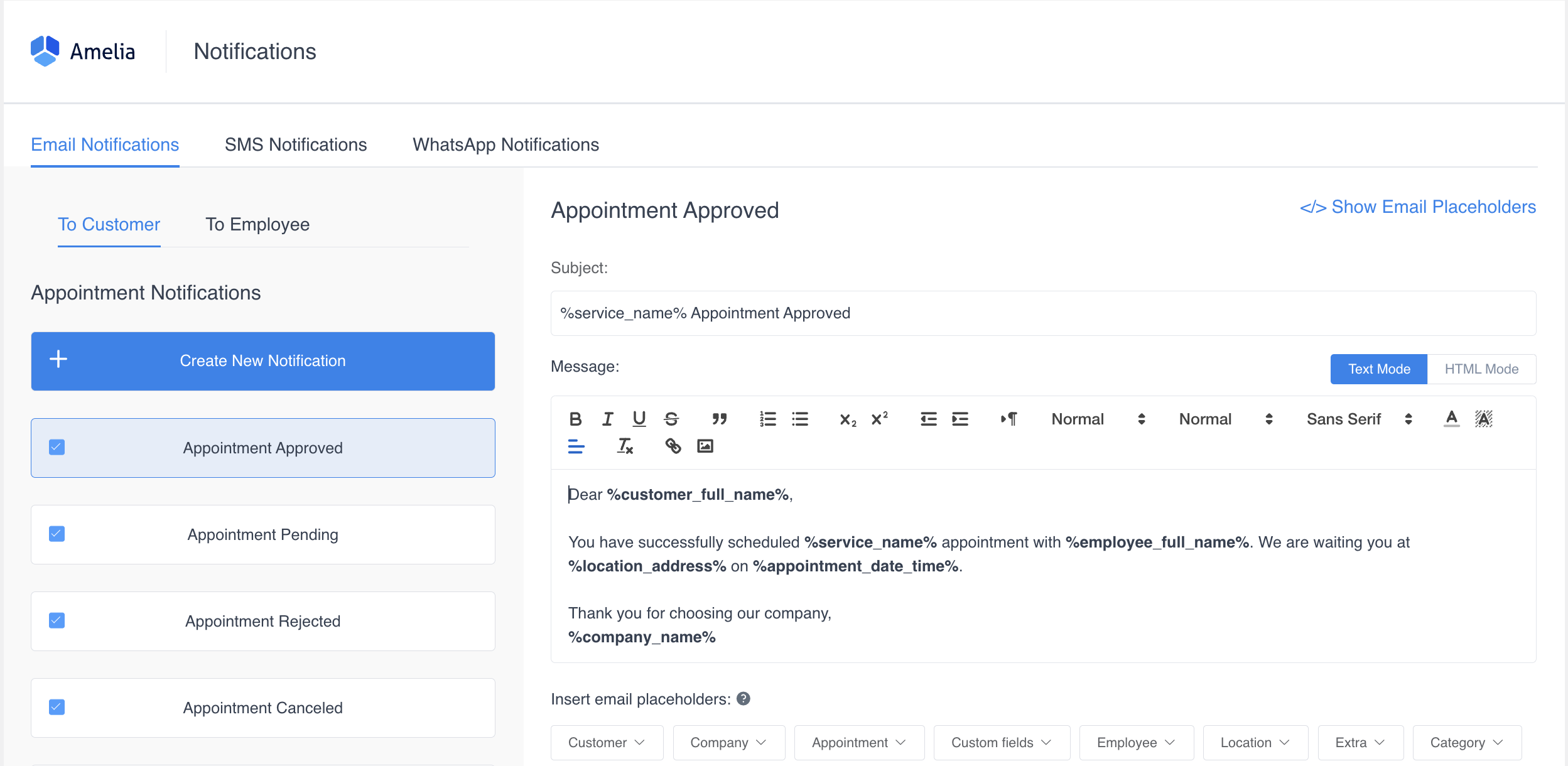
Amelia takes over the entire reminder process by sending timely email, SMS, and WhatsApp notifications for every stage of the booking. Clients receive confirmations the moment they schedule. They get reminder messages before the appointment, and you can choose exactly when those go out – for example, 24 hours before and again 3 hours before the session.
If something changes – a reschedule, a cancellation, or a staff update, the system notifies them instantly. Amelia also sends follow-up messages after the appointment to keep engagement strong.
Because these reminders arrive automatically and consistently, clients are far less likely to forget or miss their session. Everything they need is delivered straight to their phone or inbox, without any manual work from you.
Benefit: Clients stay informed and prepared, and you prevent many of the no-shows that normally drain revenue.
#2 Zero manual work for your team
With automated notifications, your staff no longer needs to send confirmations, reminders, or last-minute updates by hand. Once the rules are set, Amelia handles every message automatically – confirmations, changes, cancellations, follow-ups and anything else your workflow requires. The best thing is: you can customize messages to fit your brand voice and style, and provide links for rescheduling or cancellation. Each update goes out instantly and without the risk of someone forgetting or missing it.
What used to take hours of checking calendars, copying details, and messaging clients now happens quietly in the background.
Benefit: Your team gets those hours back every week and can focus on real client service instead of repetitive administrative work.
#3 Real-life updates for staff
Amelia keeps your team fully in sync by sending instant notifications for every new booking, change, or cancellation. Staff members get the information they need the moment it happens, no checking multiple tools, no waiting for someone to pass along the update, and no guessing what the day looks like.
Everyone stays aligned, schedules stay accurate, and the workflow becomes smoother across the entire business.
Benefit: Internal miscommunication disappears, and staff never walks into an appointment unprepared or surprised.
#4 A smoother client journey
From the moment a client books, Amelia handles every step of the communication automatically. They receive confirmation, timely reminders, payment updates, and follow-up messages after their appointment. Nothing has to be sent manually, and nothing gets missed!
This creates a consistent, predictable experience where clients always know what’s happening, what to expect, and how to prepare.
Benefit: Clients feel supported and informed, which builds trust, reduces confusion, and makes them far more likely to return.
#5 Higher revenue with better attendance
When clients show up on time and appointments run smoothly, your revenue becomes far more predictable. Automated reminders reduce no-shows, which means fewer empty spots on your calendar.
Clear communication keeps clients engaged and increases the chance they’ll book again. And with less admin work slowing things down, your team can handle more appointments in the same amount of time.
Benefit: You’re not just saving time, you’re creating a more consistent, more profitable booking flow.
Free Appointment Reminder Generator by Amelia
Closing Thoughts on Amelia’s Automated Notifications
Automated notifications take one of the biggest pain points in service business, inconsistent communication, and remove it completely.
Clients stay informed, staff stays aligned, and your schedule becomes more reliable. With fewer no-shows, less manual work, and a smoother experience overall, Amelia helps your business run with far less effort and far more consistency.
It’s a simple feature that delivers meaningful results every day!

Explore topics

Read Inspiring Customer Stories
Check out how our user set Amelia for his business