




Every layout decision you make either helps people or confuses them. There is no neutral.
Understanding visual design principles gives you the framework behind every layout that actually works. These are not aesthetic preferences. They are the structural rules, rooted in Gestalt psychology, that explain why some designs feel immediately clear and others feel like work to read.
This guide covers the core principles used across wireframes, UI design, and visual communication:
- Balance, contrast, and visual hierarchy
- Alignment, proximity, and repetition
- White space, color theory, and typography
By the end, you will know how to apply each one with purpose.
What Are Visual Design Principles
Visual design principles are the foundational rules that govern how visual elements are arranged to communicate clearly and direct attention. They are not decorative guidelines. They are the structural logic behind every layout decision that works.
The distinction matters: design elements are the raw materials (color, shape, line, texture, space). Design principles are the rules that determine how those materials interact. You can have all the right elements and still produce a confusing layout if the principles are ignored.
These principles are rooted in Gestalt psychology, a school of thought developed by Max Wertheimer, Kurt Koffka, and Wolfgang Kohler in 1920s Germany. Their core insight: the human brain perceives visual information as unified wholes, not as collections of parts. Design principles work because they align with how perception actually functions.
According to Nielsen Norman Group research, users form first impressions of digital interfaces in as little as 50 milliseconds. Visual design elements drive those snap judgments entirely.
94% of first impressions on a website are design-related (Design Resource). That is not a marginal factor. That is the whole game.
Practically, these principles apply across every format: web layouts, mobile UI, print, data dashboards, brand identity systems. The same rules that make a landing page scannable also make a product packaging label legible at three feet.
Design Principles vs. Design Elements
| Category | What It Is | Examples |
|---|---|---|
| Design Elements | Raw visual materials | Color, line, shape, texture, space, typography |
| Design Principles | Rules governing arrangement | Balance, contrast, hierarchy, alignment, proximity, repetition |
Understanding this split is where most beginners stall. They learn color theory and typeface selection, then wonder why their layouts still feel off. The principles are the missing layer.
Balance
Balance is about visual weight: how heavy or light different parts of a layout feel to the eye. Size, color saturation, contrast, and position all contribute to visual weight. A design feels balanced when those forces are distributed in a way that feels stable, even if that stability is intentional tension.
There are three types worth knowing.
Symmetrical Balance
Mirror balance. Elements on either side of a central axis reflect each other in weight and placement.
- Communicates stability, formality, and authority
- Common in government websites, luxury brands, and legal firms
- Can feel static if overdone
Apple’s product pages often use centered, symmetrical layouts for hero sections. The symmetry signals polish and precision before a single word is read.
Asymmetrical Balance
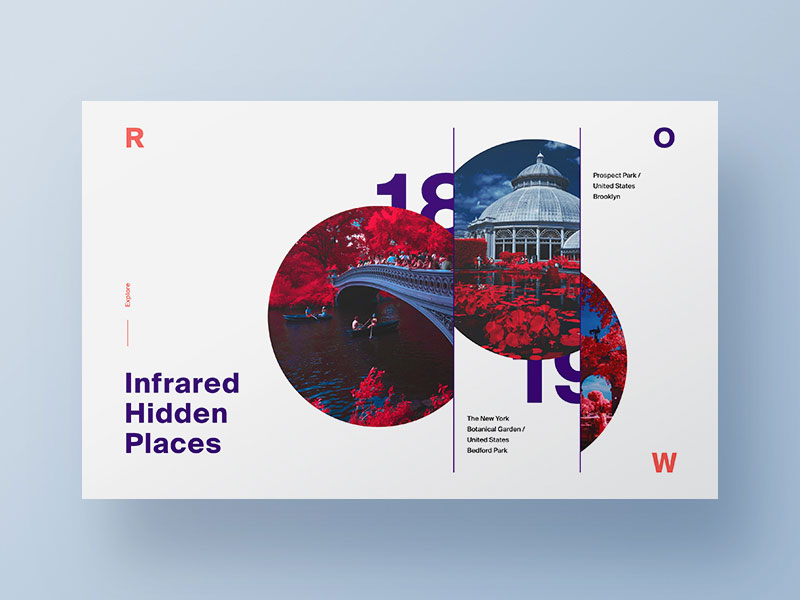
A 2024 Nielsen Norman Group study found that elements with strong contrast are noticed 70% faster than those with minimal visual differentiation. Asymmetrical layouts use that dynamic intentionally.
A large, muted image on the left can balance against a small block of high-contrast text on the right. The weights differ, but the tension resolves. This is the kind of balance that feels alive rather than static.
- Used heavily in editorial design and tech product sites
- Requires more deliberate spatial reasoning than symmetry
- Works well for guiding the eye toward a specific focal point
Radial Balance
Elements radiate outward from a central point. Less discussed, but worth knowing. You see it in clock faces, mandala-inspired graphics, and certain data visualization formats. It naturally pulls the eye to the center, making it effective for circular navigation menus or spotlight-style hero sections.
Misusing balance (not avoiding it entirely, but applying the wrong type) is one of the quieter reasons a layout feels wrong. Symmetry on a page that needs energy. Asymmetry on a page that needs trust.
Contrast
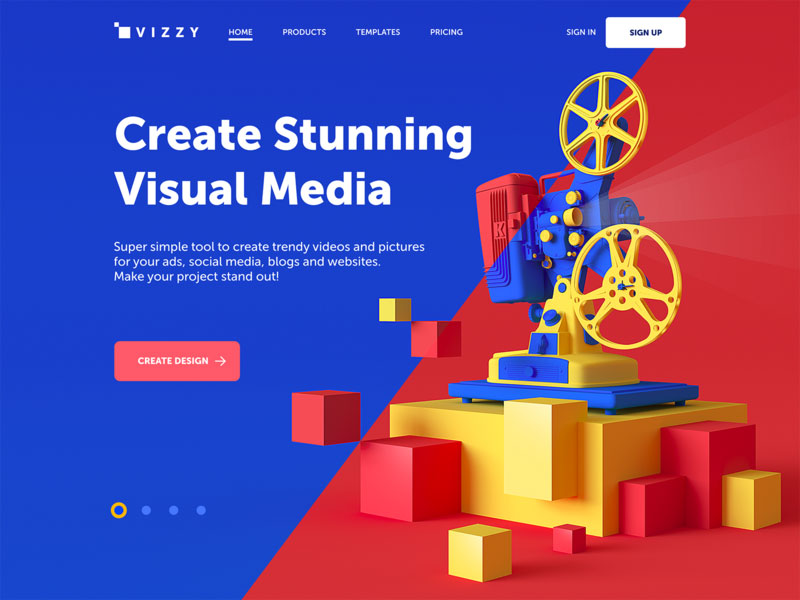
Contrast is the visual difference between elements. It exists across multiple dimensions: color, size, shape, texture, and typographic weight. It is the primary tool for directing attention.
Without contrast, there is no hierarchy. Everything competes. Nothing wins.
Contrast Dimensions and Uses
| Contrast Type | How It Works | Common Application |
|---|---|---|
| Color contrast | Hue or value difference between elements | CTAs, alerts, links, error states |
| Size contrast | Large vs. small elements on the same page | Heading vs. body text, hero vs. supporting content |
| Typographic contrast | Weight, style, or family differences | Bold labels vs. regular body copy |
| Shape contrast | Geometric vs. organic, hard vs. soft edges | Icon differentiation, button vs. card styling |
Contrast and Accessibility
WCAG 2.2 requires a minimum contrast ratio of 4.5:1 for body text and 3:1 for large text. These are not suggestions. Roughly 15% of the global population has some form of visual impairment (WCAG research), and contrast compliance directly affects their ability to use your product.
Tools like Stark (Figma plugin), A11y, and WebAIM’s Contrast Checker make this fast to verify. No excuse to skip it.
High contrast creates energy and urgency. Low contrast creates calm. Neither is wrong, but each signals something. UberEats learned this the hard way when their green logo vibrated intensely against an orange background, making the lockup nearly unreadable despite being on-brand.
Visual Hierarchy
Visual hierarchy controls the sequence in which a viewer processes information. It answers one question: what gets noticed first?
Size, color, weight, and position all signal importance. The element with the most visual weight gets read first. Everything else follows in descending order.
Research from Nielsen Norman Group shows users spend 80% of their time looking at content above the fold. Hierarchy determines whether that content earns their attention or wastes it.
Typographic Hierarchy
Type scale is one of the most reliable ways to establish hierarchy. H1 catches. H2 organizes. Body text delivers. Caption text contextualizes.
- Size difference of at least 2-3 steps between heading levels creates clear separation
- Weight contrast (bold headline vs. regular body) works even when sizes are similar
- Consistent type scale across a layout reduces cognitive load
Studies show users locate relevant information 15% faster when uniform font styles are applied consistently (Gestalt principles research, MoldStud 2024).
Spatial Hierarchy
Placement signals importance. Elements higher on the page or further left (in left-to-right reading cultures) are perceived as more important.
Most users scan digital content in an F-pattern on text-heavy pages, or a Z-pattern on landing pages. Hierarchy built without accounting for these patterns fights against natural reading behavior instead of working with it.
This is layout composition in practice. Not artistic preference, just how eyes actually move.
Alignment
Alignment creates order. It removes the visual noise of randomness and replaces it with structure the eye can follow without effort.
The invisible grid behind well-designed layouts is alignment at work. Elements don’t need visible borders or dividers to feel organized. They just need to share a common edge or axis.
Types of Alignment in Practice
Edge alignment is the most common. Elements share a left, right, top, or bottom edge. It is the backbone of grid-based layout design.
Center alignment works for short, isolated content: pull quotes, hero text, single-column email layouts. Overused in multi-column layouts, it creates visual drift and makes scanning harder.
Grid-based alignment is what design systems formalize. Google Material Design and Apple’s Human Interface Guidelines both define spacing tokens and grid systems specifically to enforce consistent alignment across components.
Misalignment is one of those things that is hard to name but easy to feel. A button that’s 4px off from the edge of a card. A heading that doesn’t share a baseline with the adjacent image. Users won’t articulate it. But 75% of consumers judge brand credibility based on website design (Kinesisinc). Those invisible pixel inconsistencies contribute to that judgment.
Alignment in Responsive Design
Alignment gets tricky when layouts reflow across screen sizes. A three-column grid that aligns perfectly at 1440px can produce orphaned, misaligned elements at 375px if the responsive rules aren’t defined.
This is not an edge case. An estimated 1.71 billion websites are now mobile-responsive (Enterprise Apps Today, 2024), which means alignment has to hold across breakpoints, not just at a fixed viewport.
Proximity
Proximity is the Gestalt principle that closest things are read as related. Elements near each other are grouped by the brain automatically, before any label or border is added.
Research from MoldStud (2024) shows effective grouping of related elements can boost comprehension by up to 50%. That is a significant usability gain from something as simple as spacing decisions.
Proximity in UI Components
Forms are where proximity does the most visible work. A label placed 20px above its input field is clearly associated. That same label at 60px above is ambiguous. The form still functions, but users hesitate.
- Navigation menus: related links grouped together, separated from unrelated sections
- Card components: title, description, and CTA clustered within a container
- Data dashboards: related metrics placed adjacent so comparison is immediate
Adobe reports that 38% of users will stop engaging with a website if the content layout is unattractive. Poor proximity, which makes layouts feel cluttered or disconnected, is one of the leading contributors to that perception.
Over-Grouping and Under-Grouping
Both are real problems. Under-grouping leaves related elements so spread apart that users miss the connection. Over-grouping clusters unrelated items together and creates false associations.
The fix is simple in theory, tricky in execution: space between groups should be larger than space within groups. That single rule resolves most proximity issues in a layout.
Airbnb’s search results page is a clean example. Property image, title, price, and rating sit tightly together. The gap between listings is noticeably larger. No borders, no background colors. Just spacing.
Repetition and Consistency
Repetition is how visual patterns become recognizable. Use the same color, typeface, spacing, and shape decisions across a layout and it starts to feel like a system rather than a collection of choices.
That coherence is not accidental. It is design consistency doing structural work.
HubSpot research shows consistent visual experience across a product can lead to a 23% rise in user retention. That number comes directly from repeating the same visual language across screens and states, not from any single design decision.
Repetition in Design Systems
Google Material Design and Apple’s Human Interface Guidelines exist specifically to formalize repetition into rules. Every spacing token, color variable, and component state is a decision made once and repeated everywhere.
- Same button radius across all interactive elements
- Consistent heading scale from screen to screen
- Uniform icon style (filled vs. outlined, never mixed)
- Predictable spacing increments (4px, 8px, 16px grids)
Spotify applies this across its entire product. Their Encore design system defines a shared visual language used by teams in multiple countries, ensuring a user who jumps from iOS to desktop never feels lost.
When Breaking Repetition Works
Intentional deviation draws attention. A single red element in an otherwise monochrome layout gets noticed first. A full-bleed image on a page of contained columns stops the scroll.
Brands like Airbnb use this deliberately on high-value conversion pages. The rest of the layout follows a repeating grid, but the primary CTA breaks the pattern in color and size. Users notice it because everything around it is consistent.
The rule: repeat enough to build expectations, then break once to direct attention. Break too often and the repetition never had a chance to form.
White Space
White space is not empty. It is the negative space that gives positive elements room to be noticed. Calling it “empty” is the same mistake as calling silence in music a mistake.
A Wichita State University study found that text with adequate spacing improves reading comprehension by up to 20%. Meanwhile, Adobe research shows 38% of users will stop engaging with a website if the content layout is unattractive, with crowding being a primary cause.
Micro vs. Macro White Space
Micro white space works between small elements: letter spacing, line height, the gap between a label and its input field. It is invisible when right and painful when wrong.
Macro white space works between sections and layout blocks. It tells the eye where one idea ends and another begins, without a border or divider in sight.
Both serve the same purpose: reducing cognitive load by separating distinct pieces of information. The difference is scale.
[activecampaign form=11]
White Space and Brand Perception
Generous white space signals premium. Apple, Rolex, and most luxury fashion brands lean into macro white space heavily.
It is not a coincidence. Research consistently links spacious layouts with higher perceived quality, even when the product itself is identical.
- Less visual clutter reads as more confidence in the product
- Spacious CTAs convert better than crowded ones
- Forms with breathing room see higher completion rates
The pushback always comes from clients. “There’s too much empty space, can we add something?” Almost always, the answer is no. That space is doing work.
Color Theory in Visual Design
Color does more than decorate. It communicates before language does. Within 90 seconds of encountering a product, 62 to 90% of the assessment is based on color alone (Color Research & Application).
Consistent signature colors can increase brand recognition by up to 80% compared to monochrome presentation (Dr. Lawrence’s research, widely cited in brand strategy literature).
Color Relationships and Palette Building
| Scheme | How It Works | Typical Mood |
|---|---|---|
| Complementary | Opposite colors on the wheel | High energy, strong contrast |
| Analogous | Adjacent colors on the wheel | Harmonious, low tension |
| Triadic | Three equidistant colors | Balanced, vibrant variety |
| Monochromatic | One hue, varying saturation/value | Refined, cohesive, minimal |
Nielsen Norman Group recommends limiting palettes to three colors to reinforce visual hierarchy without creating competing focal points. Nike’s website demonstrates this with near-monochromatic black, white, and gray, keeping the product imagery as the only source of color.
Color Psychology and Cultural Variation
Color meanings are not universal. Blue signals trust and professionalism in Western markets and is used by 33% of the world’s top brands for that reason (Straits Research, 2024).
But red means luck in China, mourning in South Africa, and danger in most Western contexts. Apple understood this well enough to use red packaging specifically for Chinese New Year campaigns, despite red being absent from their standard brand palette.
Global design systems need both a core palette and defined cultural overrides. Most don’t have the latter, which is how you end up with launch campaigns that land wrong in specific markets.
Color and Accessibility
Never rely on color alone to convey information. This is both a WCAG requirement and a practical rule for the roughly 8% of men with some form of color blindness.
Pair color with:
- Shape differences (error icon vs. success icon)
- Text labels alongside color-coded status indicators
- Pattern fills in charts and data visualizations
Tools like Stark (Figma plugin) and WebAIM’s Contrast Checker make this fast to verify. No part of your color decisions should require a user to see specific hues to understand the content.
Typography as a Design Principle
Typography is not formatting. It is a visual design decision that communicates personality, authority, and tone before a single word is read.
According to the Monotype 2024 Font Use & Forecasting Survey, 83% of designers acknowledge typography’s role in brand identity, and 76% prioritize readability and accessibility as their top selection criteria. Yet it remains one of the most under-deliberated elements in most design briefs.
Typeface Selection and Personality
Every typeface category communicates something different before content is read.
Serif fonts carry authority, history, and warmth. Notion has quietly introduced serif elements into its landing pages to signal maturity. Mailchimp uses them in campaigns to add an editorial, human tone.
Sans-serif fonts dominate digital interfaces. They are preferred by 75% of users for body text on screens (TechNotch, 2023). Clean, neutral, and scalable.
Display and variable fonts are for expression. Spotify Wrapped 2024 used a custom retro-inspired typeface to make their year-end campaign feel distinctly celebratory. That is typography doing brand work.
Type Scale and Spacing
Content with a clear typographic hierarchy is read 58% more completely than unstructured text (TechNotch, 2023).
That is not a small lift. A proper type scale means:
- Minimum 2-3 size steps between heading levels
- Line height at 1.5x the font size for body text
- Letter spacing adjusted per weight (tighter for bold display, looser for small caps)
Websites using 16px as the base font size report lower bounce rates than those using 14px or 12px. Most designers know this, but client preference for “compact” layouts still pushes things smaller more often than it should.
Font Pairing
One display typeface, one text typeface. That is the default rule, and it works 90% of the time.
Common reliable pairings:
- Geometric sans (headings) + humanist sans (body): clean contrast in personality without clashing
- Transitional serif (headings) + neutral sans (body): editorial authority with digital legibility
- Variable font (headings, multiple weights) + simple sans (body): performance-efficient and flexible
Variable fonts are growing in adoption because they ship multiple weights in a single file, reducing HTTP requests and improving modern web design performance. Figma, Google, and Apple have all expanded variable font support in their platforms over the past two years.
The common mistake is pairing two display fonts. They compete. One always loses, and the layout feels unsettled as a result.
FAQ on Visual Design Principles
What are visual design principles?
Visual design principles are the foundational rules that govern how elements like color, typography, and layout work together. They are rooted in Gestalt psychology and explain why some designs feel clear and others feel cluttered or hard to follow.
How many visual design principles are there?
Most frameworks recognize six to ten core principles. The most referenced are balance, contrast, visual hierarchy, alignment, proximity, repetition, and white space. Color theory and typography are often included as extended principles in UI and graphic design contexts.
What is the most important visual design principle?
Visual hierarchy. It controls the order in which people process information. Without it, nothing gets noticed first, which means nothing gets noticed at all. Every other principle supports it in some way.
What is the difference between design elements and design principles?
Design elements are the raw materials: color, line, shape, texture, and space. Design principles are the rules that determine how those elements interact. You can have strong elements and still produce a confusing layout without applying the principles correctly.
How do Gestalt principles relate to visual design?
Gestalt psychology explains how the brain groups and interprets visual information. Principles like proximity, similarity, and closure come directly from Gestalt theory. Designers use them to create layouts that feel intuitive because they work with natural human perception, not against it.
Why does white space matter in design?
White space reduces cognitive load and improves readability. Research shows it can increase reading comprehension by up to 20%. It also signals quality. Brands like Apple use generous white space deliberately because spacious layouts are consistently associated with premium perception.
How does color theory apply to visual design?
Color theory guides palette building through relationships like complementary, analogous, and triadic schemes. Beyond aesthetics, color psychology influences emotion and brand recognition. Consistent color use across a design system can increase brand recognition by up to 80%, according to widely cited branding research.
What role does typography play in visual design?
Typography shapes perception before content is read. Typeface choice communicates personality, weight creates hierarchy, and spacing affects readability. According to the Monotype 2024 survey, 83% of designers consider typography central to brand identity, not just a formatting decision.
How do visual design principles apply to UI design?
Every UI component relies on them. Alignment creates order in layouts. Contrast makes interactive elements stand out. Proximity groups related controls. Hierarchy guides users toward key actions. Design systems like Google Material Design formalize these principles into reusable component rules.
Can visual design principles be applied to web design?
Yes, and they are the foundation of effective web usability. Balance, contrast, and hierarchy determine whether a page is scannable. Proximity and alignment affect how forms, navigation, and content blocks are understood. These principles apply regardless of the tool or framework used to build the site.
Conclusion
This article on visual design principles covers the core rules that separate layouts that work from ones that don’t.
Balance creates stability. Color theory shapes emotion and brand recognition. Proximity reduces cognitive load. Typography sets tone before a word is read.
None of these principles operate in isolation. Repetition reinforces what contrast draws attention to. Alignment gives white space its structure. They build on each other.
Apply them together and the result is design consistency that users feel even when they can’t name it.
Whether you are working on a homepage design, a dashboard UI, or a brand identity system, these principles apply the same way. Start with hierarchy. Let everything else follow.

Explore topics

Read Inspiring Customer Stories
Check out how our user set Amelia for his business